
1. はじめに
The UGREEN USB C to DisplayPort 2.1 Cable is designed to connect devices with a USB Type-C or Thunderbolt 4/3 port to a DisplayPort-enabled monitor, providing high-resolution video and audio transmission. This cable supports advanced display technologies for an immersive visual experience.
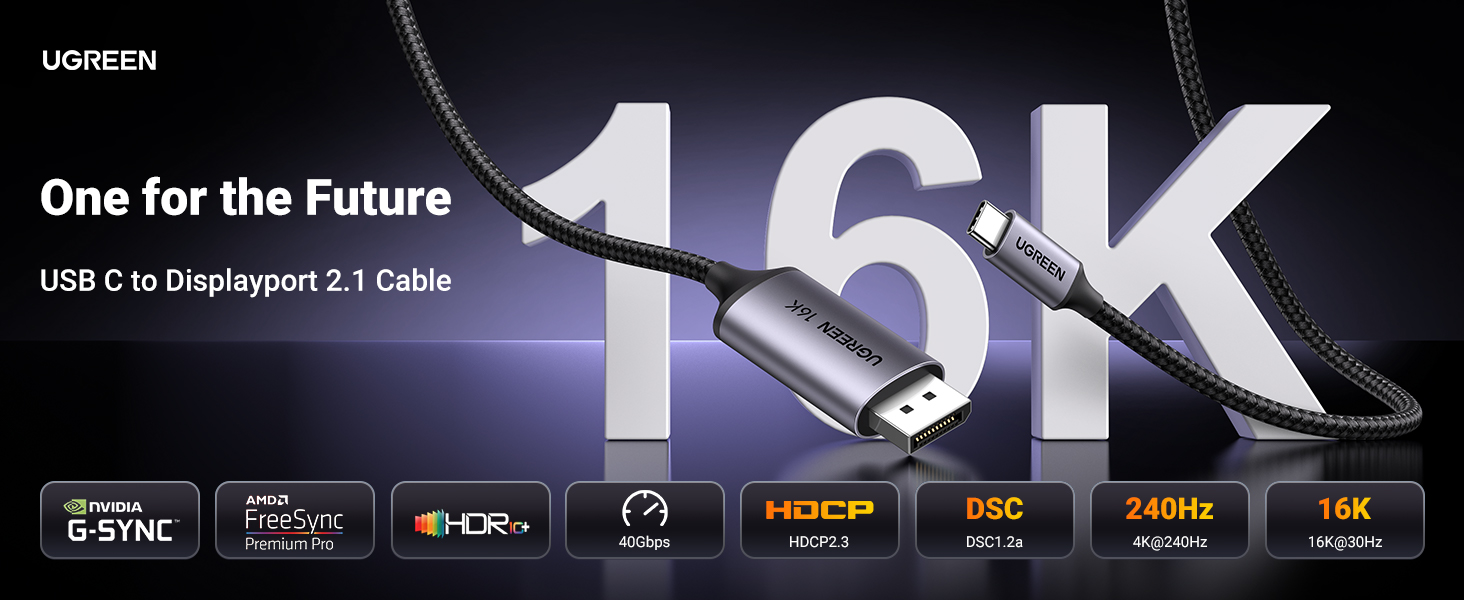
Image: UGREEN USB C to DisplayPort 2.1 Cable connecting a laptop to an external monitor.
2. 主な特徴
- 高解像度サポート: Supports 16K@30Hz, backward compatible with 8K@120Hz, 4K@240Hz, and 2K@480Hz for exceptional visual clarity.
- 高帯域幅: Features DisplayPort 2.1 with a maximum bandwidth of 40 Gbps, ensuring stable signal transmission and eliminating screen flickering.
- 高度なビデオテクノロジー: Supports HDR (High Dynamic Range), HDCP2.3, VRR (Variable Refresh Rate), ALLM (Auto Low Latency Mode), eARC, DTS, and Dolby for an immersive audio-visual experience.
- Multi-Video Modes: Allows for Mirror, Extend, and Clamshell modes. Supports Multi-Stream Transport (MST) for daisy-chaining multiple monitors.
- 耐久性のある構造: Constructed with a braided nylon cable for enhanced durability and strain relief, and a premium aluminum alloy case for superior heat dissipation.
- プラグアンドプレイ: No additional drivers or software installation required for operation.

Image: Table comparing features of DisplayPort 2.1/2.0, DP 1.4, and DP 1.2, highlighting resolution, HDR, HDCP, DSC, and bandwidth.
3. セットアップ手順
- USB-Cを接続します: Plug the USB-C end of the cable into your source device (e.g., laptop, smartphone, tablet). Ensure your device's USB-C port supports "DP Alt Mode" or is a Thunderbolt 3/4 port.
- DisplayPort を接続します: Insert the DisplayPort end of the cable into the DisplayPort input on your monitor or display device.
- 電源オン: Ensure both your source device and display are powered on. The display should automatically detect the video signal.

Image: Diagram illustrating compatible USB-C port types (Thunderbolt Full Function, DP Alt Mode, Data Transfer + DP Alt Mode) and incompatible types (Data Transfer Only, Charging Only).
4。 動作モード
The UGREEN USB C to DisplayPort 2.1 Cable supports various display modes to suit your needs:
- ミラーモード: Duplicates the content of your source device's screen onto the external display. Ideal for presentations or sharing content.
- 拡張モード: Expands your desktop workspace across the external display, allowing you to view different content on each screen.
- クラムシェルモード: Enables a laptop to operate with its lid closed while connected to an external monitor, keyboard, and mouse, effectively turning your laptop into a desktop setup.
- マルチストリーム トランスポート (MST): If your source device and monitors support MST, you can daisy-chain multiple DisplayPort monitors from a single DisplayPort output for an expanded multi-display setup.

Image: Visual representation of Mirror Mode, Extend Mode, and Clamshell Mode for connecting a laptop to an external monitor.
5. 互換性
This cable is compatible with a wide range of devices that feature a USB-C port with video output functionality (DP Alt Mode) or Thunderbolt 3/4 ports. It connects to any display device with a DisplayPort input.
互換性のあるソースデバイス:
- スマートフォン: iPhone 17 Pro Max/17 Pro/Air/17/16 Pro Max/16 Pro/16 Plus/16, Galaxy S26/25 Ultra, Note 20, LG V40.
- ノートパソコン/PC: Mac Mini M4/M4 Pro, MacBook Pro 2023/Air 2024, XPS 17/15/13, Dell, HP Chromebook x360, Surface Book 3/2.
- タブレット: iPad Pro/Air 2024, Samsung Tablet S9, Valve Steam Deck.
Compatible Display Devices:
- Monitors with DisplayPort input (e.g., Odyssey G8 G9).
- HDTVs with DisplayPort input.
- Graphic cards with DisplayPort output (e.g., Nvidia RTX 5090, AMD Radeon RX 7900).
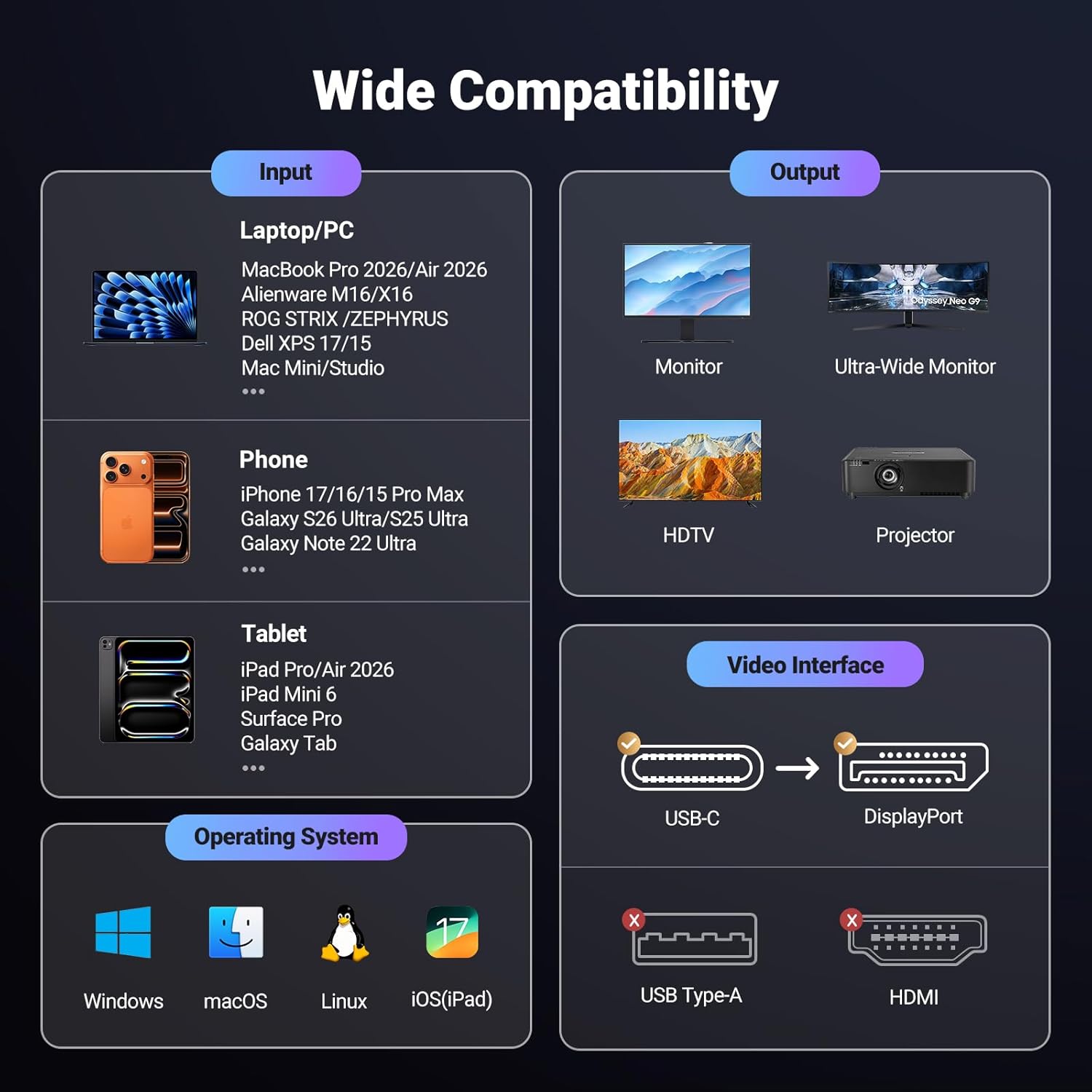
Image: Infographic detailing input devices (laptops, phones, tablets) and output devices (monitors, HDTVs, projectors) compatible with the UGREEN USB C to DisplayPort cable.
6. 仕様
| ブランド | ユーグリーン |
| モデル | 40610950348862 |
| コネクタタイプ | USB Type-C, DisplayPort |
| ケーブルタイプ | Braided Net |
| 解決サポート | 16K@30Hz, 8K@120Hz, 4K@240Hz, 2K@480Hz |
| 帯域幅 | 40Gbps |
| 特集 | HDR, HDCP2.3, VRR, ALLM, eARC, DTS, Dolby, DSC 1.2a |
| 材料 | Aluminum and Braided Nylon |
| 長さ | 6.6フィート |
| 色 | グレー |
| アイテム重量 | 0.11キログラム |
| 認証 | 安全規格 |
7. メンテナンス
To ensure the longevity and optimal performance of your UGREEN USB C to DisplayPort 2.1 Cable, follow these maintenance guidelines:
- クリーニング: Keep the cable and its connectors clean and free from dust and debris. Use a soft, dry cloth for cleaning.
- 取り扱い: Avoid sharp bends, kinks, or excessive pulling on the cable, especially near the connectors, to prevent internal wire damage.
- ストレージ: 使用しないときは、ケーブルを緩く巻き、直射日光や極端な温度を避けて、涼しく乾燥した場所に保管してください。
- 繋がり: ケーブルを抜き差しするときは、ケーブル自体を引っ張るのではなく、必ずコネクタ ハウジングをつかんでください。

Image: Durability features of the UGREEN cable, highlighting its robust construction.
8。 トラブルシューティング
If you encounter issues with your UGREEN USB C to DisplayPort 2.1 Cable, please refer to the following common solutions:
- 画面が表示されない/黒い画面:
- Ensure both your source device and monitor are powered on.
- Verify that the USB-C port on your source device supports "DP Alt Mode" or is a Thunderbolt 3/4 port. Not all USB-C ports support video output.
- Check that the cable is securely connected to both the source device and the monitor.
- Try connecting to a different DisplayPort input on your monitor, if available.
- ソースデバイスを再起動します。
- Flickering/Unstable Image:
- Ensure the cable connections are firm and not loose.
- デバイスのディスプレイ設定で解像度またはリフレッシュ レートを下げて、安定性が向上するかどうかを確認します。
- Update your graphics drivers on your source device to the latest version.
- 音声なし:
- Check the audio output settings on your source device to ensure audio is directed to the DisplayPort.
- Verify the audio settings on your monitor.
9. 公式製品ビデオ
ビデオ: UGREEN公式ビデオショーasing the features and benefits of the DisplayPort 2.1 cable, including universal device connection, fast 40Gbps transfer, multi-screen display support, and durable construction.
10. 保証とサポート
For detailed warranty information, product registration, or technical support, please visit the official UGREEN website or contact UGREEN customer service directly. Contact information can typically be found on the product packaging or the UGREEN official webサイト。