
導入
This manual provides detailed instructions for the setup, operation, and maintenance of your Zenwire USB-C Hub 10-in-1 Adapter. Please read this manual thoroughly before using the device to ensure optimal performance and longevity.

Image: The Zenwire USB-C Hub, a compact gray device, is shown connected to various cables and accessories, including HDMI, USB, Ethernet, and SD cards, illustrating its multi-functionality.
製品終了view
The Zenwire USB-C Hub is a versatile 10-in-1 adapter designed to expand the connectivity of your USB-C enabled devices. It features a durable aluminum alloy shell for efficient heat dissipation.
主な機能とポート:
- HDMI 2.1 ポート: Supports resolutions up to 8K@30Hz or 4K@120Hz, with backward compatibility for lower resolutions.
- ディスプレイポート1.4: Supports resolutions up to 8K@30Hz or 4K@120Hz, with backward compatibility for lower resolutions.
- USB-C 電力供給 (PD) 100W ポート: Allows fast charging of your host device while using the hub, providing up to 100W power.
- 2x USB 3.0 ポート: Offers data transfer speeds up to 5 Gbps, 10 times faster than USB 2.0.
- SDカードリーダー: Supports SD cards up to 2TB.
- MicroSD カードリーダー: Supports MicroSD cards up to 2TB.
- RJ-45 Gigabit Ethernet Port: Provides a stable wired internet connection with speeds up to 1000 Mbps.
- 3.5mmオーディオジャック: ヘッドフォン、マイク、または外部スピーカーを接続します。
- USB-C 3.1 / Thunderbolt 3.0 Host Connection: Connects the hub to your laptop or compatible device.

画像: 詳細な view of the Zenwire USB-C Hub, highlighting its 10 ports including 3.5mm audio, Type-C PD100W, DP1.6, HDMI2.1, Gigabit Ethernet, USB3.0 5Gbps, SD, and MicroSD slots.

Image: A close-up of the Zenwire USB-C Hub, emphasizing its aluminum alloy shell designed for effective heat dissipation, ensuring the device remains cool during operation.
設定
- ホストデバイスに接続します: Plug the integrated USB-C cable of the Zenwire Hub into a compatible USB-C or Thunderbolt 3.0/4.0 port on your laptop, tablet, or smartphone. The hub is Plug & Play and typically requires no driver installation.
- 電力供給(オプション): If your host device requires charging or if you are connecting power-intensive peripherals, connect your original USB-C power adapter to the USB-C PD 100W port on the hub.
- 周辺機器を接続します。 Connect your desired devices (monitors, USB drives, Ethernet cable, SD/MicroSD cards, audio devices) to the corresponding ports on the hub.
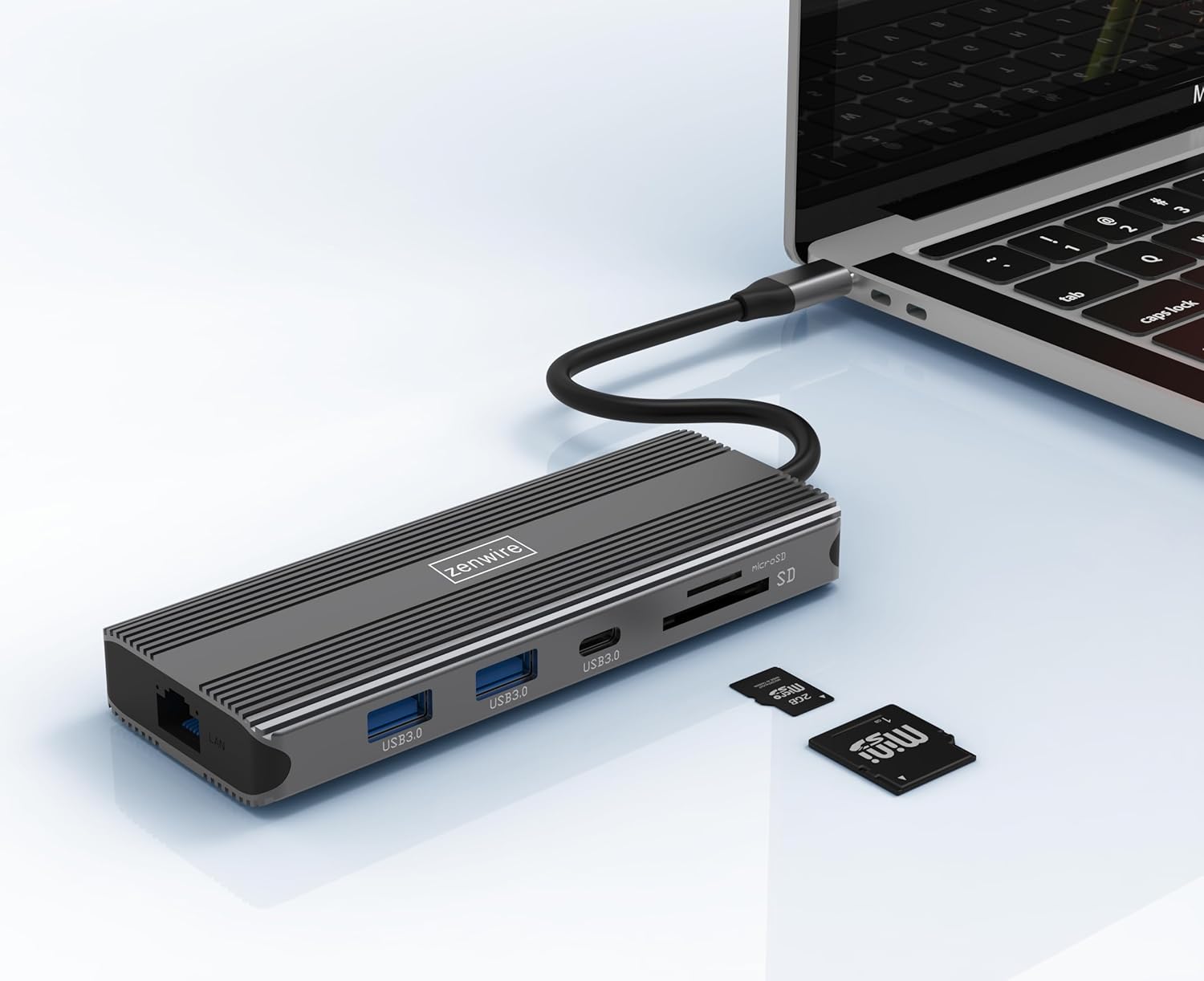
Image: The Zenwire USB-C Hub is shown connected to a laptop via its integrated USB-C cable, with SD and MicroSD cards placed nearby, illustrating a typical setup scenario.
操作手順
ディスプレイ接続:
The hub supports connecting up to two external monitors simultaneously via its HDMI 2.1 and DisplayPort 1.4 interfaces. Both can display video in 4K@60Hz concurrently.
- シングルモニター: Connect your monitor to either the HDMI or DisplayPort.
- デュアルモニター: Connect one monitor to the HDMI port and another to the DisplayPort.

Image: A laptop is displayed connected to two larger external monitors, demonstrating the multi-display capability of the Zenwire USB-C Hub.
Multi-Display Modes (MacOS vs. Windows):
The behavior of multiple external displays can vary between operating systems.
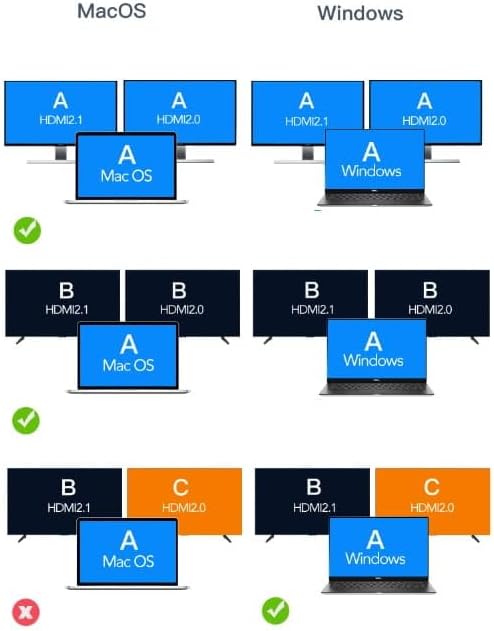
Image: A diagram illustrating different multi-display configurations for MacOS and Windows. It shows that MacOS typically supports extended desktop across two external monitors (A, B) and the laptop screen (A), while Windows can support extended desktop across three screens (A, B, C) or mirrored displays.
- MacOSの場合: Typically supports extended desktop across two external monitors (A, B) and the laptop screen (A). Mirroring is also supported.
- ウィンドウズ: Supports extended desktop across three screens (A, B, C) or mirrored displays, offering more flexibility for multi-monitor setups.
HDMI 2.1 and DisplayPort 1.4 Advanced Features:
These ports offer higher refresh rates and advanced features for an enhanced visual experience:
- High Transfer Speeds: Up to 48 Gbps for HDMI 2.1, ensuring high data throughput.
- eARC(拡張オーディオリターンチャンネル): For higher audio quality and support for object-based audio formats like Dolby Atmos and DTS-X.
- VRR (可変リフレッシュ レート): Useful for gaming, where refresh rates are not constant.
- ALLM (自動低遅延モード): Automatically detects content like games and switches the device to a low-latency mode.
- QMS (Quick Media Switching): The image on the screen changes immediately when switching between content.
- QFT(クイックフレームトランスポート): Reduces input lag further.
- ダイナミックHDR: Adjusts the image parameters during content transmission for higher quality visuals. Supports HDR 10 and 10+.
オーディオ接続:
The 3.5mm audio jack allows connection of various audio devices:
- マイク
- ヘッドフォン
- Headphones with integrated microphone
- 外部スピーカー
メンテナンス
- クリーニング: ハブの清掃には、柔らかく乾いた布をご使用ください。液体クリーナーや研磨剤は使用しないでください。
- ストレージ: ハブは直射日光や極端な温度を避け、涼しく乾燥した場所に保管してください。
- 取り扱い: デバイスを落としたり、強い衝撃を与えたりしないでください。
- 放熱: The aluminum alloy shell is designed for effective heat dissipation. Ensure the hub is placed in a well-ventilated area during prolonged use.
トラブルシューティング
- ディスプレイ出力なし:
- ハブからの USB-C ケーブルがホスト デバイスにしっかりと接続されていることを確認します。
- Verify that the HDMI/DisplayPort cable is firmly connected to both the hub and the monitor.
- ホスト デバイスのディスプレイ設定をチェックして、外部モニターが検出され、正しく構成されていることを確認します (例: 拡張、ミラーリング)。
- Try a different HDMI/DisplayPort cable or monitor to rule out cable/monitor issues.
- 電力供給なし:
- USB-C 電源アダプターがハブの PD ポートに接続され、正しく機能していることを確認します。
- ホスト デバイスが USB-C Power Delivery をサポートしていることを確認します。
- USBデバイスが認識されない:
- Reconnect the USB device to a different USB 3.0 port on the hub.
- Ensure the USB device is functioning correctly by connecting it directly to your host device.
- Some high-power USB devices may require external power if the hub's PD port is not utilized.
- イーサネット接続の問題:
- イーサネット ケーブルがハブとルーター/モデムの両方にしっかりと接続されているかどうかを確認します。
- ホスト デバイスのネットワーク設定を確認します。
- ルーター/モデムが正しく動作していることを確認してください。
- SD/MicroSD カードが検出されません:
- カードが正しいスロットに完全に挿入されていることを確認してください。
- Check if the card is formatted correctly and readable by your operating system.
- カードの問題を排除するために別のカードを試してください。
仕様
| ブランド | ゼンワイヤー |
| モデル | Zenwire USB-C Hub |
| 接続性 | USB-C 3.1 / Thunderbolt 3.0 (Host) |
| ポート |
|
| データ転送速度 | USB 3.0: 5 Gbps; Ethernet: 1000 Mbps |
| 電力供給 | 最大100W |
| 材料 | アルミ合金シェル |
| 寸法(長さ×幅×高さ) | 118 x 48 x 15 ミリメートル |
| 重さ | 109グラム |
| ケーブル長さ | 約15cm |
| オペレーティングシステムの互換性 | Windows 11/10/8/7, Apple macOS, Linux, Android, iPad Pro iOS (USB-C models) |

画像: 斜めから view of the Zenwire USB-C Hub, showcasing its compact design and the integrated USB-C host cable.
保証とサポート
Zenwire products are designed for reliability and performance. For warranty information and technical support, please refer to the official Zenwire web当サイトをご覧いただくか、販売店にお問い合わせください。保証請求のために購入時の領収書を保管してください。
For the latest software updates or driver information (if applicable), please visit the Zenwire support page. This device is designed to be Plug & Play, generally not requiring additional drivers.