
1. はじめに
This manual provides essential instructions for the safe operation, setup, maintenance, and troubleshooting of your CREATE THERA MATIC TOUCH automatic coffee machine. Please read this manual thoroughly before first use and retain it for future reference.
安全情報
Always observe basic safety precautions when using electrical appliances to reduce the risk of fire, electric shock, and injury. Ensure the appliance is placed on a stable, level surface. Do not immerse the appliance, power cord, or plug in water or other liquids. Keep out of reach of children. Unplug the machine before cleaning or when not in use for extended periods.
2.製品オーバーview
The CREATE THERA MATIC TOUCH is a fully automatic coffee machine designed to deliver fresh coffee from whole beans. It features a 20-bar pressure system, an integrated grinder, a 1.5-liter water tank, and a steam wand for milk frothing and hot water dispensing. The touch control panel allows for easy operation and customization of coffee intensity and volume.
主なコンポーネント
- Coffee Bean Hopper with integrated grinder
- 水タンク(容量1.5L)
- タッチコントロールパネル
- コーヒーの注ぎ口
- スチームワンド/温水ディスペンサー
- ドリップトレイとコーヒーかすコンテナ

図2.1: 前面 view of the coffee machine, showing the coffee spout, drip tray, and touch control panel.

図2.2: 角度付き view of the coffee machine, illustrating the removable water tank.

図2.3:以上view of the machine's removable parts for cleaning and maintenance.
3. セットアップ
3.1 開梱と初期清掃
- コーヒーマシンからすべての梱包材を慎重に取り除きます。
- Wash the water tank, drip tray, and coffee grounds container with warm soapy water, then rinse thoroughly and dry.
- 機械の外側を広告で拭きますamp 布。
3.2水タンクへの充填
- 機械の側面から水タンクを取り外します。
- タンクに新鮮な冷たい飲料水をMAXレベルインジケーターまで入れます。
- 水タンクを元の位置に戻して、しっかりと固定されていることを確認します。
3.3 コーヒー豆を加える
- マシンの上部にあるコーヒー豆ホッパーの蓋を開けます。
- Pour whole coffee beans into the hopper. The hopper has a capacity of 180g.
- 豆の鮮度を保つために蓋をしっかり閉めてください。

Figure 3.1: Adding coffee beans to the integrated hopper.
3.4 初回使用 / プライミング
- 機械をアース付き電源コンセントに差し込みます。
- Press the power button on the touch control panel. The machine will perform an initial rinse cycle.
- Place a container under the coffee spout and steam wand to collect the water.
- Once the rinse cycle is complete, the machine is ready for use.
4. 操作手順
4.1タッチパネル
The touch control panel provides access to all machine functions. Indicators will illuminate to show status or warnings such as 'no beans', 'no water', 'cleaning required', or 'drip tray full'.
4.2 コーヒーの淹れ方
- Ensure the water tank is filled and the bean hopper contains enough coffee beans.
- コーヒーの注ぎ口の下にカップを置きます。
- Select your desired coffee type (e.g., Espresso, Lungo) from the touch panel.
- You can adjust the coffee intensity and volume via the touch panel before brewing.
- Press the start button. The machine will grind the beans, brew, and dispense the coffee.
4.3 スチームワンドの使用
The steam wand can be adjusted between 0° and 42° for optimal milk frothing or hot water dispensing.
4.3.1 ミルクを泡立てる
- ミルクピッチャーに冷たいミルクを入れます。
- スチームワンドをミルクの表面のすぐ下に置きます。
- Select the steam function on the touch panel.
- ピッチャーを上下に動かして泡を作ります。
- 希望の泡ができたら、スチーム機能をオフにします。
- Immediately clean the steam wand after use.
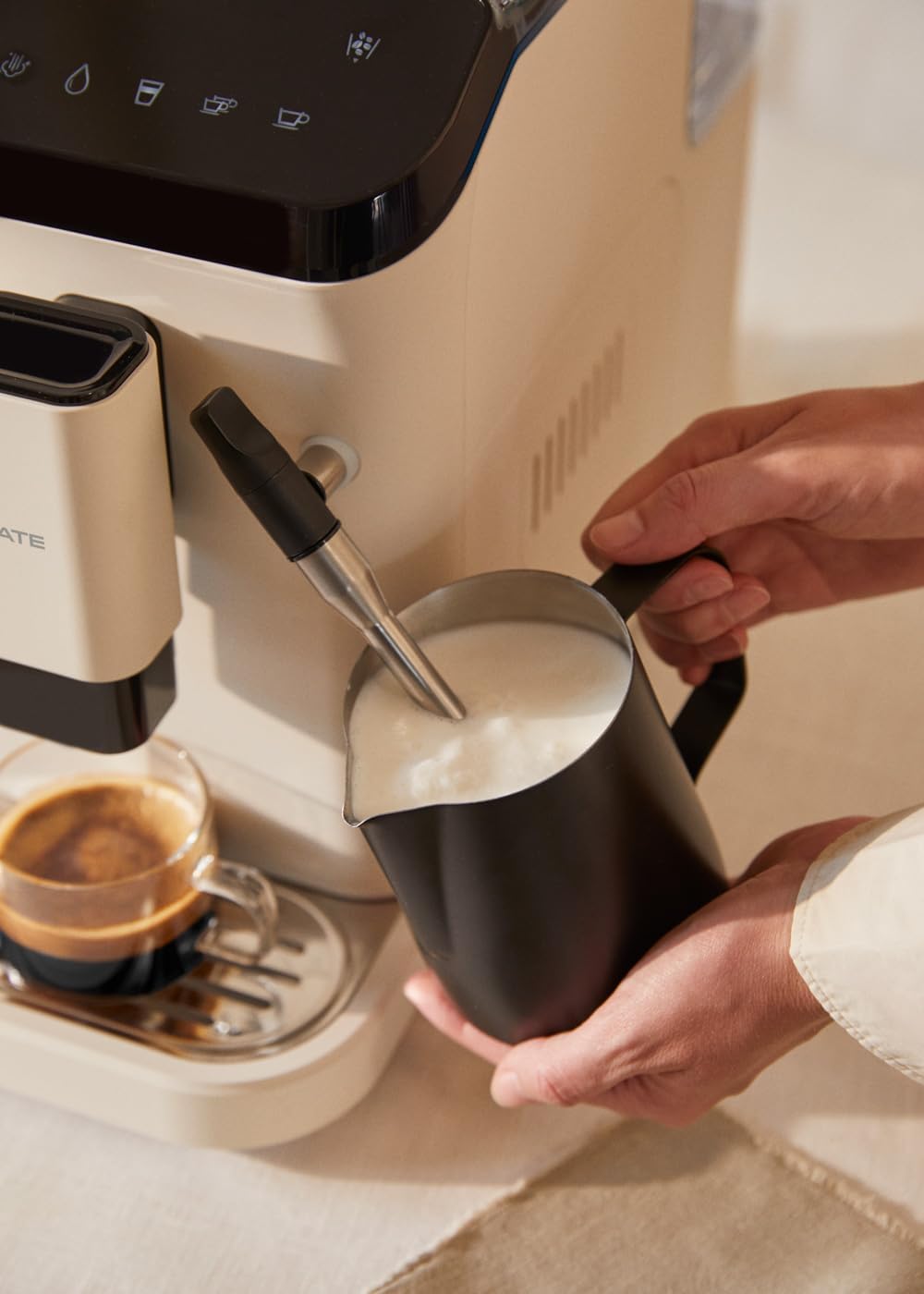
Figure 4.1: Frothing milk using the adjustable steam wand.
4.3.2 お湯を出す
- スチームワンドの下にカップを置きます。
- Select the hot water function on the touch panel.
- The machine will dispense hot water for teas or other infusions.

Figure 4.2: Dispensing hot water for beverages.
5. メンテナンスと清掃
定期的な清掃とメンテナンスにより、コーヒー マシンの最適なパフォーマンスと寿命が確保されます。
5.1 セルフクリーニング機能
The machine is equipped with a self-cleaning function. Follow the prompts on the touch control panel when the cleaning indicator illuminates. This cycle helps maintain internal hygiene.
5.2 ドリップトレイとコーヒーかす容器
- When the 'drip tray full' indicator appears, carefully remove the drip tray.
- Empty the liquid from the drip tray and the used coffee grounds from the container.
- Wash both components with warm soapy water, rinse, and dry before reinserting.
5.3 スチームワンドのクリーニング
使用後はスチームワンドを拭いてくださいamp cloth to remove any milk residue. Periodically, remove the outer nozzle and rinse it under running water to prevent blockages.
5.4スケール除去
Over time, mineral deposits can build up in the machine. The machine will indicate when descaling is required. Use a suitable descaling solution designed for coffee machines and follow the instructions provided with the descaling product and the machine's display prompts.
6。 トラブルシューティング
よくある問題とその解決策については、このセクションをご覧ください。問題が解決しない場合は、カスタマーサポートにお問い合わせください。
| 問題 | 考えられる原因 | 解決 |
|---|---|---|
| コーヒーは出されません | Water tank empty / No coffee beans / Clogged coffee spout | Refill water tank / Add coffee beans / Clean coffee spout |
| 弱いコーヒー | Insufficient coffee quantity / Coarse grind setting | Adjust coffee intensity setting / Adjust grinder to a finer setting |
| マシンの電源が入らない | Not plugged in / Power outage | Check power connection / Check circuit breaker |
| 'No water' indicator | Water tank empty or not properly inserted | Refill water tank and ensure it is correctly seated |
| 'No beans' indicator | 豆ホッパーが空です | Refill coffee bean hopper |
| 'Cleaning' indicator | Self-cleaning cycle required | Initiate the self-cleaning program as per display instructions |
| 'Drip tray full' indicator | Drip tray or coffee grounds container is full | Empty and clean the drip tray and coffee grounds container |
7. 仕様
| 特徴 | 仕様 |
|---|---|
| ブランド | 作成する |
| モデル名 | セラマティックタッチ |
| モデル番号 | 161966_361774 |
| 色 | Cream-white |
| 製品寸法(長さ x 幅 x 高さ) | 32.5 x 19 x 44 cm |
| 重さ | 9.05キロ |
| 水タンク容量 | 1.5リットル |
| コーヒー豆ホッパーの容量 | 180グラム |
| プレッシャー | 20バール |
| パワー/ワットtage | 1350ワット |
| 巻tage | 240ボルト |
| 材料 | AS + ABS |
| 特集 | Removable tank, Milk frother, Integrated grinder, Self-cleaning function, Touch control panel |
8. 保証とサポート
8.1 保証情報
Your CREATE THERA MATIC TOUCH coffee machine is covered by a manufacturer's warranty. Please refer to the warranty card included with your purchase for specific terms, conditions, and duration. Retain your proof of purchase for warranty claims.
8.2 カスタマーサポート
For technical assistance, spare parts, or any questions regarding your product, please contact CREATE customer support. Contact details can typically be found on the manufacturer's webサイトまたは製品パッケージに記載されています。
Note: Specific contact information is not provided in this manual. Please refer to your product packaging or the official CREATE webサポート詳細のサイト。