
WEWATCH S3
WEWATCH S3 スマートプロジェクター ユーザーマニュアル
モデル: S3
ブランド: WEWATCH
1. はじめに
Thank you for choosing the WEWATCH S3 Smart Projector. This projector integrates an Android operating system, offering a seamless entertainment experience with built-in streaming applications. It features 4K Ultra-HD resolution, 500 ANSI lumens brightness, 20000:1 contrast, electronic focus, 4-point keystone correction, and versatile connectivity options including dual-band WiFi and Bluetooth. This manual provides essential information for setting up, operating, maintaining, and troubleshooting your projector to ensure optimal performance and longevity.
2. 安全情報
プロジェクターをご使用になる前に、すべての安全に関する注意事項をよくお読みください。このマニュアルは保管し、今後の参考としてお役立てください。
- 電源: 付属の電源アダプターのみを使用してください。tageはプロジェクターの要件に適合します。
- 換気: 通気口を塞がないでください。プロジェクターの過熱を防ぐため、周囲に十分な空気の流れを確保してください。
- 液体への暴露: Do not expose the projector to rain, moisture, or any liquids. Avoid placing objects filled with liquids, such as vases, on the projector.
- クリーニング: 清掃する前にプロジェクターの電源プラグを抜いてください。柔らかく乾いた布を使用してください。液体クリーナーやエアゾールクリーナーは使用しないでください。
- 配置: プロジェクターは安定した平らな場所に設置してください。直射日光の当たる場所、熱源の近く、ほこりや湿気の多い場所に置かないでください。
- 目の保護: プロジェクターレンズを直接見ないでください。amp 明るい光により目が損傷する恐れがあるため、電源をオンにしてください。
- サービス: この製品を自分で修理しようとしないでください。 すべてのサービスを資格のあるサービス担当者に依頼してください。
3. パッケージ内容
開封したらパッケージの内容を確認してください:
- WEWATCH S3 Smart Projector
- リモートコントロール
- 電源アダプター
- HDMIケーブル
- ユーザーマニュアル
4.製品オーバーview
Familiarize yourself with the components and ports of your WEWATCH S3 projector.

フロント view of the WEWATCH S3 Smart Projector, showcasinレンズと洗練されたデザイン。
接続ポート

後方 view of the WEWATCH S3 Projector, highlighting the various input and output ports including LAN, USB, HDMI, AV, and headphone jack.
The projector is equipped with multiple ports for diverse connectivity:
- LANポート(x1): 有線インターネット接続用。
- USBポート(x2): USB ドライブまたはその他の USB デバイスを接続します。
- HDMIポート(x2): ノートパソコン、ゲーム機、TV スティックなどのデバイスを接続します。
- AVポート(x1): 古いオーディオ/ビデオ デバイスを接続するために使用します。
- ヘッドホンジャック(3.5mm): 外部オーディオ機器やヘッドフォンを接続します。
5. セットアップ
5.1 配置と画面サイズ
Position the projector on a stable surface. The projection distance determines the screen size. You can achieve a large screen size of up to 300 inches.
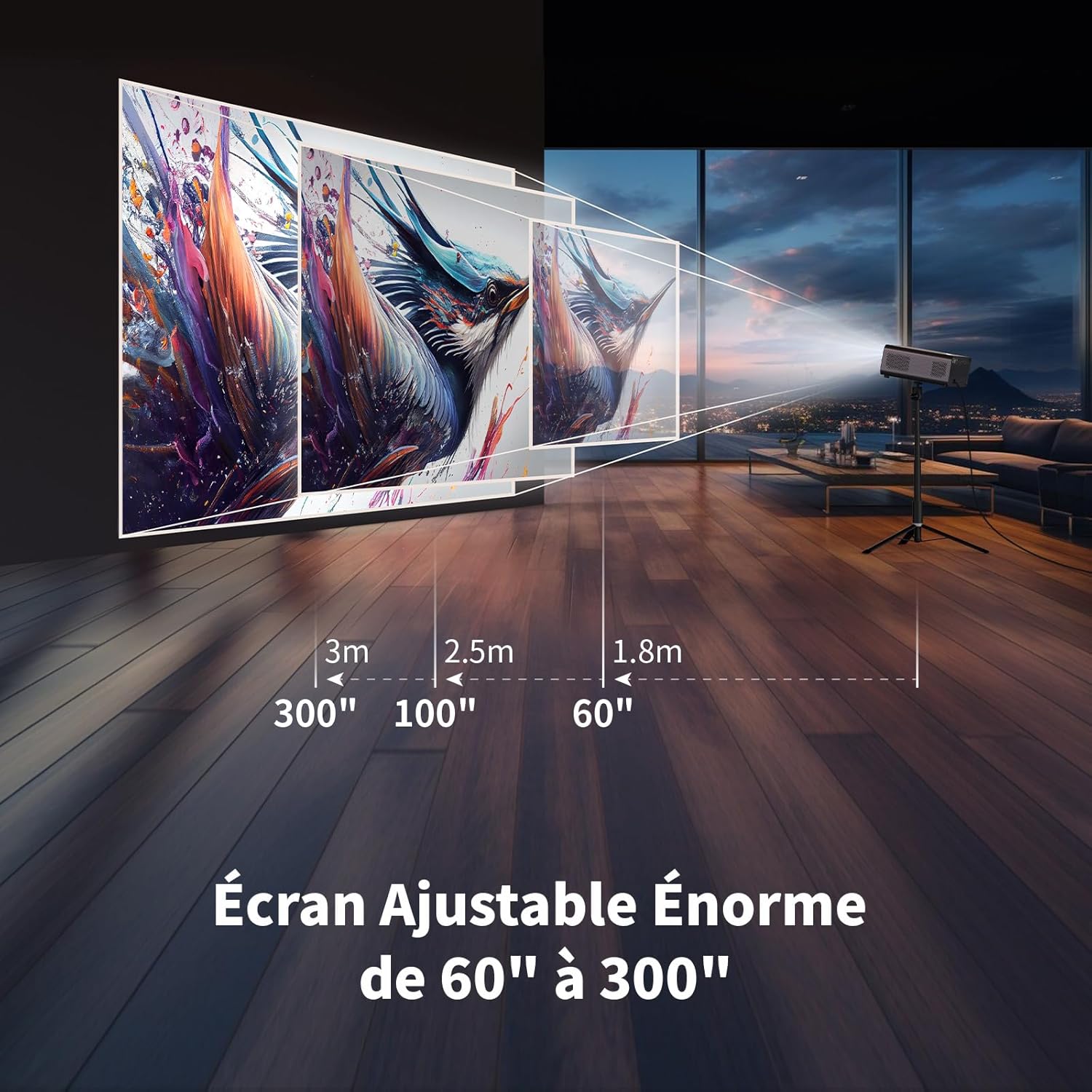
Illustration showing recommended projection distances for various screen sizes, from 60 inches at 1.8m to 300 inches at 3m.
5.2電源接続
Connect the power adapter to the projector's power input and then plug it into a wall outlet. Press the power button on the projector or remote control to turn it on.
5.3 Electronic Focus
Achieve a clear image quickly using the electronic focus function. Use the F+ and F- buttons on the remote control to adjust the focus until the image is sharp.

Image demonstrating the remote control's F+ and F- buttons for electronic focus adjustment, and the visual effect of keystone correction on the projected image.
5.4 台形補正
The projector supports 4-point keystone correction and automatic vertical correction to ensure a rectangular image, regardless of the projection angle. Adjust these settings in the projector's menu if needed.
5.5 ズーム機能
The zoom function allows you to reduce the image size from 100% to 80% without moving the projector. This can be adjusted via the projector's settings menu.

Visual representation of the projector's zoom function, showing how the image size can be reduced from 100% to 50% without physically moving the projector.
6.運用
6.1 Android OS and Built-in Applications
The WEWATCH S3 features an integrated Android operating system, providing direct access to popular streaming services like Netflix, YouTube, Prime Video, Disney+, and KODI. When using these applications, switch the remote control to mouse mode for optimal navigation. Remember to switch back to normal mode after use.

A user relaxing and watching content projected from the WEWATCH S3, showing the Android interface with icons for Netflix, YouTube, Prime Video, and other streaming applications.
6.2 ワイヤレス接続(WiFi と Bluetooth)
The projector supports dual-band 2.4G+5G WiFi for fast and stable connections with iOS, Android, and Windows devices. Bluetooth functionality allows you to connect external speakers for enhanced audio or Bluetooth headphones for private listening.

A person holding a smartphone, wirelessly mirroring its content to the WEWATCH S3 projector, demonstrating the 2.4/5G WiFi and Bluetooth capabilities for seamless content sharing.
6.3 外部機器の接続
Utilize the HDMI, USB, LAN, and AV ports to connect various external devices such as TV sticks, USB drives, laptops, gaming consoles, or older media players for diverse content playback.
6.4 Bluetoothスピーカーモード
The projector can function as a standalone Bluetooth speaker. Connect your smartphone or other Bluetooth-enabled devices to the projector to play music, utilizing its built-in HiFi 5W speaker.
7. メンテナンス
7.1 Dust Box Cleaning
The WEWATCH S3 features a hidden dust box designed to prevent dust from entering the projector. Regularly clean the dust box to maintain optimal performance and image quality.

詳細 view of the WEWATCH S3 Projector showing the hidden dust box compartment and the internal fan system, with arrows indicating airflow for cooling.
7.2一般的なケア
- Keep the projector clean and free from dust.
- プロジェクターを使用しないときは、涼しく乾燥した場所に保管してください。
- Avoid touching the lens directly. Use a lens cleaning cloth if necessary.
8。 トラブルシューティング
プロジェクターで問題が発生した場合は、次の一般的な問題と解決策を参照してください。
| 問題 | 考えられる原因 | 解決 |
|---|---|---|
| 画像が投影されない | 電源ケーブルが緩んでいる。入力ソースが正しくない。レンズキャップが装着されている。 | 電源接続を確認し、正しい入力ソース (HDMI、USB など) を選択します。レンズキャップを外します。 |
| ぼやけた画像 | Focus not adjusted; Projector too far/close; Keystone not adjusted. | Adjust electronic focus (F+/F-); Adjust projection distance; Perform keystone correction. |
| 音が出ない | Volume too low; Muted; External speaker not connected properly. | Increase volume; Unmute; Check external speaker connection or try built-in speaker. |
| WiFi/Bluetooth接続の問題 | パスワードが間違っています。デバイスが範囲外です。干渉があります。 | Verify password; Move device closer; Reduce interference from other devices. |
| Apps not working correctly | Remote not in mouse mode; App needs update; Internet connection issue. | Switch remote to mouse mode; Check for app updates; Verify internet connection. |
9. 仕様
Detailed technical specifications for the WEWATCH S3 Smart Projector:
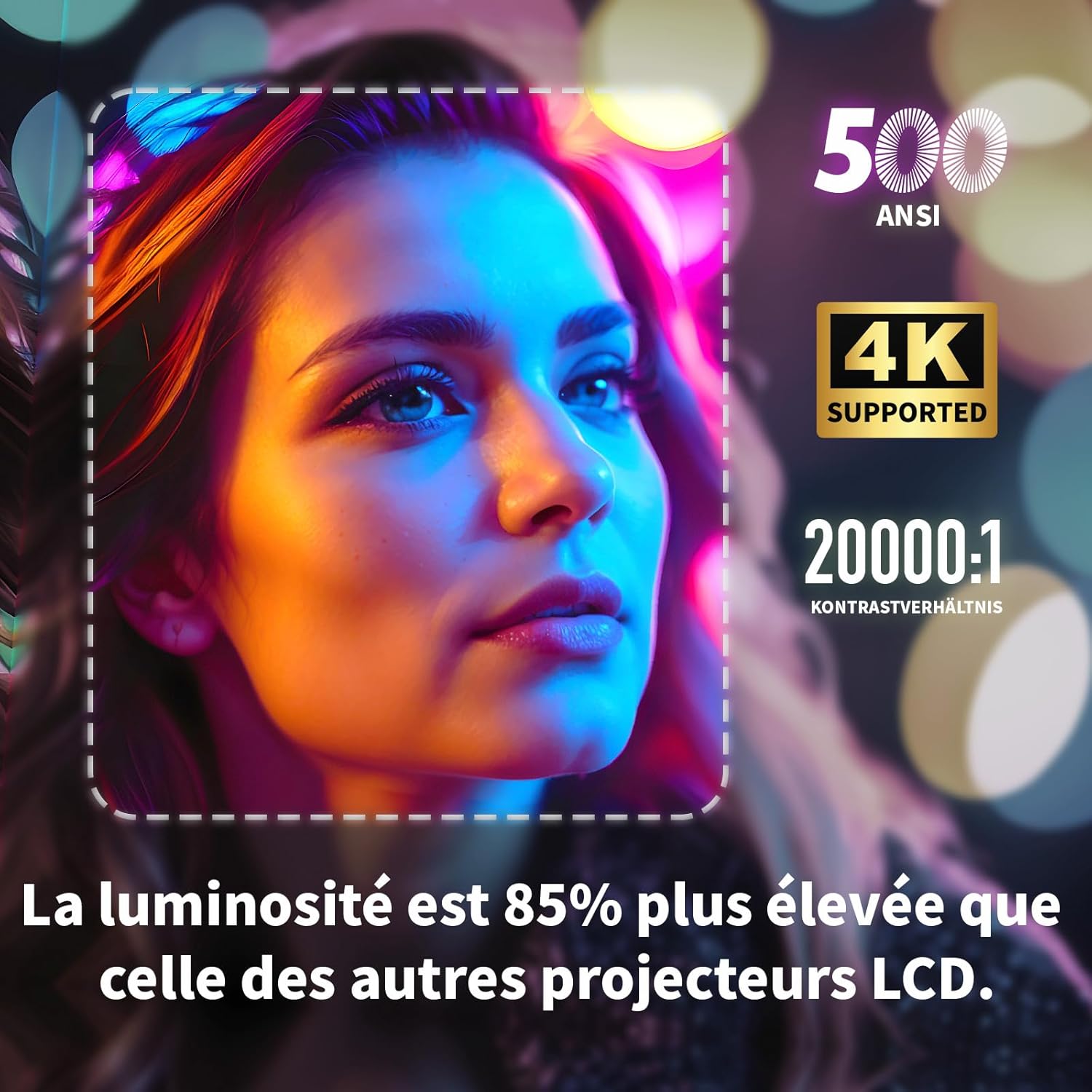
Visual highlighting key specifications: 500 ANSI lumens, 4K support, and 20000:1 contrast ratio, indicating 85% higher brightness than other LCD projectors.
| 特徴 | 仕様 |
|---|---|
| ブランド | 見る |
| モデル番号 | S3 |
| 色 | グレー |
| ディスプレイ解像度 | 3840 x 2160(4KウルトラHD) |
| 輝度 | 500 ANSIルーメン |
| コントラスト比 | 20000:1 |
| オペレーティング·システム | Android OS (with built-in Netflix, YouTube, Prime Video, Disney+, KODI) |
| 接続技術 | Bluetooth, Ethernet, HDMI, Wi-Fi (2.4G+5G dual-band) |
| 特集 | Electronic Focus, 4-Point Keystone Correction, Automatic Vertical Correction, Zoom (80%-100%), Built-in Speakers, Dust-proof Design |
| 画面サイズ | 最大300インチ |
| オーディオ | Integrated HiFi 5W Speaker, Bluetooth Speaker Mode |
| 寸法 | 24.3L×24.9W×10.5Hcm |
| USBポート | 2 |
10. 保証とサポート
WEWATCH products come with a standard manufacturer's warranty. For detailed warranty information, technical support, or service inquiries, please refer to the warranty card included in your package or visit the official WEWATCH website. Please have your product model number (S3) and purchase information ready when contacting support.
Ask a question about this manual
Ask about setup, troubleshooting, compatibility, parts, safety, or missing instructions. Manuals+ will review the question and use this page’s manual context to help answer it.