
SecuFirst B0CKLCMRKB
SecuFirst 2K ワイヤレス監視システム ユーザーマニュアル
Model: B0CKLCMRKB
ブランド: SecuFirst
1. はじめに
Welcome to the SecuFirst 2K Wireless Surveillance System user manual. This comprehensive guide provides detailed instructions for setting up, operating, and maintaining your new security system. The system includes a 7-inch touch screen monitor and four 2K (3MP) wireless outdoor cameras, designed for reliable surveillance without requiring an internet connection for basic operation.
This system is versatile and can be used as a baby video monitor, pet camera, entrance door surveillance, or for elderly care monitoring. It supports up to four cameras with multi-view モニターに表示します。

Image: The SecuFirst 2K Wireless Surveillance System, showing the 7-inch monitor displaying a four-camera split view, and four white outdoor cameras.
2. パッケージ内容
Please verify that all items listed below are included in your package.
- 1x 7-inch Touch Screen Monitor
- 4x Outdoor Cameras with Multi-position Brackets
- 5x 1.8M AC Power Adapters (1 for monitor, 4 for cameras)
- 4x 1.8M Power Extension Cables
- 1xイーサネットケーブル
- 1x 64GB MicroSD Card (pre-installed in monitor)
- 1x Screws and Anchors Kit
- 1x Camera Mounting Hole Template
- 1xクイックスタートガイド

Image: A 64GB MicroSD card, indicating included storage.
3.製品オーバーview
3.1. 7-inch Touch Screen Monitor
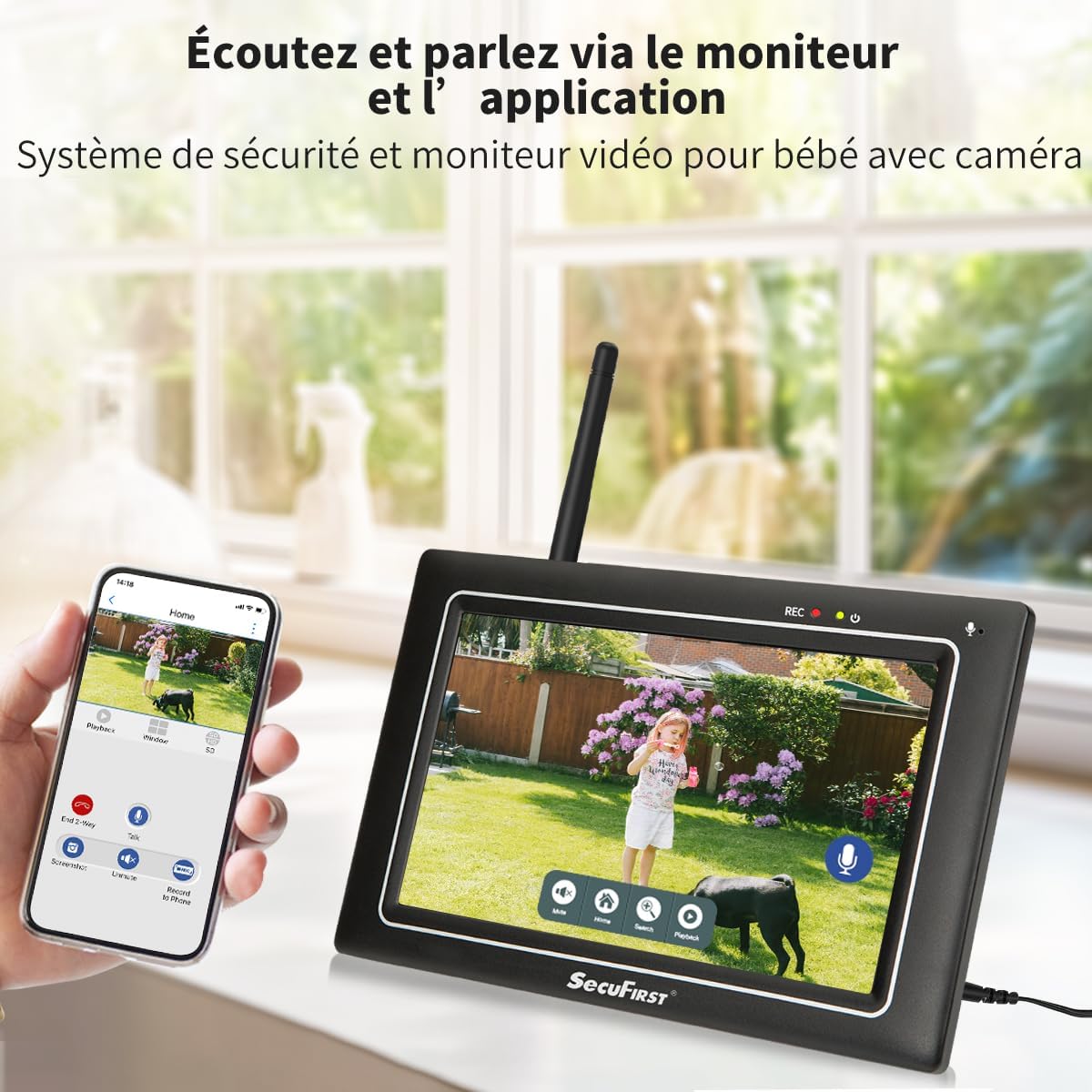
Image: Detailed diagram of the 7-inch touch screen monitor, highlighting its components such as the recording indicator, power indicator, monitor microphone, power button, antenna port, USB port, speaker, monitor stand, Ethernet port, SD card slot, power port, and reset button.
The monitor features a responsive touch screen interface, allowing for easy navigation and control. It includes a built-in microphone and speaker for two-way audio communication.
3.2. Wireless Outdoor Camera

Image: Detailed diagram of the wireless outdoor camera, showing its antenna, adjustable bracket, power cable, power status indicator, light sensor, IR LEDs, passive infrared motion sensor, audio speaker, microphone, and antenna connector.
The cameras are IP66 rated for outdoor use, featuring 2K (3MP) resolution for clear video, night vision, and AI + PIR thermal motion detection for accurate recording.
4. セットアップ
4.1. 初回電源投入
- Connect the power adapter to the 7-inch monitor and plug it into a power outlet.
- Connect the power adapters to each of the four cameras and plug them into power outlets.
- The cameras are pre-paired with the monitor. Live video feeds should appear on the monitor within seconds.

Image: An icon depicting a camera with Wi-Fi signals, indicating the auto-pairing feature.
4.2. カメラの配置
Position the cameras in desired surveillance areas. Ensure they are within the 300-meter open-area range from the monitor for optimal signal. The cameras are designed for both indoor and outdoor use.

Image: A SecuFirst camera mounted outdoors, demonstrating its IP66 waterproof rating.
4.3. Optional Internet Connection (for Remote Access)
While the system functions without internet, you can enable remote access via the "Observer HD+" application by connecting the monitor to the internet.
- Connect the monitor to your router via an Ethernet cable or Wi-Fi.
- Download the "Observer HD+" application on your smartphone or tablet.
- Follow the in-app instructions to add your device for remote viewing, two-way audio, and playback of recordings.

Image: A smartphone showing the "Observer HD+" app interface, demonstrating remote access capabilities alongside the physical monitor.
5. システムの操作
5.1.ライブ View およびマルチView
The 7-inch monitor displays live feeds from all connected cameras. You can switch between single-camera view and multi-camera split view directly on the touch screen.

Image: An icon showing a monitor with a four-way split screen, symbolizing the multi-view 能力。
5.2. 双方向オーディオ
Use the microphone icon on the monitor's touch screen or within the mobile application to activate two-way audio. This allows you to speak through the camera's speaker and hear audio from the camera's microphone.
5.3. 録音と再生
The system automatically records events triggered by motion detection to the included 64GB MicroSD card. You can also initiate manual recordings.
に view 録音:
- On the monitor, navigate to the playback interface.
- Select the desired camera and date to review 記録されたfootage.
- Recordings can also be accessed and played back via the "Observer HD+" mobile application.

Image: The monitor's screen displaying the playback menu, showing a list of recorded events with timestamps.
5.4. 動きの検知とアラート
The cameras feature AI + PIR thermal motion detection for accurate alerts.
- Configure motion detection zones directly on the monitor.
- Set up push notifications to your mobile device via the "Observer HD+" app for real-time alerts.
- Adjust alarm volume and siren settings through the monitor's interface.

Image: The monitor screen showing a house with a "PRIVACY" overlay, illustrating the privacy zone masking feature.

Image: The monitor screen showing a pathway with a "Zone" overlay, illustrating the motion detection zone configuration.
5.5. ナイトビジョン
The cameras are equipped with infrared (IR) LEDs for clear night vision, automatically activating in low-light conditions.

Image: A comparison image showing the camera's 2K/3MP resolution in daylight (color) and its clear night vision in black and white.
6. メンテナンス
6.1. 清掃
- Gently wipe the monitor screen and camera lenses with a soft, dry, lint-free cloth.
- 頑固な汚れには、軽くamp布を水で拭いてください。刺激の強い化学薬品や研磨剤入りの洗剤は使用しないでください。
6.2. ストレージ
長期間使用しない場合は、システムを直射日光や極端な温度を避け、涼しく乾燥した場所に保管してください。
6.3. ストレージの拡張
The system comes with a 64GB MicroSD card. Storage can be expanded by replacing the MicroSD card with up to a 128GB card, or by connecting an external hard drive or USB stick up to 2TB.
7。 トラブルシューティング
| 問題 | 考えられる原因 | 解決 |
|---|---|---|
| モニターに画像が表示されない | Power issue; Camera out of range; Camera not paired | Check power connections for monitor and cameras. Ensure cameras are within range. If necessary, re-pair cameras (refer to Quick Start Guide for pairing instructions). |
| 画質が悪い | Dirty lens; Low light; Interference | Clean camera lens. Ensure adequate lighting or check night vision functionality. Reduce interference by moving cameras or monitor away from other electronic devices. |
| アプリ経由のリモートアクセスは不可 | Monitor not connected to internet; Incorrect app settings | Verify monitor's internet connection (Ethernet or Wi-Fi). Check app settings and ensure correct device pairing. |
| モーション検出が機能しない | Sensitivity too low; Incorrect zone settings | Adjust motion detection sensitivity on the monitor. Review and reconfigure motion detection zones. |
8. 仕様
- ブランド: SecuFirst
- モデル: 1 Monitor + 4 Camera (White)
- メーカー: ALCエレクトロニクスBV
- 製品寸法: 28.4 x 25.8 x 19.4 cm; 3.44キログラム
- 電源タイプ: コード式電気
- 巻tage: 12ボルト
- ワットtage: 12ワット
- 特別な機能: Two-way audio, local recording, night vision, app control, motion sensor, 7-inch touch screen monitor, Plug-and-play, pre-paired cameras and monitor.
- ビデオ録画の解像度: 2K(3MP)
- チャンネル数: 4
- 記憶容量: Up to 2TB (via external HDD/USB), 64GB MicroSD included (expandable to 128GB)
- 接続技術: Wired (Ethernet) and Wireless (Proprietary for camera-monitor, Wi-Fi for monitor-internet)
- オペレーティング·システム: 独自
9. 保証とサポート
For warranty information and technical support, please contact SecuFirst directly.
売り手: SecuFirst (A2JD6PPEF2M5NQ)
Return Policy: 30-day refund/replacement policy through Amazon.
For further assistance, refer to the official SecuFirst webサイトにアクセスするか、カスタマーサービスにお問い合わせください。
Ask a question about this manual
Ask about setup, troubleshooting, compatibility, parts, safety, or missing instructions. Manuals+ will review the question and use this page’s manual context to help answer it.