
ベースス P80015804213-00
Baseus Smooth Writing Series 2 デュアル充電ペンシル iPad用 ユーザーマニュアル
Model: P80015804213-00 | Brand: Baseus
1. はじめに
This manual provides detailed instructions for the proper use and maintenance of your Baseus Smooth Writing Series 2 Dual Charging Pencil for iPad. Please read this manual thoroughly before using the product to ensure optimal performance and longevity.
The Baseus Smooth Writing Series 2 Pencil is designed to enhance your iPad experience with features like palm rejection, high precision, and versatile dual charging capabilities (both wired and wireless).

Image: The Baseus Smooth Writing Series 2 Pencil, showcasing its minimalist white design.
2. パッケージ内容
製品パッケージに以下のすべてのアイテムが含まれていることを確認してください。
- Baseus Smooth Writing Series 2 Dual Charging Pencil
- Replacement Pen Tip(s) (quantity may vary)
- USB-C充電ケーブル
- ユーザーマニュアル(このドキュメント)

Image: The Baseus Pencil, its USB-C charging cable, and the product packaging, illustrating the typical contents.
3. セットアップ
3.1 初期充電
Before first use, it is recommended to fully charge the pencil. The Baseus Smooth Writing Series 2 supports two charging methods:
- 有線充電: Connect the provided USB-C cable to the pencil's charging port and to a USB power adapter (not included).
- ワイヤレス充電: Attach the pencil magnetically to the side of a compatible iPad model. The pencil will begin charging automatically.

Image: The Baseus Pencil attached to the side of an iPad, demonstrating its wireless charging capability.
3.2 iPadとのペアリング
The Baseus Smooth Writing Series 2 Pencil typically connects automatically to compatible iPad models when powered on and placed near the device. No manual Bluetooth pairing is usually required for basic functionality.
- iPad の Bluetooth が有効になっていることを確認してください。
- Turn on the pencil by pressing the power button (if applicable, refer to Operating section).
- The pencil should connect automatically. If not, try restarting both the pencil and your iPad.
4. 操作手順
4.1 電源オン/オフ
Locate the power button on the pencil (refer to image below). Press and hold the button for a few seconds to turn the pencil on or off. An indicator light will typically show the power status.
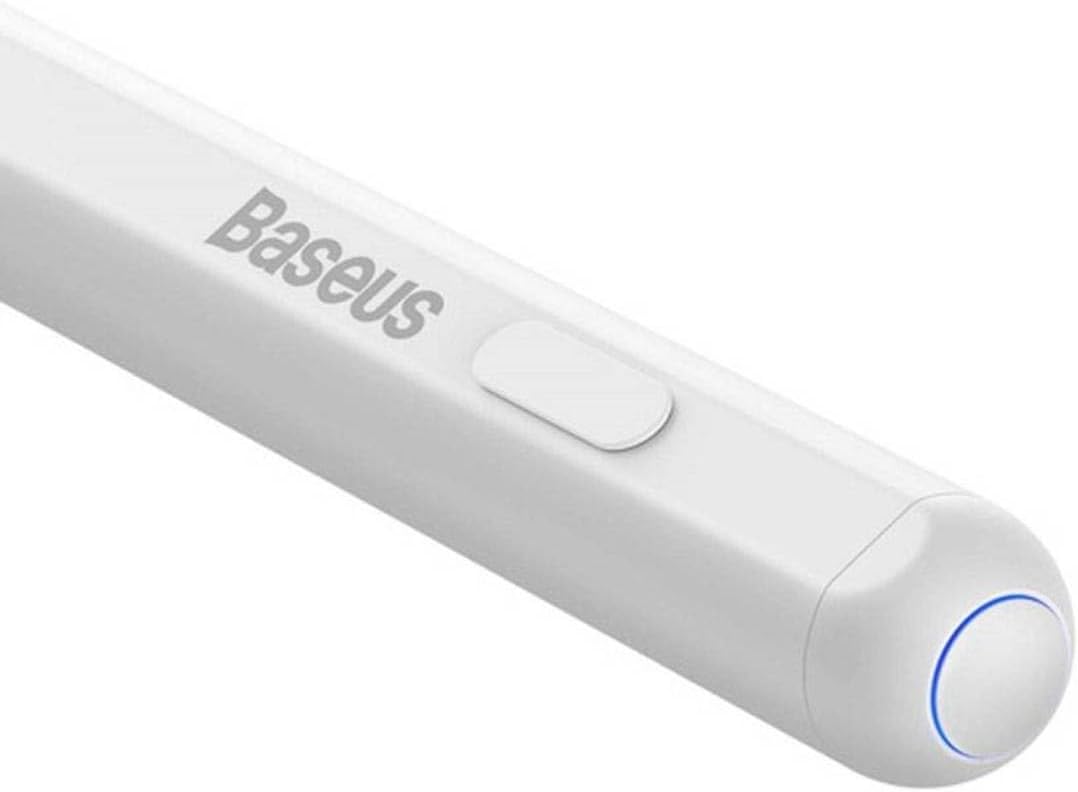
画像: 詳細な view of the Baseus Pencil's power button and the blue indicator light, which signals operational status.
4.2 書くことと描くこと
The pencil is designed for smooth and precise input on your iPad screen. Its high-precision tip allows for detailed work, while palm rejection ensures that only the pencil's input is registered, even if your hand rests on the screen.

Image: A close-up of the Baseus Pencil's fine tip, highlighting its design for precise writing and drawing.
Simply touch the tip to the iPad screen to begin writing, drawing, or navigating. Pressure sensitivity and tilt support may vary depending on the iPad model and the application used.
4.3 Charging the Pencil
Monitor the pencil's battery level through your iPad's battery widget or the pencil's indicator light. Recharge the pencil using either the wired USB-C connection or by attaching it magnetically to a compatible iPad for wireless charging.
5. メンテナンス
5.1 クリーニング
To clean the pencil, gently wipe its surface with a soft, dry, lint-free cloth. Do not use abrasive cleaners, alcohol, or solvents, as these can damage the finish.
5.2 チップの交換
Over time, the pencil tip may wear down. To replace it:
- 古い先端を反時計回りにゆっくりと回して取り外します。
- Align the new tip with the pencil's thread and twist clockwise until it is securely fastened. Do not overtighten.

Image: An illustration demonstrating the process of twisting off the old tip and screwing on a new replacement tip for the Baseus Pencil.
5.3バッテリーケア
To prolong battery life, avoid fully discharging the pencil frequently. Store the pencil in a cool, dry place when not in use for extended periods.
6。 トラブルシューティング
| 問題 | 考えられる原因 | 解決 |
|---|---|---|
| ペンシルが iPad に接続されません。 | Pencil is off, low battery, Bluetooth off on iPad, or compatibility issue. | Ensure pencil is charged and powered on. Check iPad's Bluetooth settings. Restart both devices. Verify iPad model compatibility. |
| Pencil not charging. | Cable issue, power source issue, incorrect wireless charging position, or iPad model incompatibility for wireless charging. | Try a different USB-C cable or power adapter. Ensure the pencil is correctly aligned for wireless charging. Note that wireless charging may not be compatible with all iPad models (e.g., iPad 10th Gen). |
| Tip not responding or inaccurate. | Worn tip, loose tip, or software glitch. | Replace the tip if worn. Ensure the tip is securely tightened. Restart the iPad and the pencil. |
| パームリジェクションが機能しません。 | Application specific issue or iPad settings. | Ensure the application supports palm rejection. Check iPad settings for stylus input. |
7. 仕様
| 特徴 | 詳細 |
|---|---|
| ブランド | ベースス |
| モデル番号 | P80015804213-00 |
| 色 | 白 |
| 材料 | Copper (as per product specifications, likely internal components) |
| 製品重量 | 60グラム |
| パッケージ寸法 | 21 x 6.8 x 2.9 cm |
| 充電 | Wired (USB-C) & Wireless (Magnetic) |
| 特徴 | Palm Rejection, High Precision Tip |
8. 保証とサポート
Baseus products are manufactured to high quality standards. For information regarding warranty coverage, please refer to the warranty card included with your product or visit the official Baseus webサイト。
For technical support, troubleshooting assistance, or inquiries about replacement parts, please contact the seller or the official Baseus customer service. Contact details can typically be found on the product packaging or the brand's official webサイト。
詳細については、Amazon の公式 Baseus ストアをご覧ください。 Baseus公式ストア
Ask a question about this manual
Ask about setup, troubleshooting, compatibility, parts, safety, or missing instructions. Manuals+ will review the question and use this page’s manual context to help answer it.