
1. はじめに
This manual provides detailed instructions for the operation and maintenance of your FANGOR F-CD-143 Portable CD Player and Bluetooth Speaker. This device offers a versatile audio experience, functioning as a standalone portable CD player or combining with its detachable Bluetooth speaker base for enhanced sound. Please read this manual thoroughly before using the product to ensure proper function and longevity.
2. パッケージ内容
開梱したらパッケージの内容を確認し、すべてのアイテムが揃っていることを確認してください。
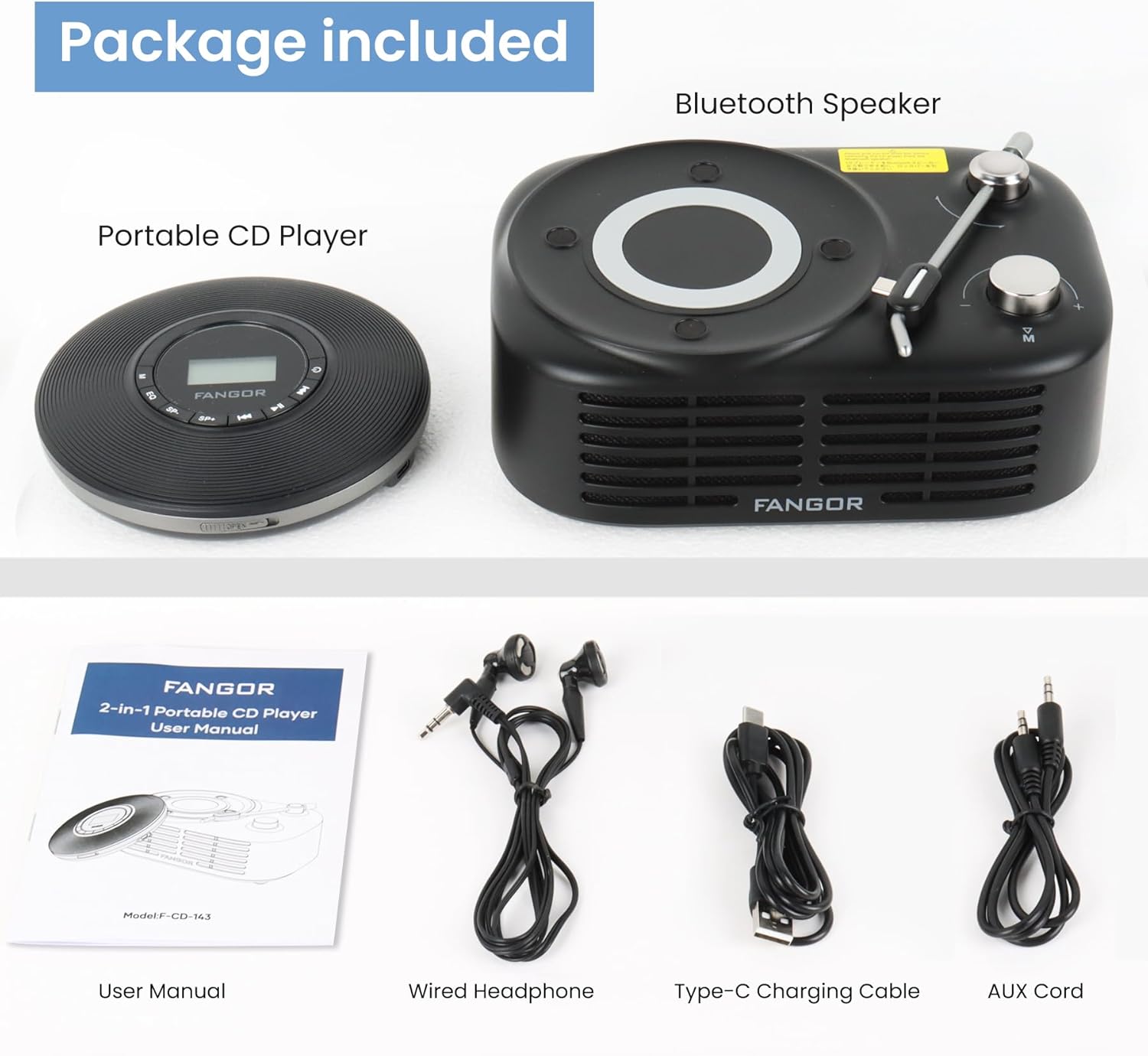
Figure 2.1: Package Contents. The image displays the portable CD player, the Bluetooth speaker base, a user manual, wired headphones, a Type-C charging cable, and an AUX cord.
- ポータブルCDプレーヤー
- Bluetoothスピーカーベース
- ユーザーマニュアル(このドキュメント)
- 有線ヘッドフォン
- タイプC充電ケーブル
- AUXコード
3.製品オーバーview
The FANGOR F-CD-143 is a versatile audio device designed for both personal and shared listening experiences. It features a portable CD player that can be used independently with wired headphones or connected to the included Bluetooth speaker base.

Figure 3.1: 2-in-1 Portable CD Player & Bluetooth Speaker. The top half shows a person using the portable CD player with wired headphones. The bottom half shows the Bluetooth speaker base with 'Bluetooth 5.3' indicated.
3.1 主な特徴
- 取り外し可能なデザイン: Use the CD player independently or with the Bluetooth speaker base.
- ワイドフォーマット互換性: Supports CD, MP3, CD-R, CD-RW, CD-DA, WMA (WAV must be below 128 bitrate) formats.
- TFカード再生: Supports TF cards up to 32GB for additional music options.
- スキップ防止保護: 60-second Electronic Skip Protection (ESP) system prevents playback interruptions.
- バックライト付きLCDディスプレイ: クリア viewing of information in various lighting conditions.
- 複数のプレイモード: Includes A-B repeat, repeat all, and repeat single track.
- サウンドエフェクト: Features 5 sound effects: BBS, POP, JAZZ, ROCK, Original Sound.
- ラストメモリー機能: 最後に停止した位置から再生を再開します。
- 接続性: 3.5mm AUX output for wired headphones or external speakers. Bluetooth 5.3 for wireless connection to the speaker base or other Bluetooth devices.
- 内蔵充電式バッテリー: Provides long-lasting playtime for portable use.
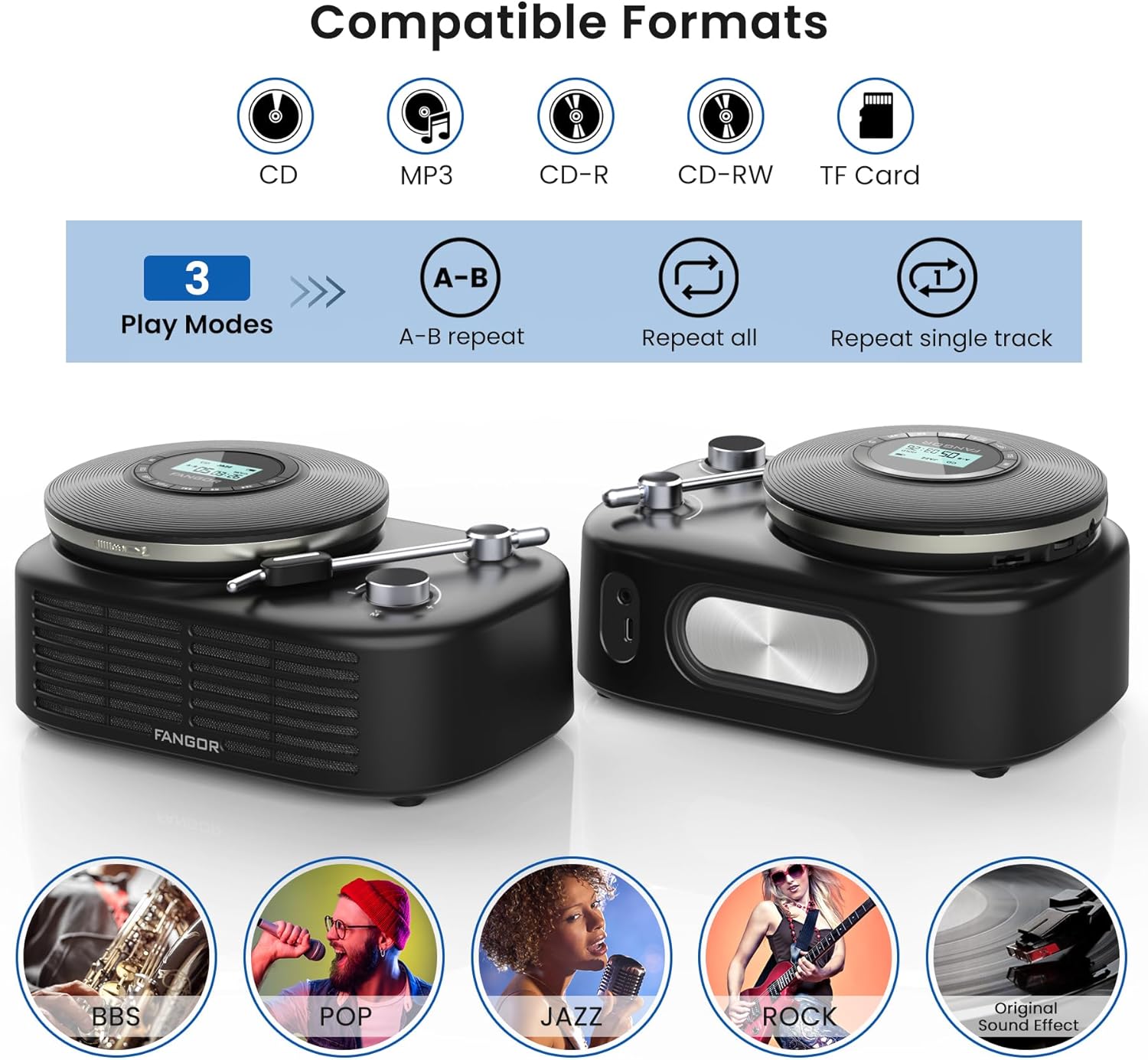
Figure 3.2: Compatible Formats, Play Modes, and Sound Effects. This image illustrates the various audio formats supported by the device, the available playback modes, and the different sound equalization options.

Figure 3.3: HIFI Stereo Sound and Connectivity. The image highlights the dual speakers of the Bluetooth base and its ability to connect via Bluetooth 5.3 or AUX to various devices like tablets, computers, and mobile phones.
4. セットアップ
4.1デバイスの充電
The portable CD player has a built-in rechargeable battery. Before first use, fully charge the device.
- Connect the provided Type-C charging cable to the charging port on the portable CD player.
- Connect the other end of the cable to a compatible USB power source (e.g., wall charger, power bank, computer USB port, car charger).
- 充電中は充電インジケータライトが点灯し、完全に充電されると消灯します。

Figure 4.1: Built-in Rechargeable Battery and Charging Options. This image demonstrates the flexibility of charging the portable CD player using common USB power sources.
4.2 Assembling the CD Player with Bluetooth Speaker Base
To use the CD player with the Bluetooth speaker base, align the CD player with the designated slot on the speaker base and gently press until it clicks into place. Ensure a secure connection.
4.3 CDの挿入
- Open the CD compartment cover on the portable CD player.
- Carefully place the CD with the label side facing up onto the spindle.
- Gently press the center of the CD until it is securely seated on the spindle.
- CDコンパートメントカバーをしっかりと閉じます。
4.4 ヘッドフォンまたは外部スピーカーの接続
- 有線ヘッドフォン: Plug the wired headphones into the 3.5mm AUX output jack on the portable CD player.
- External Speakers (Wired): Use the provided AUX cord to connect the 3.5mm AUX output jack of the CD player to the AUX input of an external speaker system.
- External Speakers (Bluetooth): The Bluetooth speaker base can connect to other Bluetooth devices. Refer to section 5.3 for Bluetooth pairing instructions.
5. 操作手順
5.1 基本的なCD再生
- Ensure a CD is properly inserted and the device is powered on.
- を押す 再生/一時停止 button to start playback. The track number and elapsed time will be shown on the LCD display.
- プレス 再生/一時停止 もう一度押すと再生が一時停止します。もう一度押すと再開します。
- を押す スキップフォワード 次のトラックにスキップするボタン。
- を押す 後方にスキップ button to return to the beginning of the current track. Press it twice quickly to go to the previous track.
- を押す 停止 再生を停止するボタン。
5.2 ボリュームコントロール
を使用して音量を調整します 巻+ そして vol- buttons on the portable CD player. If using the Bluetooth speaker base, additional volume control may be available on the speaker itself or the connected Bluetooth device.
5.3 Bluetooth Pairing (Speaker Base)
The Bluetooth speaker base can be used independently as a Bluetooth speaker.
- Ensure the Bluetooth speaker base is powered on.
- 外部デバイス(スマートフォン、タブレットなど)で Bluetooth を有効にします。
- 検索する available Bluetooth devices. The speaker base will appear as "FANGOR Speaker" or similar.
- Select the speaker from the list to pair. Once paired, a confirmation sound may be heard.
5.4 TFカードの再生
- Insert a TF card (up to 32GB) into the TF card slot on the portable CD player.
- The device should automatically switch to TF card mode. If not, press the モード button to select TF card playback.
- 使用 再生/一時停止 そして スキップ 再生を制御するボタン。
5.5 ABリピート機能
The A-B repeat function allows you to repeatedly play a specific segment of a track. This is particularly useful for language learning or musical practice.

Figure 5.1: Ideal for Language Learners and Audiobook Enthusiasts. This image demonstrates a practical application of the device's features, such as A-B repeat, for educational purposes.
- 再生中に、 AB ボタンを1回押して開始点(A)を設定します。
- を押す AB button again to set the ending point (B). The segment between A and B will now repeat.
- を押す AB button a third time to cancel the A-B repeat function.
5.6 サウンドエフェクト(EQ)
を押す EQ button repeatedly to cycle through the available sound effects: BBS, POP, JAZZ, ROCK, Original Sound. Select the effect that best suits your listening preference.
5.7 ラストメモリー機能
The device automatically remembers the last playback position. When you power on the CD player again, it will resume from where it last stopped.
6. メンテナンス
6.1デバイスのクリーニング
- 清掃する前に必ずデバイスの電源をオフにし、すべての電源から取り外してください。
- 外装面の拭き取りには、柔らかく乾いた布をご使用ください。研磨剤入りの洗剤、ワックス、溶剤は使用しないでください。
- CDレンズには専用のCDレンズクリーニングキットを使用してください。レンズに直接触れないでください。
6.2バッテリーケア
- バッテリーの寿命を延ばすには、バッテリーを頻繁に完全に放電しないようにしてください。
- デバイスを長期間保管する場合は、数か月ごとに約 50% まで充電してください。
- バッテリーのパフォーマンスを低下させる可能性があるため、デバイスを極端な温度にさらさないでください。
6.3 ストレージ
Store the device in a cool, dry place away from direct sunlight, dust, and moisture when not in use.
7。 トラブルシューティング
If you encounter issues with your FANGOR F-CD-143, please refer to the following common problems and solutions.
| 問題 | 考えられる原因 | 解決 |
|---|---|---|
| CD does not play / No sound | CD inserted incorrectly; CD is dirty or scratched; Headphones/speakers not connected; Volume too low; Device not powered on. | Ensure CD is inserted correctly (label side up); Clean or replace CD; Check headphone/speaker connection; Increase volume; Power on the device. |
| 再生中にスキップする | CD is scratched or dirty; Device is subjected to strong vibrations; ESP system malfunction. | Clean or replace CD; Use the device on a stable surface; Ensure ESP is active (60 seconds anti-skip protection). |
| Bluetooth speaker not pairing | Speaker not in pairing mode; Bluetooth disabled on external device; Speaker too far from external device. | Ensure speaker is powered on and in pairing mode; Enable Bluetooth on your external device; Move speaker closer to the external device (within 10 meters). |
| TFカードが認識されない | TF card inserted incorrectly; TF card corrupted; Unsupported file format on TF card. | Reinsert TF card correctly; Try a different TF card; Ensure music files are in supported formats (MP3, WMA). |
| デバイスの電源が入らない | バッテリーが消耗しています。電源ボタンが正しく押されていません。 | デバイスを完全に充電します。電源ボタンを数秒間押し続けます。 |
8. 仕様
| 特徴 | 仕様 |
|---|---|
| ブランド | ファンゴール |
| モデル番号 | F-CD-143 |
| 接続技術 | 補助、Bluetooth 5.3 |
| 特集 | Portable, Detachable Bluetooth Speaker Base, Anti-Skip Protection, Backlit LCD Display, A-B Repeat, Last Memory |
| サポートされているオーディオ形式 | CD, MP3, CD-R, CD-RW, CD-DA, WMA (WAV below 128 bitrate) |
| メディアフォーマットタイプ | CD-R |
| TFカードサポート | 最大32GB |
| コネクタタイプ | 3.5mm Jack (AUX output), Type-C (Charging) |
| ディスクの数 | 1 |
| 対応デバイス | Headphone, Speaker, Phones, Tablets, Smart TVs (via Bluetooth speaker base) |
| 内蔵メディア | CDプレーヤー |
9. 保証とサポート
FANGOR is committed to providing high-quality products and services. Your FANGOR F-CD-143 Portable CD Player and Bluetooth Speaker comes with:
- 365-Day No-Reason Replacement: 購入後 365 日以内に問題が発生した場合は、交換を受けることができます。
- 生涯テクニカルサポート: Our professional after-sales team is available to provide technical assistance for the lifetime of the product.
For any inquiries or support needs, please contact our customer service team. We aim to handle all issues properly within 24 hours.