
M7 GTW-940
M7 GTW-940 1/2インチデジタルトルクレンチアダプター ユーザーマニュアル
Model: GTW-940 | Brand: M7
1. はじめに
Thank you for choosing the M7 GTW-940 1/2-inch Digital Torque Wrench Adapter. This precision tool is designed to convert any standard 1/2-inch square drive ratchet wrench into a digital torque wrench, providing accurate and reliable torque measurements for various fastening tasks. It features multiple unit displays, audible and visual alerts, and advanced functions like Peak and Trace modes. Please read this manual thoroughly before operation to ensure safe and effective use.
2. 安全情報
怪我や工具の損傷を防ぐために、常に次の安全上の注意事項を守ってください。
- ツールを操作するときは、安全メガネなどの適切な個人用保護具を着用してください。
- Do not exceed the maximum torque capacity of the adapter (200 Nm / 147.5 lb-ft).
- Ensure the adapter is securely attached to the ratchet and the fastener before applying torque.
- Keep the tool clean and free from oil, grease, and debris.
- Do not use the adapter if it is damaged or malfunctioning.
- Store the tool in a dry, secure place away from extreme temperatures and direct sunlight.
- This tool is designed for hand tools only. Do not use with impact wrenches or power tools.
3. パッケージ内容
パッケージにすべてのアイテムが揃っていることを確認します。
- M7 GTW-940 Digital Torque Wrench Adapter
- 保護収納ケース
- ユーザーマニュアル(このドキュメント)

Image: The M7 GTW-940 Digital Torque Wrench Adapter stored in its protective case, displaying the unit conversion table on the lid.
4.製品オーバーview
コンポーネント
The M7 GTW-940 features a compact design with an easy-to-read digital display and intuitive controls.

画像: 詳細な view of the M7 GTW-940 adapter, highlighting its digital screen and button layout.
- デジタルディスプレイ: Shows torque readings, selected units, and mode.
- コントロールボタン: For power, unit selection, mode selection, and value adjustment.
- 1/2インチスクエアドライブ: Input for connecting to a ratchet wrench.
- 1/2-inch Square Output: Output for connecting to sockets or other accessories.
- LEDインジケーター: Provides visual alerts when target torque is reached.
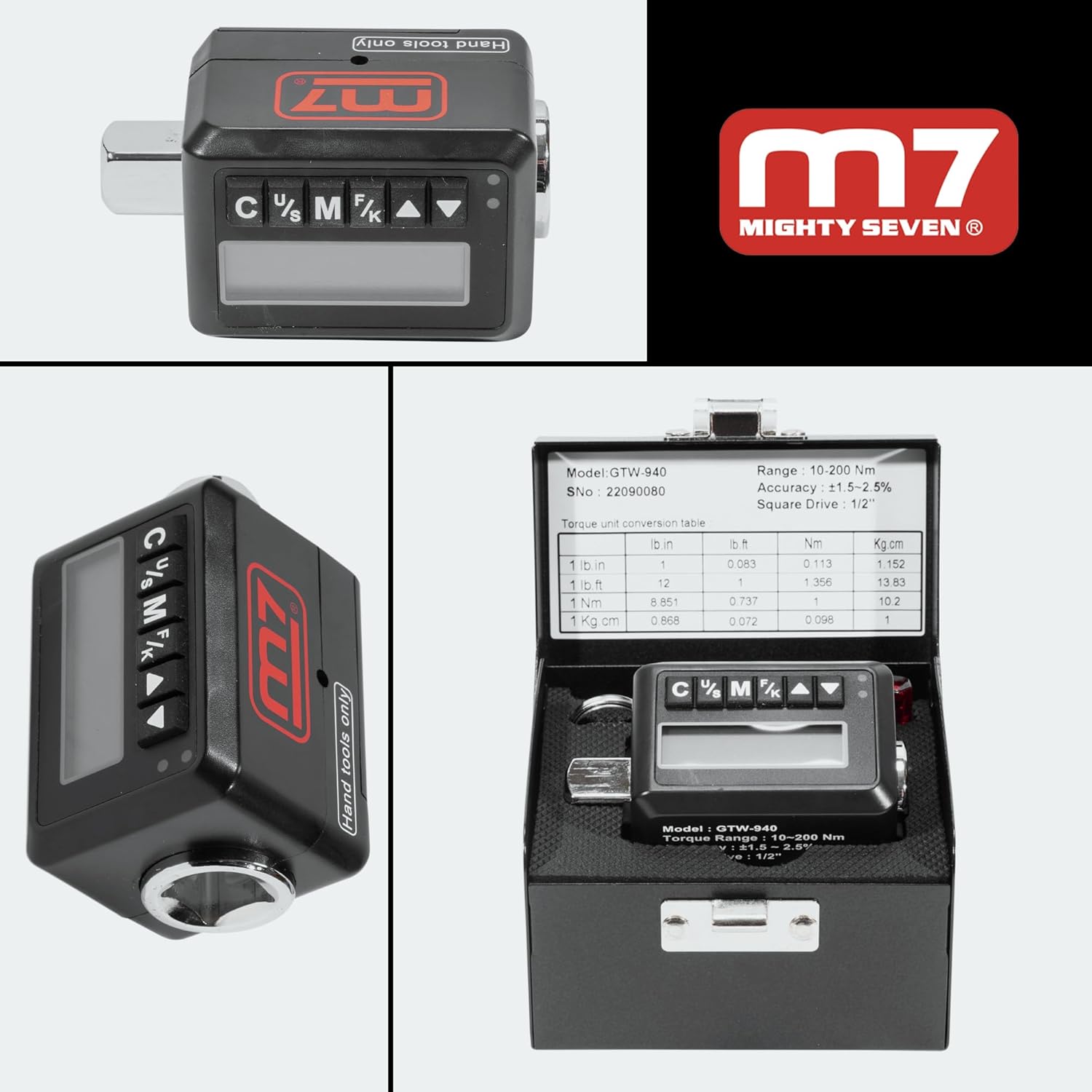
Image: Various perspectives of the M7 GTW-940 adapter, showcasing its compact design and square drive ends.
5. セットアップ
バッテリーの取り付け
The M7 GTW-940 operates on batteries (not included). Locate the battery compartment, typically on the back or side of the unit. Insert the required batteries, ensuring correct polarity. Close the battery compartment securely.
Attaching to Ratchet
To use the adapter, securely attach it to any standard 1/2-inch square drive ratchet wrench. Then, attach the appropriate socket or accessory to the output square drive of the adapter.

Image: The M7 GTW-940 adapter shown connected to a standard 1/2-inch drive ratchet wrench, ready for use.
6. 操作手順
電源オン/オフ
Press and hold the power button (usually marked 'C' or 'Power') to turn the unit on or off. The unit will automatically power off after 2 minutes of inactivity to conserve battery life.
ユニット選択
Press the 'U/S' (Unit/Set) button to cycle through the available torque units: lb-ft, N-m, Kg-cm, and lb-in. Select the desired unit for your measurement.
Mode Selection (Peak/Trace)
Press the 'M/F' (Mode/Function) button to switch between operating modes:
- トレースモード: 適用されたトルクの値をリアルタイムで表示します。
- ピークモード: Captures and displays the maximum torque value reached during the fastening process.
Setting Target Torque
In the desired mode, use the up/down arrow buttons to set your target torque value. The display will show the set value.
Torque Application and Alert
Apply torque to the fastener. As you approach the target torque, the adapter will provide audible and visual notifications (flashing LED) to indicate when the desired torque setting is reached. Stop applying force once the alert activates to avoid over-torquing.
プリセットの保存
The adapter can store up to 30 frequently used settings. Refer to the detailed instructions in the full manual for saving and recalling preset values.

Image: The M7 GTW-940 adapter actively being used to tighten a lug nut on a vehicle wheel, demonstrating its practical application.
7. メンテナンス
- クリーニング: Wipe the adapter with a clean, dry cloth after each use. Do not use abrasive cleaners or solvents.
- ストレージ: Store the adapter in its protective case in a cool, dry place when not in use.
- バッテリー交換: Replace batteries when the low battery indicator appears on the display. Remove batteries if the tool will not be used for an extended period.
- 較正: 最適な精度を得るには、認定サービス センターによる定期的な校正をお勧めします。
8。 トラブルシューティング
| 問題 | 考えられる原因 | 解決 |
|---|---|---|
| ユニットの電源が入りません。 | 電池が切れているか、正しく取り付けられていない。 | 電池の極性を確認するか、電池を交換してください。 |
| 不正確な測定値。 | Needs calibration; improper use. | Contact service center for calibration; ensure proper technique and secure connections. |
| No audible/visual alert. | Alert function disabled; unit malfunction. | Check settings to ensure alerts are enabled; if problem persists, contact support. |
| ディスプレイが空白またはちらつきます。 | バッテリー残量が少ない; 環境条件。 | Replace batteries; operate within specified temperature range. |
9. 仕様
| 特徴 | 詳細 |
|---|---|
| モデル番号 | GTW-940 |
| ドライブサイズ | 1/2インチ四方 |
| トルク範囲 | 10-200 Nm (7.38-147.5 lb-ft) |
| Accuracy (CW) | ±1.5% |
| Accuracy (CCW) | ±2.5% |
| 測定単位 | N-m, Kg-cm, lb-ft, lb-in |
| Min. Scale Unit | 0.1Nm |
| Storage Presets | 30 |
| Max. Reverse Torque | 200 |
| 操作モード | バッテリー |
| バッテリー寿命(スタンバイ) | 1年 |
| バッテリー寿命(連続) | 37時間 |
| 動作温度 | -10℃~60℃ |
| 保管温度 | -20℃~70℃ |
| 材料 | 合金鋼 |
| アイテム重量 | 1.05ポンド |
| 製品寸法 | 2 x 3 x 4インチ |

Image: A visual representation of the M7 GTW-940's technical specifications, alongside a mechanic performing work on a vehicle.
10. 保証とサポート
M7 products are built for durability and reliability. This product comes with a standard manufacturer's warranty against defects in materials and workmanship. For specific warranty terms, claims, or technical support, please refer to the warranty card included with your product or visit the official M7 webサイトをご覧ください。販売者に直接問い合わせてサポートを受けることもできます。
For further inquiries or assistance, please visit the M7 Store on Amazon.
Ask a question about this manual
Ask about setup, troubleshooting, compatibility, parts, safety, or missing instructions. Manuals+ will review the question and use this page’s manual context to help answer it.