
1. はじめに
This manual provides essential information for the setup, operation, maintenance, and troubleshooting of your DELTACO GAMING WM87 Gaming Mouse. Please read these instructions carefully to ensure proper use and to maximize your gaming experience.
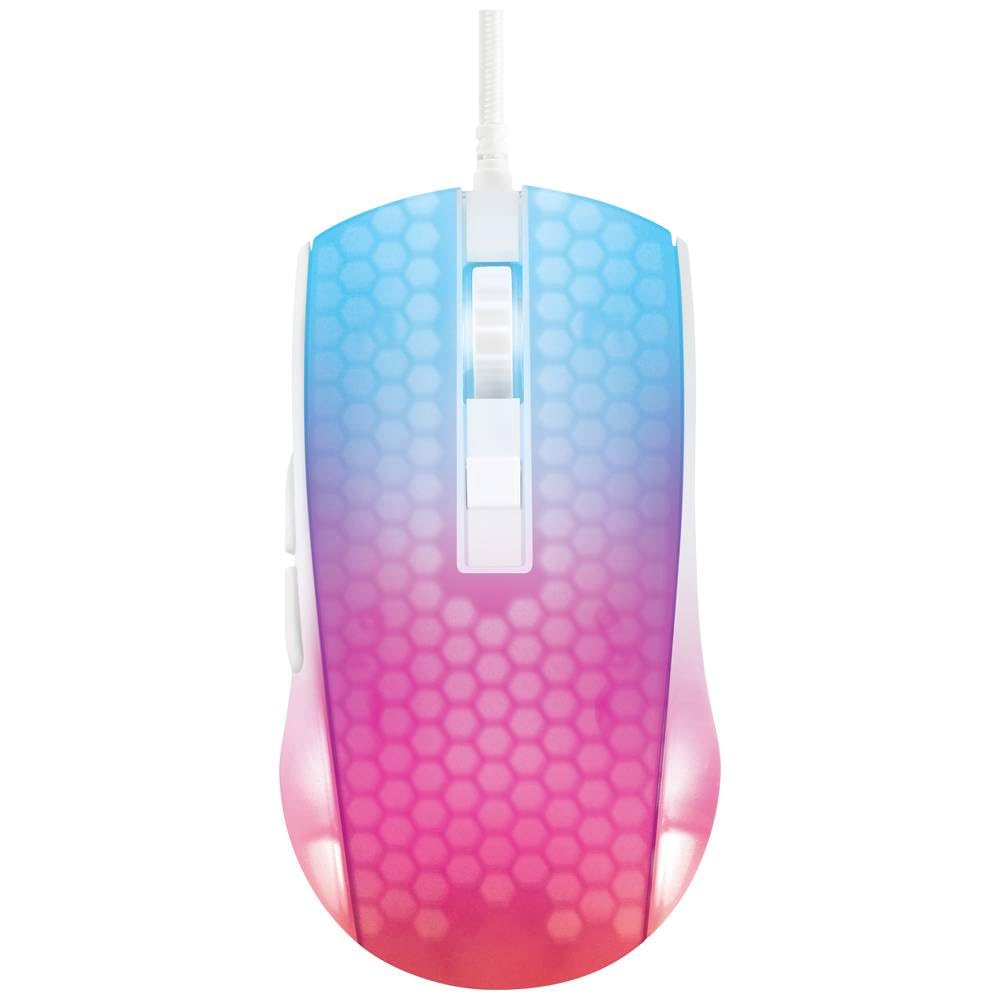
オーバーヘッド view of the DELTACO GAMING WM87 Gaming Mouse. The mouse features a translucent white body with an illuminated honeycomb pattern that transitions from blue at the front to pink and red at the rear. It has a scroll wheel and two main buttons, along with two side buttons visible on the left.
2.製品オーバーview
The DELTACO GAMING WM87 is a high-performance gaming mouse designed for precision and comfort. It features a transparent design with integrated illumination, a high-accuracy optical sensor, and six programmable buttons.
主な特徴:
- 接続性: USB有線
- センサー: 光学式、最大6200 DPI
- ボタン: 6 (Left, Right, Scroll Click, DPI Cycle, Forward, Back)
- デザイン: Transparent shell with illuminated honeycomb pattern
- 互換性: パソコン、ラップトップ
3. セットアップ手順
- マウスを開梱します。 Carefully remove the DELTACO GAMING WM87 mouse from its packaging.
- コンピュータに接続します: Locate an available USB port on your personal computer or laptop. Insert the USB connector of the mouse firmly into the USB port.
- ドライバーのインストール: The mouse is plug-and-play. Your operating system should automatically detect and install the necessary drivers. No additional software installation is typically required for basic functionality.
- 機能の確認: Once connected, move the mouse and click the buttons to ensure it is working correctly. The integrated illumination should light up.
4. 操作手順
基本機能:
- 左クリック: 主なアクション、選択。
- 右クリック: コンテキスト メニュー、セカンダリ アクション。
- スクロールホイール: Scroll up/down pages. Pressing the scroll wheel typically acts as a middle click.
- 進む/戻るボタン: Located on the left side of the mouse, these buttons are commonly used for navigation in web ブラウザまたは file 探検家。
DPI 調整:
The DELTACO GAMING WM87 mouse features adjustable DPI (Dots Per Inch) settings, allowing you to change the cursor sensitivity on the fly. A dedicated DPI button (often located behind the scroll wheel) cycles through preset DPI levels up to 6200 DPI. Press this button to adjust the sensitivity to your preference.
照明:
The mouse features integrated illumination. The lighting pattern and colors are typically pre-programmed and may change based on DPI settings or automatically cycle through colors. Refer to any potential software for advanced customization, if available.
5. メンテナンス
- クリーニング: マウスの外側を掃除するには、柔らかく乾いた糸くずの出ない布を使用してください。頑固な汚れには、軽く拭き取ってください。ampen the cloth with water. Avoid using harsh chemicals, solvents, or abrasive materials.
- センサーのクリーニング: マウスの底面にある光学センサーの周りに、ほこりやゴミがたまってしまうことがあります。綿棒や圧縮空気を使って、センサー部分を優しく掃除してください。
- ストレージ: 使用していないときは、マウスを極端な温度や直射日光を避け、清潔で乾燥した環境に保管してください。
- ケーブルのお手入れ: 損傷を防ぐため、USB ケーブルを過度に曲げたりねじったりしないでください。
6。 トラブルシューティング
- マウスが反応しない:
- USB ケーブルが動作している USB ポートにしっかりと差し込まれていることを確認します。
- マウスをコンピューターの別の USB ポートに接続してみてください。
- コンピュータを再起動します。
- カーソルの動きが不規則:
- マウスの裏側にある光学センサーを清掃します。
- マウスを適切な表面(マウスパッドなど)で使用してください。反射率の高い表面や透明な表面は避けてください。
- 照明が機能しない:
- USB接続を確認してください。
- If the mouse has a dedicated lighting control button or software, ensure it is enabled.
7. 仕様
| 特徴 | 詳細 |
|---|---|
| ブランド | DELTACOゲーミング |
| モデル番号 | GAM-144-W (WM87) |
| 接続技術 | USB |
| 動き検出技術 | 光学 |
| ボタンの数 | 6 |
| 解像度 | 最大6200 |
| 手の向き | 右 |
| 推奨製品の使用 | ゲーム |
| 対応デバイス | ラップトップ、パソコン |
| 製品寸法 | 180 x 0.07 x 0.12 cm (Note: These dimensions appear to be for the cable or packaging, not the mouse itself. Please refer to product packaging for accurate mouse dimensions.) |
| 重さ | Approximately 65 Grams (Lithium battery weight, likely referring to overall mouse weight if no battery is present) |
| 初回利用可能日 | 16年2023月XNUMX日 |
8. 保証とサポート
For warranty information, technical support, or service inquiries regarding your DELTACO GAMING WM87 Gaming Mouse, please refer to the warranty card included with your product or visit the official DELTACO GAMING webサイトでご確認ください。保証請求に備えて購入証明書を保管してください。