
1.製品オーバーview
The Armorcope CQ1S is a wireless 2K HD solar-powered security camera designed for outdoor surveillance. This camera system offers a 360° PTZ (Pan-Tilt-Zoom) view, color night vision with an integrated spotlight, two-way audio communication, and advanced motion detection capabilities. Its solar power feature ensures continuous operation without the need for constant recharging or wired power connections, making it ideal for various outdoor environments.

Figure 1.1: Armorcope CQ1S Solar Security Cameras (Set of 2)
This image displays two Armorcope CQ1S cameras, each equipped with a solar panel for continuous power. The cameras are designed for outdoor installation, providing comprehensive surveillance.
2. パッケージ内容
Upon opening the package, verify that all components are present and in good condition. The standard package for the Armorcope CQ1S (Lot de 2) includes:
- 2 x Armorcope CQ1S Wireless 2K HD Solar Security Cameras
- ソーラーパネル x 2 (モデルによって一体型または別体型)
- 2 x Mounting Brackets and Screws
- 1 x USB Charging Cable (for initial charge, if needed)
- ユーザーマニュアル (本書) x 1
- クイックスタートガイド x 1
Note: An SD card for local storage is not included and must be purchased separately if desired.
3. セットアップとインストール
3.1 Initial Charging (Optional)
While the camera is solar-powered, it is recommended to fully charge the internal battery using the provided USB cable before the first use, especially if installing in an area with limited initial sunlight.
3.2 アプリのインストールとアカウント作成
The Armorcope CQ1S camera operates with the ヴィコホーム application. Download the Vicohome app from your smartphone's app store (iOS App Store or Google Play Store). Follow the on-screen instructions to create an account and log in.
3.3 カメラのペアリングとWi-Fi接続
- Open the Vicohome app and tap "Add Device" or the "+" icon.
- Select the Armorcope CQ1S camera model from the list.
- カメラの電源を入れます。カメラはペアリングモードになります(特定のLEDライトパターンまたは音声プロンプトで示されます)。
- スマートフォンを 2.4 GHz Wi-Fiネットワーク. 注意: 5G Wi-Fi ネットワークはサポートされていません。
- Follow the app's instructions to scan the QR code displayed on your phone with the camera lens, or enter your Wi-Fi credentials manually.
- 接続されると、カメラはペアリングが成功したことを確認します。
3.4物理的な設置
Choose a suitable outdoor location for installation, ensuring the solar panel receives adequate direct sunlight throughout the day. The camera is designed for wall mounting.
- 取り付けブラケットをテンプレートとして使用して、穴あけポイントをマークします。
- 必要に応じて穴を開け、壁アンカーを挿入します。
- 付属のネジを使用して取り付けブラケットを壁に固定します。
- カメラを取り付けブラケットに取り付けます。
- 太陽光パネルの角度を調整して太陽光の当たり具合を最大化します。

Figure 3.1: Solar Wireless Charging Setup
This image illustrates the camera mounted on a wall, with its solar panel connected and positioned to efficiently capture sunlight for continuous wireless charging.
4. 操作手順
4.1 ライブ View PTZコントロール
Access the live video feed through the Vicohome app. The camera features a 355° horizontal pan and 100° vertical tilt range, allowing for comprehensive area coverage. Use the directional controls within the app to adjust the camera's view角度。

Figure 4.1: All-Round Full View (PTZ)
This image demonstrates the camera's extensive pan and tilt capabilities, providing a wide, comprehensive view 監視対象エリアはモバイル アプリケーションから制御できます。
4.2 2K HD Resolution and Color Night Vision
The camera records in Full HD 2K resolution, providing clear and detailed video footage during both day and night. The advanced color night vision technology, enhanced by the integrated spotlight, ensures vivid and accurate colors even in low-light conditions.
4.3 PIRモーション検知とアラーム
Equipped with PIR (Passive Infrared) sensors, the camera accurately detects human motion, minimizing false alarms from insects or swaying branches. When motion is detected, you will receive instant notifications on your smartphone. The camera can also activate a sound-light alarm to deter intruders.
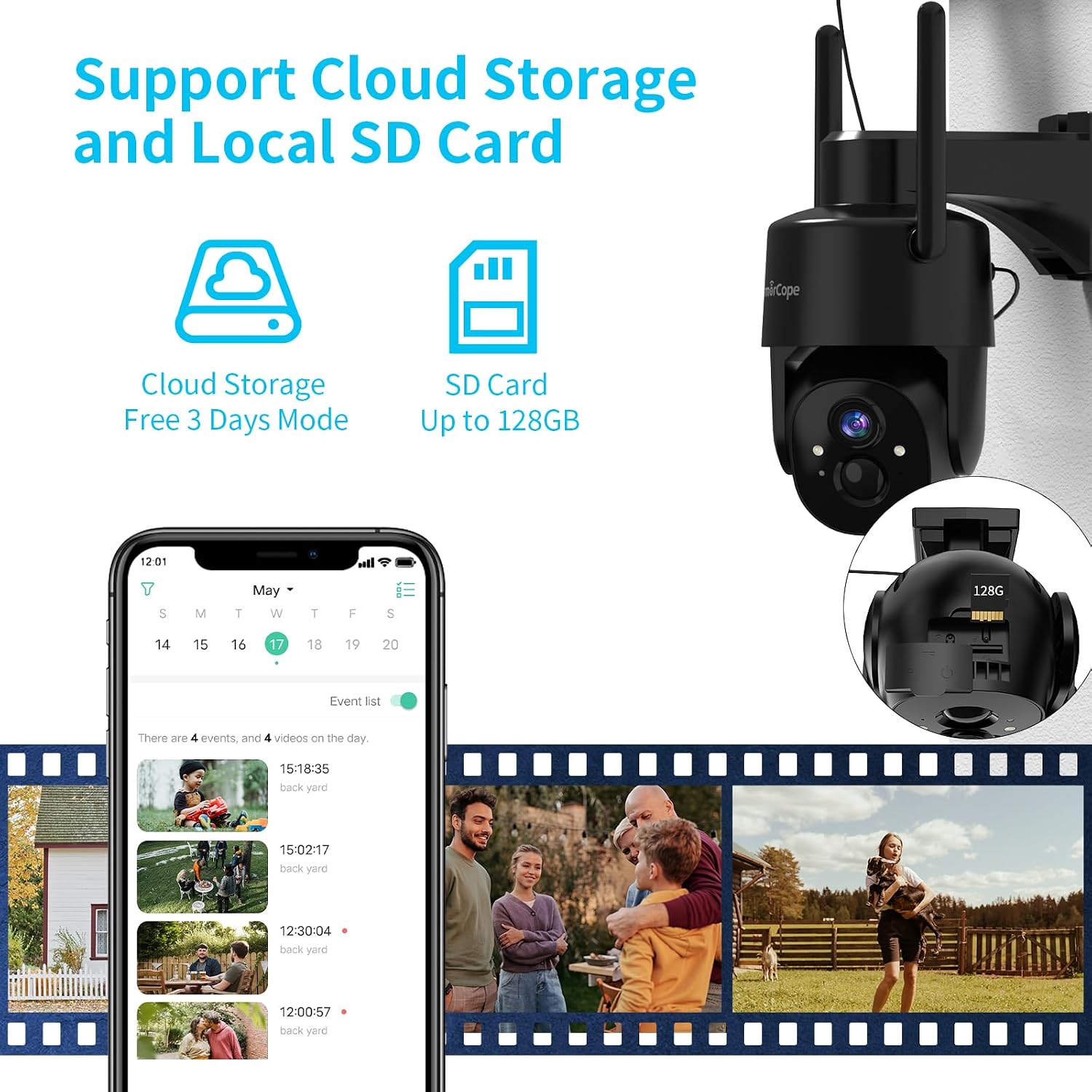
Figure 4.2: Motion Detection and Sound-Light Alarm
This image illustrates the camera's motion detection feature, showing how it identifies human presence and triggers an alert, along with the option for a sound and light alarm.
4.4 双方向オーディオ
The built-in microphone and speaker enable two-way communication. You can listen to what's happening around the camera and speak through the camera to communicate with visitors or deter unwanted individuals, directly from your smartphone.

図4.3: 双方向音声通信
This image demonstrates the two-way audio functionality, allowing users to communicate remotely with individuals near the camera, such as delivery personnel.
4.5 ビデオ保存オプション
The Armorcope CQ1S offers flexible storage solutions for recorded events:
- ローカル SD カード ストレージ: Supports up to a 128GB Micro SD card (not included). Insert the SD card into the designated slot on the camera.
- クラウドストレージ: A free 3-day cloud storage plan for event videos is available. Paid subscription plans for extended cloud storage are also offered through the Vicohome app.

Figure 4.4: Cloud and Local SD Card Storage
This image highlights the camera's dual storage capabilities, supporting both cloud-based recording and local storage via a Micro SD card for event footage.
5. メンテナンス
5.1 耐候性
The Armorcope CQ1S camera has an IP65 waterproof rating, making it resistant to dust and water jets. It is designed to operate reliably in various weather conditions, including rain and snow, within a temperature range of -15.6 °C to 55 °C (4 °F to 131 °F).

図5.1: IP65耐候性設計
This image illustrates the camera's robust IP65 weather-resistant construction, ensuring reliable operation in diverse environmental conditions such as rain, snow, and dust.
5.2 ソーラーパネルの洗浄
最適な充電効率を確保するため、定期的にソーラーパネルの表面を清掃し、蓄積した埃、汚れ、ゴミなどを除去してください。柔らかくて乾いた布を使用してください。amp 掃除用の布。
5.3 バッテリー寿命
The camera is powered by a rechargeable Lithium-ion battery (included). With sufficient sunlight exposure, the solar panel continuously charges the battery, allowing for uninterrupted operation. In periods of low sunlight, the battery will sustain camera function.
6。 トラブルシューティング
- カメラがWi-Fiに接続できない: Ensure your Wi-Fi network is 2.4 GHz. Check Wi-Fi signal strength at the camera's location. Restart your router and the camera.
- モーション検出アラートなし: Verify that motion detection is enabled in the Vicohome app settings. Adjust PIR sensitivity if necessary. Ensure there are no obstructions blocking the sensor.
- ビデオ品質が悪い: Check your Wi-Fi connection stability. Ensure the camera lens is clean and free from smudges or dirt.
- バッテリーが充電されない: ソーラーパネルが清潔で、毎日数時間直射日光が当たることを確認してください。ソーラーパネルとカメラの接続を確認してください。
- 双方向オーディオの問題: Check microphone and speaker permissions for the Vicohome app on your smartphone. Ensure volume levels are adequate.
7. 仕様
| 特徴 | 仕様 |
|---|---|
| モデル番号 | CQ1S |
| ブランド | アーマーコープ |
| 色 | Black (Lot de 2) |
| アイテム数 | 2 |
| 無線通信技術 | Wi-Fi(2.4GHzのみ) |
| フォームファクター | ドーム |
| View角度 | 360 Degrees (PTZ: 355° Horizontal, 100° Vertical) |
| インストールタイプ | 壁掛け |
| 電源 | Solar Powered / Battery Powered (6 Watts) |
| 商品の寸法 (長さ x 幅 x 高さ) | 10.16 x 10.16 x 15.24 cm(4 x 4 x 6インチ) |
| アイテム重量 | 1.78キログラム(3.92ポンド) |
| バッテリー | リチウムイオン1個(付属) |
| 特集 | Waterproof (IP65), Color Night Vision, Two-Way Audio, Motion Detection, Spotlight |
| 対応デバイス | アレクサ、アンドロイド |
| ビデオ録画解像度 | 2K |
| 推奨用途 | 屋外セキュリティ、屋内セキュリティ |
8. 保証とサポート
For warranty information and technical support, please refer to the contact details provided with your product packaging or visit the official Armorcope website. While specific spare parts availability information is not provided, general product support can be obtained through the manufacturer's customer service channels.
For app-related issues, please contact Vicohome app support directly.


