
導入
This manual provides instructions for the safe and effective use of your REPTITRIP Reptile Heating Pad with PID Thermostat. This device is designed to provide a controlled heat source for reptile terrariums, helping to maintain a stable and appropriate temperature for your pets. Please read all instructions carefully before installation and operation.
重要な安全情報
これらの安全に関する指示に従わなかった場合、火災、感電、怪我、または製品や財産の損傷が発生する可能性があります。
- This product is intended for household use only, specifically for heating reptile terrariums.
- Do not immerse the heating pad or thermostat controller in water. The heating pad is waterproof (IP67 rated) but not designed for submersion.
- Do not use the heating pad if it is folded or creased. Ensure it lies flat.
- Do not use the heating pad directly on a metal tank, as this can lead to inefficient heating or damage.
- Prolonged application at high temperature settings can cause skin burns to animals. Always monitor the temperature carefully.
- Discontinue use immediately if the heating pad shows any signs of deterioration, such as cracking, blistering, or melting.
- The heating pad features a built-in temperature sensor that will stop heating if the internal temperature reaches 122°F (50°C) to prevent overheating.
- Keep out of reach of children and pets not intended for its use.
製品終了view
The REPTITRIP Reptile Heating Pad system includes a heating mat and an intelligent PID thermostat controller. It is designed to provide precise and stable temperature control for reptile habitats.
主な特徴:
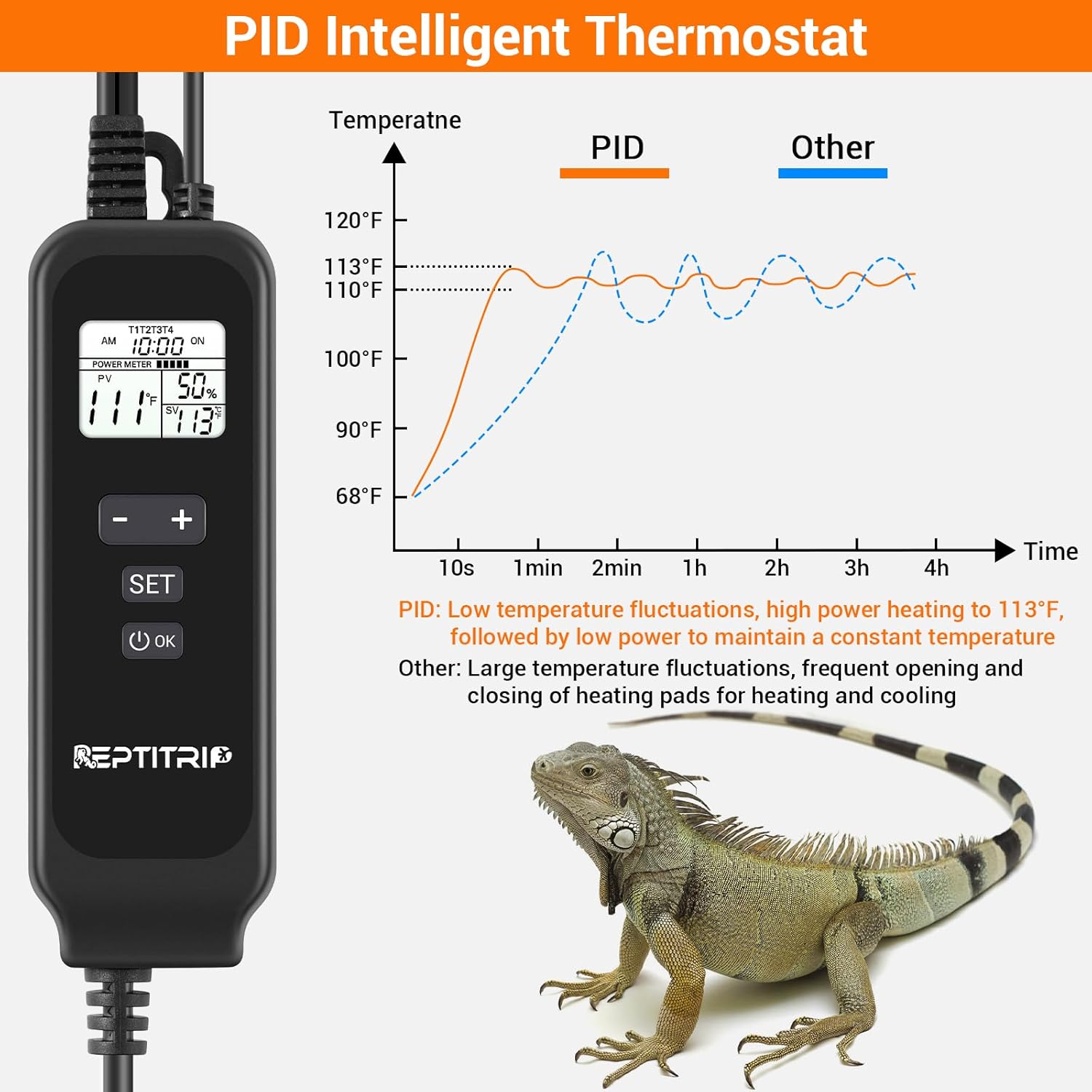
- PID Intelligent Thermostat: Accurately controls heating temperature for efficiency and stability.
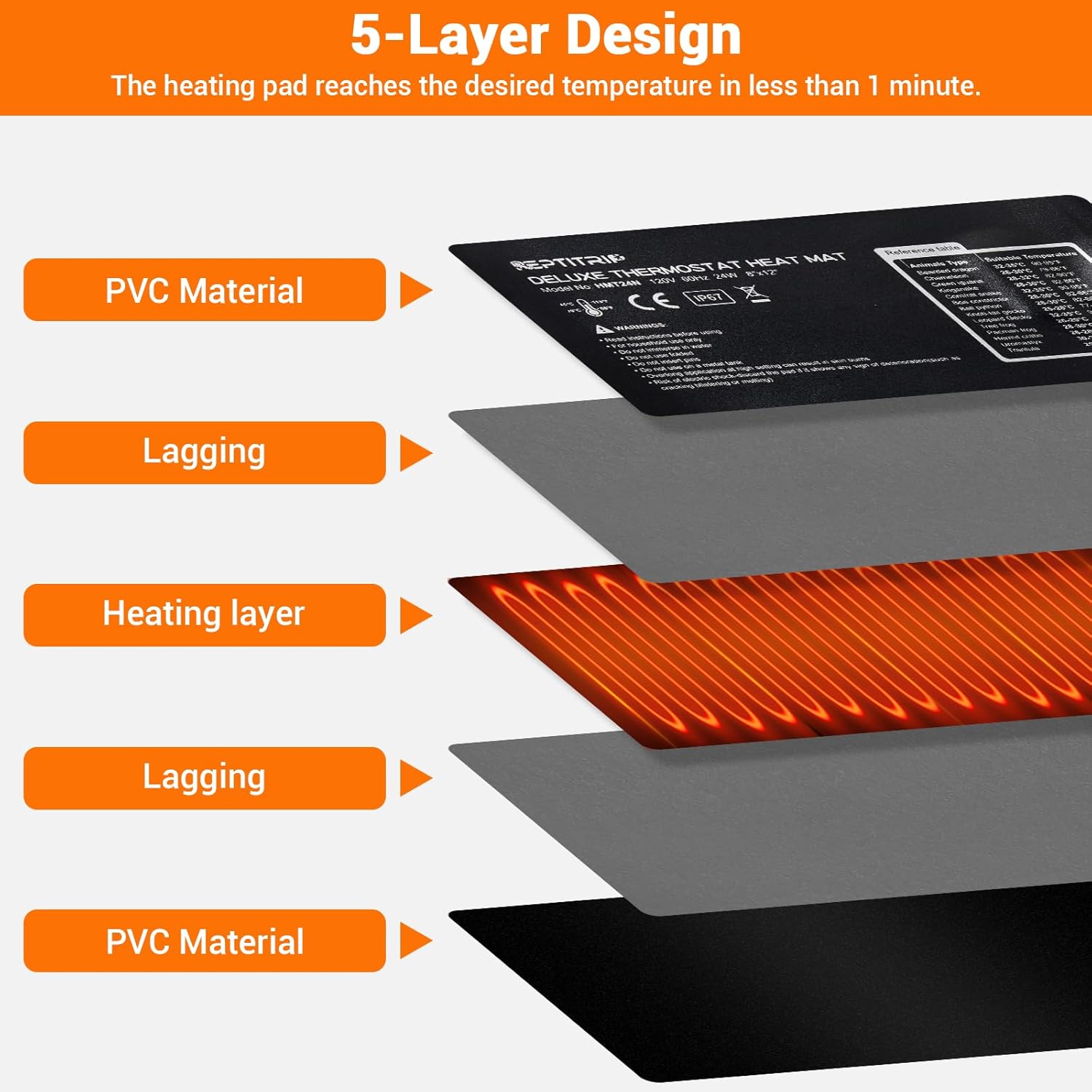
- 急速加熱: 24W power heats to 113°F (45°C) in approximately 1 minute.
- 高温保護: Automatically stops heating at 122°F (50°C).
- 温度検出: Built-in sensor and external probe for real-time temperature monitoring.
- 耐久性のある構造: 5-layer design including PVC material, lagging, and heating layer.
- 防水設計: IP67 rated heating pad (do not immerse).
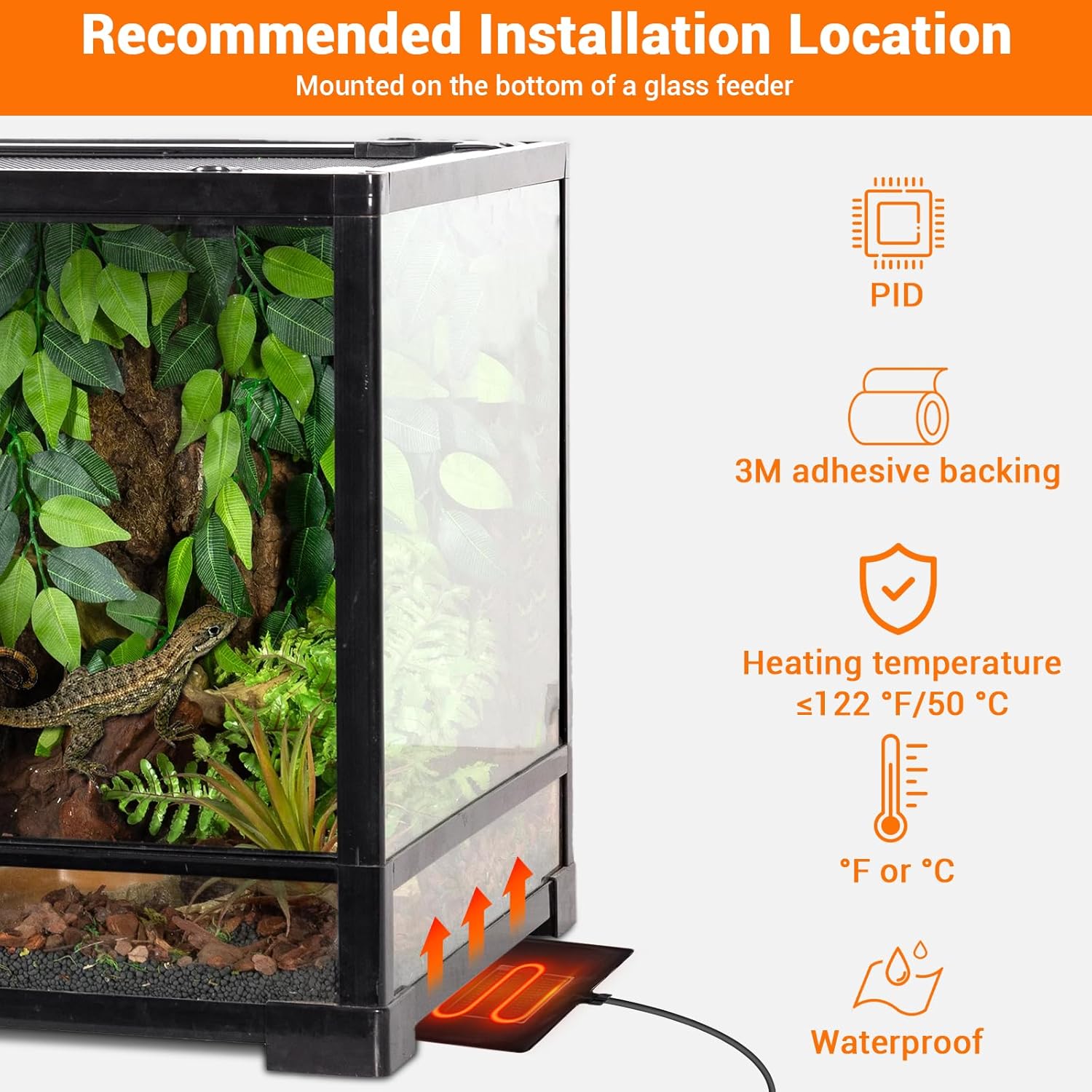
- 粘着裏地: Equipped with 3M adhesive for secure mounting.

セットアップ手順
- 場所を選択してください: Select a suitable location for the heating pad, typically on the bottom or side of a glass terrarium. Ensure the surface is clean and dry.
- Apply Heating Pad: Remove the protective film from the 3M adhesive backing on the heating pad. Carefully press the pad firmly onto the chosen surface of the terrarium. Ensure there are no air bubbles or wrinkles.
- 温度プローブの位置: Place the external temperature probe inside the terrarium, near the area where the heat is needed most, but away from direct contact with the heating pad to ensure accurate ambient temperature readings. Secure it to prevent movement.
- サーモスタットを接続する: Plug the heating pad into the thermostat controller. Then, plug the thermostat controller into a standard electrical outlet.


操作手順
The PID thermostat controller allows for precise temperature management. The controllable temperature range is 68°F to 113°F (20°C to 45°C).
コントローラー機能:

- LCDディスプレイ: Shows current time, sensor temperature, set temperature, and power percentage.
- オン/オフボタン: 長押しするとユニットの電源がオンまたはオフになります。
- SETボタン: 押すと温度設定モードになります。
- 「+」ボタン: Increases the set temperature or navigates menu options.
- '-' ボタン: Decreases the set temperature or navigates menu options.
- OKボタン: 選択を確定します。
温度の設定:
- を押す セット button. The set temperature display will begin to flash.
- 使用 + or - 希望の温度を調整するためのボタン。
- を押す OK button to confirm your setting. The display will stop flashing.
Switching Between °F and °C:
To switch the temperature display between Fahrenheit (°F) and Celsius (°C), long press the セット ボタンと + ボタンを同時に押します。
メンテナンス
- クリーニング: Disconnect the power before cleaning. Wipe the heating pad and controller with a damp 布で拭いてください。研磨剤入りの洗剤を使用したり、水に浸したりしないでください。
- 検査: Regularly inspect the heating pad and power cords for any signs of damage, wear, or deterioration. If any damage is observed, discontinue use and replace the unit.
- ストレージ: When not in use, store the heating pad and controller in a dry, cool place, away from direct sunlight and extreme temperatures.
トラブルシューティング
- No Power/Heating:
- 電源コードが機能しているコンセントにしっかりと差し込まれていることを確認してください。
- Check if the thermostat controller is powered on (press and hold the ON/OFF button).
- Verify that the heating pad is correctly plugged into the thermostat controller.
- 温度の読み取りが不正確:
- Ensure the external temperature probe is properly positioned within the terrarium and not directly touching the heating pad or other heat sources.
- Check for any obstructions around the probe that might affect its reading.
- 温度変動:
- The PID system is designed for stable control, but significant external temperature changes or drafts can affect stability.
- Ensure the terrarium is adequately insulated and placed in a stable environment.
- Heating Pad Overheating (reaching 122°F/50°C):
- The built-in protection will temporarily stop heating. This is a safety feature.
- Check if the set temperature is too high for the environment or if the pad is covered by insulating material that traps excessive heat.
仕様
| 特徴 | 詳細 |
|---|---|
| モデル番号 | HMT24N |
| 加熱パッドの寸法 | 8 x 12インチ(20.3 x 30.5 cm) |
| 出力 | 24ワット |
| 巻tage | 120V、60Hz |
| 温度制御範囲 | 68°F ~ 113°F (20°C ~ 45°C) |
| 高温保護 | 122°F (50°C) |
| 防水等級 | IP67 (Heating Pad) |
| 電源コードの長さ | 70インチ(約178cm) |
| プローブコードの長さ | 60インチ(約152cm) |
| 推奨タンクサイズ | 30~40ガロン |
| メーカー | レプティトリップ |
保証とカスタマーサポート
For warranty information, technical assistance, or customer support, please refer to the contact information provided with your purchase or visit the official REPTITRIP webサイトでご確認ください。購入証明として購入レシートを保管してください。