
1. はじめに
Thank you for choosing the ARROWMAX SES PRO Electric Precision Screwdriver. This cordless tool is designed for precision tasks, featuring smart motion control and a comprehensive set of 34 magnetic bits. It is ideal for electronics, laptops, glasses, and other delicate applications. This manual provides essential information for safe operation, setup, maintenance, and troubleshooting to ensure optimal performance and longevity of your device.
2. 安全情報
本製品をご使用になる前に、すべての安全に関する警告と指示をよくお読みください。これらの指示に従わない場合、感電、火災、または重傷を負う可能性があります。
- 作業エリアを清潔に保ち、明るくしてください。雑然とした場所や暗い場所は事故を招きます。
- 可燃性の液体、ガス、粉塵などがある爆発性雰囲気では電動工具を操作しないでください。電動工具は火花を発し、粉塵や煙に引火する可能性があります。
- 電動工具を操作するときは、子供や傍観者を近づけないでください。注意散漫になると制御不能になる可能性があります。
- 誤って始動しないようにしてください。バッテリーパックに接続する前、工具を持ち上げる前、持ち運ぶ前に、スイッチがオフになっていることを確認してください。
- 手を伸ばしすぎないでください。常に適切な足場とバランスを保ってください。これにより、予期しない状況でも電動工具をより適切に制御できます。
- 適切な服装をしてください。ゆったりとした服やアクセサリーは身につけないでください。髪の毛や服を可動部分に近づけないでください。ゆったりとした服、アクセサリー、長い髪の毛は可動部分に引っかかる可能性があります。
- 個人用保護具を使用してください。常に目の保護具を着用してください。適切な状況で防塵マスク、滑り止め付き安全靴、ヘルメット、聴覚保護具などの保護具を使用すると、人身傷害を軽減できます。
- 使用していない電動工具は子供の手の届かないところに保管し、電動工具やこの説明書をよく知らない人が電動工具を操作しないようにしてください。
- 電動工具のメンテナンスを行ってください。可動部品のずれや固着、部品の破損、その他電動工具の動作に影響する可能性のある状態がないか確認してください。損傷がある場合は、使用前に電動工具を修理してください。
- 作業条件や実行する作業を考慮して、これらの指示に従って電動工具、付属品、工具ビットなどを使用してください。電動工具を意図された操作と異なる操作に使用すると、危険な状況が発生する可能性があります。
- 充電は製造元が指定した充電器のみを使用してください。あるタイプのバッテリー パックに適した充電器を別のバッテリー パックに使用すると、火災の危険が生じる可能性があります。
- スイッチでオンとオフが切り替えられない場合は、ツールを使用しないでください。 スイッチで制御できない電動工具は危険であり、修理する必要があります。
- 調整、アクセサリの交換、または電動工具の保管を行う前に、バッテリパックを電動工具から外してください。 このような予防安全対策により、電動工具を誤って始動するリスクが軽減されます。
3. パッケージ内容
The ARROWMAX SES PRO Electric Precision Screwdriver package typically includes the following items:
- 1 x ARROWMAX SES PRO Electric Precision Screwdriver
- マグネット式収納ケース x 1
- 34 x Magnetic Precision Bits (S2 Steel, 4mm)
- 1 x USB-A-USB-C充電ケーブル

Image: The ARROWMAX SES PRO Electric Precision Screwdriver, its magnetic bit case, and the included 34 precision bits.
4.製品オーバーview およびコンポーネント
Familiarize yourself with the main components of your ARROWMAX SES PRO screwdriver:

Image: Labeled diagram of the ARROWMAX SES PRO screwdriver's key components.
- Type-C充電ポート: Located at the top for recharging the internal battery.
- LEDステータス表示: An OLED screen showing battery level, torque setting, and operational status.
- 電源ボタン: Used to turn the device on/off and adjust torque settings.
- アルミニウム合金ボディ: 耐久性と軽量性に優れた構造。
- LEDライト: 作業エリアを照らして視認性を高めます。
- Bit Installation Port: Where precision bits are inserted.
5. セットアップ
5.1 ドライバーの充電
- Locate the USB-C charging port at the top of the screwdriver.
- Connect the provided USB-A to USB-C charging cable to the screwdriver and a compatible USB-A power adapter (not included).
- The LED Status Display will indicate the charging progress. A full charge allows for tightening approximately 900 screws.
- 重要な注意: This electric screwdriver only supports USB-A to USB-C charging and is not compatible with USB-C PD (Power Delivery) chargers.

画像: 上view of charging port, battery, torque adjustment, and OLED display.
5.2 Installing Precision Bits
- Select the appropriate precision bit from the magnetic storage case. The case features a pop-up design for easy access.
- Insert the bit firmly into the Bit Installation Port at the tip of the screwdriver. The magnetic holder will secure the bit in place.
- ビットを取り外すには、単に引き抜くだけです。
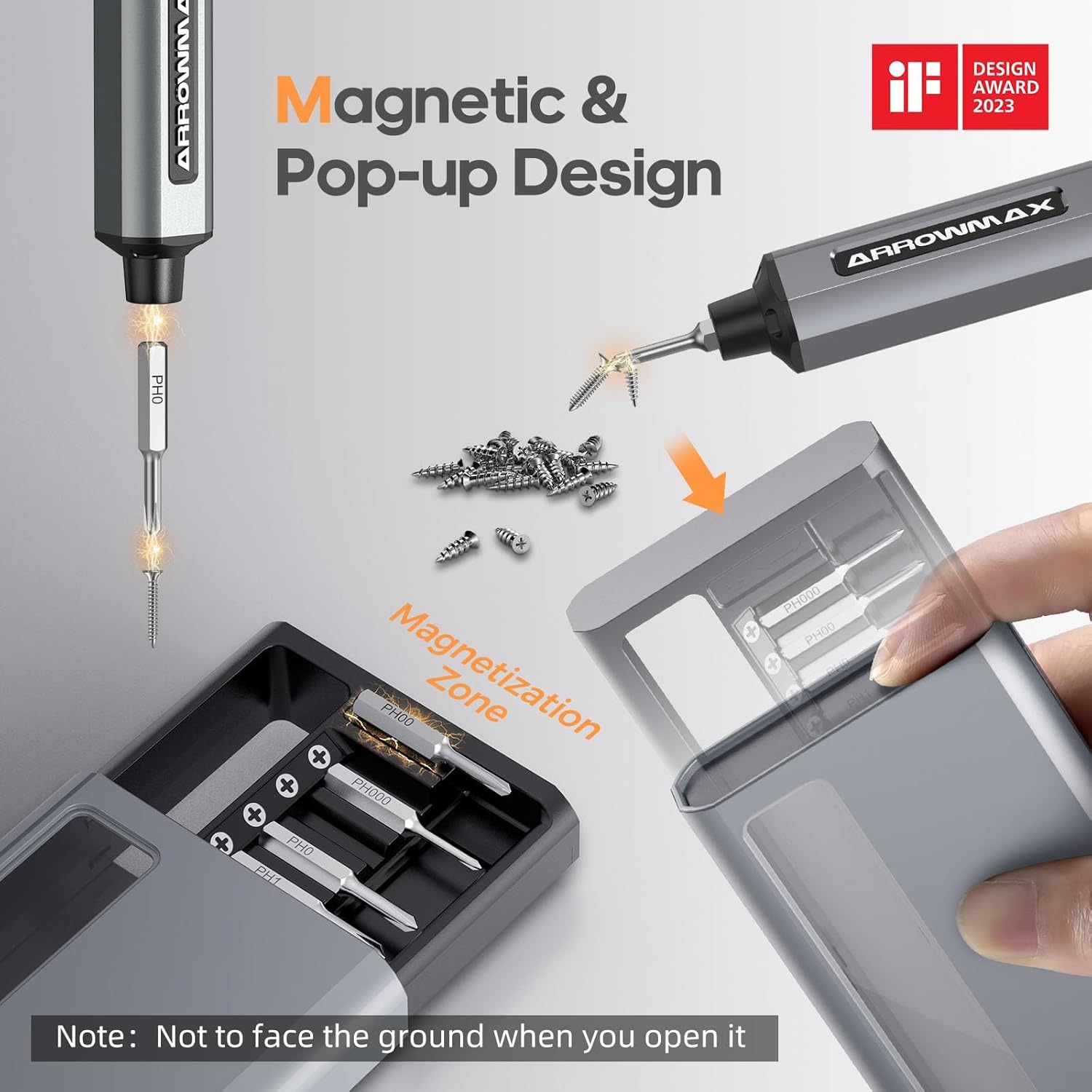
Image: Magnetic pop-up bit case design and bit magnetization zone.
6. 操作手順
6.1 電源のオン/オフ
Press and hold the Power Button for a few seconds to turn the screwdriver on or off. The OLED screen will illuminate upon activation.
6.2 トルク設定の調整
The SES PRO offers 5 adjustable torque levels, including an auto-sensing mode, to suit various tasks. The electric torque ranges from 0.049 N.m to 0.30-0.35 N.m, with a manual torque of 3 N.m.
- With the screwdriver powered on, press the Power Button three times continuously to cycle through the torque settings.
- The OLED screen will display the current torque level (e.g., 1, 2, 3, 4, A for Auto-Sensing).
- Select a lower torque for delicate items like glasses or small electronics, and higher torque for more robust applications.
- For screws that are too tight for the electric motor, the screwdriver can be used in manual mode by applying direct force.
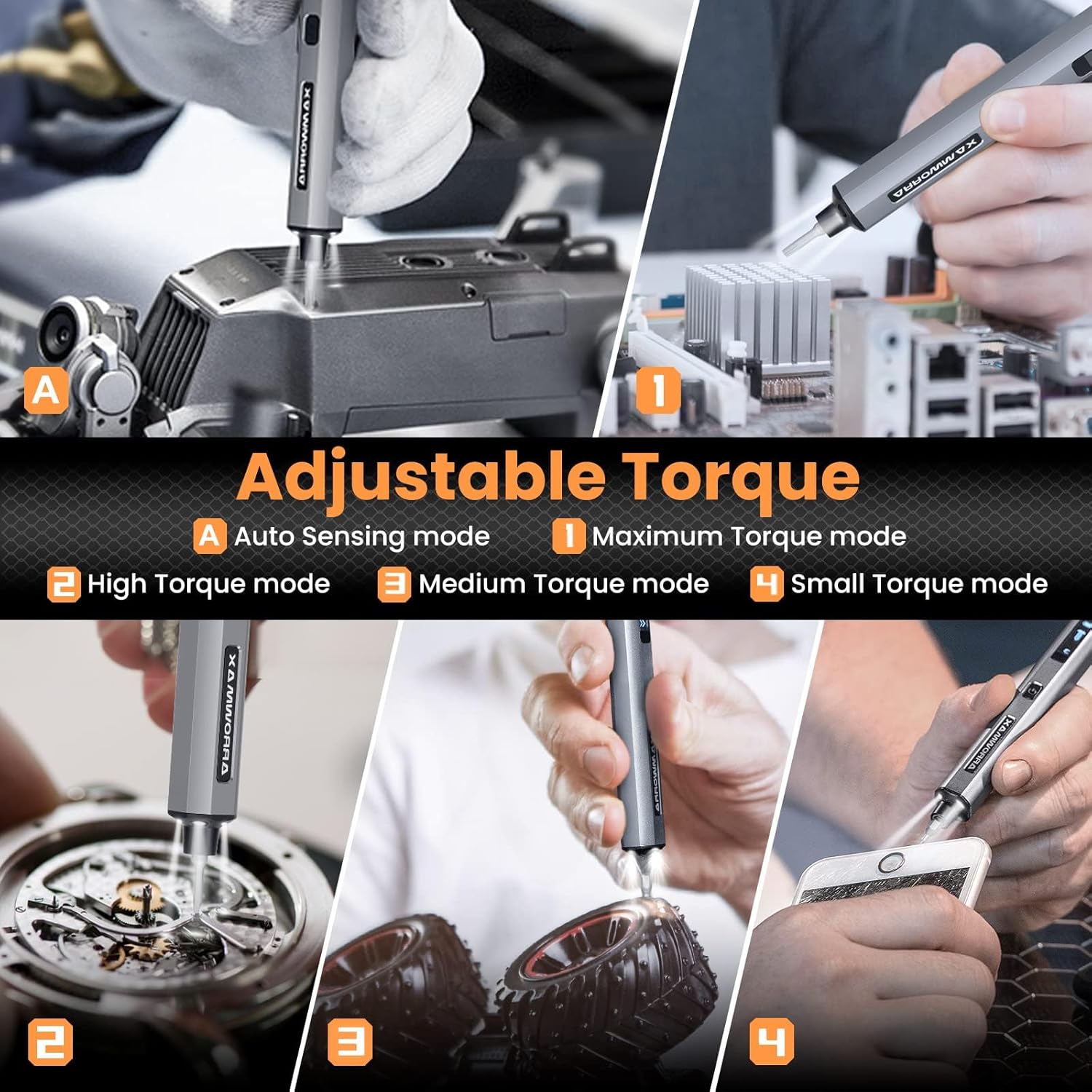
Image: Adjustable torque settings for various applications.
6.3 Body Sensory Dual-Mode (Forward/Reverse)
The SES PRO features a body sensory dual-mode for intuitive control of rotation direction.
- To drive a screw in (tighten), gently rotate your wrist in a clockwise direction while holding the screwdriver.
- To remove a screw (loosen), gently rotate your wrist in a counter-clockwise direction.
- The screwdriver's internal gyroscope detects your wrist movement and activates the motor accordingly.
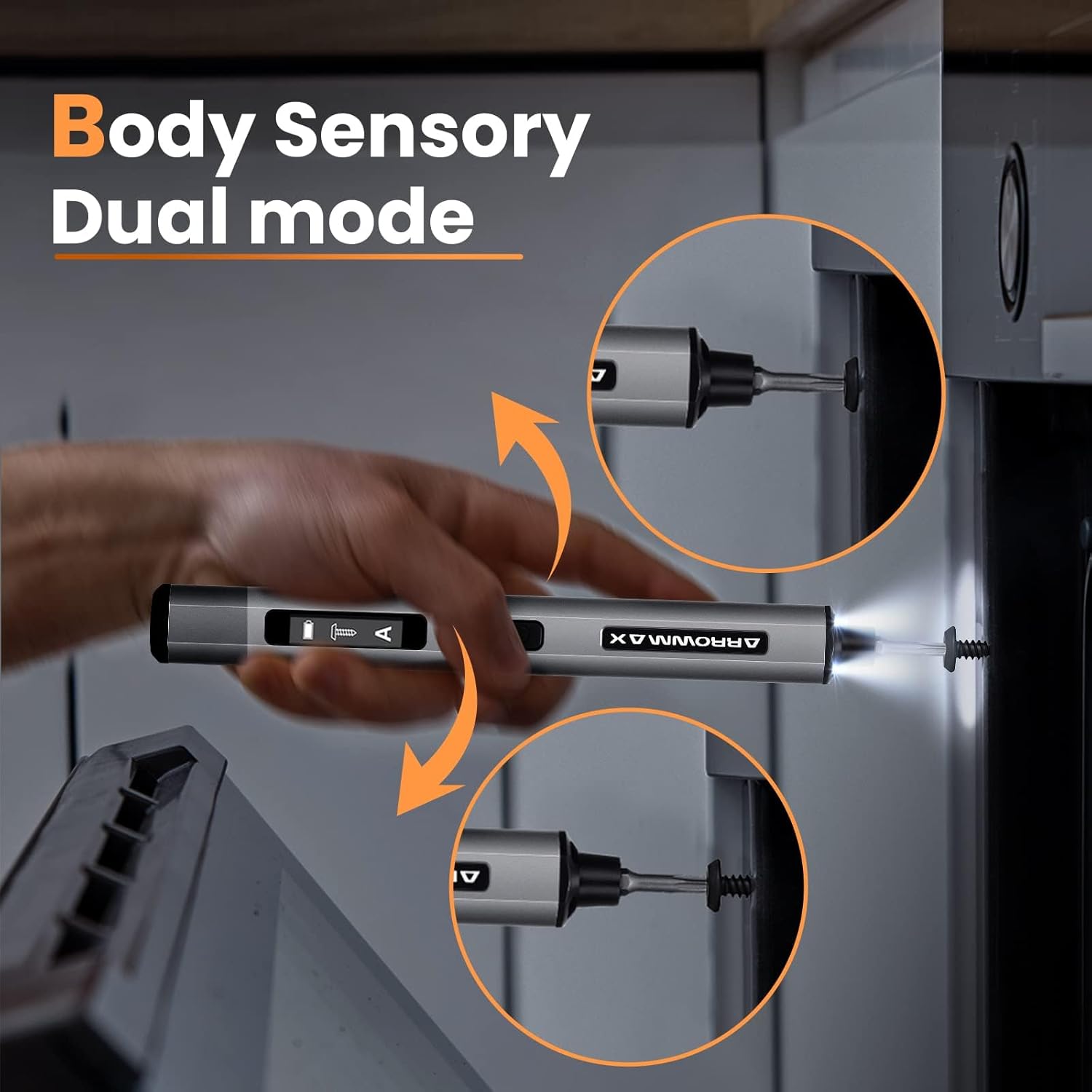
Image: Body sensory dual-mode in action for forward and reverse operation.
6.4 LED作業灯
The integrated LED lights at the tip of the screwdriver automatically illuminate when the motor is active, providing clear visibility of your work area.
7. メンテナンス
7.1 クリーニング
- Wipe the screwdriver body with a soft, dry cloth. Do not use abrasive cleaners or solvents.
- Ensure the bit installation port is free of debris.
7.2バッテリーケア
- バッテリーの寿命を延ばすには、バッテリーを頻繁に完全に放電しないようにしてください。
- ドライバーを使用しないときは、涼しく乾燥した場所に保管してください。
- Recharge the battery periodically if stored for extended periods to prevent deep discharge.

Image: The SES PRO's long-lasting battery capacity.
7.3 ビットケア
- Keep the precision bits clean and free of rust.
- Store bits securely in the magnetic case to prevent loss and damage.
8。 トラブルシューティング
If you encounter issues with your ARROWMAX SES PRO screwdriver, refer to the following common problems and solutions:
| 問題 | 考えられる原因 | 解決 |
|---|---|---|
| Screwdriver does not turn on or respond. | バッテリー残量が少なく、デバイスがオフになっています。 | Charge the screwdriver using the provided USB-A to USB-C cable. Ensure the power button is pressed to turn it on. |
| ドライバーが充電されません。 | Incorrect charger type; faulty cable/adapter. | Ensure you are using a USB-A to USB-C cable and a standard USB-A power adapter. USB-C PD chargers are not supported. Try a different cable or adapter. |
| Motor lacks power or cannot loosen/tighten screws. | Low battery; incorrect torque setting; screw is too tight for electric mode. | Charge the screwdriver. Increase the torque setting. For very tight screws, manually loosen or tighten them first, then use the electric mode. |
| Directional control (forward/reverse) is inconsistent. | Improper wrist movement; gyroscope calibration issue. | Ensure clear and deliberate wrist movements. If issues persist, try restarting the device. |
| Bits fall out or are not held securely. | Bit installation port is dirty; bit is not fully inserted. | Clean the bit installation port. Ensure the bit is pushed in firmly until it clicks or feels secure. |
9. 仕様
Key technical specifications for the ARROWMAX SES PRO Electric Precision Screwdriver:
| 特徴 | 仕様 |
|---|---|
| ブランド | アローマックス |
| モデル | SES PRO (AM-199913-G) |
| スピード | 200 回転 |
| 電源 | 電池駆動 |
| 巻tage | 3.7 ボルト (DC) |
| 電気トルク | 0.049 N.m - 0.30-0.35 N.m (Adjustable) |
| 手動トルク | 3ナノメートル |
| 電池のタイプ | リチウムイオン(500mAh) |
| 充電ポート | USB-C (USB-A to USB-C charging only) |
| アイテム重量 | 13.7オンス |
| パッケージ寸法 | 7.48 x 3.43 x 1.73インチ |
| 特集 | OLED Screen, Smart Motion Control, Ergonomic Design, LED Lights |
10. 保証とサポート
The manufacturer's warranty information for this product is not explicitly provided in the available data. For details regarding warranty coverage, duration, and terms, please refer to the documentation included with your purchase or contact the retailer where the product was acquired.
For technical support, product inquiries, or assistance with troubleshooting that is not covered in this manual, please visit the official ARROWMAX website or contact their customer service department. Contact information can typically be found on the product packaging or the manufacturer's official online channels.


