
1. はじめにview
The GTRS M800 Smart Electric Guitar is an innovative instrument designed to integrate traditional guitar playing with advanced digital technology. It features a built-in intelligent system that provides a wide array of effects, practice tools, and connectivity options, aiming to offer a comprehensive musical experience without the need for extensive external equipment.
This manual provides essential information for setting up, operating, and maintaining your GTRS M800 guitar, ensuring you can fully utilize its intelligent features and enjoy its high-quality sound.
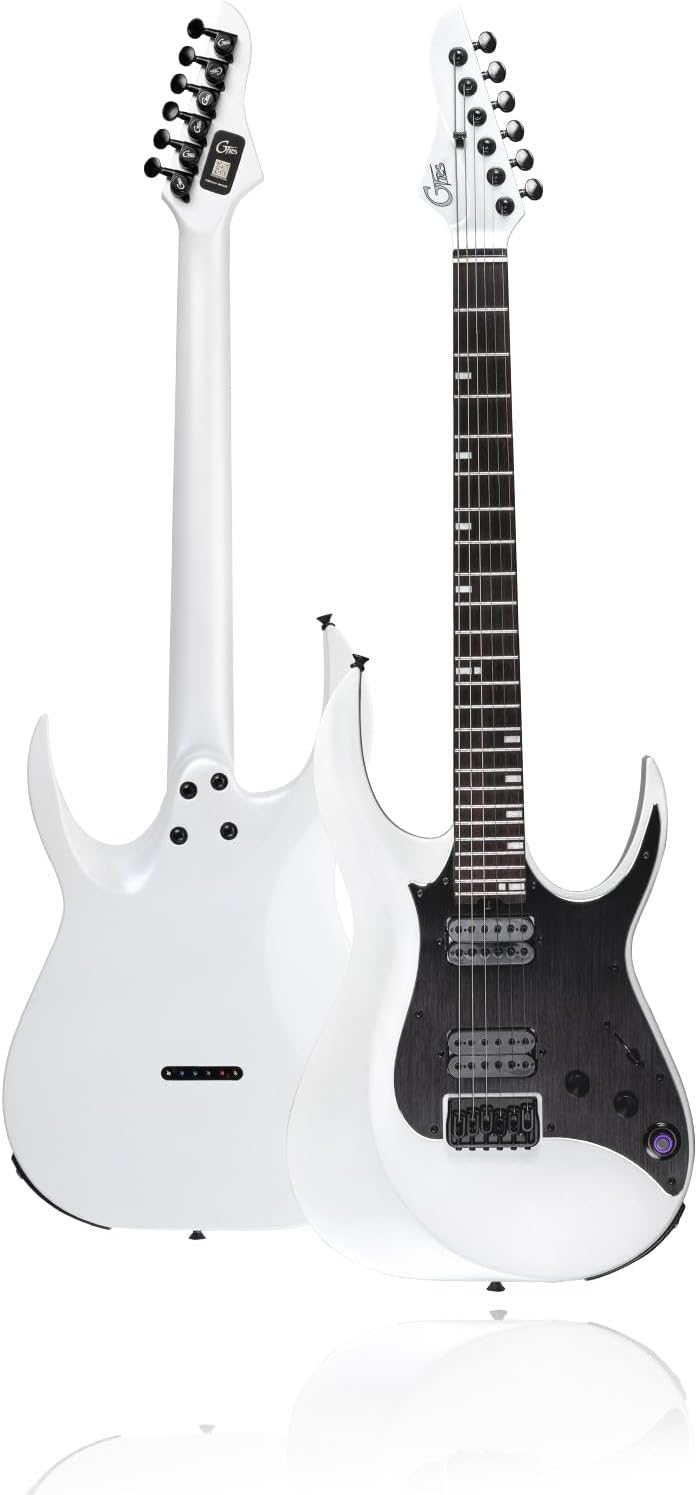
図1: 前面と背面 view of the GTRS M800 Smart Electric Guitar in white.
2. セットアップ
2.1 開梱と初期検査
すべての部品をパッケージから慎重に取り出してください。以下のすべての部品が揃っていて、損傷がないことを確認してください。
- GTRS M800 Smart Electric Guitar
- GTRSギグバッグ
- ユーザーマニュアル
- USB3.0 AM to Type C cable
- レンチ (x2)

Figure 2: Included accessories with the GTRS M800 Smart Electric Guitar.
2.2 バッテリーの充電
The GTRS M800 is equipped with a 4000 mAH Lithium Ion battery. Before first use, it is recommended to fully charge the guitar. Connect the provided USB-C cable to the guitar's charging port and a compatible USB power adapter (not included). A full charge provides approximately 10 hours of continuous use.

Figure 3: The GTRS M800 features a USB-C port for fast charging, offering up to 10 hours of battery life.
2.3 アプリのインストールと接続
To unlock the full potential of your GTRS M800, download the official GTRS App from your device's app store (Android/iOS). The app allows for comprehensive control over the guitar's intelligent system, effects, and practice tools.
- 検索する "GTRS App" in your device's app store.
- アプリケーションをインストールします。
- モバイルデバイスでBluetoothが有効になっていることを確認します。
- Turn on your GTRS M800 guitar.
- Open the GTRS App and follow the on-screen prompts to connect to your guitar via Bluetooth. You may need to scan the QR code located on the back of the guitar's neck plate for initial pairing.

Figure 4: The GTRS Smart App provides access to 128 effect types and various settings.
3. 操作手順
3.1 Intelligent System (G100) Overview
The GTRS M800 integrates the G100 Intelligent System, which includes built-in effects and tools. This system is controlled via the "Super Konb" (knob) on the guitar and the GTRS App.

Figure 5: Key features of the GTRS M800, including the Super Konb for smart system control.
3.2 Effects and Tone Management
The GTRS M800 offers 126 types of effects. You can switch between 4 preset banks by pressing the "Super Konb". All tones can be edited and modified within the GTRS App. The app also allows you to share your custom presets to the Mooer Cloud and download tones shared by other users.

Figure 6: The GTRS App provides extensive effect module settings for tone customization.
The guitar also supports tone capture using MNRS technology, allowing you to reproduce the sound of 16 classic guitars, including acoustic and rock electric guitars, with high fidelity.

Figure 7: GTRS guitars can simulate 16 classic guitar tones.
3.3 Practice Tools and Connectivity
The GTRS M800 includes several useful tools for practice:
- 80s Loop: Create and play along with loops.
- 40 Drummer: Access various drum patterns for rhythm practice.
- チューナー: 正確なチューニングを可能にするチューナーを内蔵。
- ブルートゥース: Connect your device via Bluetooth to play along with backing tracks or music.
- ヘッドフォン出力: ヘッドフォンを直接ギターに接続して静かに練習できます。
- ワイヤレスフットスイッチのサポート: The system supports the GWF4 Wireless Footswitch (sold separately) for hands-free control of effects and functions.

Figure 8: The GTRS App provides integrated practice tools.

Figure 9: The GTRS M800 can be connected to headphones or a guitar amp.
3.4 Pickup Configuration
The M800 features an H-H (Humbucker-Humbucker) pickup configuration, providing a wide range of tonal flexibility. These pickups perform optimally even when the G100 system is off, ensuring a consistent and powerful sound.

Figure 10: The M800 is equipped with H-H pickups for versatile tone.
4. メンテナンス
4.1一般的なケア
- 使用後は毎回、柔らかく乾いた布で拭いてギターを清潔に保ってください。
- ギターを使用しないときは、ほこり、湿気、物理的な損傷から保護するために、ギグバッグまたはハードケースにギターを保管してください。
- Avoid exposing the guitar to extreme temperatures or sudden changes in humidity.
- Regularly check and tighten any loose screws on hardware components.
4.2 文字列の置換
Replace strings regularly to maintain optimal tone and playability. The M800 uses 6 brass strings. Refer to standard electric guitar string replacement procedures. Ensure proper string gauge for best performance.
4.3ソフトウェアアップデート
Periodically check the GTRS App for firmware updates for your guitar. Updates can improve performance, add new features, or fix bugs. Follow the in-app instructions for safe and successful updates.
5。 トラブルシューティング
| 問題 | 考えられる原因 | 解決 |
|---|---|---|
| Guitar not connecting to App via Bluetooth. | Bluetooth is off on device; guitar is off; app not updated; incorrect pairing. | Ensure Bluetooth is on. Turn guitar off/on. Update GTRS App. Re-attempt pairing via QR code. |
| 音が出ない、または音量が低い。 | Volume knob low; headphones/amp not connected properly; effect settings muted. | Increase guitar volume. Check cable connections. Verify effect chain settings in GTRS App. |
| バッテリーが充電されていません。 | Faulty USB-C cable; power adapter issue; charging port damage. | Try a different USB-C cable and power adapter. Contact support if issue persists. |
| Effects not changing or responding. | App not synced; "Super Konb" not functioning; firmware issue. | Ensure app is synced. Restart guitar and app. Check for firmware updates. |
6. 仕様
| 特徴 | 詳細 |
|---|---|
| モデル | M800 |
| アイテム重量 | 14.22ポンド |
| 製品寸法 | 45.31 x 17 x 6.3インチ |
| バッテリー | 1 個のリチウムイオン電池が必要 (付属) |
| バッテリー寿命 | 約10時間 |
| 裏素材 | アルダーウッド |
| ボディ素材 | アルダー |
| 色名 | 白 |
| 指板の材質 | ローズウッド |
| ギターピックアップの構成 | HH |
| 弦の素材 | 真鍮 |
| トップ素材 | メープルウッド |
| ネック材の種類 | メープル |
| 文字列の数 | 6 |
| ギターブリッジシステム | 修理済み |
| 手の向き | 右 |
7. 公式製品ビデオ
Watch the official GTRS M800 Intelligent Electric Guitar video for a comprehensive overview その機能と能力について。
Video: GTRS M800 Intelligent Electric Guitar. This video showcases the design, intelligent system, effects, and overall performance of the GTRS M800 guitar.
8. 保証とサポート
For warranty information, technical support, or service inquiries, please refer to the warranty card included with your product or visit the official GTRS Store online. Keep your proof of purchase for warranty claims.
GTRS Store: https://www.amazon.com/stores/GTRS/page/45F90FE5-251F-4A5F-A899-0E5E60DF7D78