
KAOLALI G13
KAOLALI G13 GPS HUD Speedometer User Manual
Universal Car Head-Up Display with Speed, Time, and Compass Functions
製品終了view
The KAOLALI G13 GPS Head-Up Display (HUD) is designed to enhance driving safety by projecting essential vehicle information directly into the driver's line of sight. This allows drivers to monitor key data such as speed, time, and driving direction without diverting their attention from the road.
Equipped with a 2.2-inch full HD LCD screen, the G13 offers clear, large-font displays with multiple color options for personalization. Its built-in light sensor automatically adjusts screen brightness for optimal visibility day or night. The device is universally compatible with all car models, featuring a simple plug-and-play USB power supply and flexible installation options including a 360-degree rotating suction cup mount and an anti-slip mat.

Image: The KAOLALI G13 GPS HUD Speedometer, shown with its suction cup mount. The main display shows "1200 KM/H" in blue, and smaller displays below illustrate different color themes and data presentations.
パッケージ内容
以下にリストされているすべてのアイテムがパッケージに含まれていることを確認してください。
- 1 x KAOLALI G13 Car HUD Display
- USBケーブル1本
- 滑り止めマット1枚
- 1 x Rotating Suction Cup Mount
- ユーザーマニュアル (本書) x 1

Image: A visual representation of the product accessories. From left to right: the G13 HUD unit, a Micro USB cable, a red non-slip mat, a rotary suction cup holder, and a printed manual.
セットアップとインストール
The KAOLALI G13 HUD is designed for easy installation with a plug-and-play setup. No complex wiring or professional installation is required.
インストール方法:
- Dashboard Placement with Anti-slip Mat:
Place the provided anti-slip mat on a flat, clean surface of your dashboard. Position the G13 HUD unit on the mat. This method offers quick placement and removal.
- Windshield Mounting with Suction Cup:
Attach the rotating suction cup mount to the back of the G13 HUD unit. Clean the desired area on your windshield or dashboard thoroughly. Press the suction cup firmly against the surface and engage the lever to secure it. Adjust the angle of the HUD for optimal viewing。
電源接続:
Connect the supplied USB cable to the Micro USB interface on the G13 HUD unit. Plug the other end of the USB cable into a USB power source in your vehicle (e.g., a car USB port, a USB car charger, or a cigarette lighter adapter with USB output). The device will power on automatically.

Image: The G13 GPS HUD Speedometer positioned on a car's dashboard, displaying "12:58 MPH KM/H". This illustrates a typical installation scenario within a vehicle.
操作手順
The G13 HUD features a multi-function display and intuitive controls for easy operation.
表示機能:
The G13 can display various information, including:
- スピード: Current driving speed (KM/H or MPH).
- クロック: 現在の時刻。
- Speed + Clock: Displays both speed and time simultaneously.
- Satellites Number: Indicates the number of GPS satellites connected for accurate positioning.
- 運転距離: Total distance traveled during the current trip.
- 運転時間: Total time spent driving during the current trip.
- 運転方向: コンパス表示(北、南、東、西)。
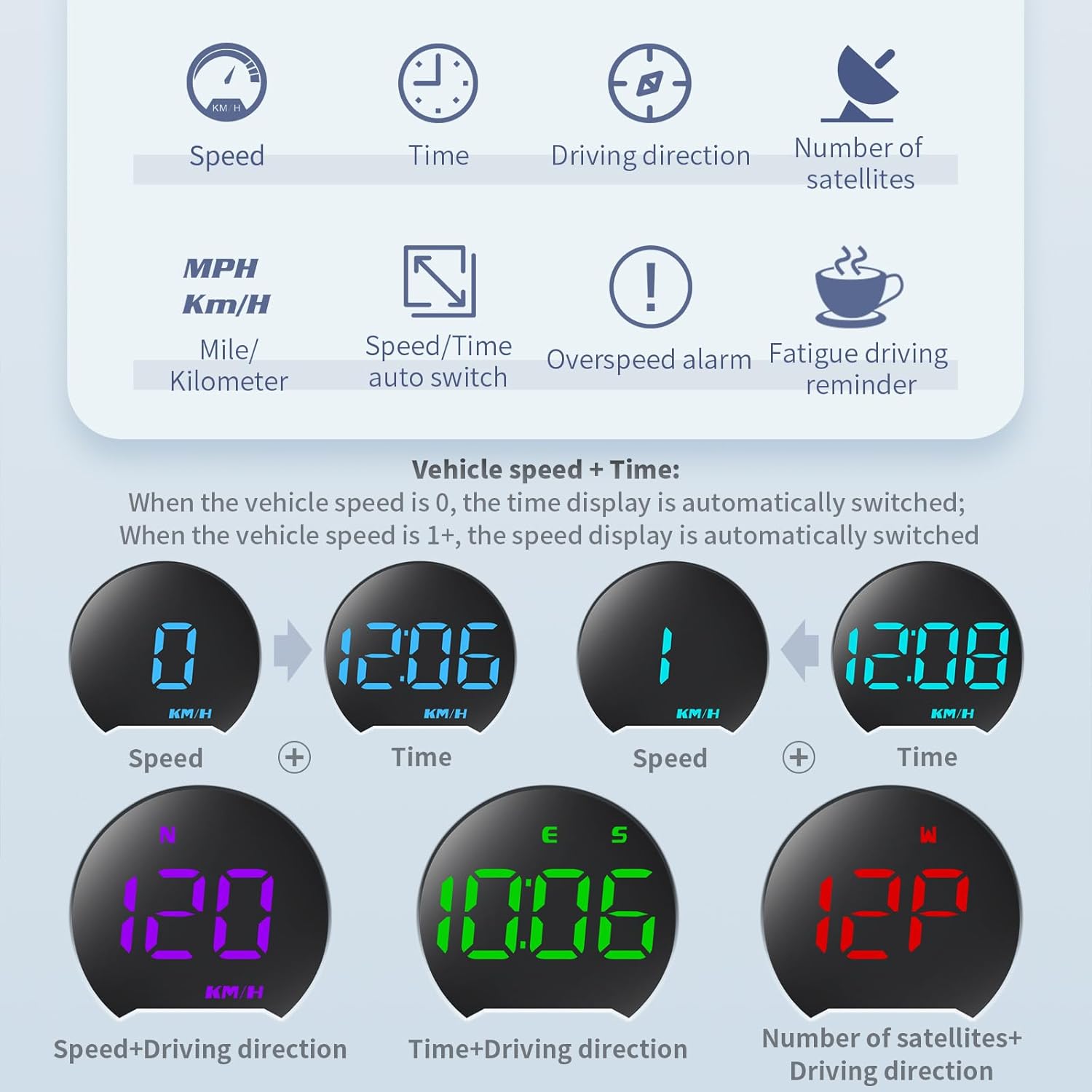
Image: A graphic illustrating the different display modes and functions of the G13 HUD. Icons represent Speed, Time, Driving Direction, and Number of Satellites. Examples of combined displays like Speed+Time and Speed+Driving Direction are also shown.
表示インターフェースの切り替え:
The G13 offers 7 different display interfaces. To switch between them, press the dial button located on the top of the unit vertically. Each press will cycle through the available display modes.
自動明るさ調整:
The built-in photosensitive element automatically detects ambient light and adjusts the display brightness accordingly. This ensures the display is visible during the day and soft/non-glaring at night.

Image: Two panels demonstrating the automatic photosensitive adjustment feature. The left panel shows the HUD in a bright daytime setting, while the right panel shows it in a darker nighttime setting, with adjusted display brightness.
アラーム機能:
The G13 includes two important alarm functions for enhanced safety:
- 速度超過アラーム: Alerts you when your vehicle exceeds a preset speed limit. This limit can be adjusted in the settings.
- 疲労運転の注意: Provides a reminder after 8 hours of continuous driving to encourage breaks.
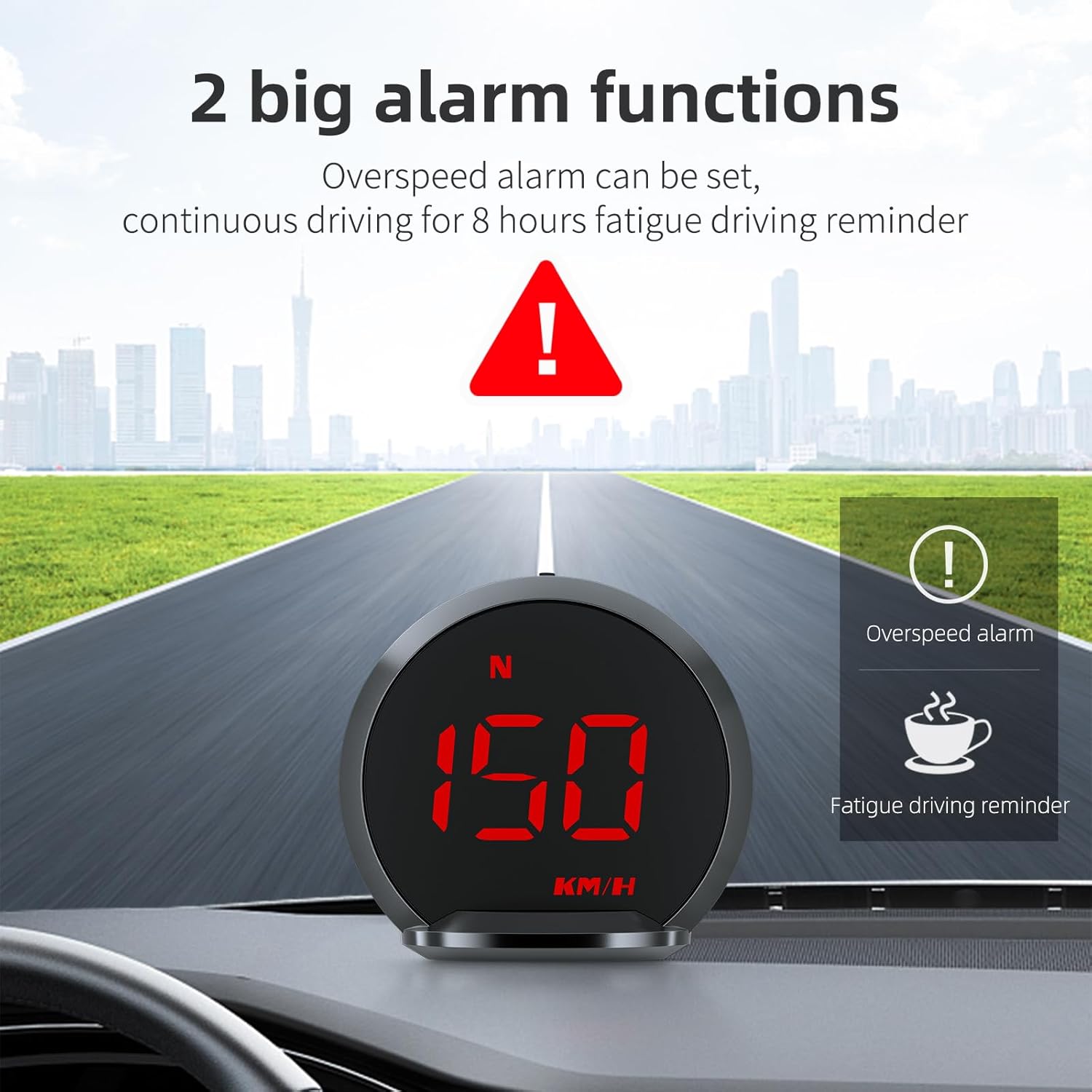
Image: A visual representation of the two main alarm functions: an overspeed alarm (indicated by an exclamation mark in a triangle) and a fatigue driving reminder (indicated by a steaming coffee cup icon). The HUD displays "150 KM/H" in red, suggesting an overspeed condition.
色のカスタマイズ:
The display offers 6 different color themes that can be switched to your preference. Use the dial button to navigate through color options in the settings menu.

Image: A series of small HUD displays showcasing the six different color themes available: Yellow-green, Light blue, Cyan, Blue, Red, and Purple. The main image shows the HUD displaying "16 KM/H" in green.
トラブルシューティング
If you encounter issues with your KAOLALI G13 HUD, please refer to the following common solutions:
| 問題 | 考えられる原因 | 解決 |
|---|---|---|
| ディスプレイが表示されない/デバイスの電源が入らない | No power supply or faulty USB cable/port. | Ensure the USB cable is securely connected to both the HUD and a working USB power source in your vehicle. Try a different USB port or cable. |
| 不正確な速読 | GPS signal interference or initial calibration. Note: The HUD's displayed speed may be slightly higher than actual speed for safety. | デバイスにクリアな view of the sky for optimal GPS signal reception. Drive for a few minutes to allow the GPS to stabilize. If the discrepancy is significant, you may be able to adjust the speed calibration in the device settings (refer to the detailed manual for specific steps). |
| ディスプレイが暗すぎる、または明るすぎる | 自動輝度センサーが妨害されているか、故障しています。 | Ensure the photosensitive element (located on the top of the unit, as shown in the diagram) is not covered. Clean the sensor if necessary. |
| No GPS signal/Satellites not found | Device is indoors, in a tunnel, or obstructed view 空の。 | 車を、障害物のない開けた場所に移動させてください。 view of the sky. Wait a few minutes for the device to acquire GPS satellites. |
メンテナンス
To ensure the longevity and optimal performance of your KAOLALI G13 HUD, follow these maintenance guidelines:
- クリーニング: Use a soft, dry cloth to clean the display screen and the device body. Avoid using abrasive cleaners, solvents, or spray cleaners directly on the unit.
- ストレージ: 長期間使用しない場合は、直射日光や極端な温度を避け、涼しく乾燥した場所に保管してください。
- 温度: Avoid exposing the device to extreme hot or cold temperatures, as this can affect its electronic components and battery life (if applicable).
- 取り扱い: デバイスは丁寧に取り扱ってください。落としたり、強い衝撃を与えたりしないでください。
仕様
| 特徴 | 詳細 |
|---|---|
| ブランド | カオラリ |
| モデル | G13 |
| 画面サイズ | 2.2インチ |
| 表示タイプ | LCD, Full HD |
| 材料 | ポリカーボネート(PC) |
| 商品の寸法 (長さ x 幅 x 高さ) | 6.6 x 6 x 2.4 センチメートル |
| 電源 | USB(プラグアンドプレイ) |
| 機能 | Speed, Clock, Satellites Number, Driving Distance, Driving Time, Driving Direction, Overspeed Alarm, Fatigue Driving Reminder |
| 明るさ調整 | Automatic (Photosensitive Sensor) |
| インストール | Dashboard (Anti-slip mat) or Windshield (Suction cup mount) |

Image: A technical diagram of the G13 HUD, showing its dimensions (60mm height, 66mm width, 24mm depth) and labeling key components such as the dial button, compass display, LED display, photosensitive element, bracket interface, and Micro USB interface.
保証とサポート
Specific warranty information for the KAOLALI G13 GPS HUD Speedometer is not provided in this manual. Please refer to the product packaging or the retailer's web保証範囲および条件の詳細については、サイトをご覧ください。
For technical support or further assistance, please contact KAOLALI customer service through the contact information provided on the product packaging or the official KAOLALI webサイト。
Ask a question about this manual
Ask about setup, troubleshooting, compatibility, parts, safety, or missing instructions. Manuals+ will review the question and use this page’s manual context to help answer it.