
製品終了view
This manual provides essential information for the installation, use, and maintenance of the ONE Pre-Cut 475 mm (~19 INCH) RoHS Steel Slotted 35 x 15 mm DIN Rail.
The DIN rail is a standardized metal rail type widely used for mounting circuit breakers and industrial control equipment inside equipment racks. These products are manufactured according to international standards, ensuring compatibility and ease of substitution with other manufacturers' DIN rails.
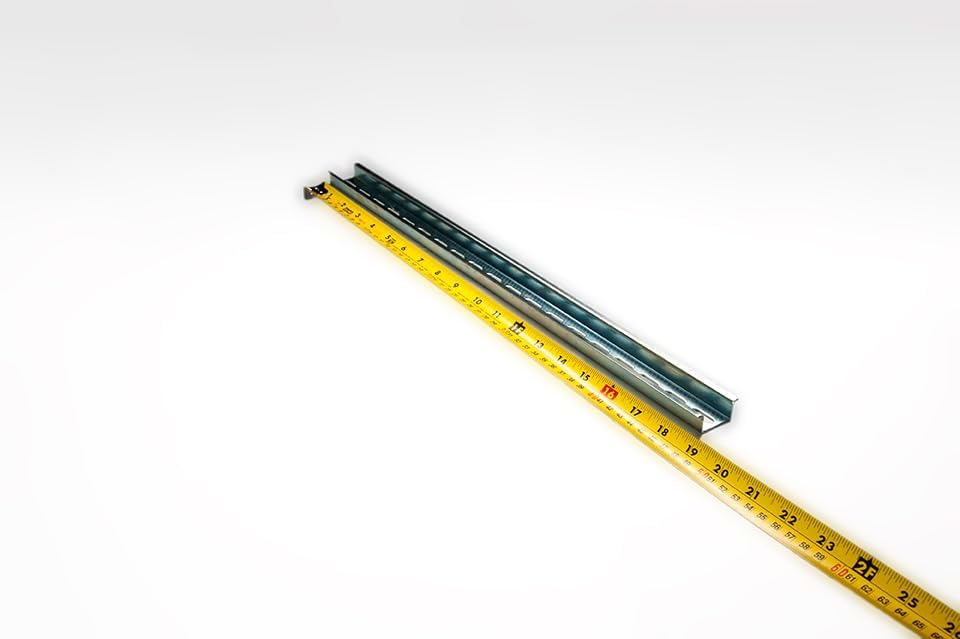
Image: A single piece of the ONE Pre-Cut 475 mm DIN Rail, showcasing its slotted design and metallic finish.
主な特徴
- 寸法: 475 mm (~19 INCH / 18.7") length, 35 mm width, 15 mm height.
- 材料: 1.5 mm thick steel with RoHS compliant trivalent chrome plating.
- Slotted Design: Slots are 6.2 x 18 mm on 25 mm centers.
- 精密カット: Machine cut, square, and burr-free. Cuts are made in fixed locations between slots to ensure whole slots and a repeating hole pattern.

Image: The DIN rail measured with a tape measure, indicating its approximate 19-inch length.

Image: A technical diagram illustrating the precise dimensions of the DIN rail's slots and overall profile, including 6.2 x 18 mm slots on 25 mm centers, and 35 x 15 mm profile 寸法。
セットアップとインストール
The DIN rail is designed for easy installation within electrical enclosures, control panels, and other industrial applications. It serves as a mounting platform for various electrical components.
必要なツール:
- ドライバー(取り付けネジに適したもの)
- 巻尺または定規
- Pencil or marker for marking
- Drill (if mounting surface requires pilot holes)
インストール手順:
- 取り付け面の準備: Identify the desired location for the DIN rail within your enclosure or panel. Ensure the surface is clean, flat, and capable of supporting the rail and mounted components.
- 取り付けポイントをマークする: Align the DIN rail with the intended mounting position. Use a pencil or marker to mark the locations of the slotted holes on the mounting surface. The slots are designed to accommodate various screw sizes and allow for minor adjustments.
- 下穴を開ける(必要な場合) If mounting to a material that requires pilot holes, drill them at the marked locations. Ensure the drill bit size is appropriate for your mounting screws.
- Secure the DIN Rail: Place the DIN rail back onto the marked or drilled mounting points. Insert appropriate screws through the slots and fasten the rail securely to the surface. Do not overtighten, but ensure the rail is firmly fixed and does not wobble.
- マウントコンポーネント: Once the DIN rail is installed, electrical components (e.g., terminal blocks, circuit breakers, relays) designed for DIN rail mounting can be snapped or slid onto the rail.
運営原則
The DIN rail itself is a passive mounting component and does not have active operating principles. Its function is to provide a standardized, secure, and organized method for mounting electrical and electronic components within an enclosure.
Components mounted on the DIN rail typically feature a spring-loaded or clip-on mechanism that allows them to be easily attached and detached without the need for additional tools in many cases. This facilitates quick installation, modification, and maintenance of control systems.
メンテナンス
The ONE Pre-Cut DIN Rail requires minimal maintenance due to its robust steel construction and trivalent chrome plating, which provides corrosion resistance.
General Maintenance Guidelines:
- クリーニング: Periodically inspect the DIN rail for dust, dirt, or debris accumulation. Clean with a dry, lint-free cloth. For stubborn grime, a slightly damp cloth with mild detergent can be used, followed by immediate drying. Avoid abrasive cleaners or solvents that could damage the plating.
- 検査: Regularly check the mounting screws for tightness. Vibrations in industrial environments can sometimes loosen fasteners. Ensure all mounted components are securely seated on the rail.
- 腐食チェック: While plated for corrosion resistance, inspect the rail in humid or corrosive environments for any signs of rust or degradation. Address any issues promptly to prevent further damage.
トラブルシューティング
As a passive mechanical component, the DIN rail itself rarely experiences "malfunctions." Most issues relate to installation or compatibility.
一般的な問題と解決策:
| 問題 | 考えられる原因 | 解決 |
|---|---|---|
| DIN rail is loose after installation. | Screws are not tightened sufficiently, or mounting surface is unstable. | Retighten all mounting screws. If the surface is unstable, reinforce it or use larger washers. |
| Components do not fit or snap onto the rail. | Component is not designed for 35x15 mm DIN rail, or there is debris in the rail channel. | Verify component compatibility with 35x15 mm DIN rail. Clean the rail channel to remove any obstructions. |
| Rail shows signs of corrosion. | Exposure to harsh chemicals or extreme humidity/moisture. | Clean affected areas and consider applying a protective coating if the environment cannot be controlled. Ensure proper ventilation in the enclosure. |
仕様
| モデル番号 | DR3515ST-19INCH |
| 部品番号 | DR3515ST-19INCH |
| 欧州連合 | 759626201734 |
| 長さ | 475 mm (~19 INCH / 18.7 inches) |
| 幅 | 35ミリメートル |
| 身長 | 15ミリメートル |
| 材料 | 1.5 mm thick Steel |
| メッキ | RoHS compliant trivalent chrome |
| スロット寸法 | 6.2×18ミリ |
| Slot Center Spacing | 25ミリメートル |
| アイテム重量 | 1.2ポンド |
| メーカー | Control Panel Supply |
保証とサポート
This product is manufactured by Control Panel Supply. For specific warranty information, please refer to the terms and conditions provided by the seller or manufacturer at the time of purchase. General return policy is 30 days.
For technical support, inquiries about different lengths (minimum order required), or discounts on larger quantities, please contact Control Panel Supply directly. Their contact information can typically be found on their official webサイトまたは製品を購入したプラットフォームを通じて行われます。
Original part number: Control Panel Supply DR3515ST-2 (Note: This product is a pre-cut version of the original part number).