
導入
This manual provides essential instructions for the safe and efficient operation, setup, maintenance, and troubleshooting of your GOYOJO FA2204 Analytical Balance. This precision instrument is designed for accurate weight measurements in laboratory environments, offering 0.0001g readability and a 220g capacity.
主な機能は次のとおりです。
- Precise 0.0001g readability for accurate measurements down to 0.1mg.
- 220g capacity to handle a wide range of analytical sampレ。
- Superb 0.0002g repeatability for consistent, reliable results.
- Excellent 0.0003g linearity ensuring precise readings across the full range.
- 80mm pan accommodates various containers and sampルサイズ。
- External calibration for routine validation with traceable weights.

図1: 前面 view of the GOYOJO FA2204 Analytical Balance. This image shows the balance with its protective draft shield, the weighing pan, and the digital display.
1. セットアップ
1.1 開梱と検査
Carefully remove the analytical balance from its packaging. Inspect all components for any signs of damage during transit. Ensure all accessories, such as the weighing pan, draft shield components, and power adapter, are present.
1.2 配置
Place the balance on a stable, level, and vibration-free surface. Avoid locations near air currents (e.g., air conditioning vents, open windows), direct sunlight, or heat sources, as these can affect measurement accuracy.
1.3 バランスの均衡
Use the adjustable feet at the base of the balance and the built-in spirit level (usually located near the display) to ensure the balance is perfectly level. Adjust the feet until the air bubble in the spirit level is centered.
1.4 組み立て
Assemble the draft shield components according to the diagrams provided with your balance. Carefully place the weighing pan onto the pan support. Ensure all parts are clean and properly seated.
1.5電源接続
Connect the power adapter to the balance's power input port and then plug it into a suitable electrical outlet. Allow the balance to warm up for at least 30 minutes after connecting power before performing any measurements or calibration. This ensures thermal stability for accurate readings.

図2:背面 view of the balance. This image highlights the power input port and a serial communication port, essential for connecting the device to power and potentially other instruments.
2. 操作手順
2.1 電源のオン/オフ
- 電源を入れるには: ON ボタンを押します。ディスプレイにセルフテストシーケンスが表示され、0.0000gで安定します。
- 電源を切るには: オフ ディスプレイが消えるまでボタンを押し続けます。
2.2 外部キャリブレーション
Regular external calibration is crucial for maintaining accuracy. Refer to your balance's specific calibration procedure, typically involving a certified external calibration weight.
- 天秤が水平であり、温まっていることを確認します。
- Clear the weighing pan.
- を押す カル button (or follow the menu prompts for calibration).
- The display will prompt you to place the specified calibration weight (e.g., 200g) on the pan.
- Carefully place the calibration weight on the center of the pan.
- Wait for the balance to stabilize and complete the calibration process.
- The display will indicate successful calibration, then prompt you to remove the weight.
- Remove the weight. The balance should return to 0.0000g.
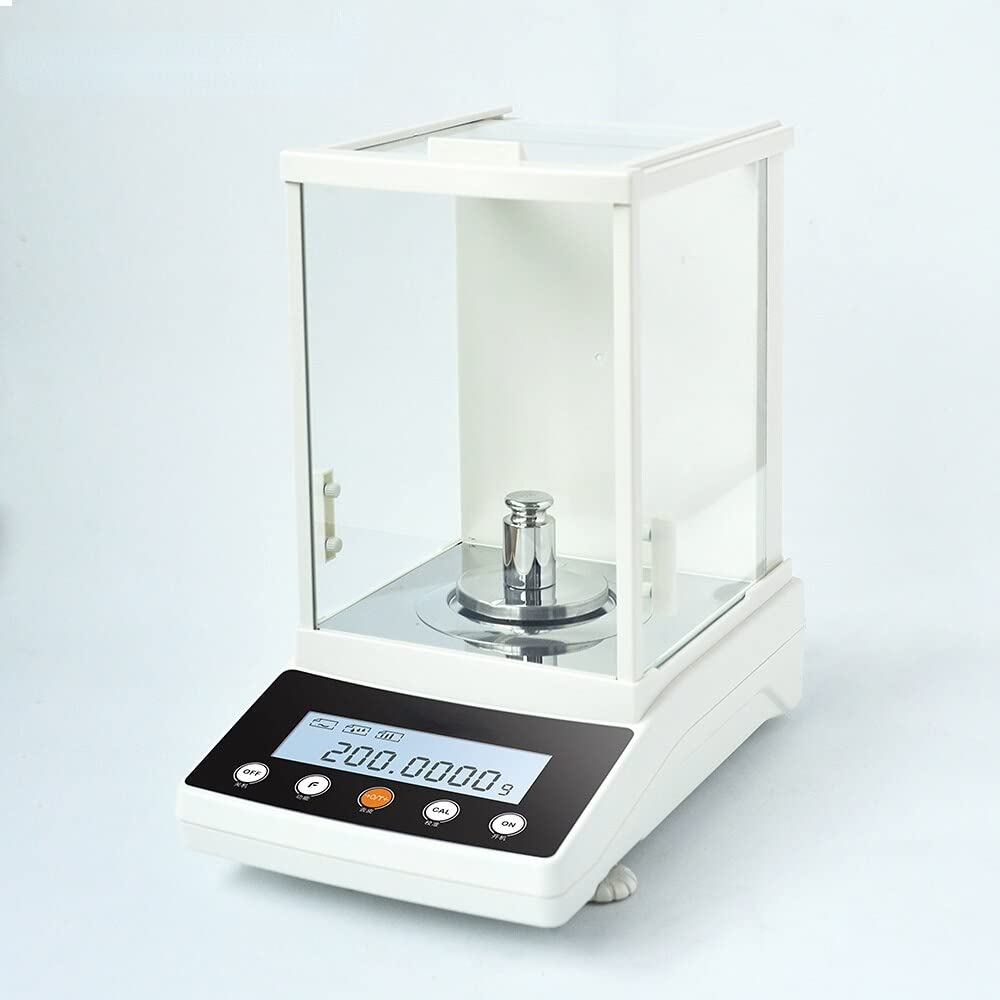
Figure 3: Balance during calibration. This image shows the analytical balance with a standard calibration weight placed on the weighing pan, illustrating the calibration process.
2.3 基本的な計量手順
- Ensure the balance is level, warmed up, and calibrated.
- を押す 風袋 button to zero the display if it's not already at 0.0000g.
- If using a container, place the empty container on the weighing pan. Wait for the reading to stabilize, then press the 風袋 button again to zero the display (this subtracts the container's weight).
- 慎重にsを配置しますample to be weighed onto the center of the weighing pan (or into the tared container).
- Wait for the reading to stabilize. The displayed value is the net weight of your sampル。
- Record the measurement.
- を削除しますample and container.
2.4ユニットの選択
Your balance may support multiple weighing units (e.g., grams, milligrams, carats). Consult your balance's specific instructions for changing units, typically done via a ユニット or モード ボタン。
3. メンテナンス
3.1 クリーニング
- 清掃する前に必ず天びんを電源から外してください。
- 柔らかく糸くずの出ない布を使用してください。ampened with a mild detergent solution or isopropyl alcohol to clean the exterior surfaces, weighing pan, and draft shield.
- 研磨剤入りの洗剤、溶剤、または刺激の強い化学薬品は使用しないでください。
- 天秤のハウジングや表示領域に液体が入らないようにしてください。
- The weighing pan and draft shield glass panels can often be removed for more thorough cleaning. Refer to your balance's specific instructions for removal and reassembly.
3.2 ストレージ
When not in use, keep the balance covered with a dust cover (if provided) to protect it from dust and debris. Store in a dry, temperature-controlled environment.
3.3 定期点検
Periodically check the balance's level and perform external calibration to ensure continued accuracy, especially if the balance has been moved or subjected to environmental changes.
4。 トラブルシューティング
| 問題 | 考えられる原因 | 解決 |
|---|---|---|
| Unstable readings / Drifting display |
|
|
| バランスが取れない |
|
|
| 不正確な測定値 |
|
|
これらの解決策を試しても問題が解決しない場合は、販売者または製造元に連絡してサポートを受けてください。
5. 仕様
| パラメータ | 価値 |
|---|---|
| モデル | FA2204 |
| 容量 | 220グラム |
| 読みやすさ | 0.0001g(0.1mg) |
| 再現性 | 0.0002グラム |
| 直線性 | 0.0003グラム |
| パンサイズ | 80mm |
| 校正タイプ | 外部の |
| メーカー | ごようじょ |
6. 保証とサポート
For detailed warranty information, please refer to the documentation provided with your purchase or contact the seller directly.
For technical support or service inquiries, please contact the GOYOJO customer support or the authorized reseller from whom you purchased the analytical balance.