
1. はじめに
This manual provides detailed instructions for the setup, operation, and maintenance of your Lemnoi S72 4G Cellular Outdoor Security Camera. This solar-powered camera offers 2K resolution, PTZ functionality, two-way audio, and motion detection, operating independently via a 4G cellular network without the need for Wi-Fi. Its IP66 waterproof design ensures reliable performance in various outdoor environments.
2. パッケージ内容
以下にリストされているすべてのアイテムがパッケージに含まれていることを確認してください。
- Lemnoi S72 4G Cellular Outdoor Security Camera
- 取り付けブラケット付きソーラーパネル
- USB充電ケーブル
- 取り付けネジと壁プラグ
- Pre-installed SIM Card (with initial data)
- 32GB マイクロ SD カード
- ユーザーマニュアル

3.製品オーバーview
The Lemnoi S72 camera is designed for robust outdoor surveillance, offering advanced features for remote monitoring.
3.1 主な特徴
- 4Gセルラー接続: Operates on a 4G network, eliminating the need for Wi-Fi.
- 太陽光発電: Integrated 6W solar panel and 10400mAh battery for continuous operation.
- 2K ウルトラ HD 解像度: 鮮明なビデオ映像を提供tage.
- カラーナイトビジョン: Offers clear, full-color night vision up to 20 meters.
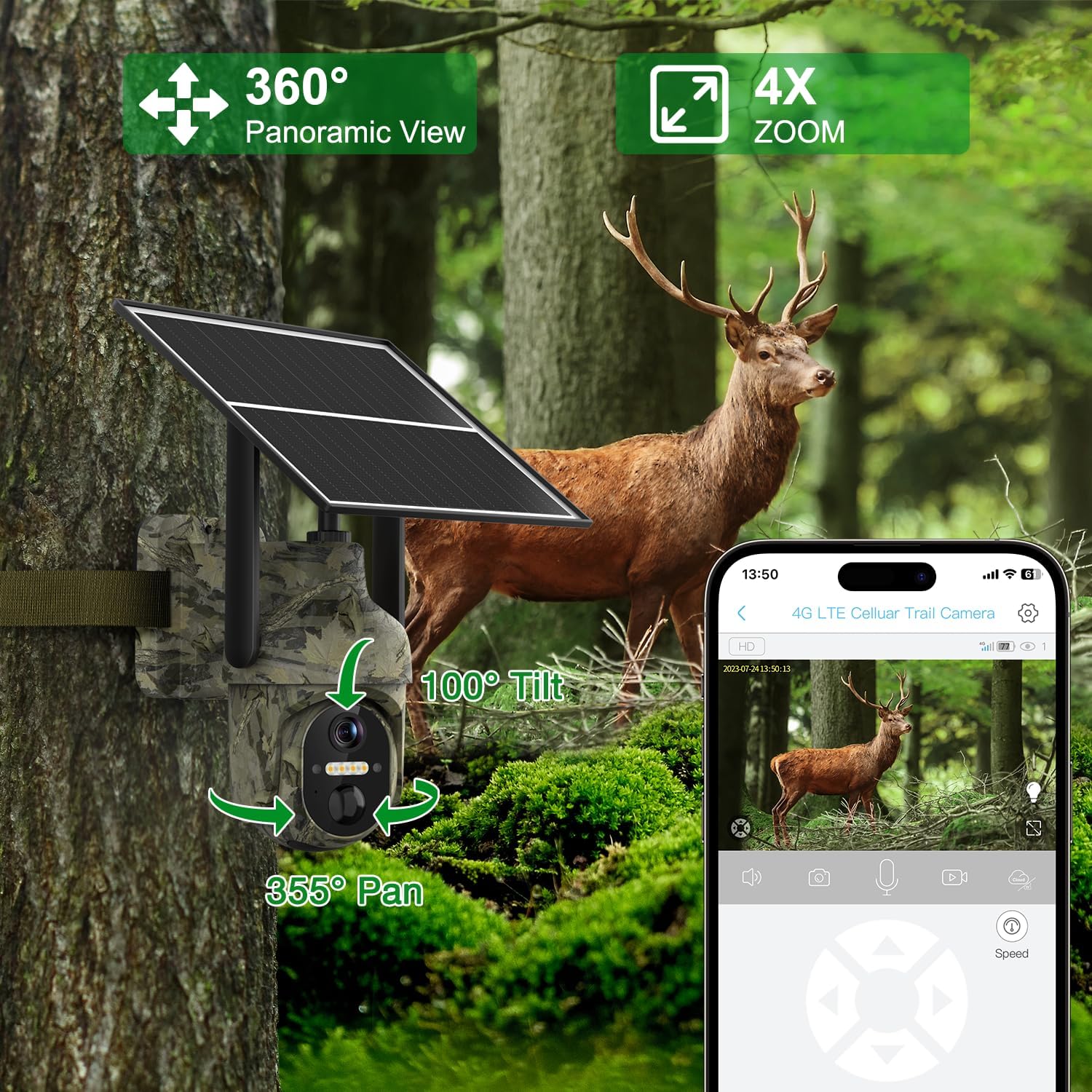
- PTZ機能: 355°の水平パンと100°の垂直傾斜で広範囲をカバーします。
- スマートモーション検出: AI algorithms distinguish between people, animals, and vehicles, sending instant alerts.
- 双方向オーディオ: Built-in speaker and microphone for remote communication.
- デュアルストレージ: Micro SD カード (最大 128 GB) とクラウド ストレージをサポートします。
- IP66防水: Durable design for all-weather outdoor use.

4. セットアップ
4.1 カメラの初期準備
- SIMカードの挿入: The camera comes with a pre-installed SIM card. If you wish to use your own local carrier's SIM card, carefully remove the pre-installed card and insert your activated SIM card. Ensure the PIN code on your SIM card is disabled before insertion.
- マイクロSDカードの挿入: The camera includes a 32GB Micro SD card. Insert it into the designated slot. The camera supports up to 128GB.
- 電源オン: Locate the power switch, usually near the SIM/SD card slots, and turn the camera ON. Wait for the indicator light to turn blue, signifying it's ready for connection.

4.2 アプリのインストールと接続
Download the UBox app from your smartphone's app store (iOS or Android). Follow these steps to connect your camera:
- Install the UBox app on your smartphone.
- アプリを初めて開くときは、必要なすべての権限を許可します。
- アカウントを登録してログインします。
- Tap "Add a Device" and then "Setup 4G Device".
- Follow the on-screen prompts to scan the QR code located on your camera.
- 正常に追加されると、カメラがデバイス リストに表示されます。
4.3物理的な設置
Choose a suitable location for your camera and solar panel. Ensure the solar panel receives amp最適な充電のために直射日光を避けてください。
- カメラを取り付ける: 付属の取り付けブラケットとネジを使用して、カメラを壁やその他の安定した表面にしっかりと取り付けます。
- ソーラーパネルを取り付けます: Install the solar panel in a location that maximizes sun exposure. The long cable allows flexibility in placement relative to the camera.
- ソーラーパネルを接続する: Plug the solar panel's USB cable into the camera's charging port. Ensure the rubber stopper is properly sealed to maintain weatherproofing.

5. 操作
5.1 ライブ View PTZコントロール
Open the UBox app and select your camera from the device list to access the live feed. Use the on-screen controls to pan (355° horizontally) and tilt (100° vertically) the camera to adjust the viewing angle. You can also use the digital zoom feature.

5.2 動きの検出とアラート
The camera features advanced AI motion detection. When motion is detected, the camera will record footage and send instant alerts to your smartphone. You can customize alert settings, including specific time periods for receiving notifications.
- AIアルゴリズム: Distinguishes between people, animals, and vehicles to minimize false alarms.
- インスタントアラート: Receive real-time notifications on your mobile app.
- Custom Alert Time: Set specific schedules for motion detection and alerts.


5.3 双方向オーディオ
Utilize the two-way audio feature to communicate through the camera. Tap the microphone icon in the UBox app to speak, and listen through the camera's built-in speaker. This is useful for interacting with visitors or deterring unwanted guests.

5.4 ナイトビジョン
The camera automatically switches to night vision in low-light conditions. It supports both infrared (black and white) and color night vision (spotlight mode) for clear visibility up to 20 meters.
5.5 ストレージオプション
記録された footage は次の 2 つの方法で保存できます。
- マイクロSDカード: All recordings are saved locally on the inserted Micro SD card. You can playback recorded footage directly from the card.
- クラウドストレージ: The camera offers cloud storage for viewing stored videos and offline footage. A 30-day trial is typically included, with subscription options for extended usage.

6. メンテナンス
- クリーニング: カメラのレンズとソーラーパネルを定期的に柔らかくてきれいな布で拭いてください。amp 最適なパフォーマンスと充電効率を確保するための布です。
- バッテリーのケア: Ensure the solar panel is positioned to receive maximum sunlight daily to keep the internal battery charged. Avoid prolonged periods without sunlight to prevent battery depletion.
- ファームウェアの更新: Check the UBox app periodically for firmware updates to ensure your camera has the latest features and security enhancements.
7。 トラブルシューティング
If you encounter issues with your Lemnoi S72 camera, refer to the common questions and answers below:
- Q1: Can I use Wi-Fi without a data plan?
A1: No, this 3G/4G LTE surveillance camera is designed for off-grid and remote areas without Wi-Fi coverage. It functions anywhere with 3G/4G coverage using the included SIM card. - Q2: The 4G cellular phone surveillance camera SIM card is included in the package?
A2: Yes, the package comes with a SIM card that includes 300MB of initial traffic for free use. Additional usage requires a paid data plan. - Q3:できますか view the live stream via Wi-Fi or is a 4G cellular network required for live streaming?
A3: The 4G cellular security camera uses the inserted SIM card to connect to the 4G network. Other accessible configurations using the mobile phone can be obtained through the Ubox application using cellular 4G/5G or Wi-Fi. - Q4: The included SIM card does not work?
A4: First, insert the SIM card into the phone, disable the PIN code, and then insert it into the camera to check if it works properly. If it still doesn't work, try configuring the PIN code manually. - Q5: How do I know if I can use my SIM card?
A5: To ensure your own SIM card can be used normally, enter the PIN code as indicated when turning on the phone; otherwise, the SIM card may be blocked by the PIN code and cannot be used.

8. 仕様
| 特徴 | 詳細 |
|---|---|
| モデル | S72 |
| 接続技術 | 4Gセルラー |
| 電源 | Solar Powered (6W solar panel, 10400mAh battery) |
| ビデオキャプチャ解像度 | 2K Ultra HD (1080p effective) |
| View角度 | 130度 |
| PTZ機能 | 355°水平パン、100°垂直チルト |
| 暗視範囲 | 最大20メートル(カラーナイトビジョン) |
| モーション検出 | AI Humanoid, Animal, Vehicle Detection |
| オーディオ | 双方向オーディオ |
| ストレージ | Micro SD(最大128GB)、クラウドストレージ |
| 耐水性レベル | IP66防水 |
| 動作温度 | -30°C ~ 60°C |
| 材料 | プラスチック |
9. 保証とサポート
Your Lemnoi S72 4G Cellular Outdoor Security Camera is covered by a manufacturer's warranty. Please refer to the product packaging or contact Lemnoi customer support for specific warranty terms and conditions.
For technical assistance, troubleshooting, or any inquiries, please contact Lemnoi customer support through the contact information provided in your product packaging or on the official Lemnoi webサイト。