
クトロニクス CTIPC-640C-Z16
Ctronics 4K 8MP 16倍光学ズーム PTZ WiFi 屋外セキュリティカメラ ユーザーマニュアル
モデル: CTIPC-640C-Z16
導入
This manual provides comprehensive instructions for the installation, operation, and maintenance of your Ctronics 4K 8MP 16X Optical Zoom PTZ WiFi Outdoor Security Camera. This advanced camera offers superior surveillance capabilities with its high-resolution imaging, extensive zoom, and intelligent detection features. Please read this manual thoroughly before using the product to ensure optimal performance and safety.
パッケージ内容
以下にリストされているすべてのアイテムがパッケージに含まれていることを確認してください。
- 1 x Ctronics 4K 16X Camera
- 1 x 3m Power Cable (with plug)
- 1 xネットワークケーブル
- 1 x Accessories Kit (screws, anchors, etc.)
- ユーザーマニュアル x 1
製品終了view および主な機能
The Ctronics CTIPC-640C-Z16 camera is designed for robust outdoor surveillance, offering a range of advanced features:
4K 8MP Ultra HD & 16X Optical Zoom
Experience crystal-clear imaging with 4K Ultra HD resolution. The 16X optical zoom allows you to magnify distant objects without compromising image quality, enabling clear identification of faces or license plates.

Image: Ctronics 4K 8MP 16X Optical Zoom PTZ WiFi Outdoor Security Camera, showing the camera unit and a smartphone screen displaying 4K 8MP resolution and 16x zoom capability.
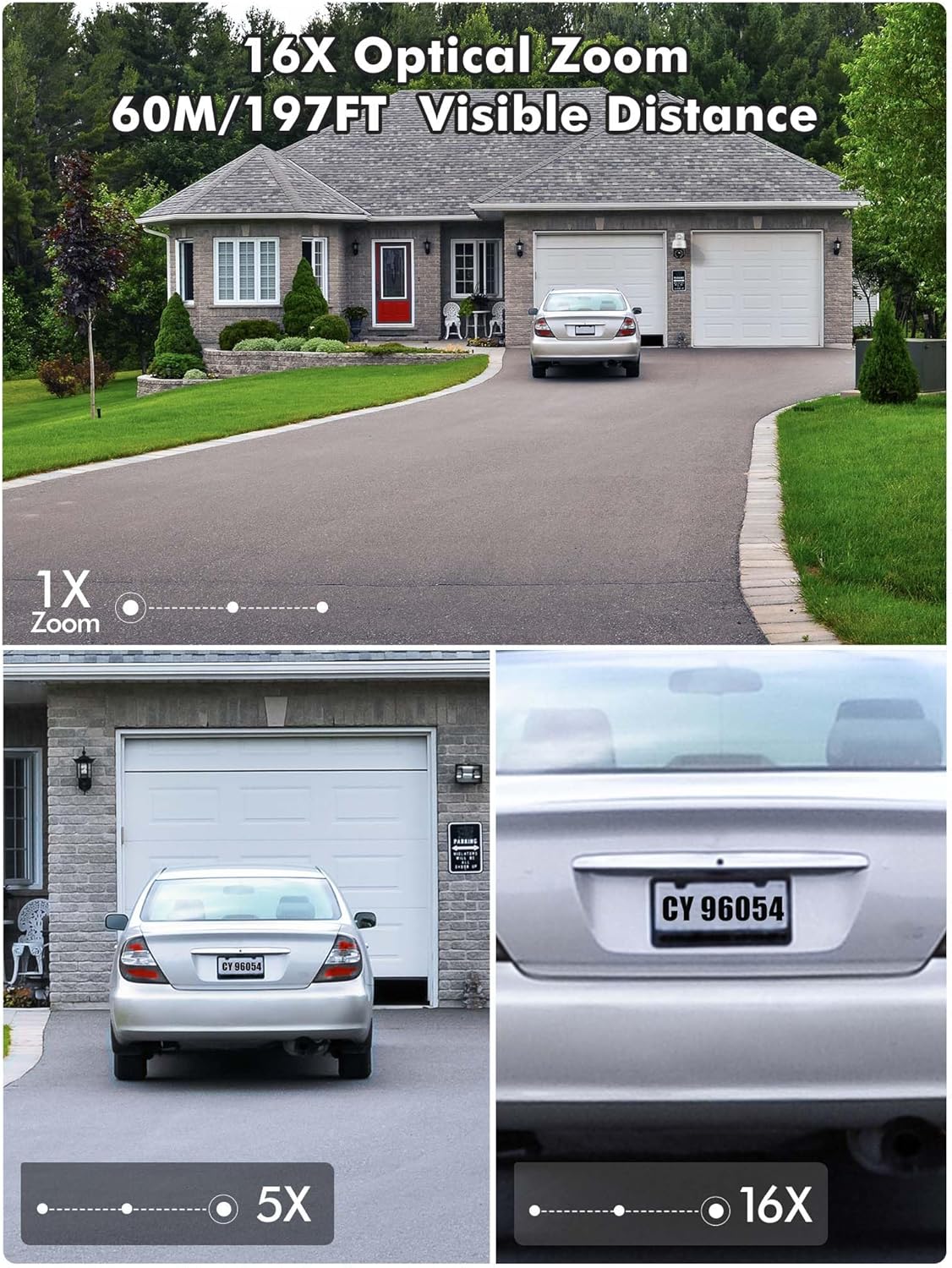
Image: Demonstration of 16X optical zoom, showing a car's license plate clearly visible at 16x magnification compared to 1x and 5x zoom levels. The visible distance is up to 60 meters (197 feet).

Image: Intelligent Optical Zoom feature, demonstrating auto-zoom within 1 second and auto-tracking. A person is shown being zoomed in on as they move, with magnification automatically adjusted based on distance.
高度なナイトビジョン
Equipped with a starlight lens and Sony sensors, the camera provides clear night vision up to 60m (infrared) and color night vision up to 45m, ensuring visibility even in complete darkness.
Video: Product presentation highlighting features like full metal housing, 4K UHD video, human/vehicle/pet detection, 360-degree field of view, cruise control, auto-tracking, 60m infrared night vision, 45m color night vision, 2.4GHz & 5GHz WiFi connection, and red/blue light acoustic alarms. Please note that while the video mentions 30X optical zoom, this product features 16X optical zoom. This video is titled "640C-Z16 Product Presentation".
355° Pan & 90° Tilt (PTZ) with Auto Cruise/Tracking
Eliminate blind spots with a full 355° horizontal and 90° vertical coverage. The camera supports automatic cruise control with up to 30 preset points, and automatically tracks and zooms in on moving objects for ultimate convenience.

Image: Automatic Zoom Cruise feature, illustrating the camera's 355° pan and 90° tilt capabilities with multiple preset points around a house.
Video: Demonstration of setting up automatic tracking (Suivi automatique) by saving a preset position. The video shows a person walking and the camera automatically tracking their movement. This video is titled "640C-Z16 Product Presentation".
Intelligent Detection & Two-Way Audio
The camera can distinguish between people, vehicles, and pets, significantly reducing false alarms. With built-in two-way audio, you can listen and speak in real-time to deter intruders or communicate with visitors.
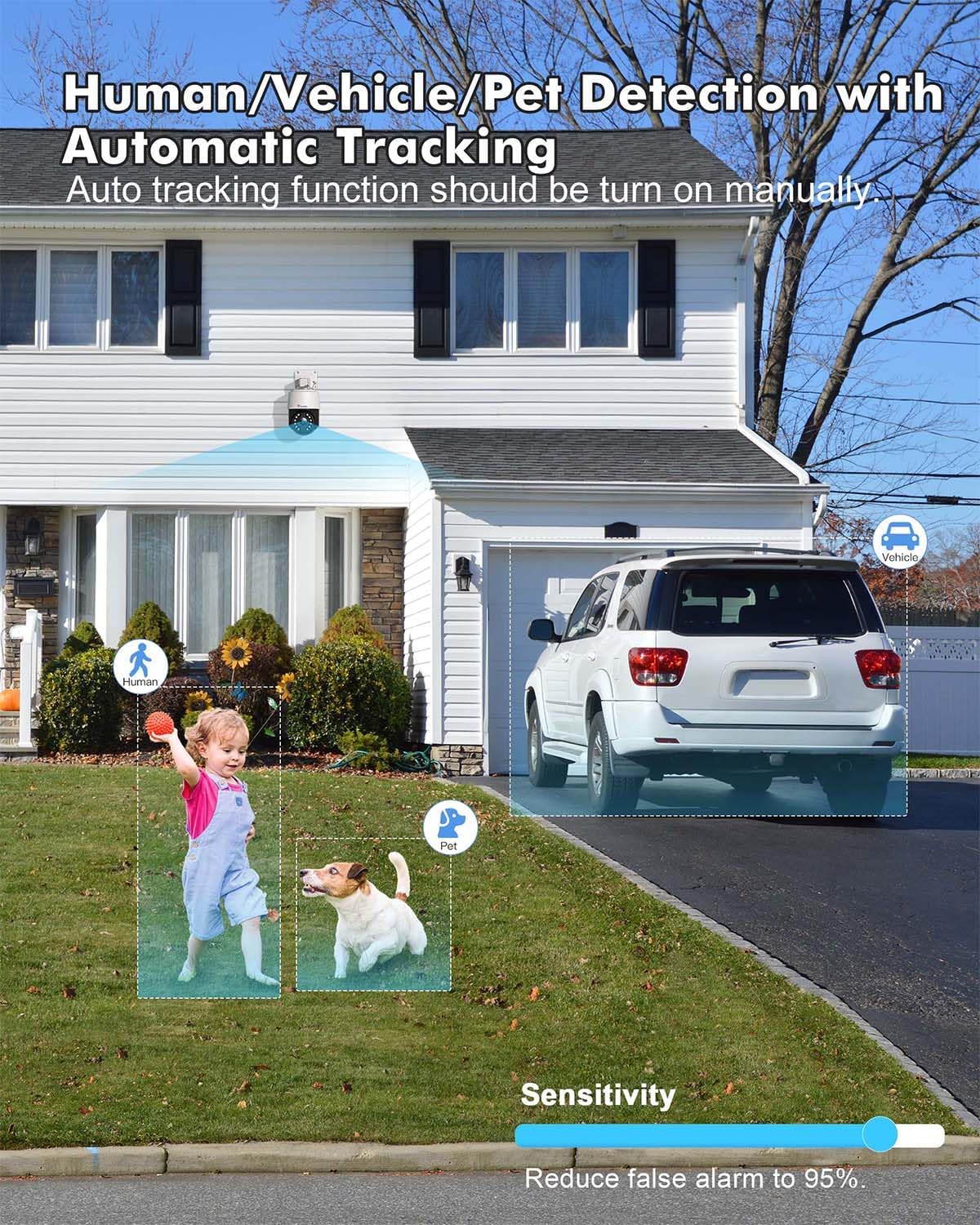
Image: Human/Vehicle/Pet Detection feature, showing the camera identifying a child, a dog, and a vehicle with bounding boxes, and a sensitivity slider to reduce false alarms.

Image: Instant Alarm and 24-Hour Monitoring, showing a person running past the camera at night, triggering sound and light alarms, and a notification on a smartphone.
Multiple Recording Options & IP66 Weather Resistance
Supports 24/7 continuous recording, or scheduled recording, with videos automatically saved to the cloud or a TF card (up to 256GB, not included). Constructed from metal, the camera boasts IP66 weather resistance for durability in various outdoor conditions.

Image: Various storage options available for the camera, including up to 256GB TF card, NVR/NAS 24/7 recording, FTP, and Ctronics Cloud storage.
Dual-Band WiFi & Broad Compatibility
Connects via 2.4GHz for longer transmission range or 5GHz for stronger network connection. Compatible with iOS, Android, Windows, and Mac OS via the Ctronics Pro app and HIP2P Client.

Image: Dual-band WiFi connectivity, showing the camera installed on a house with circles indicating 5GHz for stronger connection and 2.4GHz for longer transmission range.

Image: Broad compatibility of the camera with various operating systems and applications, including iOS, Android, Windows, Mac OS, Ctronics Pro, and HIP2P Client, showing a laptop, tablet, and smartphone displaying camera feeds.
セットアップガイド
1. 初期接続
For the initial setup, it is recommended to connect the camera to your router via an Ethernet cable for a stable connection. Once configured, you can switch to Wi-Fi.
- 付属の電源アダプターを使用してカメラを電源コンセントに接続します。
- Connect one end of the network cable to the camera's Ethernet port and the other end to your router.
- Wait for the camera to power on and initialize (indicated by a status light, refer to the camera's LED indicator guide for details).
2. アプリのインストールとペアリング
Download the Ctronics Pro app on your smartphone or tablet. The app is available for both iOS and Android devices.
- 検索する "Ctronics Pro" in your device's app store (Apple App Store for iOS, Google Play Store for Android).
- アプリをインストールし、アカウントをお持ちでない場合は作成してください。
- Open the app and follow the on-screen instructions to add your camera. This typically involves scanning a QR code on the camera or manually entering its UID.
- Once the camera is detected, follow the prompts to connect it to your Wi-Fi network (2.4GHz or 5GHz).
3.カメラの取り付け
The camera supports wall or ceiling mounting. Choose a location that provides optimal viewing coverage and is within range of your Wi-Fi signal and power source.
- Use the provided mounting template (if included) or mark the drill holes on the desired surface.
- 穴を開けて壁アンカーを挿入します。
- 付属のネジを使用して取り付けブラケットを壁/天井に固定します。
- カメラを取り付けブラケットに取り付け、しっかりと固定されていることを確認します。
- 目的の領域をカバーするためにカメラの角度を調整します。
操作手順
1.ライブ View と再生
ライブビデオフィードにアクセスしてview 記録されたfootage through the Ctronics Pro app or desktop client.
- ライブ View: アプリを開き、デバイスリストからカメラを選択して view リアルタイムフィード。
- 再生: Navigate to the playback section in the app to access recorded videos from your TF card or cloud storage.
2. PTZ Control and Optical Zoom
Control the camera's pan, tilt, and zoom functions directly from the app.
- Use the directional controls in the app to pan (horizontal movement) and tilt (vertical movement) the camera.
- Use the zoom in/out buttons to activate the 16X optical zoom.
3. Auto Cruise and Preset Points
Set up automated patrol routes for comprehensive area coverage.
- In the app, move the camera to a desired position and save it as a preset point. You can set up to 30 preset points.
- Configure an auto-cruise route by selecting the desired preset points and the order in which the camera should visit them.
- Activate the auto-cruise function to have the camera automatically patrol the defined route.
4. Intelligent Detection Configuration
Customize detection settings to receive accurate alerts.
- Access the detection settings in the app.
- Enable human, vehicle, or pet detection as needed.
- 誤報を最小限に抑えるために感度レベルを調整します。
- Enable automatic tracking to have the camera follow detected objects.
5. 双方向オーディオ
双方向オーディオ機能を使用してカメラを通じて通信します。
- ライブ中 view、マイクのアイコンをタップして、カメラのスピーカーから話します。
- スピーカーアイコンをタップすると、カメラのマイクからの音声を聞くことができます。
6.記録設定
Manage how your footage is recorded and stored.
- Configure 24/7 continuous recording or set specific recording schedules.
- Choose your preferred storage method: TF card, NVR/NAS, or cloud storage.
- Ensure your TF card is properly inserted and formatted if using local storage.
メンテナンス
1. 清掃
鮮明な画質と適切な動作を確保するために、カメラのレンズとハウジングを定期的に清掃してください。
- 柔らかくてamp カメラの外側を拭くための布。
- レンズには、傷を防ぐために専用のレンズクリーニングクロスと洗浄液を使用してください。
- 刺激の強い化学物質や研磨材を使用しないでください。
2. ファームウェアのアップデート
Keep your camera's firmware updated to benefit from the latest features, security enhancements, and bug fixes.
- Check for firmware updates periodically through the Ctronics Pro app.
- Follow the app's instructions carefully during the update process. Ensure a stable power supply and internet connection during updates.
3. Weather Resistance Care
While the camera is IP66 weather-resistant, proper installation and occasional checks can prolong its lifespan.
- Ensure all cables are properly sealed and protected from moisture.
- 特に悪天候の後には、定期的に取り付けの安定性を確認してください。
トラブルシューティング
If you encounter issues with your Ctronics camera, refer to the following common troubleshooting steps:
- 電源なし: 電源アダプターがカメラと電源コンセントの両方にしっかりと接続されていることを確認します。
- ネットワーク接続なし:
- Wi-Fi パスワードが正しいことを確認してください。
- カメラが Wi-Fi ルーターの範囲内にあることを確認してください。
- ルーターとカメラを再起動してみてください。
- For initial setup, try connecting via Ethernet cable first.
- 画質が悪い:
- カメラのレンズを掃除してください。
- ネットワーク速度を確認してください。接続速度が遅いとストリーミング品質に影響する可能性があります。
- Ensure the camera's resolution setting in the app is set to 4K/HD.
- 誤報:
- Adjust the detection sensitivity in the app.
- Ensure human/vehicle/pet detection is enabled if you wish to filter out other movements.
- 録音の問題:
- TF カードが正しく挿入されており、容量がいっぱいでないかどうかを確認します。
- Format the TF card if necessary (this will erase all data).
- Verify your cloud storage subscription status if using cloud recording.
さらにサポートが必要な場合は、Ctronics カスタマー サポートにお問い合わせください。
仕様
| 特徴 | 詳細 |
|---|---|
| ビデオ録画解像度 | 4K |
| 色 | 白 |
| アイテム数 | 1 |
| 無線通信技術 | Wi-Fi |
| View角度 | 355度(パン)、90度(チルト) |
| 暗視範囲 | 60 Meters (IR), 45 Meters (Color) |
| 材料 | 金属、アクリロニトリルブタジエンスチレン(ABS) |
| 巻tage | 12ボルト |
| 力 | 24ワット |
| 商品の寸法 (長さ x 幅 x 高さ) | 17 x 15 x 15 センチメートル |
| 耐水性レベル | 防水(IP66) |
| 光学ズーム | 16X Multiplier |
| 特集 | Auto Cruise/Tracking/Zoom, Night Vision, 4K Ultra HD, Human, Vehicle, Animal Detection |
| モデル | CTIPC-640C-Z16 |
| 実効静止画解像度 | 8メガピクセル |
| 推奨用途 | 屋外セキュリティ |
| 接続技術 | Wi-Fi |
| 屋内/屋外での使用 | 屋外 |
| 対応デバイス | スマートフォン |
| 電源 | コード式電気 |
| 取り付けタイプ | ウォールマウント、天井マウント |
保証とサポート
Ctronicsは 3年間の保証 on this product. For any technical assistance, inquiries, or warranty claims, please contact Ctronics customer support. Many users have reported positive experiences with their support team, specifically mentioning helpful representatives like Eric and Candy.
You can typically find contact information on the official Ctronics webサイトまたは Ctronics Pro アプリケーション内で行います。
Ask a question about this manual
Ask about setup, troubleshooting, compatibility, parts, safety, or missing instructions. Manuals+ will review the question and use this page’s manual context to help answer it.