
導入
This manual provides comprehensive instructions for the setup, operation, maintenance, and troubleshooting of your VisionTechShop TVP-12B Price Computing Scale and LP-50 Thermal Label Printer. Please read this manual thoroughly before operating the device to ensure proper function and longevity.

Figure 1: VisionTechShop TVP-12B Price Computing Scale with LP-50 Thermal Label Printer and labels.
設定
1. 開梱
Carefully unpack all components from the box. Ensure you have the TVP scale, DLP-50 printer, and the case of LST8060 labels (12 rolls).
Video 1: Unpacking the TVP Scale and DLP-50 Printer. This video demonstrates how to safely unpack your new scale and printer, identifying all included components.
2. 電源接続
- Connect the 12V/500mA adapter to the TVP scale. The port is located on the underside of the scale.
- Connect the 12V/2.5A adapter to the DLP-50 printer.
- Plug both adapters into a suitable power outlet. A red light will illuminate on the front of the scale, indicating it is receiving power. A green light will appear on the printer.
3.インターフェースケーブル接続
Connect the interface cable between the DLP-50 printer and the TVP scale. The connection port for the printer is labeled 'LABEL PRINTER' and for the scale, it is on the underside.
4. 初回電源投入
Turn on the scale using the switch located on the right front side of the bottom of the scale. The display will cycle through numbers and then settle at 0.00.
操作手順
1. Changing Measurement Units (Lb/Oz/Kg)
測定単位を変更するには、 ユニット key. The display will cycle through kilograms (kg), pounds (lb), and ounces (oz). Select your desired unit.
Video 2: How to Change Measurement Units and Use the Give Change Function. This video demonstrates how to switch between different weight units and utilize the change calculation feature.
2. Using the Accumulation Function
The accumulation function allows you to sum the total price of multiple items. Follow these steps:
- Power on the TVP scale while holding down the 風袋 key. Continue holding until 'Pn' appears on the screen.
- コードを入力してください 0000 を押して 風袋 入力します。
- プレス 風袋 また。
- 使用 M+ or プル buttons to navigate until the weight display reads 'F11'.
- プレス 風袋 to enter the setting. The 'Unit Price' display should read 'nodE'.
- プレス プル until the 'Unit Price' reads 'EP50'.
- プレス M+ to go back, then press 風袋 保存します。
- を押す ゼロ key repeatedly to exit to the main menu.
- Place the first item on the scale and enter its unit price.
- プレス M+ to accumulate the price.
- Remove the first item, place the second item, enter its unit price, and press M+ again. Repeat for all items.
- プレス CH に view the accumulated total price.
Video 3: How to Use the Accumulation Function. This video guides you through the steps to enable and use the accumulation feature for multiple item transactions.
3. Creating PLU Profiles
To save frequently used prices as PLU (Price Look-Up) profiles:
- テンキーを使用して希望の単価を入力します。
- 保持する プル key for 3 seconds until 'SAVE PoS' appears on the screen.
- Enter a PLU number (0-9) where you want to save the price. For example, press '1' for PLU 1. The screen will show 'SAVEd'.
- To recall a saved PLU, place an item on the scale, press プル, and then the corresponding PLU number.
- プレス M+ to print a label with the PLU information.
Video 4: Creating PLU Profiles. This video demonstrates how to save and recall Price Look-Up profiles for quick access to common item prices.
4. Turning On the Backlight
To activate the display backlight:
- Power on the TVP scale.
- を押したまま '.' (decimal) key until the backlight setting opens. The display will show '6LSEE' and 'OFF' or 'ON' or 'AUTO'.
- 使用 M+ or プル button to cycle through 'OFF', 'ON', or 'AUTO'. 'AUTO' mode saves power by turning on the backlight only when the scale is in use.
- プレス 風袋 選択内容を保存します。
Video 5: How to Turn On the Backlight. This video shows how to adjust the backlight settings for optimal visibility.
5. Using the Give Change Function
To calculate change for a customer:
- Place the item on the scale and enter its unit price.
- プレス M+ to add the item to the total.
- プレス CH に view the total price.
- Enter the amount the customer paid using the numeric keypad. The 'Total Price' display will show the change due.
- プレス 風袋 to clear the transaction and exit.
6. ラベルの印刷
After weighing an item and entering its unit price, press the M+ key to print a label. The printer will generate a label with sales information including weight, unit price, and total price. Note: The printer does not print barcodes. It prints text such as "THANK YOU", "Total Weight", "Price per lb and Total Price". If the total price is 0.00, no label will be printed. The total price must be greater than 0.00 to print a label.
メンテナンス
クリーニング
The TVP-12B scale features a stainless steel removable platter for easy cleaning. Regularly clean the platter and the scale body with a damp cloth. Avoid using abrasive cleaners or submerging the unit in water.

Figure 2: TVP-12B Scale with its protective dust cover.
保護
A dust cover is included to protect the scale from dust and spills when not in use. Always use the dust cover to prolong the life of your scale.
トラブルシューティング
Printer Not Printing Labels
- Ensure the total price displayed on the scale is greater than 0.00. The printer will not issue a label if the total price is zero.
- Check if the printer is properly connected to the scale via the interface cable and that its power adapter is securely plugged in and the printer is turned on (green light).
- Verify that the label roll is correctly installed and not jammed.
仕様
| 特徴 | 詳細 |
|---|---|
| ブランド | ビジョンテックショップ |
| モデル | TVP-12B |
| 容量 | 12lb x 0.002lb, 160oz x 0.05oz, 6kg x 0.001kg |
| 読み出し精度 | NTEP Required Accuracy |
| 測定単位 | Lb/Oz/Kg switchable |
| 認定資格 | NTEP Approved Legal for Trade (Coc #19-038), NSF Certified |
| プリンタの機種 | LP-50 Thermal Label Printer |
| ラベルが含まれています | 1 Case of 12 Rolls of LST8060 Labels (55 x 25mm, 550 Per Roll) |
| 表示タイプ | バックライト付きLCD |
| PLU Memory | 10 Indirect PLU for selection |
| 電源 | Adapter, Battery Operated |
| 大皿の材質 | ステンレス鋼 |
| 大皿サイズ | 10.5 x 8 inch (W x D) |
| スケール寸法 | 11 x 12 x 4 inch / 288 x 313 x 108.8mm (W x D x H) |
| 正味重量 | 9ポンド / 4.1kg |
| フォームファクター | ベンチタイプ |
| 推奨用途 | Food, Fish |

Figure 3: Dimensions of the TVP-12B Price Computing Scale.
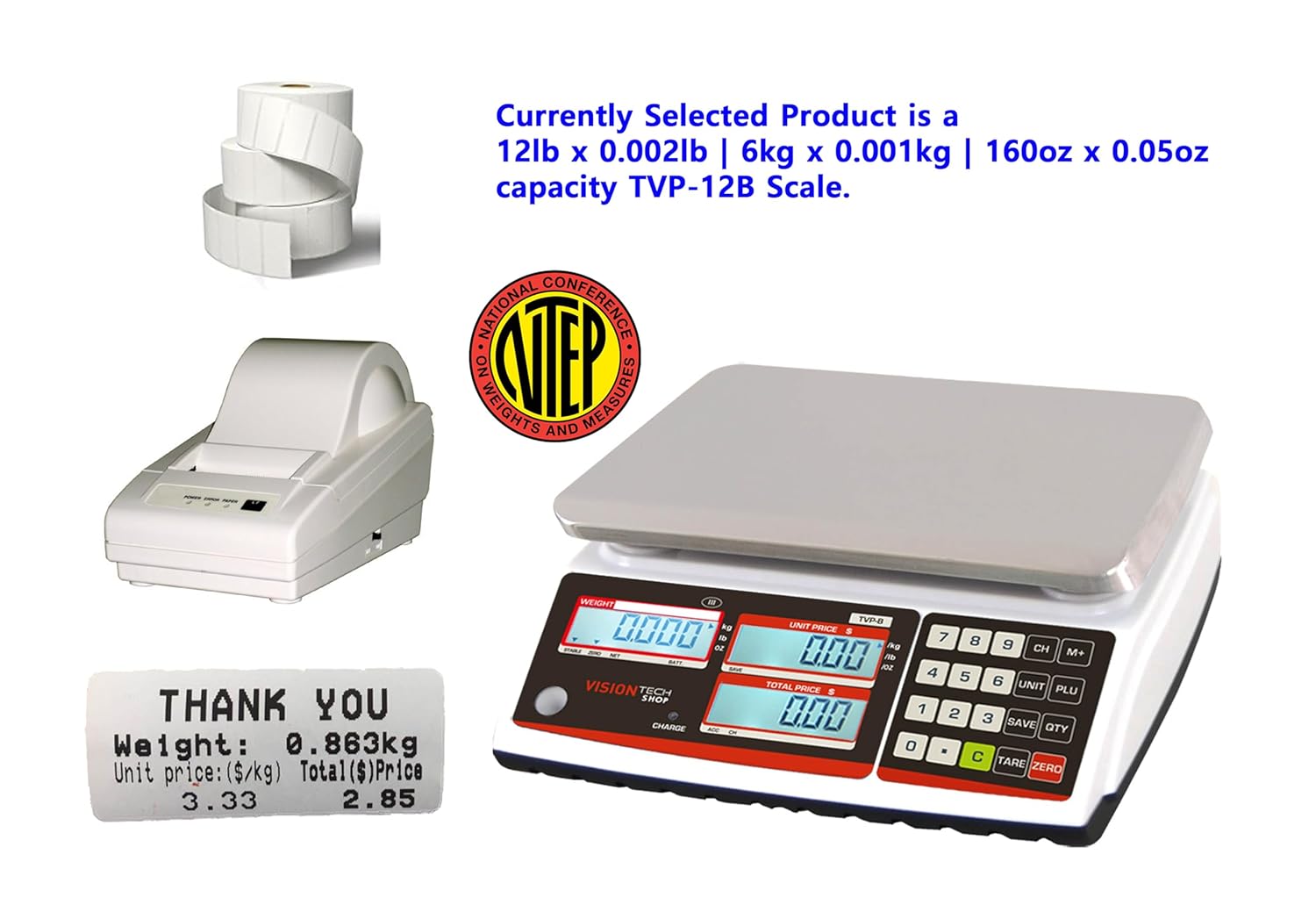
Figure 4: NTEP Certificate of Conformance for TVP Series scales.
サポート
For technical support or any inquiries regarding your VisionTechShop product, please contact us:
- 電話: +1.201.970.8897
- メールアドレス: GoUSApos@Gmail.com
- Webサイト: www.VisionTechShop.com
- 住所: 100 Temple Ave. Hackensack、NJ 07601