
1. はじめに
The Weymic F7-Pro is a 7-channel professional audio mixer designed for various applications including recording, DJ performances, stage events, and karaoke. It features a 2-bus design, a built-in USB audio interface, and integrated digital effects. This manual provides detailed instructions for the setup, operation, and maintenance of your mixer.
2. 安全情報
- 電源: 指定された電源アダプタのみを使用してください。tage はお住まいの地域の電源に適合します。
- 換気: 通気口を塞がないでください。ユニット周囲に十分な空気の流れを確保してください。
- 水分: ユニットを雨、湿気、または過度の湿度にさらさないでください。
- クリーニング: Disconnect power before cleaning. Use a dry, soft cloth. Avoid liquid cleaners.
- サービス: ユニットの修理はご自身で行わないでください。修理はすべて資格を持った専門家にご依頼ください。
- 配置: ミキサーは安定した平らな場所に置いてください。熱源の近くや直射日光の当たる場所に置かないでください。
3.製品オーバーview および機能
The Weymic F7-Pro mixer offers a comprehensive set of features for audio mixing and processing:
- 7チャンネル設計: Multiple input channels for microphones and line-level instruments.
- USBオーディオインターフェース: Connects to computers (Mac/PC) for recording and playback.
- 48Vファンタム電源: Available on microphone inputs for condenser microphones.
- 内蔵Bluetooth: 互換性のあるデバイスからのワイヤレスオーディオストリーミング。
- Integrated MP3/USB Player: Direct playback from USB flash drives with control functions.
- 16 Digital Effects (DSP): Preset effects with adjustable depth and speed.
- 3バンドイコライゼーション: High, Mid, and Low frequency controls on each channel for precise tone shaping.
- コンパクトなデザイン: Ultra-thin and durable construction for portability.
- 幅広い互換性: Supports various devices including wired/wireless microphones, guitars, and amplifiers。

Figure 3.1: Weymic F7-Pro 7-Channel Professional Mixer front panel view. This image displays the complete layout of the Weymic F7-Pro mixer, showcasing all input channels, control knobs, faders, and the master section with its digital display.
4.コントロールとコネクタ
4.1 Input Channels (MIC/LIE 1-5, LINE 6/7)

Figure 4.1: Labeled diagram of an individual channel's controls. A detailed diagram labeling the controls for an individual input channel, showing the Gain control, Pan control, High, Mid, and Low tone adjustments, Channel Volume fader, AUX regulating knob, and EFF (effects) regulating knob.
- MIC/LIE (XLR/TRS Combo Jack): マイク (XLR) またはラインレベル楽器 (TRS) を接続します。
- +48Vファンタム電源スイッチ: Activates phantom power for condenser microphones on individual channels.
- ゲインコントロール: Adjusts the input sensitivity for the connected device.
- 高/中/低イコライザー: 3-band equalizer to adjust the treble, midrange, and bass frequencies of the channel.
- PAN コントロール: チャンネル信号のステレオ位置 (左/右) を調整します。
- AUXコントロール: Sends a portion of the channel's signal to the auxiliary output.
- EFF コントロール: チャンネル信号の一部を内部エフェクト プロセッサに送信します。
- ピークLED: 入力信号が高すぎる場合に点灯し、クリッピングの可能性があることを示します。
- チャンネルボリュームフェーダー: Adjusts the output level of the individual channel to the main mix.
4.2 Master Section and Outputs
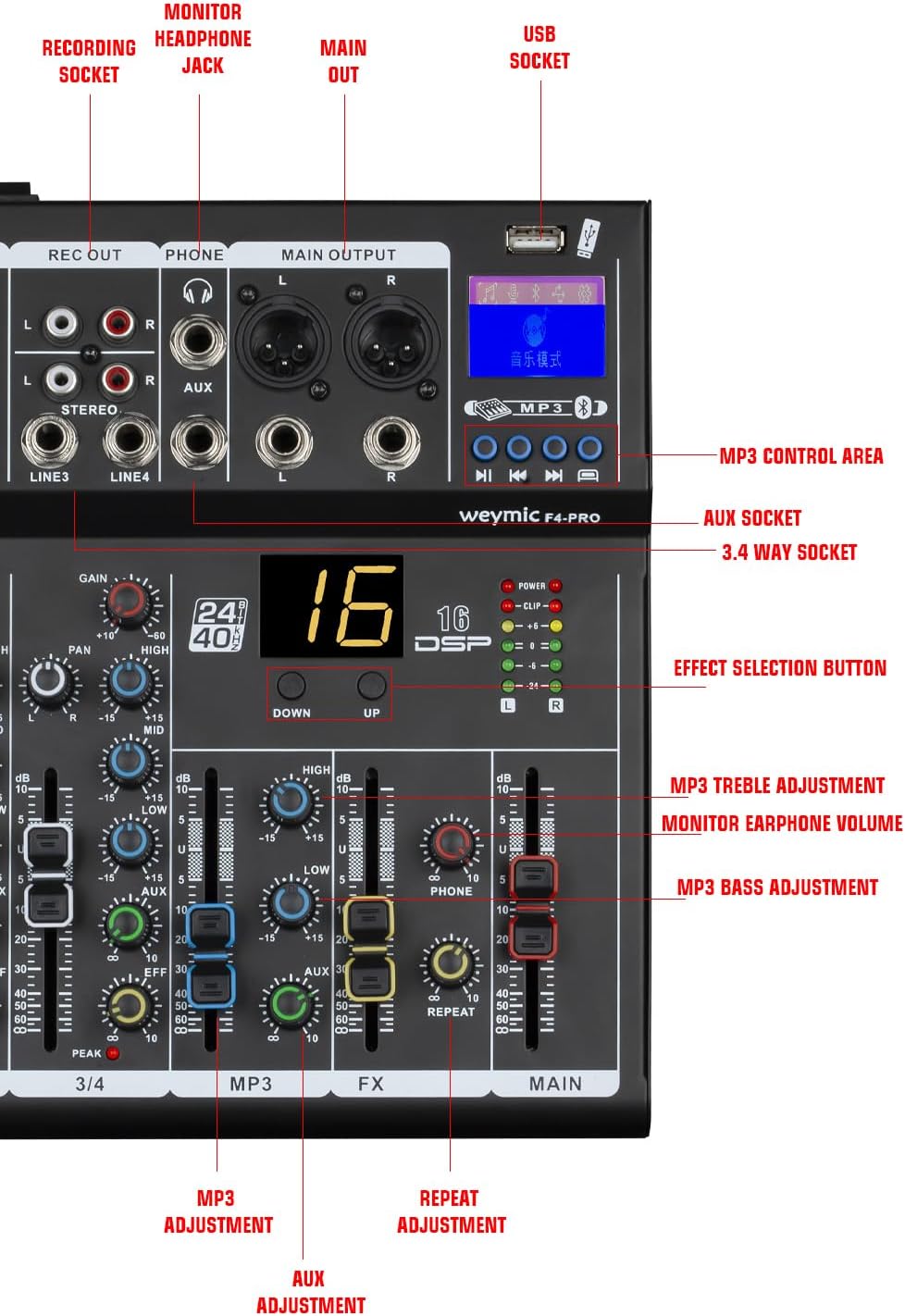
Figure 4.2: Labeled diagram of the master section controls. This diagram labels the master section controls, pointing out the USB socket, MP3 control area, AUX socket, Effect Selection button, MP3 Treble and Bass adjustments, and the Monitor Earphone Volume control.
- 録音出力(RCA): Stereo RCA outputs for connecting to a recording device.
- PHONE (TRS Jack): メインミックスをモニタリングするためのヘッドフォン出力。
- MAIN OUT (XLR/TRS Combo Jack): Main stereo outputs for connecting to power ampリファイアーまたはパワードスピーカー。
- USBソケット: Connects to a computer for audio interface functions or for USB flash drive playback.
- MP3 Control Area: Buttons for play/pause, skip tracks, and mode selection for USB/Bluetooth audio.
- 効果選択ボタン: Cycles through the 16 built-in digital effects.
- DSPディスプレイ: Shows the currently selected digital effect number.
- MP3 Treble/Bass Adjustment: EQ controls for the MP3/USB/Bluetooth audio source.
- Monitor Earphone Volume: ヘッドホン出力の音量を調整します。
- メインフェーダー: メインステレオミックスの全体的な出力音量を制御します。
- Level Signal Lights: LED meters indicating the output level of the main mix.

Figure 4.3: Detailed display of craftsmanship. This image provides detailed close-ups of key components, including the XLR/TRS combo input jacks, the headphone monitoring jack, RCA recording output, the +48V phantom power switch, and the LED level meters, highlighting the build quality and specific functions.
5. セットアップ
5.1電源接続
- ミキサーの電源スイッチがオフになっていることを確認します。
- 付属の電源アダプターをミキサーの電源入力に接続します。
- 電源アダプターを適切なコンセントに差し込みます。
5.2 入力デバイスの接続

Figure 5.1: Strong compatibility and rich connectivity. This visual illustrates the extensive connectivity options of the mixer, showing its compatibility with wired microphones, wireless microphones, guitars, computers, and power amplifiers, suitable for diverse audio setups.
- マイク: Connect XLR cables from your microphones to the MIC/LIE combo jacks. For condenser microphones, activate the +48V Phantom Power switch on the respective channel.
- ラインレベル機器: Connect 1/4" TRS cables from instruments (e.g., keyboards, guitars with preamps) to the MIC/LIE combo jacks.
- Stereo Line Inputs (LINE 6/7): Use these for stereo sources like CD players or other audio devices.
5.3 出力デバイスの接続
- メインスピーカー/Amplifiers: Connect XLR or 1/4" TRS cables from the MAIN OUT jacks to your power ampスピーカーまたはパワードスピーカー。
- ヘッドフォン: Plug your headphones into the PHONE TRS jack.
- 録音装置: Connect RCA cables from the REC OUT jacks to the input of your recording device.
5.4 USBオーディオインターフェース接続
- Connect a USB cable from the mixer's USB socket to an available USB port on your computer.
- Your computer should automatically detect the mixer as an audio device. No specific drivers are typically required for basic functionality on most operating systems (Mac/PC).
- Select the mixer as your input/output audio device in your computer's sound settings or DAW (Digital Audio Workstation) software.
5.5 Bluetooth接続

Figure 5.2: Built-in Bluetooth connectivity. The image highlights the mixer's built-in Bluetooth capability, allowing wireless audio streaming from devices like smartphones for playback or integration into a mix.
- Press the MODE button in the MP3 control area until 'Bluetooth' mode is selected. The display will indicate Bluetooth pairing mode.
- On your Bluetooth-enabled device (e.g., smartphone, tablet), search for available devices and select 'WEYMIC MIXER' (or similar).
- ペアリングされると、デバイスからのオーディオがミキサーにストリーミングされます。
6. 操作手順
6.1 基本的なミキシング
- 電源オン: Turn on the mixer's power switch.
- ゲイン設定: For each active input channel, speak or play into the microphone/instrument. Adjust the GAIN control until the PEAK LED flashes only occasionally during the loudest parts.
- EQを調整する: Use the HIGH, MID, and LOW EQ controls to shape the tone of each channel.
- パン: Use the PAN control to position the sound source in the stereo field.
- チャンネル音量: Use the Channel Volume Fader to set the individual level of each channel in the main mix.
- メインボリューム: Adjust the MAIN Fader to control the overall output volume. Monitor the Level Signal Lights to avoid clipping.
6.2 Using Digital Effects (DSP)

Figure 6.1: Rich 16 digital effects. This image focuses on the digital signal processing (DSP) section of the mixer, indicating the availability of 16 preset digital effects that can be adjusted for depth and speed.
- 効果を選択: Use the Effect Selection button to cycle through the 16 available digital effects. The DSP display will show the selected effect number.
- Send to Effect: Use the EFF control on each channel to send a portion of that channel's signal to the selected effect.
- エフェクトパラメータを調整する: Use the dedicated DSP controls (e.g., UP/DOWN, REPEAT) to adjust the depth and speed of the chosen effect.
6.3 MP3/USB Playback
- MP3が入ったUSBフラッシュドライブを挿入します fileUSBソケットに差し込みます。
- MODEボタンを押して「USB」モードを選択します。
- Use the MP3 control area buttons (Play/Pause, Skip) to control playback.
- Adjust the MP3 Treble and Bass controls for tone shaping.
7. メンテナンス
- クリーニング: Regularly wipe the mixer's surface with a dry, soft cloth. Avoid abrasive cleaners or solvents.
- ストレージ: When not in use, store the mixer in a clean, dry environment, away from extreme temperatures and direct sunlight.
- ケーブル管理 Ensure cables are not tangled or stressed to prevent damage to connectors.
8。 トラブルシューティング
- サウンド出力なし:
- すべての電源接続を確認し、ミキサーがオンになっていることを確認します。
- Verify that the MAIN Fader and individual Channel Volume Faders are raised.
- Ensure output cables are securely connected to speakers/amplifiers and that these devices are powered on and functioning.
- Check input connections and GAIN settings for each channel.
- ハム音またはノイズ:
- すべてのケーブルが適切にシールドされ、しっかりと接続されていることを確認してください。
- グランド ループがないか確認し、すべてのオーディオ機器を同じ電源タップに接続してみます。
- Reduce GAIN settings if the input signal is too hot.
- オーディオ ケーブルを電源ケーブルから離してください。
- 歪んだ音:
- Reduce GAIN settings on individual channels if the PEAK LED is constantly lit.
- Lower the Channel Volume Faders or the MAIN Fader.
- Check the input level of connected devices.
- Bluetoothが接続されない:
- ミキサーが Bluetooth ペアリング モードになっていることを確認します。
- デバイスで Bluetooth が有効になっており、範囲内にあることを確認してください。
- デバイスのペアリングを解除して再度ペアリングしてみてください。
- USB Audio Interface Not Recognized:
- USB ケーブルがミキサーとコンピューターの両方にしっかりと接続されていることを確認します。
- コンピュータの別のUSBポートを試してください。
- コンピュータとミキサーを再起動します。
- Check your computer's sound settings to ensure the mixer is selected as the audio device.
9. 仕様
| 特徴 | 仕様 |
|---|---|
| モデル番号 | F7-PRO |
| ブランド | WEYMIC |
| チャンネル数 | 7 |
| 接続技術 | USB、ブルートゥース |
| オーディオ入力 | XLR, TRS, USB, Bluetooth |
| 出力コネクタタイプ | XLR |
| 電源 | コード式電気 |
| 巻tage | 220ボルト |
| アイテム重量 | 1.3キログラム |
| パッケージ寸法 | 41.7 x 30.2 x 7.9 cm |
10. 保証情報
This product is covered by a standard manufacturer's warranty. Please refer to the warranty card included with your purchase or contact the retailer for specific terms and conditions. The warranty typically covers defects in materials and workmanship under normal use.
11. カスタマーサポート
For technical assistance, troubleshooting, or service inquiries, please contact your retailer or the manufacturer's customer support. Have your product model number (F7-PRO) and purchase information ready when contacting support.