
導入
This manual provides comprehensive instructions for the Gvyugke CT780 Wireless Gaming Headset. Please read this manual carefully before using the product to ensure proper operation and to maximize your gaming experience. This headset offers versatile connectivity options including 2.4GHz wireless, Bluetooth 5.3, and a 3.5mm wired connection, compatible with various platforms such as PS5, PS4, PC, and Nintendo Switch.
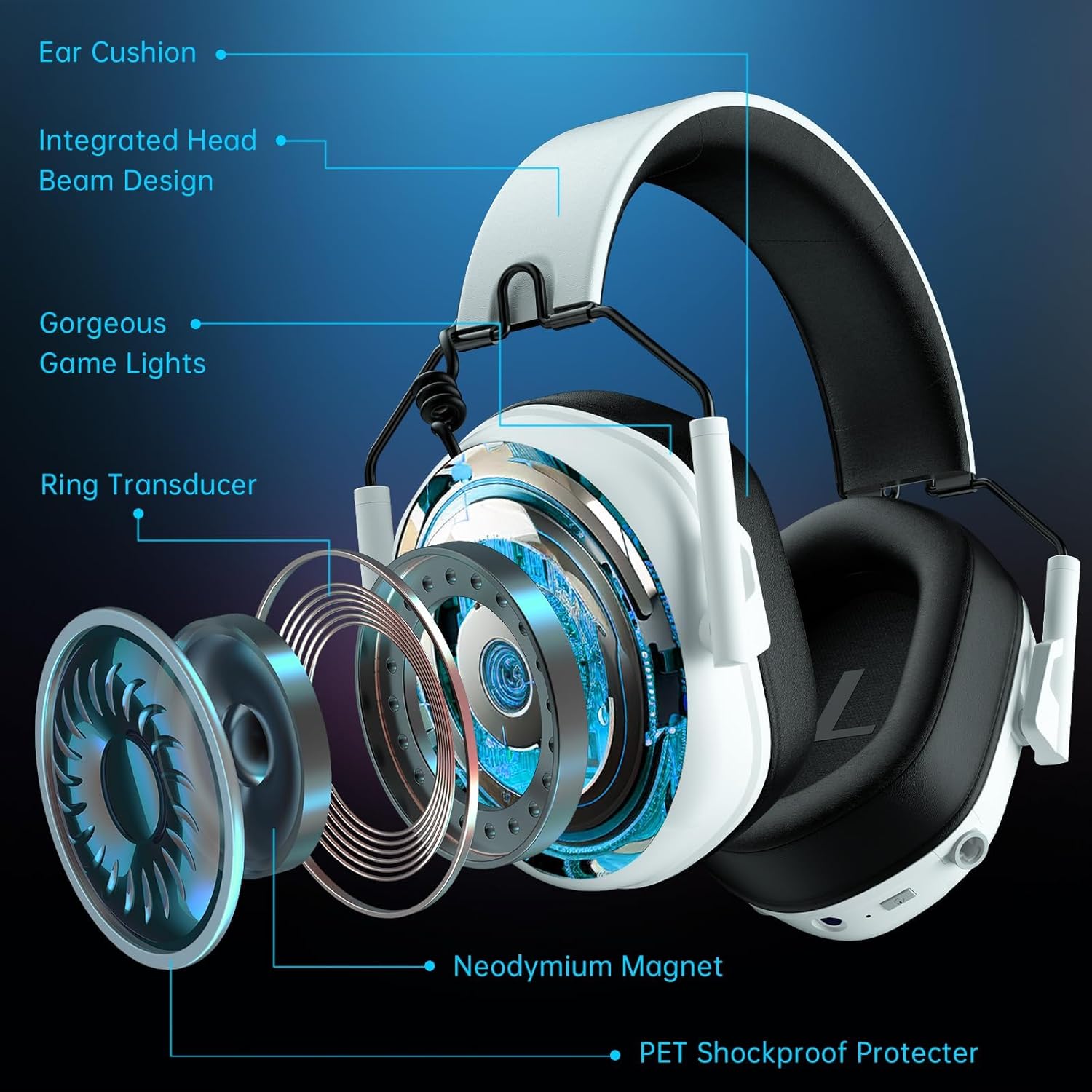
Image: The Gvyugke CT780 Wireless Gaming Headset, showcasing its light yellow design and over-ear form factor.
パッケージ内容
パッケージにすべてのアイテムが揃っていることを確認します。
- Gvyugke CT780 Wireless Gaming Headset
- 2.4GHz USBワイヤレスドングル
- 取り外し可能なノイズキャンセリングマイク
- USB充電ケーブル
- 3.5mmオーディオケーブル
- ユーザーマニュアル(このドキュメント)
製品終了view
Familiarize yourself with the components and controls of your Gvyugke CT780 headset.
主な特徴:
- 50mmオーディオドライバー: Designed for immersive 7.1 surround sound.
- 統合ヘッドビーム設計: Provides structural integrity and comfort.
- 快適なイヤークッション: Protein leather ear pads with memory foam for extended wear.
- 調整可能なスライダー: Allows for a customized fit for various head sizes.
- 取り外し可能なマイク: Omni-directional with noise-canceling capabilities for clear communication.
- LED照明: Futuristic blue lighting effects along the edges of the earcups.

画像: 分解図 view of the headset's internal components, highlighting the 50mm drivers and comfort features.

Image: The detachable microphone, emphasizing its flexibility and noise-canceling feature.

Image: Details on the headset's ergonomic design, highlighting breathable memory foam, soft protective elements, and adjustable sliders for comfort.
設定
The Gvyugke CT780 headset offers multiple connection methods. Choose the one that suits your device.

Image: A compatibility chart detailing the various devices supported by each connection type (2.4GHz, Wired, Bluetooth).
1. 2.4GHz Wireless Connection (for PC, PS5, PS4, Nintendo Switch)
- 2.4GHz USB ワイヤレス ドングルを PC、PS5、PS4、または Nintendo Switch ドックの使用可能な USB ポートに挿入します。
- LED インジケーターが点灯するまで電源ボタンを押し続け、ヘッドセットの電源をオンにします。
- The headset and dongle should automatically pair. The LED indicator on the headset will show a solid light when connected.
- On your device, ensure the audio output is set to the "Gvyugke CT780" or similar headset option.
Note: For Nintendo Switch, the microphone may not be supported in 2.4GHz mode. For Xbox Series, 2.4GHz wireless is not supported.

Image: The headset connected to a PS5 console via the 2.4GHz USB dongle, demonstrating the wireless setup.
2. Bluetooth Connection (for Phones, Tablets, Bluetooth-enabled Mobile Devices)
- ヘッドセットの電源がオンになっていることを確認します。
- Press and hold the Bluetooth pairing button (refer to product diagram for exact location) until the LED indicator flashes rapidly, indicating pairing mode.
- On your mobile device, go to Bluetooth settings and search for "Gvyugke CT780" or similar.
- Select the headset to pair. The LED indicator will show a solid light when connected.
Note: Bluetooth mode is not supported for Xbox All Series.

Image: A user enjoying the headset, highlighting its Bluetooth 5.3 capabilities for mobile and PC use.
3. Wired Connection (for Xbox, 3.5mm Audio Devices)
- 3.5mm オーディオ ケーブルの一方の端をヘッドセットの 3.5mm ジャックに接続します。
- Connect the other end of the 3.5mm audio cable to your device's 3.5mm audio jack (e.g., Xbox controller, PC audio port).
Note: For older Xbox controllers, a headset adapter (not included) may be required.
操作手順
電源オン/オフ
- 電源オン: LED インジケーターが点灯するまで、電源ボタンを約 3 秒間押し続けます。
- 電源を切る: LED インジケーターが消えるまで、電源ボタンを約 3 秒間押し続けます。
ボリュームコントロール
- Use the volume roller/buttons located on the earcup to adjust the audio output level.
マイクの使用
- マイクを接続する: 取り外し可能なマイクをヘッドセットの指定されたポートに挿入します。
- ミュート/ミュート解除: Use the microphone mute button (refer to product diagram) to toggle the microphone on or off.
- ポジショニング: 柔軟なマイクブームを調整して、最適な音声を拾います。
LED照明制御
The headset features integrated LED lighting. The lighting can be controlled via a dedicated button (refer to product diagram).
- Press the LED button to cycle through different lighting modes or to turn the lights off.

画像: ヘッドセットのショーケースasinカスタマイズ可能な RGB 照明効果を備えています。
充電
The headset is equipped with a 1200mAh battery, offering up to 70 hours of playtime (without LED lighting) or 15-20 hours with lighting enabled.
- Connect the USB charging cable to the headset's charging port and to a USB power source (e.g., computer, wall adapter).
- LED インジケーターは充電状態を示します (例: 充電中は赤、完全に充電されている場合は消灯または青)。
- フル充電には約2.5〜3時間かかります。
- A quick charge feature provides approximately 2 hours of use after just 5 minutes of charging.
- A voice alert will notify you when the battery level is below 3%.

Image: Battery life and charging details, including usage times with and without LED lighting.
メンテナンス
適切なメンテナンスを行うことで、ヘッドセットの寿命とパフォーマンスが保証されます。
- クリーニング: ヘッドセットのお手入れには、柔らかく乾いた布をご使用ください。刺激の強い化学薬品や研磨剤は使用しないでください。
- ストレージ: Store the headset in a cool, dry place away from direct sunlight and extreme temperatures. The foldable design allows for easy storage.
- 湿気を避ける: ヘッドセットを水や過度の湿気にさらさないでください。
- ケーブルのお手入れ: Handle cables gently to prevent damage.
トラブルシューティング
ヘッドセットで問題が発生した場合は、次の一般的な解決策を参照してください。
| 問題 | 解決 |
|---|---|
| ヘッドセットから音が出ない |
|
| マイクが機能しない |
|
| ヘッドセットがワイヤレスで接続されない |
|
| バッテリー寿命が短い |
|
仕様
Detailed technical specifications for the Gvyugke CT780 Wireless Gaming Headset.
| 特徴 | 詳細 |
|---|---|
| ブランド | グヴュゲケ |
| モデル名 | CT780 |
| モデル番号 | キャプテン5 |
| 色 | ライトイエロー |
| 耳の位置 | オーバーイヤー |
| 接続技術 | 有線、無線(2.4GHz、Bluetooth 5.3) |
| ワイヤレステクノロジー | 2.4GHz、Bluetooth 5.3 |
| Bluetooth範囲 | 33フィート(10メートル) |
| 2.4GHzワイヤレス範囲 | 最大49フィート(15メートル) |
| オーディオレイテンシー(2.4GHz) | 20ミリ秒未満 |
| Audio Latency (Bluetooth) | 120ミリ秒未満 |
| オーディオドライバーのサイズ | 50ミリメートル |
| インピーダンス | 32オーム |
| 周波数応答 | 20 Hz - 20 KHz |
| マイクロフォン | Omni-directional, Noise-Canceling, Detachable |
| バッテリー容量 | 1200mAh |
| バッテリー寿命(ゲーム) | Up to 70 hours (lights off), 15-20 hours (lights on) |
| 充電時間 | 約2.5~3時間 |
| クイックチャージ | 5分の充電で2時間使用可能 |
| 材料 | ABS Plastic, Metal, Leather |
| 対応デバイス | PS5, PS4, PC, Nintendo Switch, Mac, USB-compatible devices, Xbox Series (wired) |
保証とサポート
Gvyugke products are manufactured with quality and reliability in mind. For specific warranty information, please refer to the warranty card included with your purchase or visit the official Gvyugke website. If you require technical assistance or have questions not covered in this manual, please contact Gvyugke customer support through their official channels.
保証請求のために購入証明書を保管してください。