
導入
Welcome to your new ieGeek ZY-C1 5MP AI Recognition Outdoor Solar Security Camera. This manual provides detailed instructions for setup, operation, maintenance, and troubleshooting to ensure optimal performance and security for your property. Please read this manual thoroughly before using the product.
製品終了view
The ieGeek ZY-C1 is a high-performance 5-megapixel wireless security camera designed for outdoor use. It is powered by an integrated solar panel and an 8000mAh battery, offering continuous operation. Key features include advanced AI human detection, color night vision, two-way audio, and compatibility with Alexa for smart home integration.
ビデオ: 簡単な説明view of the ieGeek ZY-C1 camera's features and capabilities.
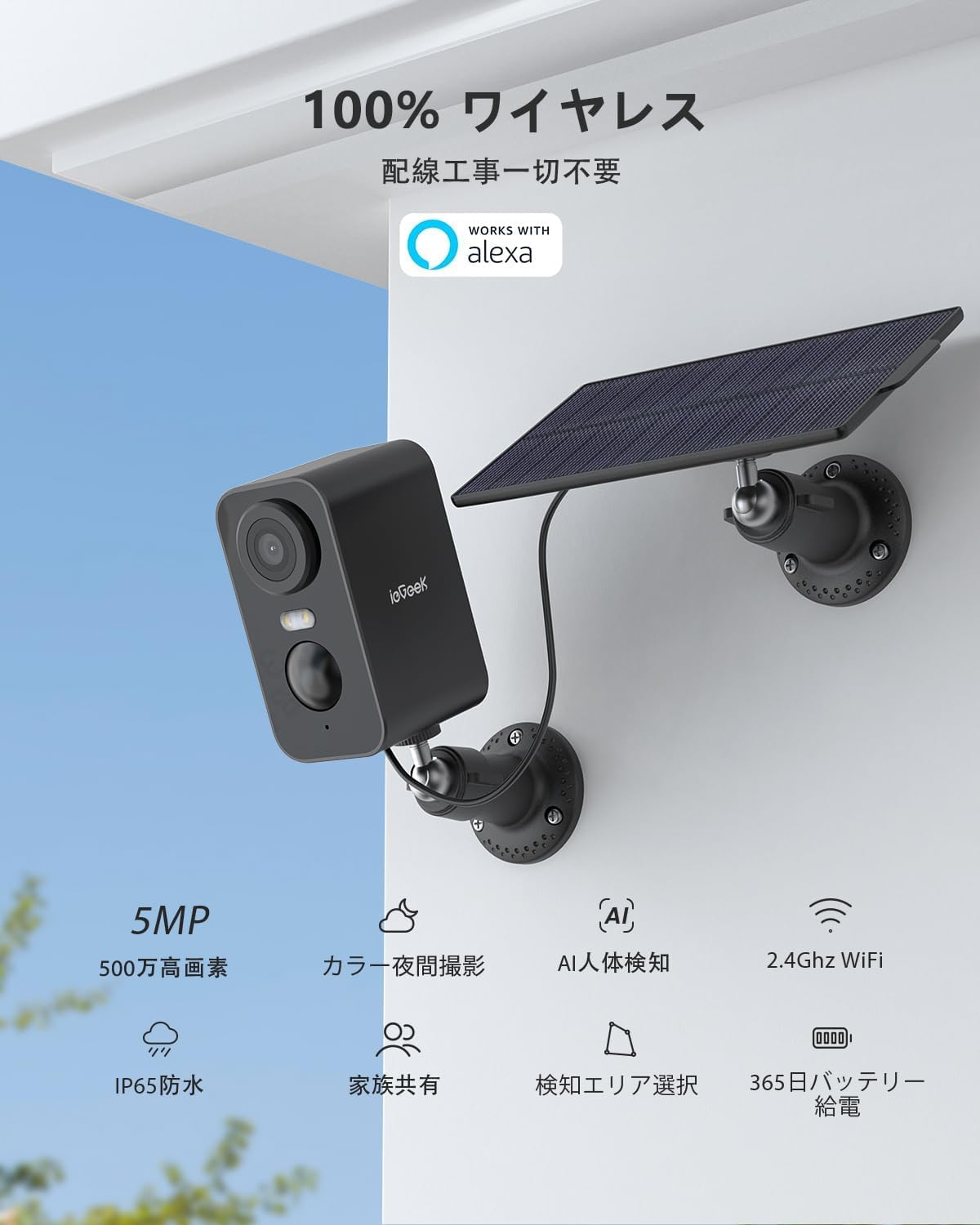
画像: The ieGeek ZY-C1 security camera with its accompanying solar panel, ready for outdoor installation.
パッケージ内容
パッケージをチェックして、すべてのコンポーネントが揃っていることを確認してください。
- ソーラーパネルx1
- ネジ×6
- アンカー×6
- 取付金具×2
- バッテリー式セキュリティカメラ x 1
- 電源ケーブル×1
設定
1. Download the ieGeek Cam App
まず、公式の ieGeekカム 応用。 検索する "ieGeek Cam" on the Apple App Store (for iOS devices) or Google Play Store (for Android devices) and install it on your smartphone or tablet.

画像: Step 1 of the connection process, illustrating the download of the ieGeek Cam app.
2. 電源オンとWi-Fi接続
Ensure your camera is sufficiently charged. Follow the step-by-step instructions provided within the ieGeek Cam app to connect your camera to your 2.4GHz Wi-Fi network. A stable Wi-Fi connection is crucial for optimal performance.
画像: Step 2 of the connection process, showing the camera connecting to a 2.4GHz Wi-Fi network.
3. インストール
The ieGeek ZY-C1 camera is suitable for both outdoor and indoor environments. Select a mounting location that provides a clear view, good Wi-Fi signal strength, and ample direct sunlight for the solar panel. Use the included screws and anchors to securely mount the camera and solar panel. Ensure the solar panel cable is properly connected to the camera.
画像: The ieGeek ZY-C1 camera and solar panel installed on an exterior wall, demonstrating a typical outdoor setup.
手術
ライブ View
Access the ieGeek Cam app on your device to view the live video feed from your camera. This allows for real-time monitoring of your designated areas.

画像: A smartphone displaying the live feed from the ieGeek Cam app, showing real-time home surveillance.
双方向オーディオ
Utilize the camera's built-in microphone and speaker for two-way communication. This feature allows you to speak with visitors or deter unwanted guests directly through the app.

画像: A delivery person interacting with the camera via two-way audio, demonstrating its communication capabilities.
動きの検出とアラート
The camera features advanced AI human detection to significantly reduce false alarms caused by minor movements. It can also identify pets, vehicles, and packages (note: some advanced AI image analysis features may require a paid subscription). Upon detecting motion, you will receive instant push notifications on your smartphone.

画像: The camera's AI detection system identifying and highlighting a person, pet, vehicle, and package within its field of view.
Siren and Strobe Light
For enhanced security, the camera can automatically activate a loud siren and bright strobe light when suspicious activity is detected, effectively deterring potential intruders.

画像: The camera's motion detection triggering a light and siren, startling a person in the dark.
カラーナイトビジョン
The camera provides clear and detailed color night vision up to 15 meters (approximately 49 feet), allowing you to identify objects and individuals even in very low-light conditions.

画像: A clear color image captured by the camera at night, highlighting its night vision capabilities.
ストレージオプション
Recordings can be stored locally on a microSD card (up to 128GB, not included) or securely in the cloud. A 7-day free cloud recording service is available for 6-second event clips.

画像: Visual representation of the camera's support for both local microSD card storage and cloud storage.
Alexa統合
The ieGeek ZY-C1 camera is compatible with Amazon Alexa. You can use voice commands to view your camera's live feed on compatible Alexa-enabled smart displays. For example, say "Alexa, show me the front door" to see what's happening outside.

画像: An Alexa-enabled smart display showing the live feed from the ieGeek camera, illustrating voice control functionality.
メンテナンス
バッテリーとソーラー充電
The camera's 8000mAh battery is continuously recharged by the high-efficiency solar panel, allowing for year-round, maintenance-free operation. Ensure the solar panel is positioned in an area that receives maximum direct sunlight throughout the day to maintain optimal battery levels.

画像: The camera and solar panel installed on a wooden surface, showcasing the solar charging mechanism.
耐候性
With an IP65 waterproof rating, the ieGeek ZY-C1 camera is built to withstand various harsh weather conditions, including heavy rain, snow, and strong winds, ensuring reliable performance year-round.

画像: The camera and solar panel enduring rainfall, highlighting its IP65 weather resistance.
トラブルシューティング
- 電源なし/カメラがオフライン:
Check the solar panel connection and ensure it receives adequate sunlight. Verify that the camera's battery is charged. Confirm your Wi-Fi router is powered on and the camera is within range of a strong 2.4GHz Wi-Fi signal. - 画質が悪い:
Gently clean the camera lens with a soft cloth. Ensure the camera has a strong Wi-Fi connection for optimal video streaming. - 頻繁な誤報:
Adjust the motion detection sensitivity settings within the ieGeek Cam app. Utilize the custom detection zone feature to focus monitoring on specific areas and exclude irrelevant ones. - 双方向オーディオの問題:
Check the microphone and speaker settings in the app. Ensure your network connectivity is stable for clear audio transmission.
仕様
| 特徴 | 詳細 |
|---|---|
| モデル番号 | ZY-C1 |
| 解決 | 5メガピクセル(2560x1920) |
| 分野 View | 130°広角 |
| バッテリー容量 | 8000mAh |
| 防水等級 | IP65 |
| Wi-Fi周波数 | 2.4GHz |
| ストレージオプション | MicroSDカード(最大128GB)、クラウドストレージ |
| AI検出 | Human, Pet, Vehicle, Package (some features paid) |
| ナイトビジョン | Color Night Vision (up to 15m) |
| 双方向オーディオ | はい |
| 対応デバイス | Smartphones, Tablets, Alexa-enabled devices |
| 寸法(長さx幅x高さ) | 8.6 x 4.8 x 5.2 cm |
| 重さ | 0.32キロ |
| 色 | 黒 |
保証とサポート
ieGeekは 24ヶ月保証 from the date of purchase. If you encounter any issues or have questions regarding your product, please contact ieGeek customer service. You can typically reach support through your Amazon order history by navigating to "Order History" > "Purchase History" > "Ask a Question". Responses are usually provided within 1 business day.
For additional information and products, please visit the official ieGeek store: ieGeekストア.