
1. はじめに
The IHSENO Mini WiFi Smart Switch Relay is a compact and intelligent device designed to integrate your traditional lighting and appliances into a smart home system. It operates on 2.4GHz WiFi and is compatible with the Tuya Smart Life App, allowing for remote control, voice commands via Alexa and Google Home, and intelligent scheduling.

画像1.1: 以上view of the IHSENO Mini WiFi Smart Switch Relay and its packaging.
主な特徴:
- Mini WiFi Smart Switch: Designed for 2.4GHz WiFi, enabling whole-house intelligence through the Tuya APP.
- Tuya Smart Life App Control: Connects with other smart devices for intelligent scene linkage.
- Customize Different Scene Modes: Allows setting scenes like 'Reading' or 'Movie' and controlling various smart devices.
- Alexa & Google Home Enabled: Supports voice control for hands-free operation.
- コンパクトなデザイン: Fits into most standard electrical boxes, even with existing wiring.
2. 安全情報
設置および操作の前に、すべての安全に関する指示をよくお読みください。指示に従わないと、感電、火災、その他の危険が発生する可能性があります。
- 専門家による取り付けを推奨: 電気工事は資格を持った電気技師が行う必要があります。
- インストール前に電源を切る: デバイスの設置または保守を行う前に、必ず回路ブレーカーで電源を切ってください。
- 屋内使用のみ: このデバイスは乾燥した屋内での使用を目的としています。
- 巻tageおよび現在の定格: 指定された容量を超えないでくださいtage (AC 100-240V) and current (3 Amps) ratings.
- 配線: Ensure all wiring connections are secure and comply with local electrical codes. Input and output connections cannot be reversed.

Image 2.1: Safety and Certification details for the Mini Smart Switch.
3. セットアップとインストール
The IHSENO Mini WiFi Smart Switch Relay is designed for easy integration into your existing electrical system. It supports both 1-way and 2-way control setups.
配線図:
重要: Always ensure the power is OFF at the circuit breaker before performing any wiring. Input and output connections cannot be reversed.

Image 3.1: Wiring Method 1 - Direct connection to a lamp and mains power.

Image 3.2: Wiring Method 2 - Connection with a 1-way wall switch.

Image 3.3: Wiring Method 3 - Connection with a 2-way wall switch.
アプリのペアリング:
- ダウンロード トゥヤ・スマート or スマートライフ スマートフォンのアプリストアからアプリをダウンロードしてください。
- アカウントに登録またはログインします。
- スマートフォンが 2.4GHz WiFi ネットワークに接続されていることを確認します。
- Power on the smart switch. The indicator light should blink rapidly, indicating it's in pairing mode. If not, refer to the troubleshooting section for resetting the device.
- In the app, tap '+' to add a device. Select 'Electrical' > 'Switch (Wi-Fi)' or allow the app to auto-discover the device.
- 画面上の指示に従ってペアリングプロセスを完了します。
4. 操作手順
Once installed and paired, you can control your IHSENO Mini WiFi Smart Switch Relay through various methods.
4.1. アプリリモートコントロール
Control your connected devices from anywhere using the Tuya Smart Life App, as long as your smartphone and the switch are connected to the internet.

Image 4.1: WiFi Remote Control functionality.

Image 4.2: App Remote Control in action, showing control of a lamp.
4.2. 音声コントロール
Integrate your smart switch with Amazon Alexa or Google Assistant for convenient voice commands.
- Alexa または Google Home アプリを開きます。
- Link your Tuya Smart Life account to the voice assistant.
- デバイスを検出します。
- Use commands like "Alexa, turn on the lamp" or "Hey Google, turn off the kitchen light."
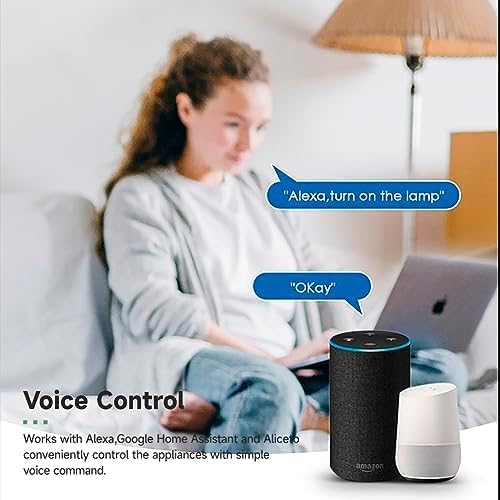
Image 4.3: Voice control with Alexa and Google Home.
4.3. Intelligent Timing and Scene Modes
Set schedules, countdowns, and create custom scene modes within the Tuya Smart Life App.
- タイミング: Schedule devices to turn on/off at specific times (e.g., 23:30 Off).
- サイクリング: Set recurring schedules (e.g., 08:00 ON Everyday).
- 秒読み: 指定された時間が経過するとデバイスの電源がオフになるようにタイマーを設定します。
- シーンモード: Combine multiple smart devices to activate with a single command or schedule (e.g., 'Movie Night' scene dims lights and turns on entertainment).
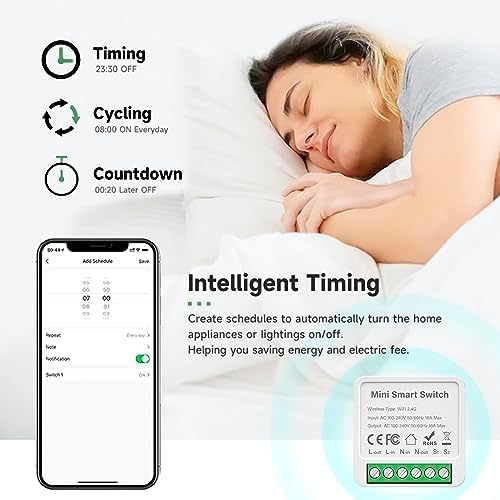
Image 4.4: Intelligent Timing features in the app.
4.4. 共有機能
Share control of your smart devices with family members through the Tuya Smart Life App.

Image 4.5: Sharing function for family members.
5. メンテナンス
To ensure the longevity and optimal performance of your IHSENO Mini WiFi Smart Switch Relay, follow these simple maintenance guidelines:
- クリーニング: デバイスの清掃には、柔らかく乾いた布をご使用ください。液体クリーナーやエアゾールは使用しないでください。
- 環境: Avoid exposing the device to excessive moisture, extreme temperatures, or direct sunlight.
- 検査: 配線接続に摩耗や緩みの兆候がないか定期的に確認してください。
6。 トラブルシューティング
If you encounter issues with your IHSENO Mini WiFi Smart Switch Relay, refer to the following common problems and solutions:
- デバイスがペアリングされない:
- Wi-Fiネットワークが2.4GHzであることを確認してください。デバイスは5GHz Wi-Fiをサポートしていません。
- Check that the device is powered on and the indicator light is blinking rapidly. If not, power cycle the device or perform a factory reset (refer to app instructions for reset procedure).
- Move the device closer to your WiFi router during pairing.
- アプリ内でデバイスがオフライン:
- Verify your home WiFi network is active and has internet access.
- Check the power supply to the smart switch.
- WiFiルーターを再起動します。
- 音声制御が機能しない:
- Ensure your Tuya Smart Life account is correctly linked to Alexa or Google Home.
- Check the device name in the voice assistant app; ensure it's easy to pronounce and recognize.
- 音声アシスタントデバイスがインターネットに接続されていることを確認します。
- Physical switch not responding:
- すべての配線接続が図に従って安全かつ正しいことを確認します。
- Check if the physical switch itself is functional.
7. 仕様
Technical specifications for the IHSENO Mini WiFi Smart Switch Relay:

画像 7.1: 詳細な製品仕様。
| 仕様 | 詳細 |
|---|---|
| ブランド | IHSENO |
| モデル | B0CF1FYYBN |
| ワイヤレスタイプ | WiFi 2.4G |
| 入力ボリュームtage | AC 100-240V 50/60Hz |
| 出力巻tage | AC 100-240V 50/60Hz |
| 最大電流定格 | 3 Amps (Note: Product image shows 16A Max, but product specifications list 3 Amps. Please verify with product packaging.) |
| 取り付けタイプ | 表面実装 |
| 連絡先 | 銅 |
| 材料 | PC V0(耐火) |
| サイズ | 41x20x41mm (approx. 1.6*0.8*1.6 inches) |
| 操作モード | (ON)-ON-OFF |
| スイッチタイプ | 1ウェイ |
| スイッチスタイル | プッシュボタン |
| アプリの互換性 | Smart Life (Support iOS & Android) |
8. 保証とサポート
IHSENO is committed to providing high-quality products and customer satisfaction.
If you have any questions about this product, please feel free to contact our customer service team. We aim to reply within 24 hours to assist you with any inquiries or issues.
具体的な保証条件については、購入書類を参照してください。