
1. はじめに
The CALEX Smart Home Indoor Ambiance Aroma Diffuser 590100500 is designed to enhance your indoor environment by improving air quality, diffusing pleasant aromas, and providing ambient lighting. This smart device integrates seamlessly into your smart home ecosystem, offering control through the Calex app, voice commands, and programmable features.
主な機能は次のとおりです。
- Aroma diffusion with essential oils.
- Realistic flame effect for ambiance.
- Adjustable ambient lighting with 16 million color options.
- Smart control via Calex app (timers, programmable scenarios).
- Voice control compatibility with Google Assistant, Siri, and Amazon Alexa.
- 300ml water tank capacity with automatic shut-off.
2. 安全情報
怪我や損傷を防ぐために、デバイスを使用する前にすべての安全に関する指示をお読みください。
- Always place the diffuser on a stable, flat surface away from direct sunlight, heat sources, and electronic devices.
- あふれを防ぐため、最大水量線(300ml)を超えないようにしてください。
- きれいな水道水または蒸留水のみを使用してください。熱湯は使用しないでください。
- Only use 100% pure, water-soluble essential oils. Other oils or corrosive liquids may damage the device.
- デバイスを子供やペットの手の届かない場所に保管してください。
- 運転中はミスト吹出口を覆わないでください。
- 清掃または補充を行う前に、デバイスのプラグを電源コンセントから抜いてください。
- The device features an automatic shut-off function when the water tank is empty, and sends a notification to your phone.
- A built-in safety configuration will cause the diffuser to flash if the remaining water in the tank needs to cool down after a maximum of 72 hours of continuous operation.
- ご自身でデバイスの修理や改造を試みないでください。サポートが必要な場合は、カスタマーサポートにお問い合わせください。
3. パッケージ内容
パッケージにすべてのアイテムが揃っていることを確認します。
- CALEX Smart Home Indoor Ambiance Aroma Diffuser (Model 5901000500)
- 電源アダプター
- ユーザーマニュアル
4.製品オーバーview
Familiarize yourself with the components of your aroma diffuser.
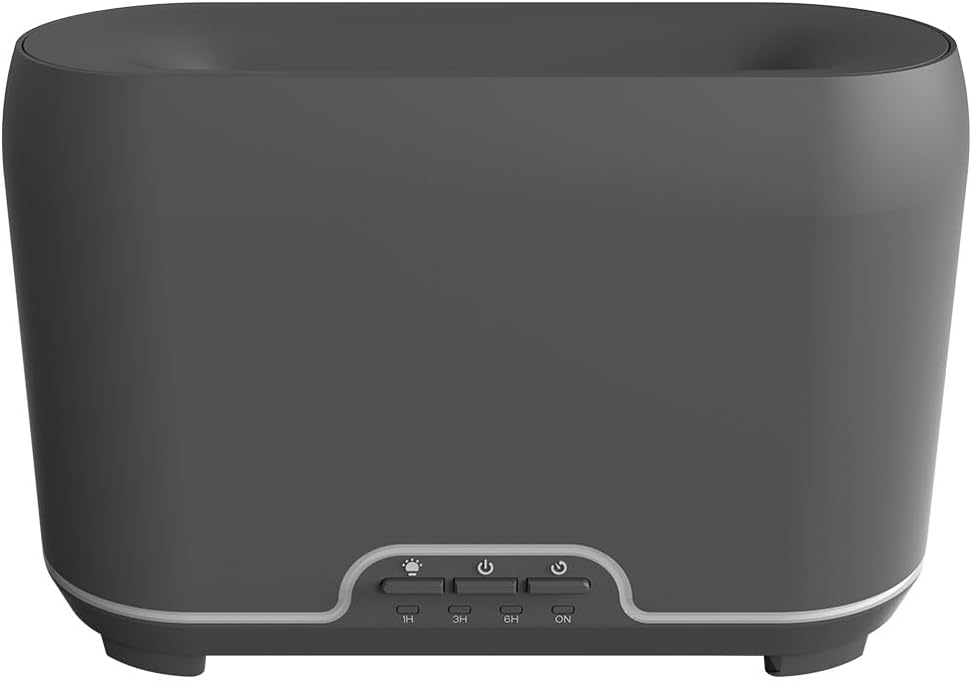
画像: 正面 view of the CALEX Smart Home Aroma Diffuser, showing the control panel with buttons for light, power, and timer settings (1H, 3H, 6H, ON).

Image: The CALEX Smart Home Aroma Diffuser operating on a wooden table, displaying its ambient flame effect and mist output.
The diffuser typically consists of a water tank, an ultrasonic plate, a mist outlet, and a control panel with buttons for power, light, and timer functions. The power input port is usually located at the back or bottom of the device.
5. セットアップ
初期設定は次の手順で行います。
- 配置: ディフューザーを平らで安定した場所に置きます。
- 蓋を開ける: ディフューザーの上部カバーをゆっくりと取り外します。
- 水タンクに水を入れる: Fill the water tank with clean water up to the 300ml maximum fill line. Do not overfill.
- エッセンシャルオイルを加える: お好みのエッセンシャルオイルを数滴、水タンクに直接加えます。
- 蓋を閉めます: 上部カバーをしっかりと取り付けます。
- 接続電源: Plug the power adapter into the diffuser's power input port, then plug the adapter into a wall outlet.
- Download Calex App: Download the free Calex Smart app from your smartphone's app store (available for iOS and Android).
- WiFiに接続します: Follow the in-app instructions to connect your diffuser to your home WiFi network. Ensure your WiFi is 2.4GHz.
6. 操作手順
The CALEX Smart Home Aroma Diffuser can be operated via the Calex app or its integrated control buttons.
6.1 Using the Calex Smart App
The Calex app provides full control over your diffuser's functions:
- 電源オン/オフ: Turn the diffuser on or off remotely.
- ミストコントロール: Adjust the mist output level.
- ライトコントロール: Change the ambient light color from over 16 million options, adjust brightness, and select lighting modes.
- 炎の効果: Activate or deactivate the flame effect.
- タイマー: Set schedules for the diffuser to turn on or off automatically.
- Programmable Scenarios: Create custom scenarios based on time, weather, or other smart home triggers.
- 通知: Receive alerts when the water tank is empty.
6.2 音声制御
Integrate your diffuser with voice assistants for hands-free control:
- Google アシスタント: Link your Calex account in the Google Home app. Use commands like "Hey Google, turn on the diffuser."
- シリ: Create custom shortcuts in the Apple Home app or through the Calex app for Siri commands.
- アマゾンアレクサ: Enable the Calex skill in the Alexa app. Use commands like "Alexa, set diffuser light to blue."
6.3 Manual Control Buttons
The control panel on the diffuser allows for basic operation:
- 電源ボタン: Press once to turn on/off the mist and flame effect.
- ライトボタン: Press to cycle through light colors or turn the light on/off.
- Timer Buttons (1H, 3H, 6H, ON): Select a desired operating duration. The diffuser will automatically shut off after the selected time. 'ON' typically means continuous operation until water runs out or manually turned off.
7. メンテナンス
定期的に清掃することで、最適なパフォーマンスが確保され、ディフューザーの寿命が延びます。
- 毎日の清掃: After each use, empty any remaining water from the tank. Wipe the inside of the tank with a clean, soft cloth.
- 毎週の清掃: For a more thorough clean, unplug the device. Add a small amount of white vinegar (about 10ml) to the water tank and let it sit for 10-15 minutes to dissolve mineral buildup. Gently wipe the ultrasonic plate with a cotton swab or soft brush. Rinse the tank thoroughly with clean water, avoiding the air outlet.
- 外部洗浄: ディフューザーの外側を柔らかくて乾いた布で拭いてください。amp 布で拭いてください。研磨剤や溶剤は使用しないでください。
- Ensure the device is completely dry before refilling or storing.
8。 トラブルシューティング
問題が発生した場合は、次の一般的な問題と解決策を参照してください。
| 問題 | 考えられる原因 | 解決 |
|---|---|---|
| 霧が出ない、または弱い | 低水位 超音波プレートが汚れている ミスト出口が詰まっている | 適切なレベルまで水を補充します。 メンテナンス手順に従って超音波プレートを清掃してください。 ミスト出口が詰まっていないことを確認してください。 |
| デバイスの電源が入らない | 電源なし 水タンクが空です デバイスの故障 | 電源接続と壁のコンセントを確認してください。 水タンクを補充してください。 問題が解決しない場合は、カスタマー サポートにお問い合わせください。 |
| アプリの接続の問題 | WiFiパスワードが正しくありません ルータが遠すぎる 2.4GHz vs 5GHz WiFi | WiFiパスワードを確認してください。 Move diffuser closer to the router. Ensure your router is broadcasting a 2.4GHz network and connect to it. |
| 炎の効果が機能しない | Feature deactivated in app デバイスの故障 | Check app settings to ensure flame effect is enabled. カスタマーサポートにお問い合わせください。 |
9. 仕様
| 特徴 | 仕様 |
|---|---|
| モデル番号 | 5901000500 |
| ブランド | ケイレックス |
| 容量 | 300ミリリットル |
| 材料 | プラスチック |
| 自動シャットオフ | はい |
| 接続性 | WiFi(2.4GHz) |
| 制御方法 | Calex Smart App, Voice Control (Google Assistant, Siri, Amazon Alexa), Manual Buttons |
| ライトオプション | 16万色 |
| 推奨使用エリア | Medium space |
| 国際商品コード(EAN/UPC) | 08712879157090 |
10. 保証とサポート
保証情報やテクニカルサポートについては、ご購入時に付属の説明書をご参照いただくか、販売店またはメーカーに直接お問い合わせください。保証請求の際に必要となりますので、購入証明書を保管してください。