
1. はじめに
This manual provides essential information for the safe and efficient use of your FLEXISPOT 42-inch Sit-to-Stand Desk Riser. This height-adjustable computer workstation is designed to promote a healthy balance between sitting and standing throughout your workday. Please read these instructions thoroughly before assembly and operation.
2. 安全情報
- 使用前にすべてのコンポーネントがしっかりと固定されていることを確認してください。
- デスクトップの場合は最大 33 ポンド、キーボード トレイの場合は最大 4.4 ポンドの重量容量を超えないでください。
- Keep hands and fingers clear of moving parts during height adjustment to prevent injury.
- Place the desk riser on a stable, level surface.
- 安定性を保つためにデスクトップ上で重量を均等に分散します。
- 動作中は子供やペットを装置から遠ざけてください。
3. パッケージ内容
組み立てを始める前に、すべての部品が揃っていることを確認してください。部品が不足または破損している場合は、カスタマーサポートにお問い合わせください。
- Main Desk Riser Unit
- Removable Keyboard Tray
- Assembly Hardware (screws for keyboard tray)
- 取扱説明書
4. セットアップ手順
The FLEXISPOT Sit-to-Stand Desk Riser is designed for quick and straightforward assembly. Two people are recommended for easier setup.
- ユニットを開梱します: パッケージからすべてのコンポーネントを慎重に取り出します。
- 本体の位置: Place the main desk riser unit on your existing desk or workstation. Ensure it is centered and stable.
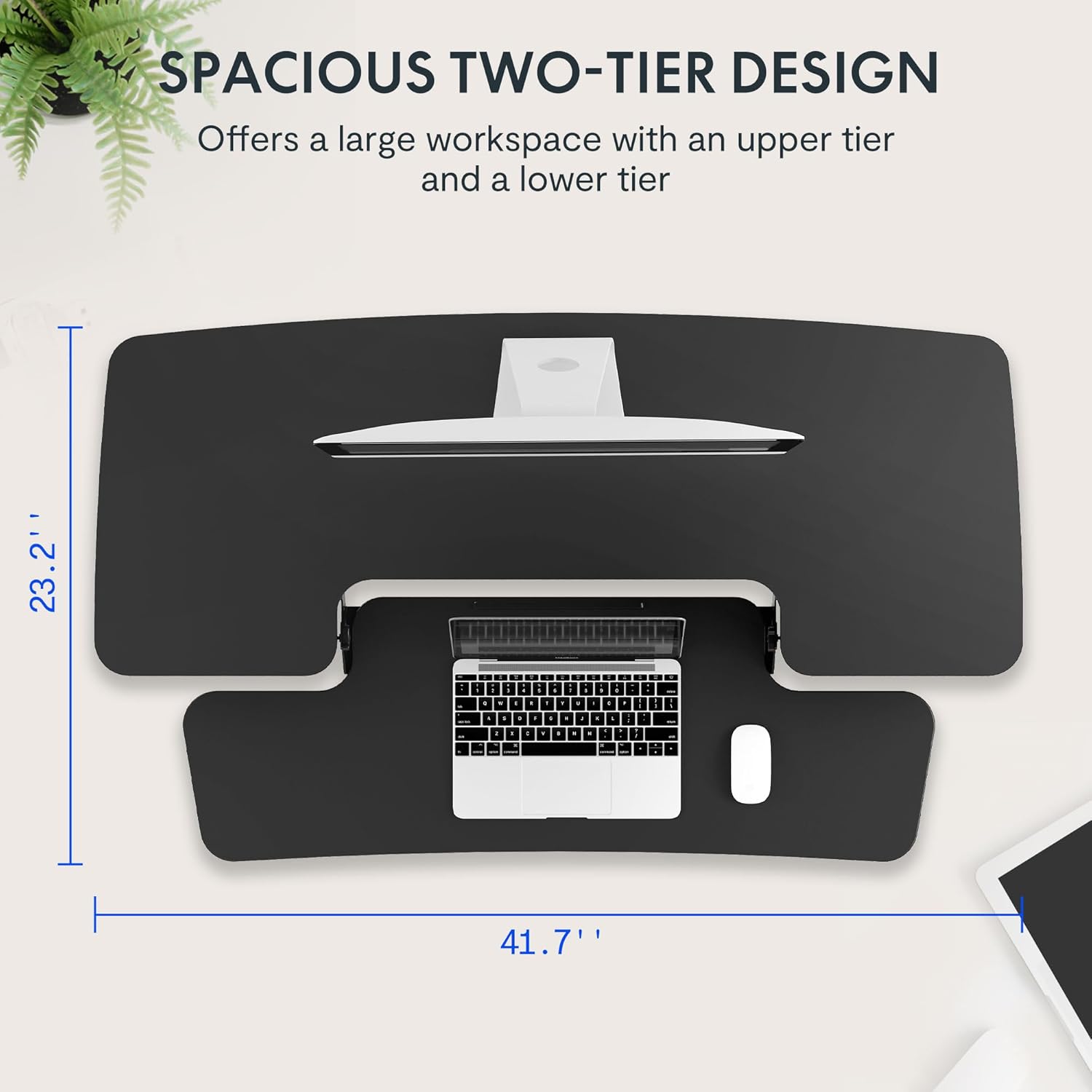
- キーボードトレイを取り付けます。 Align the removable keyboard tray with the designated slots on the underside of the main unit. Slide the tray into place until it clicks securely. Use a Phillips screwdriver (not included) to fasten any provided screws for additional stability.
- ケーブルを整理する: Utilize the included cable management loops to organize your monitor, keyboard, and mouse cables. Ensure cables have enough slack to accommodate the full range of height adjustment.


5. 操作手順
The desk riser features a spring-assisted lifting mechanism for smooth and effortless height adjustments.
- 高さの調整: To raise or lower the desk, locate the lever on the right side of the main unit. Squeeze the lever firmly.
- 机を上げる: While squeezing the lever, gently lift the desktop to your desired standing height. The spring-assisted mechanism will help elevate the unit. Release the lever to lock the desk in place.
- 机を下げる: While squeezing the lever, gently push down on the desktop to lower it to your desired sitting height. Release the lever to lock the desk in place.
- 垂直方向の移動: The desk riser moves straight up and down within its own footprint, requiring no additional spatial accommodations. The height can be adjusted between 4.7 inches (minimum) and 19.7 inches (maximum).


6. メンテナンス
Regular maintenance ensures the longevity and optimal performance of your desk riser.
- クリーニング: 柔らかい布で表面を拭いてください。amp 布。 仕上げを損傷する可能性がある研磨剤入りのクリーナーや刺激の強い化学薬品は避けてください。
- 検査: すべてのネジと接続部がしっかりと締まっているか定期的に確認してください。必要に応じて締め直してください。
- 可動部品: The lifting mechanism is designed to be maintenance-free. Do not attempt to lubricate or disassemble it.
7。 トラブルシューティング
If you encounter any issues with your desk riser, refer to the following common solutions:
- Desk is difficult to adjust: Ensure no objects are obstructing the lifting mechanism. Verify that the weight on the desktop does not exceed the maximum capacity.
- 机が不安定に感じる: Check that the unit is placed on a flat, stable surface. Ensure all components, especially the keyboard tray, are securely attached. Redistribute weight evenly on the desktop.
- Keyboard tray is loose: Re-check the connection points of the keyboard tray and ensure any fastening screws are tightened.
If problems persist, please contact FLEXISPOT customer support for assistance.
8. 仕様
| 特徴 | 仕様 |
|---|---|
| ブランド | フレキシポット |
| モデル | B0CDWSPYKQ |
| 製品寸法(奥行き×幅×高さ) | 奥行き24インチ x 幅42インチ x 高さ19.7インチ |
| 色 | 黒 |
| 上部の材質の種類 | エンジニアリングウッド |
| アイテム重量 | 52 ポンド |
| 最小高さ | 4.7インチ |
| 最大高さ | 19.7インチ |
| デスクトップの耐荷重 | 33ポンド |
| キーボードトレイの耐荷重 | 4.4ポンド |
| 必要な組み立て | Yes (Keyboard Tray) |
| 組み立てに推奨される人数 | 2 |

9. 保証とサポート
Your FLEXISPOT Sit-to-Stand Desk Riser comes with a limited warranty. For specific details regarding warranty coverage, please refer to the warranty documentation included with your purchase or visit the official FLEXISPOT webサイト。
For technical support, troubleshooting assistance, or warranty claims, please contact FLEXISPOT customer service. You can typically find contact information on the manufacturer's webサイトまたは購入プラットフォームを通じて購入できます。
オンラインサポート: 訪問する AmazonのFLEXISPOTストア 製品情報およびサポート リソースについては、こちらをご覧ください。


