
1. はじめに
Thank you for choosing the Diffuserlove Cloud Humidifier Rain Water Drip Diffuser. This device combines the functions of a humidifier, a rain sound generator, and a multi-color mood lamp to create a relaxing and comfortable environment. Please read this manual thoroughly before use to ensure proper operation and maintenance.
重要な安全情報
- Do not use with essential oils. This device is designed for water-based humidification and rain effects only.
- お子様やペットの手の届かない場所に保管してください。
- Place the humidifier on a stable, flat surface away from direct sunlight or heat sources.
- 電源コードが損傷しておらず、正しく接続されていることを確認してください。
- ベースユニットを水やその他の液体に浸さないでください。
- 清掃または補充を行う前にデバイスのプラグを抜いてください。
2. パッケージ内容
パッケージにすべてのアイテムが揃っていることを確認します。
- Diffuserlove Cloud Rain Humidifier Unit
- Remote Control (requires two AAA batteries, not included)
- Type-C Power Cord (plug not included)

Image: The Diffuserlove Cloud Humidifier unit with its remote control.
3.製品オーバーview
The Diffuserlove Cloud Humidifier features a unique mushroom-shaped design with integrated rain and mist functions, along with customizable lighting.

Image: The humidifier showing its approximate dimensions: 16cm (6.3 inches) wide and 25cm (9.95 inches) tall.
コンポーネント:
- Mushroom Top: Houses the light and rain drip mechanism.
- 水タンク: Transparent section for water, capacity 300ml.
- 基本単位: Contains controls, power input, and ultrasonic mist generator.
- コントロールボタン: Located on the front of the base unit for light, power, and mist/rain functions.
- リモートコントロール: 設定の調整に便利です。
4. セットアップ
- 配置: Place the humidifier on a flat, stable surface. Ensure it is not near electronic devices sensitive to moisture.
- 上部を削除: Gently lift the transparent water tank section from the base.
- 水タンクに水を入れる: Fill the water tank with clean tap water up to the MAX line. Do not overfill. Do not add essential oils.

Image: A hand pouring water into the humidifier's base reservoir.
- 組み立て直す: Carefully place the transparent water tank back onto the base unit, ensuring it is securely seated.
- 接続電源: Insert the Type-C power cord into the port on the back of the base unit, then connect the other end to a suitable USB power adapter (not included).

Image: A hand connecting the Type-C power cable to the humidifier's power port.
5. 操作
The humidifier can be operated using the touch buttons on the base unit or the included remote control.
5.1 電源オン/オフ
- デバイスボタン: 電源ボタンを押します(U) on the base unit to turn the device on or off.
- リモートコントロール: Press the 'ON' or 'OFF' button on the remote control.
5.2 Rain & Mist Modes
The humidifier offers three combined rain and mist modes:
- Heavy Rain & Mist: Provides a strong rain sound and mist output.
- Light Rain & Mist: Offers a softer rain sound and mist output.
- Mist Only (No Rain): Produces mist without the rain sound effect.
Use the 'Rain' and 'Mist' buttons on the remote control to adjust these settings. The touch button on the device cycles through mist modes.

Image: Visual representation of the three rain and mist modes: Heavy, Light, and No Rain.
5.3 照明機能
The mushroom top features a 7-color LED mood light with various display options:
- 固定カラーモード: Select a specific color from the remote control (R, G, B, or other color buttons).
- Cycling Color Mode: The light transitions through all 7 colors automatically.
- 呼吸ライトモード: The selected or cycling color gently fades in and out.
- 明るさ調整: Use the sun icon buttons on the remote to increase or decrease light brightness.
The light button on the device cycles through light modes. The remote offers more precise control.
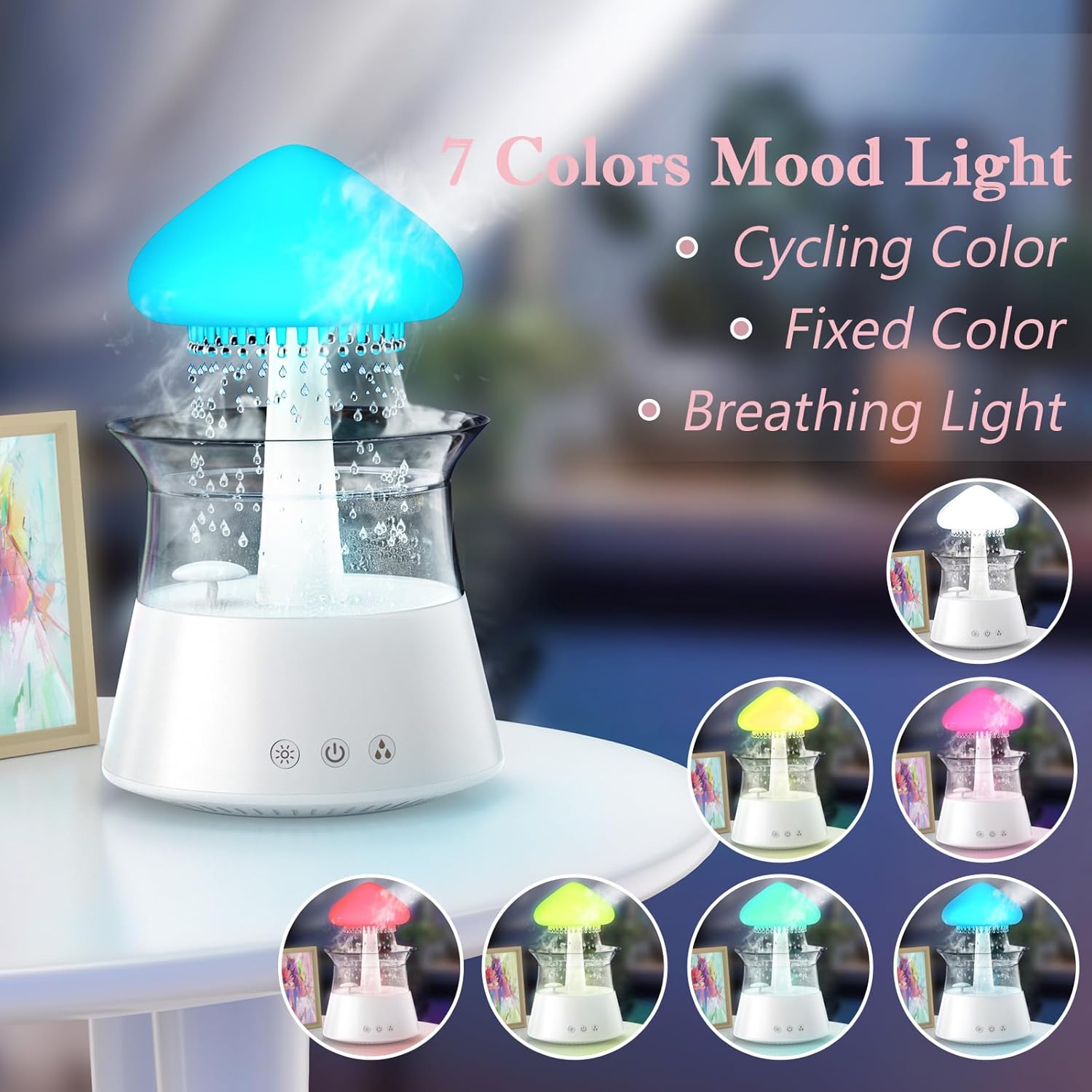
画像: 加湿器のショーケースasing its 7-color mood light feature, including cycling, fixed, and breathing light modes.
5.4 タイマー設定
Set an automatic shut-off timer using the remote control:
- Press the '4H', '6H', or '8H' buttons on the remote to set the timer for 4, 6, or 8 hours respectively.
- 選択した時間が経過すると、デバイスの電源は自動的にオフになります。

Image: A diagram illustrating the remote control with buttons for timer settings (4H, 6H, 8H), light colors, breathing light, rain volume, mist volume, and light brightness.
6. メンテナンス
定期的に清掃することで、最適なパフォーマンスが確保され、加湿器の寿命が延びます。
6.1。XNUMX日常のメンテナンス
- 水の交換: Change the water in the tank daily to prevent bacterial growth.
- 拭き取る: Wipe the inside of the water tank and the mushroom top with a clean, damp 布。
6.2毎週の清掃
- プラグを抜く: 清掃する前に必ず加湿器のプラグを抜いてください。
- 分解: Carefully remove the mushroom top and the transparent water tank.
- 浄水タンク: Wash the water tank with mild soap and water. Rinse thoroughly to remove all soap residue.
- クリーンベースユニット: Use a soft brush or cotton swab to gently clean the ultrasonic mist generator and any small openings in the base unit. Do not use abrasive cleaners.
- スケール除去: If mineral deposits accumulate, fill the tank with a mixture of equal parts white vinegar and water. Let it sit for 30 minutes, then rinse thoroughly.
- ドライ: 再組み立てする前に、すべての部品を完全に自然乾燥させてください。

Image: Hands gently lifting the transparent water tank from the humidifier's base, indicating how to access for cleaning or refilling.
7。 トラブルシューティング
If you encounter issues with your Diffuserlove Cloud Humidifier, refer to the following common problems and solutions:
| 問題 | 考えられる原因 | 解決 |
|---|---|---|
| ミストが出ない、またはミストの出力が弱い | 低水位 Mineral buildup on mist generator 通気口が詰まっている | 水タンクを補充する Clean the mist generator as per maintenance instructions Ensure air vents are clear |
| No rain sound or weak rain sound | 低水位 Rain drip holes blocked Rain function not activated | 水タンクを補充する Clean rain drip holes (a small wire may be needed, not included) Activate rain function via remote or device button |
| ライトが機能しない | ライト機能オフ デバイスに電力が供給されていない | Turn on light function via remote or device button Ensure device is plugged in and powered on |
| リモコンが反応しない | 電池切れ リモコンとデバイスの間に障害物がある | リモコンの単4電池を交換してください Ensure clear line of sight to the device's sensor |
| 水漏れ | 水タンクが正しく取り付けられていない 過水タンク Damage to unit | Re-seat the water tank correctly MAXラインを超えて充填しないでください Contact customer support if unit is damaged |
8. 仕様
Technical details for the Diffuserlove Cloud Humidifier (Model CH06):
- モデル名: 06 位
- ブランド: Diffuserlove
- 製品寸法: 奥行き6.3インチ x 幅6.3インチ x 高さ9.95インチ (160 x 160 x 251 mm)
- 水容量: 300ml
- 電源: Type-C electric, 5V 2A
- ワットtage: 10ワット
- 巻tage: 2.3E+2 Volts (Note: This value seems unusually high for a 5V USB device. Please refer to the product label for accurate voltag要件を満たしている必要があります。
- 動作モード: Manual (via device buttons) / Remote Control
- 特別な機能: Auto Shut Off, Night Light, Rain Sounds, Remote Control
- ライト: 7 colors LED night light
- 超音波周波数: 2.4MHz
- Rain Sounds: ホワイトノイズ 30~50dB
- 材料: ABS+PPプラスチック
- 商品の重量: 1.87ポンド
- 国際コード: 663992505702

Image: The back of the product packaging displaying detailed product parameters and specifications.
9. 保証とサポート
The Diffuserlove Cloud Humidifier (Model CH06) comes with a 12ヶ月保証 ご購入日から有効です。この保証は通常の使用における製造上の欠陥をカバーします。
For warranty claims, technical support, or any questions regarding your product, please contact Diffuserlove customer service through the retailer where the product was purchased or refer to the contact information provided on the product packaging.