
HUGEROCK X7
HUGEROCK X7 Rugged Tablet User Manual
モデル:X7
1. はじめに
The HUGEROCK X7 is a 7-inch rugged tablet designed for demanding outdoor environments. Featuring a 2600-nit sunlight-readable display, IP68 waterproof rating, and MIL-STD-810H drop-proof certification, it is built for durability and performance. This manual provides essential information for setting up, operating, maintaining, and troubleshooting your X7 tablet.
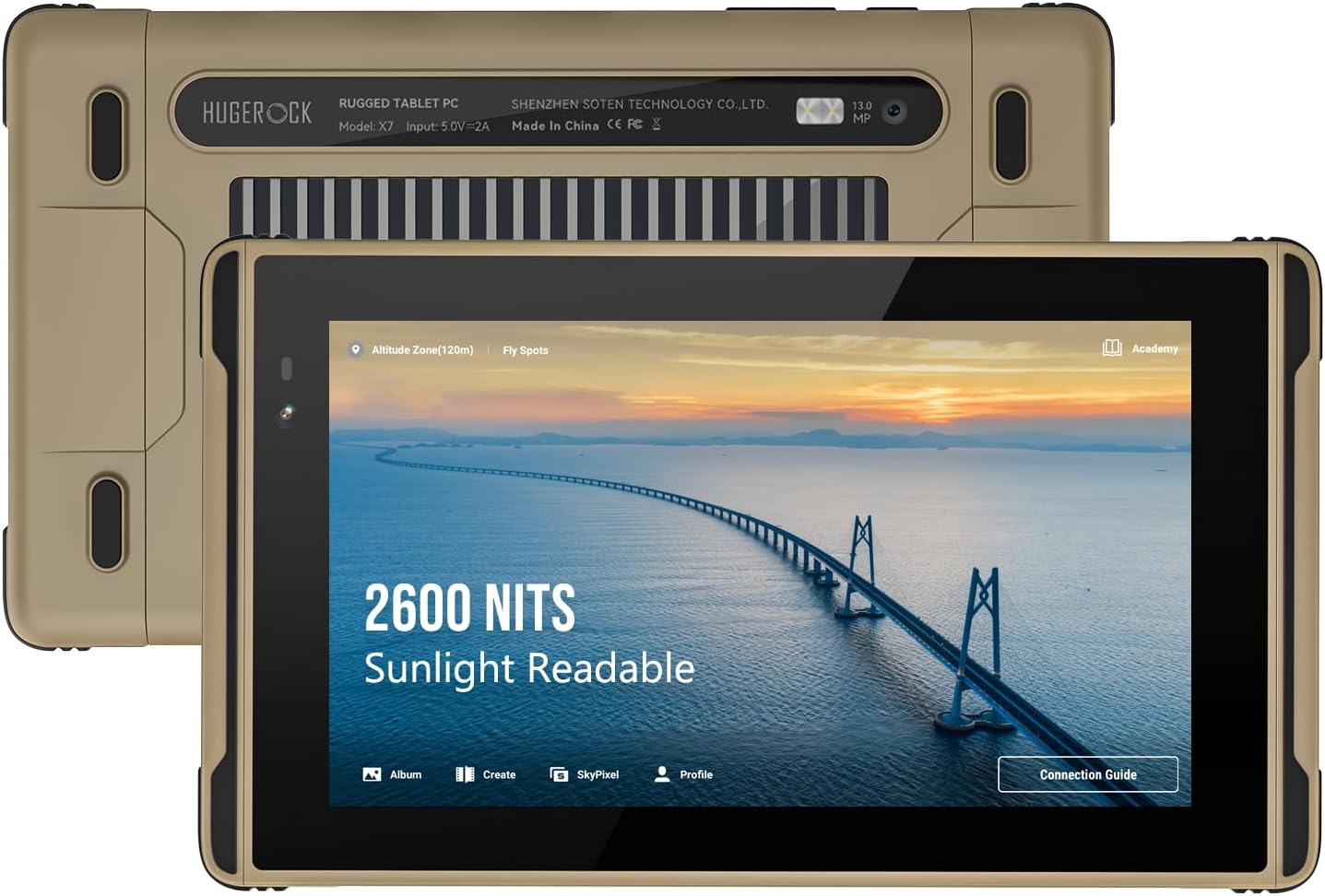
画像: 前面と背面 view of the HUGEROCK X7 Rugged Tablet, highlighting its 2600 NITS sunlight readable display and robust design.
2. 安全情報
- ご自身でデバイスの分解や修理を試みないでください。資格のあるサービス担当者にご相談ください。
- 損傷を防ぎ安全を確保するために、承認された充電器とアクセサリのみを使用してください。
- タブレットを動作範囲(-40°C ~ 80°C)外の極端な温度にさらさないでください。
- Ensure all port covers are securely closed when operating in wet or dusty conditions to maintain IP68 rating.
- デバイスを強い磁場から遠ざけてください。
3. 箱の中身
開梱時にすべてのアイテムが揃っていることを確認します。
- X7 頑丈なタブレット
- Flight Controller Data Cable
- タイプCデータケーブル
- Hex Wrench/Screen Protector (Screen protector is pre-attached)
- Introduction Manual (this document)
4.製品オーバーview
The HUGEROCK X7 features a robust casing designed for protection. Familiarize yourself with the tablet's physical components:

画像: サイド view of the HUGEROCK X7 Rugged Tablet, showing various ports and the durable chassis.
主要コンポーネント:
- 画面: 7-inch, 1920x1080 FHD, 2600 NITS sunlight readable.
- フロントカメラ: ビデオ通話や自撮りに。
- リアカメラ: 13 MP for high-quality photos and videos.
- USB-Cポート: 充電やデータ転送に。
- SIM/MicroSDカードスロット: Supports dual Nano SIM and MicroSD expansion.
- 電源ボタン: デバイスの電源をオン/オフにしたり、スリープ状態にしたりします。
- 音量ボタン: オーディオレベルを調整します。
- 磁気充電ポート: For convenient charging with the custom cable.
5. セットアップ
5.1 初期充電
Before first use, fully charge your HUGEROCK X7 tablet. Connect the provided Type-C data cable or the magnetic charging cable to the tablet and a power adapter (not included). The charging indicator will show the charging status.
5.2 SIMカードとMicroSDカードの取り付け
The tablet supports dual Nano SIM cards for 4G connectivity and a MicroSD card for expanded storage.
- タブレットの側面にある SIM/MicroSD カード スロットを見つけます。
- Use the provided hex wrench to open the protective cover.
- Carefully insert the Nano SIM card(s) and/or MicroSD card into the designated slots, ensuring correct orientation.
- Close the protective cover securely to maintain the device's waterproof and dustproof rating.

Image: Diagram showing the SIM and MicroSD card installation process and the tablet's connectivity options.
5.3 電源オン/オフ
- 電源を入れるには: Press and hold the Power button until the HUGEROCK logo appears.
- 電源を切るには: 電源ボタンを長押しし、オプションから「電源を切る」を選択します。
- 再起動します: 電源ボタンを長押しし、オプションから「再起動」を選択します。
5.4ネットワーク接続
- Wi-Fi: Go to Settings > Network & internet > Wi-Fi, then select your desired network and enter the password.
- モバイルデータ(4G): Ensure a valid SIM card is installed. Go to Settings > Network & internet > Mobile network and enable mobile data.
- ブルートゥース: Bluetooth アクセサリとペアリングするには、[設定] > [接続済みのデバイス] > [接続の設定] > [Bluetooth] に移動します。
6. タブレットの操作
The HUGEROCK X7 runs on Android 13, offering a familiar and intuitive user experience.
6.1 基本的なナビゲーション
- タッチジェスチャー: タップ、スワイプ、ピンチズームは、Android の標準ジェスチャです。
- ホーム画面: アプリ、ウィジェット、通知にアクセスします。
- 設定: Customize tablet functions, network, display, and more.
6.2 ディスプレイの明るさ
The 2600-nit display ensures excellent visibility in direct sunlight. Adjust brightness via the quick settings panel (swipe down from the top of the screen) or in Settings > Display > Brightness level.

Image: Visual comparison demonstrating the superior brightness of the HUGEROCK X7 tablet (2600 Nits) compared to a standard display in bright conditions.
6.3 Outdoor Applications
The X7 tablet is optimized for various outdoor uses:
- ドローン制御: Connect the tablet to your drone controller using the provided Flight Controller Data Cable for a clear, bright monitoring screen.
- External Camera Monitor: Utilize the tablet as a high-brightness monitor for professional camera setups.
- ナビゲーション: Integrated GPS and sunlight-readable display make it ideal for motorcycle navigation, cycling, and marine use.

Image: The HUGEROCK X7 tablet in use as a drone control monitor, providing clear visuals for outdoor drone operations.

Image: The HUGEROCK X7 tablet serving as an external monitor for a professional camera, enhancing visibility during shoots.
6.4 堅牢な機能
The X7 tablet is built to withstand harsh conditions:
- IP68防水: 最大 1.5 メートルの水に 30 分間連続して浸漬しても保護されます。
- Class 6 Dustproof: ほこりの侵入を完全に防ぎます。
- MIL-STD-810H 落下防止: 指定された高さから硬い表面への落下にも耐えられるよう設計されています。

Image: Visual representation of the HUGEROCK X7 tablet's resistance to drops, water, and dust, showcasin頑丈なデザインです。
7. メンテナンス
7.1 クリーニング
- 画面と本体を柔らかくて乾いた布で拭いてください。amp 布で拭いてください。研磨剤入りの洗剤や溶剤は使用しないでください。
- Ensure all port covers are closed before cleaning with water.
7.2バッテリーケア
- バッテリーを頻繁に完全に放電することは避けてください。
- Store the tablet with a partial charge (around 50%) if not used for extended periods.
- バッテリーを極度の高温や低温にさらさないでください。
7.3 ストレージ
When storing the tablet, especially for long durations, ensure it is in a cool, dry place, away from direct sunlight and extreme temperatures.
8。 トラブルシューティング
If you encounter issues with your HUGEROCK X7 tablet, try the following solutions:
- タブレットの電源が入らない: バッテリーが充電されていることを確認してください。充電器に接続し、数分間待ってから再度電源を入れてください。
- 画面が反応しない: Try restarting the tablet. If unresponsive, press and hold the power button for about 10-15 seconds for a forced restart.
- Wi-Fi/4G 接続の問題: Check if Wi-Fi or mobile data is enabled in settings. Ensure SIM card is correctly installed and has an active plan. Try restarting the tablet and your router (for Wi-Fi).
- アプリがクラッシュする: 問題のあるアプリのキャッシュをクリアしてください(設定 > アプリ > [アプリ名] > ストレージとキャッシュ > キャッシュをクリア)。問題が解決しない場合は、アプリを再インストールしてみてください。
- パフォーマンスが遅い: Close unnecessary background apps. Clear cached data. Consider a factory reset as a last resort (back up your data first).
For persistent issues, refer to the Support section.
9. 仕様
| 特徴 | 仕様 |
|---|---|
| ブランド | 巨大な岩 |
| モデル名 | X7 |
| オペレーティング·システム | アンドロイド13 |
| 画面サイズ | 7インチ |
| 画面解像度 | 1920 x 1080ピクセル(FHD) |
| 輝度 | 2600 NITS (Sunlight Readable) |
| プロセッサ | 2 GHz (MediaTek) |
| ラム | 8ギガバイト |
| フラッシュメモリサイズ | 128ギガバイト |
| 後方 Webカム解像度 | 13 MP |
| ワイヤレスタイプ | 802.11g (Dual-band 2.4GHz/5GHz Wi-Fi) |
| ブルートゥース | 5.0 |
| バッテリー容量 | 7000mAh |
| 平均バッテリー寿命 | 7時間 |
| アイテム重量 | 1.02ポンド(465g) |
| 製品寸法 | 8.19 x 4.76 x 0.63インチ |
| 色 | ブラック/グレー |
| 耐久性 | IP68 Waterproof, Class 6 Dustproof, MIL-STD-810H Drop-proof |
10. 保証とサポート
10.1 保証情報
For detailed warranty information, please refer to the documentation provided with your purchase or contact the seller directly. Standard warranty terms typically cover manufacturing defects.
10.2 カスタマーサポート
If you have any questions, require technical assistance, or experience issues with your HUGEROCK X7 tablet, please reach out to us via Amazon for prompt after-sales service. Our support team is available to assist you.
You can also visit the official HUGEROCK Store on Amazon for additional product information and accessories: HUGEROCK Store
Ask a question about this manual
Ask about setup, troubleshooting, compatibility, parts, safety, or missing instructions. Manuals+ will review the question and use this page’s manual context to help answer it.