
1. はじめに
This instruction manual provides essential information for the proper installation, operation, and maintenance of your BlackZon Drive Shaft Set (Front/Rear), model 540126. Designed for remote-controlled (RC) vehicles, these drive shafts are crucial components for transmitting power from the differential to the wheels. Please read this manual thoroughly before installation to ensure optimal performance and longevity of your product.
2. 製品の説明
The BlackZon Drive Shaft Set 540126 is a replacement or upgrade component for RC vehicles, specifically designed for front and rear axle applications. It includes the necessary components to connect the vehicle's differential to the wheel axles, enabling power transfer and allowing for suspension movement. The set is engineered for durability and efficient power delivery under various operating conditions.
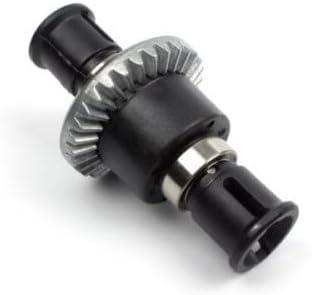
This image displays the BlackZon Drive Shaft Set, model 540126. It features a central differential gear assembly with two output shafts, designed for transmitting power to the wheels of an RC vehicle. The components are primarily black with a metallic gear and bearing visible.
3. パッケージ内容
Upon opening the package, please verify that all components are present and undamaged. The BlackZon Drive Shaft Set 540126 typically includes:
- Drive Shaft Assembly (Front)
- Drive Shaft Assembly (Rear)
- Associated hardware (e.g., pins, grub screws, bearings if applicable)
Note: Specific contents may vary slightly. Refer to the product packaging for a precise list.
4. 安全情報
Always prioritize safety when working with RC components and tools. Adhere to the following guidelines:
- 目の保護: Always wear safety glasses to protect your eyes from small flying debris or chemicals.
- ツールの取り扱い: Use appropriate tools for the task and handle them with care to prevent injury.
- 小さな部品: Keep small components away from children and pets to prevent choking hazards.
- 車両パワー: Disconnect the vehicle's battery before performing any maintenance or installation to prevent accidental activation.
- 鋭いエッジ: Be aware of any sharp edges on components that could cause cuts.
5. セットアップとインストール
Installation of the drive shaft set requires basic mechanical aptitude and appropriate tools. If you are unsure about any step, consult a qualified RC technician or refer to your vehicle's specific service manual.
- 車両を準備する: Ensure the RC vehicle is powered off and the battery is disconnected. Place the vehicle on a stable, clean surface.
- 古いドライブシャフトを取り外す: Carefully remove the wheels, then detach the existing drive shafts from both the differential output and the wheel hub. Note the orientation and any shims or spacers.
- コンポーネントの検査: Before installing the new drive shafts, inspect the differential output cups and wheel hubs for wear or damage. Replace any worn parts.
- 新しいドライブシャフトを取り付けます。 Insert the new BlackZon drive shafts into the differential output cups and then connect them to the wheel hubs. Ensure all pins and grub screws are securely fastened. Apply a small amount of thread-locking compound to metal-to-metal screws if recommended by your vehicle's manufacturer.
- 組み立て直す: Reattach the wheels and ensure all fasteners are tightened to the manufacturer's specifications.
- テスト機能: Manually rotate the wheels to check for smooth operation and proper engagement of the drive shafts.
6. 運用ガイドライン
While drive shafts are passive components, their longevity is directly affected by how the RC vehicle is operated. Adhere to these guidelines:
- Avoid Excessive Stress: Minimize sudden acceleration, hard landings, and impacts that can put undue stress on the drive train.
- Proper Gearing: Ensure your vehicle's gearing is appropriate for the motor and terrain to prevent overloading the drive shafts.
- 地形認識: Avoid operating in conditions that could cause the drive shafts to bind or become clogged with debris (e.g., thick mud, deep sand).
- 定期点検: Periodically check the drive shafts for signs of wear, bending, or damage during operation.
7. メンテナンス
Regular maintenance will extend the life of your BlackZon Drive Shaft Set:
- クリーニング: After each use, especially in dirty or wet conditions, clean the drive shafts to remove dirt, dust, and debris. A soft brush and compressed air can be effective.
- 潤滑: Apply a small amount of appropriate grease or lubricant to the universal joints or CV joints (if applicable) to reduce friction and wear. Consult your vehicle's manual for recommended lubricants.
- 検査: Regularly inspect the drive shafts for any signs of wear, cracks, bends, or loose connections. Pay close attention to the pins, bearings, and joint areas.
- ファスナーチェック: Ensure all screws and pins holding the drive shafts in place are tight. Re-tighten as necessary.
- ベアリングチェック: If your drive shafts incorporate bearings, ensure they spin freely and are not gritty. Replace worn bearings promptly.
8。 トラブルシューティング
This section addresses common issues related to drive shafts:
| 症状 | 考えられる原因 | 解決 |
|---|---|---|
| ドライブトレインからのクリック音や軋み音 | Worn or damaged universal joints/CV joints; debris in joints; loose pins. | Inspect and clean joints. Replace worn components or tighten loose pins. |
| 動作中の振動 | Bent drive shaft; unbalanced wheel; worn bearings. | Inspect drive shaft for bends and replace if necessary. Check wheel balance and replace worn bearings. |
| Loss of power to wheels | Broken drive shaft; stripped differential output cup or wheel hub. | Inspect drive shafts for breakage. Check differential output and wheel hub for damage and replace as needed. |
| Drive shaft pops out | Excessive suspension travel; incorrect length drive shaft; worn outdrive cups. | Check suspension limits. Ensure correct drive shaft length for your vehicle. Replace worn outdrive cups. |
9. 仕様
Key specifications for the BlackZon Drive Shaft Set 540126:
- モデル: 540126
- ブランド: BlackZon
- メーカー: HPI
- 商品の重量: 7オンス(約198グラム)
- ASIN: B0CDCD1JVX
- 推奨年齢: 8 months and up (for handling the product, not for operating an RC vehicle)
10. 保証とサポート
BlackZon products are manufactured to high standards. For information regarding warranty coverage, terms, and conditions, please refer to the warranty card included with your purchase or visit the official BlackZon website. For technical support, replacement parts, or further assistance, please contact your retailer or the manufacturer directly. Keep your proof of purchase for warranty claims.
