
1.製品オーバーview
The Xoopar Octopus Gamma is a versatile 4-in-1 multi-connector USB hub with an integrated 3000mAh power bank. Designed for convenience and portability, it allows you to charge various devices simultaneously and provides a power boost when an external power source is unavailable. This product is made from recycled plastic and features a compact, lightweight design.

Image 1.1: The Xoopar Octopus Gamma with its four distinct connectors: Lightning, USB-C, Micro USB, and USB-A.

Image 1.2: Key features of the Octopus Gamma, including recycled plastic construction, readiness for use, dual charging capability, and its 4-in-1 multi-adapter functionality.
2. セットアップ
The Xoopar Octopus Gamma is designed for immediate use. No complex setup is required. Simply identify the appropriate connector for your device.
2.1 コネクタの識別
The device features four types of connectors:
- 稲妻: For Apple devices (iPhone, iPad, AirPods).
- USB-C: For modern Android phones, tablets, and other USB-C compatible devices.
- マイクロUSB: For older Android phones, power banks, and various accessories.
- USB-A: The standard USB connector for connecting to power adapters, computers, or other USB-A ports.
画像2.1: 詳細 view of the Octopus Gamma's connectors, clearly indicating Lightning, USB-C, Micro USB, and USB-A ports.
3. 操作手順
3.1 デバイスの充電
- Identify the correct connector for your device (Lightning, USB-C, or Micro USB).
- 適切なコネクタをデバイスの充電ポートに差し込みます。
- Connect the USB-A end of the Octopus Gamma to a power source. This can be a wall adapter, computer USB port, or car charger.
- Your device will begin charging. The Octopus Gamma can charge up to two devices simultaneously if connected to a sufficient power source.

Image 3.1: The Octopus Gamma actively charging a smartphone, illustrating its function as a portable power source.
3.2 内蔵パワーバンクの使用
The Octopus Gamma includes a 3000mAh internal battery for portable charging when no external power source is available.
- Ensure the internal power bank is charged (see Section 3.3).
- Plug the appropriate connector (Lightning, USB-C, or Micro USB) into your device.
- The Octopus Gamma will automatically begin supplying power from its internal battery to your device.
- The power bank can provide a significant boost to your smartphone's battery, helping to prevent power loss during travel or emergencies.
3.3 Recharging the Octopus Gamma Power Bank
The internal power bank of the Octopus Gamma recharges automatically when the USB-A connector is plugged into an external power source and you are simultaneously charging another device. This ensures the power bank is always ready for use.
- Connect the USB-A end of the Octopus Gamma to a wall adapter, computer, or other USB-A power source.
- Connect one of the output connectors (Lightning, USB-C, or Micro USB) to a device you wish to charge.
- The Octopus Gamma will charge your device and its internal power bank simultaneously.
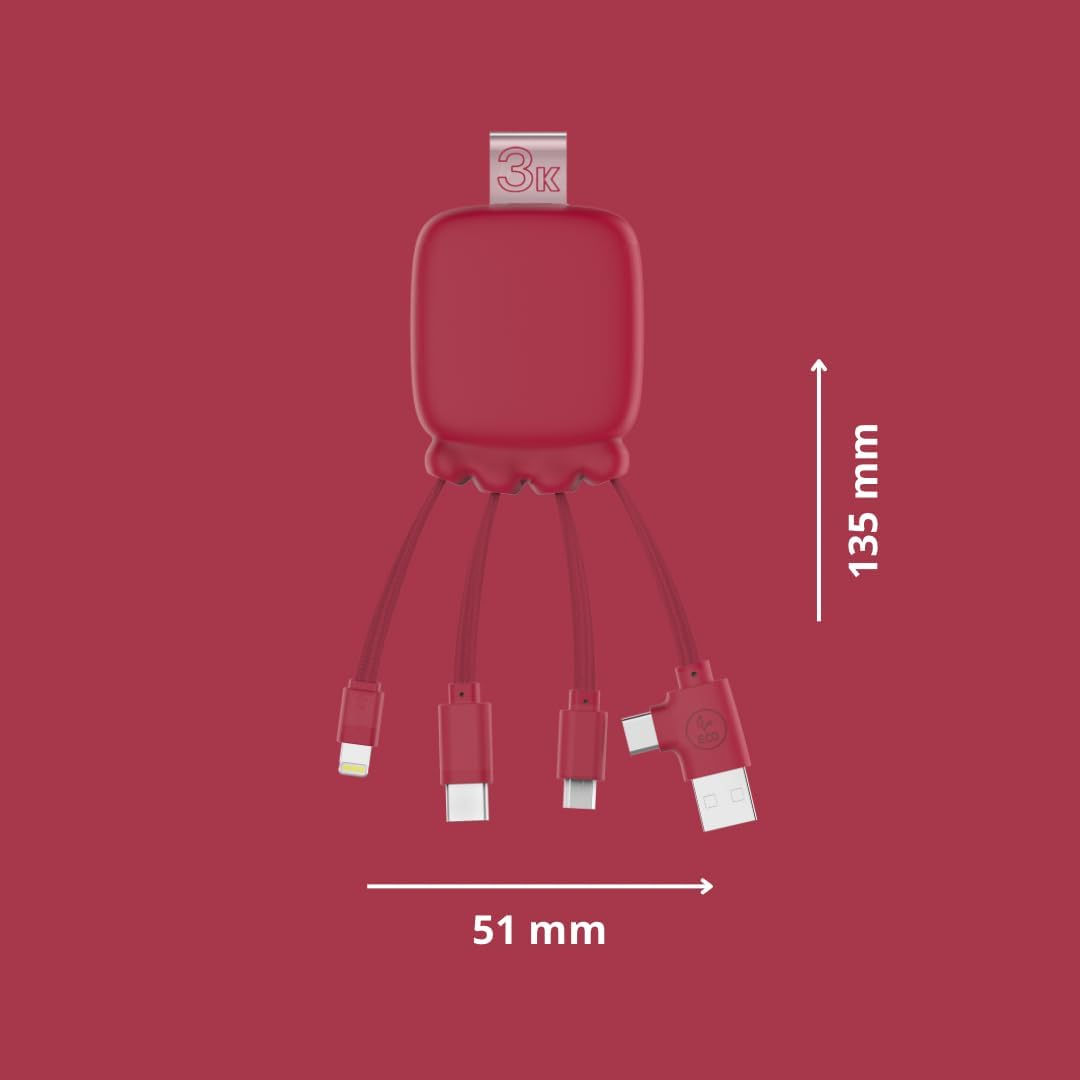
Image 3.2: The Octopus Gamma connected to a power strip, demonstrating simultaneous charging of both the connected device and the internal power bank.

Image 3.3: The Octopus Gamma in a typical use environment, connected to a laptop, alongside a keyboard and smartphone.
4. メンテナンス
To ensure the longevity and optimal performance of your Xoopar Octopus Gamma, follow these maintenance guidelines:
- クリーニング: 柔らかく乾いた布でデバイスを拭いてください。刺激の強い化学薬品や研磨剤の使用は避けてください。
- ストレージ: デバイスは直射日光や極端な温度を避け、涼しく乾燥した場所に保管してください。
- 取り扱い: Avoid excessive bending or pulling of the cables to prevent damage to the connectors or internal wiring.
- バッテリーのケア: For optimal battery life, avoid fully discharging the internal power bank frequently. Recharge it regularly.
5。 トラブルシューティング
| 問題 | 考えられる原因 | 解決 |
|---|---|---|
| デバイスが充電されていません。 | 間違ったコネクタが使用されています。 電源の問題。 Internal power bank depleted. | Ensure the correct connector is firmly plugged into your device. Try a different USB-A port or wall adapter. Recharge the Octopus Gamma by connecting its USB-A end to a power source. |
| 充電が遅い。 | ソースからの出力電力が低い。 複数のデバイスを充電します。 | より高いワットを使用するtag電源アダプター。 充電を高速化するには、デバイスを 1 台ずつ充電します。 |
| Octopus Gamma not recharging. | Faulty USB-A connection. 電源の問題。 | Ensure the USB-A connector is securely plugged into a working power source. Try a different USB-A port or wall adapter. |
6. 仕様
| 特徴 | 詳細 |
|---|---|
| モデル名 | Gamma RP |
| モデル番号 | XP61075 |
| コネクタ | Lightning, Micro USB, USB Type A, USB Type C |
| パワーバンク容量 | 3000mAh |
| 電池のタイプ | リチウムポリマー |
| 重さ | 70グラム |
| 寸法(長さ×幅×高さ) | 13.5 x 5.1 x 1.7 cm |
| 特集 | Fast Charging, Lightweight, Recycled Plastic Construction |
| 対応デバイス | Smartphones, Tablets, Laptops, Speakers, Earphones (Universal compatibility) |
| メーカー | XOOPAR |
| 原産国 | 中国 |

Image 6.1: Dimensions of the Octopus Gamma, showing its compact size.
7. 保証とサポート
7.1 保証情報
The Xoopar Octopus Gamma (Model XP61075) comes with a 2年間のメーカー保証この保証は、通常の使用状況における材料および製造上の欠陥を対象としています。保証請求の際は、購入証明書を保管してください。
以下のものは保証の対象外となります:
- 誤用、乱用、事故、または怠慢によって生じた損害。
- 許可されていない修理または改造。
- 通常の消耗。
7.2 カスタマーサポート
For technical assistance, warranty claims, or any questions regarding your Xoopar Octopus Gamma, please contact Xoopar customer support through their official web製品を購入したサイトまたは小売店。
You can visit the official Xoopar store for more information: Xoopar Official Store