
1.製品オーバーview
The UNI-T UT372 is a non-contact digital laser tachometer designed for measuring the rotational speed (RPM) and count of objects. It utilizes a laser pointer and reflective tape to provide accurate and stable measurements without physical contact. This device is suitable for various industrial and scientific applications.
主な特徴:
- 5-digit LCD screen with RPM/count and time dual display.
- Measurement modes: MAX (Maximum), MIN (Minimum), AVG (Average), and Normal.
- 調整可能ampling rate (0.5-255 seconds).
- Automatic power-off function (cancelable).
- Selectable laser pointer (on/off).
- Clock and time setting capabilities.
- データホールド機能。
- Low power consumption, allowing for approximately 40 hours of continuous operation.
- Equipped with a USB interface for data transfer (UT372 only).
- Certified with CE and UKCA standards.
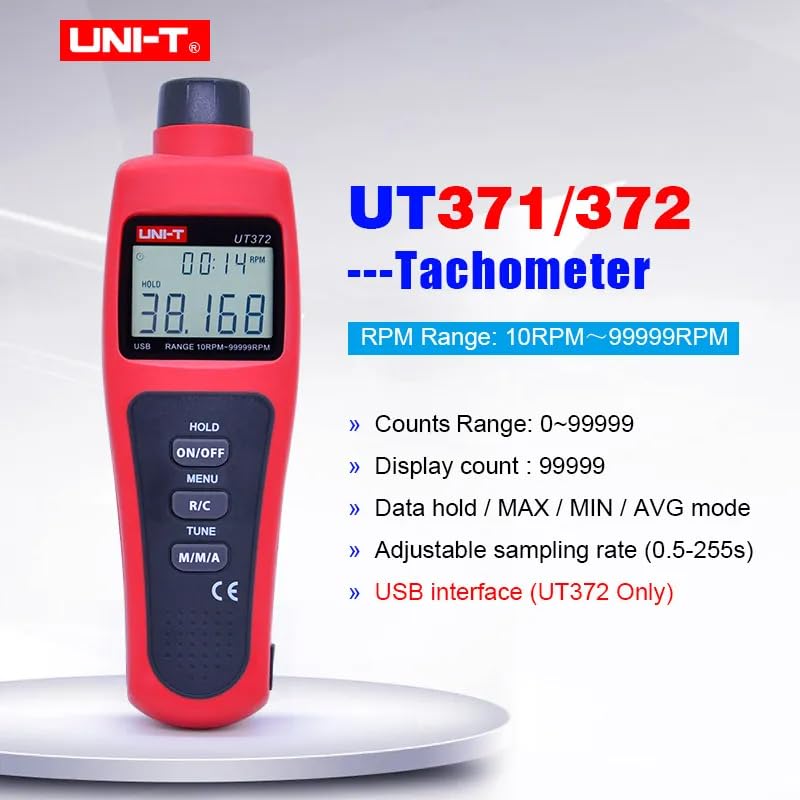
Image 1.1: The UNI-T UT372 tachometer displaying its main features and specifications.
2. 安全情報
デバイスを操作する前に、すべての安全に関する指示をよく読んで理解してください。これらの指示に従わない場合、怪我をしたり、デバイスが損傷したりする可能性があります。
- Do not look directly into the laser beam. The laser is a Class 2 laser product.
- デバイスの改造や分解は行わないでください。修理は資格のある担当者のみが行ってください。
- 使用する前に、電池ボックスがしっかりと閉まっていることを確認してください。
- 長期間使用しない場合は、液漏れを防ぐため電池を取り外してください。
- デバイスを水、ほこり、極端な温度から遠ざけてください。
3. パッケージ内容
Carefully unpack the box and check if all items are present and undamaged. If any item is missing or damaged, contact your supplier.
- UNI-T UT372 Digital Laser Tachometer
- 反射テープ
- USB Interface Cable (for UT372 only)
- PC Software CD (for UT372 only)
- 英語ユーザーマニュアル
- 電池(1.5V LR6×4)

Image 3.1: The UNI-T UT372 tachometer and its standard accessories as packaged.
4. 製品レイアウトとパネルの紹介
Familiarize yourself with the components and controls of your UT372 tachometer.

画像4.1: 前面と側面 view of the UT372 tachometer with labeled components.
- Tachometer Light Source: 測定用のレーザー光を放射します。
- LCDディスプレイ: Shows measurement readings, modes, and other indicators.
- HOLD / ON/OFF Button: Press to power on/off the device. Short press to activate/deactivate data hold.
- メニューボタン: Accesses the menu for settings adjustments.
- R/C (RPM / Counts) Button: Toggles between RPM and Count measurement modes.
- TUNEボタン: Used for adjusting settings within the menu.
- M/M/A (MAX/MIN/AVG) Button: Cycles through Maximum, Minimum, and Average measurement modes.
- USB Port (UT372 only): データ転送のためにコンピューターに接続します。
5. セットアップとバッテリーの取り付け
5.1 バッテリーの取り付け
- デバイスの背面にある電池ボックスのカバーを見つけます。
- カバーをスライドさせるか、ねじを外して開きます。
- Insert four 1.5V LR6 (AA) batteries, ensuring correct polarity (+/-).
- 電池カバーをしっかりと閉じてください。
5.2 Applying Reflective Tape
For accurate non-contact measurement, apply a piece of reflective tape to the rotating object whose speed or count you wish to measure. Ensure the tape is clean and securely attached.
6. 操作手順
6.1 電源オン/オフ
を押す HOLD / ON/OFF button to turn the tachometer on or off.
6.2 RPM Measurement
- Ensure the device is in RPM measurement mode (indicated on the LCD). If not, press the ラジコン 切り替えるボタン。
- Point the laser beam at the reflective tape on the rotating object.
- Maintain a measurement distance between 50mm and 200mm (2 to 8 inches) from the target.
- The RPM reading will be displayed on the LCD.
- 注記: If no signal is detected within 7 seconds, the LCD will display "0.0000". If the RPM exceeds 99999, the LCD will display "OL" (Overload).

Image 6.1: Illustrates the correct distance and method for RPM measurement.
6.3 Counts Measurement
- を押す ラジコン button to switch to Count measurement mode.
- Point the laser beam at the reflective tape on the object.
- The device will count the number of times the laser beam reflects off the tape.
6.4 Mode Selection (MAX/MIN/AVG)
を押す まあ ボタンを繰り返し押すと、次の表示モードが切り替わります。
- MAX: 最大の測定値を表示します。
- 分: 最小測定値を表示します。
- AVG: Displays the average measured value.
- 普通: Displays the current real-time measurement.
6.5データ保持
During measurement, a short press of the HOLD / ON/OFF button will freeze the current reading on the display. Press it again to release the data hold and resume live measurement.
6.6年ampリングレート調整
Sampling rate can be adjusted from 0.5 to 255 seconds. Refer to the detailed user manual for specific steps on how to access and change this setting via the メニュー そして チューニング ボタン。
6.7 USB Interface (UT372 Only)
The UT372 model features a USB port for connecting to a computer. Use the provided USB cable and PC software CD to transfer measurement data for analysis and logging. Follow the instructions provided with the software for installation and operation.
7. メンテナンス
- クリーニング: デバイスの清掃には、柔らかく乾いた布を使用してください。研磨剤入りの洗剤や溶剤は使用しないでください。
- ストレージ: Store the tachometer in a cool, dry place away from direct sunlight and extreme temperatures. Remove batteries if storing for extended periods.
- 反射テープ: Ensure the reflective tape is clean and free from damage for accurate readings. Replace as needed.
8。 トラブルシューティング
- デバイスの電源が入らない: 電池の取り付けを確認し、電池が消耗していないことを確認してください。必要に応じて交換してください。
- "0.0000" displayed during RPM measurement: Ensure the laser is correctly aimed at the reflective tape and the measurement distance is within 50-200mm. Check if the reflective tape is properly applied and clean.
- 「OL」が表示されました: The measured RPM exceeds the device's maximum range (99999 RPM).
- 不正確な読み取り: Verify the reflective tape is securely attached and clean. Ensure the target object is stable during measurement. Check for any obstructions in the laser path.
- 低バッテリーインジケーター: Replace batteries promptly when the low battery icon appears on the display.
9. 仕様
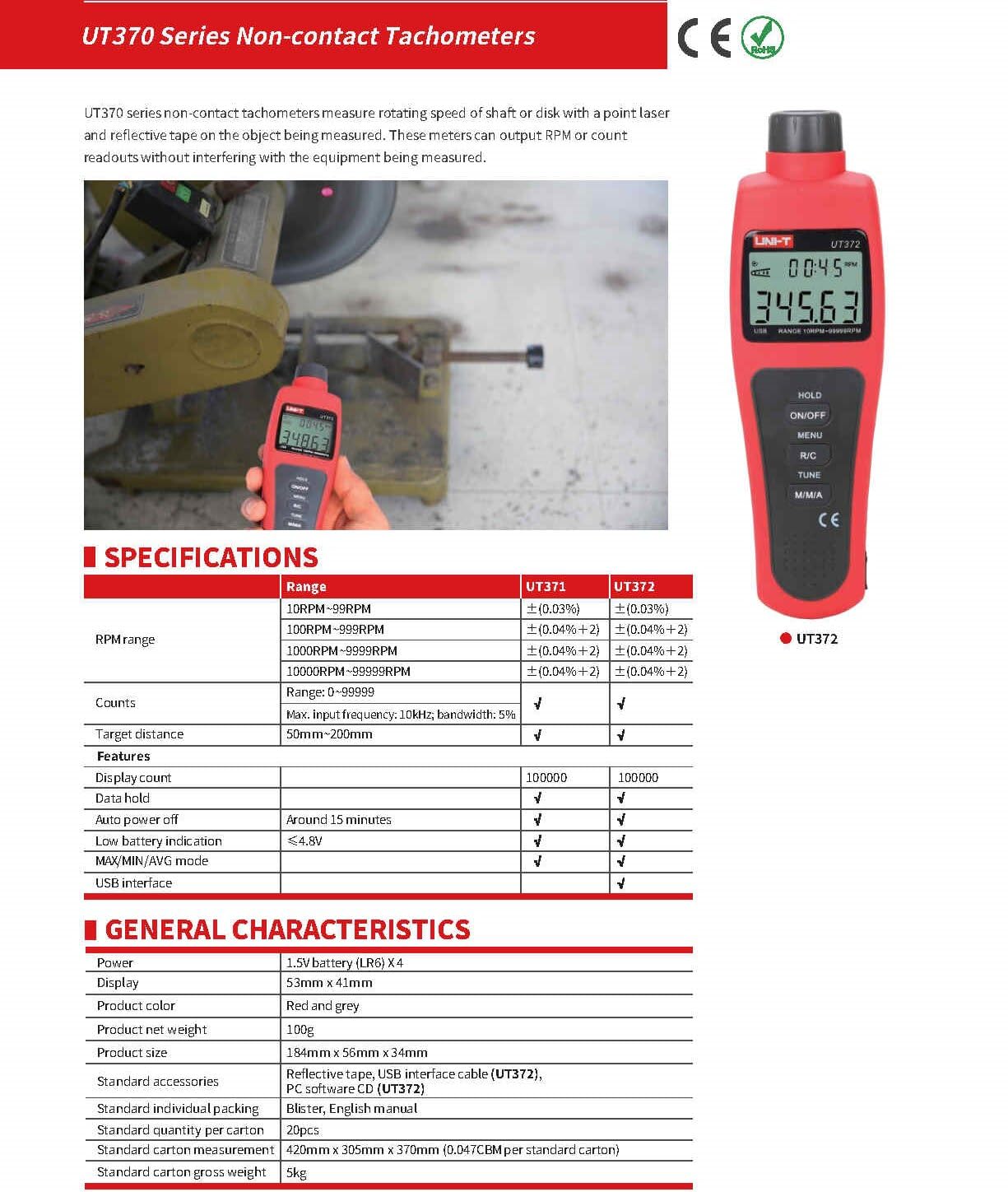
Image 9.1: Detailed specifications for the UT370 series tachometers.
| パラメータ | UT372 Specification |
|---|---|
| RPM範囲 | 10 RPM ~ 99999 RPM (Accuracy: ±(0.04%+2)) |
| Counts Range | 0〜99999 |
| 表示数 | 99999 |
| ターゲット距離 | 50mm~200mm |
| 最大入力周波数 | 10kHz, bandwidth: 5% |
| 力 | 1.5V Battery (LR6) x 4 |
| 画面 | 53mm×41mm液晶 |
| 製品の色 | 赤とグレー |
| 製品正味重量 | 100グラム |
| 製品サイズ | 184mm x 56mm x 34mm |
| 自動電源オフ | Around 15 minutes (cancelable) |
| 低バッテリー表示 | <4.8V |
| USBインターフェース | はい |
| 動作温度 | 0°C ~ 50°C (32°F ~ 122°F) |
| 保管温度 | -20°C ~ 60°C (-4°F ~ 140°F) |
| 湿度 | <80%RH(結露しないこと) |
10. 保証とサポート
UNI-T products are designed and manufactured to high quality standards. For warranty information, technical support, or service, please refer to the warranty card included with your product or contact your local UNI-T distributor or customer service center. Please have your product model number (UT372) and purchase date available when contacting support.