
1.製品オーバーview
The GOLOZA LA-C337 is a versatile digital alarm clock featuring a 180° rotatable projection, a large curved LED display, and a convenient USB charging port. It is designed for clear time display and easy operation.

Image 1.1: The GOLOZA Digital Projection Alarm Clock, showcasing its curved display and compact design, placed on a nightstand.
2. パッケージ内容
パッケージに以下の項目が含まれているか確認してください。
- GOLOZA Digital Projection Alarm Clock (LA-C337)
- マイクロUSBケーブル
- 電源アダプター
- ユーザーマニュアル
3 製品の特徴
- Curved LED Display: Large, clear digital time display with adjustable brightness.
- 180°投影: Projects time onto a wall or ceiling with adjustable brightness and rotation.
- デュアルアラーム: Set two independent alarms with progressive volume.
- スヌーズ機能: アラームが鳴った後も、さらに睡眠時間を確保できます。
- USB充電ポート: モバイルデバイスを便利に充電できます。
- メモリーバッテリー: Built-in button battery maintains time settings during power outages。
画像3.1: クローズアップ view of the GOLOZA Digital Projection Alarm Clock's clear, blue LED display, showing the time.
4. 初期設定
4.1電源接続
- Connect the Micro USB cable to the power input port on the back of the alarm clock.
- USB ケーブルのもう一方の端を付属の電源アダプターに差し込みます。
- Insert the power adapter into a standard electrical outlet. The clock display will light up.
注記: The built-in button battery serves as a backup for time and alarm settings during a power interruption. It does not power the main display or projection.
4.2 時刻と日付の設定
Specific button names are not provided, but typically these clocks have 'TIME SET', 'MODE', or similar buttons. Refer to the physical unit for exact button labels.
- を押し続けます 時間設定 button (or similar) to enter time setting mode. The hour digits will flash.
- 使用 +/- or 上/下 時間を調整するボタン。
- を押す 時間設定 もう一度ボタンを押すと、時間が確定し、分の設定に移ります。分の表示が点滅します。
- 使用 +/- or 上/下 分を調整するためのボタン。
- を押す 時間設定 button again to confirm minutes and exit time setting mode.
- Follow similar steps to set the date if your model supports it (usually by pressing the Time Set button multiple times to cycle through year, month, day).
5. 操作手順
5.1 アラームの設定
時計は 2 つの独立したアラーム (アラーム 1 とアラーム 2) をサポートします。
- を押し続けます アラーム1 button (or similar) to enter Alarm 1 setting mode. The alarm hour digits will flash.
- 使用 +/- or 上/下 ボタンでアラーム時間を調整します。
- を押す アラーム1 もう一度ボタンを押して時間を確定し、分の設定に移ります。アラームの分表示が点滅します。
- 使用 +/- or 上/下 アラームの分数を調整するボタン。
- を押す アラーム1 button again to confirm minutes and select the alarm sound (e.g., Beep, Chord, Bird Song).
- を押す アラーム1 button one more time to activate/deactivate Alarm 1 and exit setting mode. An alarm icon will appear on the display when active.
- このプロセスを繰り返す アラーム2 using the corresponding button.
5.2 ディスプレイの明るさの調整
The main LED display typically has multiple brightness levels.
- を押す 輝度 button (or a dedicated dimmer button) repeatedly to cycle through the available brightness levels (e.g., High, Medium, Low, Off).
5.3 Using Projection Feature
投影機能を使用すると、 view the time on a wall or ceiling.
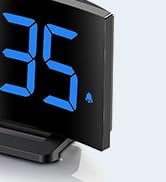
Image 5.1: The GOLOZA Digital Projection Alarm Clock actively projecting the time onto a surface, demonstrating its projection capability.
- 投影の有効化/無効化: を押す プロジェクター button (or similar) to turn the projection on or off.
- 投影の明るさを調整する: While the projector is on, press the プロジェクターの明るさ button (or the same Projector button repeatedly) to cycle through brightness levels (e.g., High, Medium, Low).
- 回転投影: The projector lens can be physically rotated 180° to adjust the projection angle. Some models may also have a button to flip the projected image.
5.4 USB充電ポートの使用
The integrated USB port allows you to charge external devices.
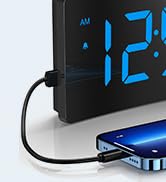
Image 5.2: The GOLOZA Digital Projection Alarm Clock with a smartphone connected to its USB charging port, illustrating its charging capability.
- Connect your device's USB charging cable to the USB output port on the alarm clock.
- 目覚まし時計の電源がオンになっていることを確認してください。
- The clock's USB port provides power to charge your device.
5.5スヌーズ機能
アラームが鳴ったら、 スヌーズ button (often a large button on top) to temporarily silence the alarm. The alarm will sound again after a preset interval (e.g., 9 minutes).
5.6 アラーム音量調整
The alarm volume is progressive, meaning it starts soft and gradually increases. Some models may offer adjustable volume levels.
- 利用可能な場合は、 音量 button (or a dedicated switch) to adjust the alarm volume to your preferred level.
6. メンテナンス
- クリーニング: 時計は柔らかく乾いた布で拭いてください。研磨剤入りの洗剤や溶剤は使用しないでください。
- 配置: 直射日光、熱源、湿気を避け、安定した平らな面の上に時計を置いてください。
- バッテリー: The internal button battery is for memory backup. If the clock consistently loses settings after a power outage, the battery may need replacement by a qualified technician.
7。 トラブルシューティング
| 問題 | 考えられる原因 | 解決 |
|---|---|---|
| 時計の表示がオフになっています。 | 電源が接続されていません。 | 電源アダプタが時計と機能している電源コンセントにしっかりと差し込まれていることを確認します。 |
| 投影が暗かったり不鮮明です。 | Incorrect brightness setting; dirty lens; too much ambient light. | Adjust projection brightness. Clean the projector lens with a soft cloth. Reduce ambient light in the room. |
| アラームは鳴りません。 | Alarm is not activated; alarm volume is too low. | Ensure the alarm icon is visible on the display. Check and adjust alarm volume. |
| Time settings are lost after power outage. | Internal backup battery is depleted or faulty. | The internal button battery may need replacement. Contact customer support. |
| USB充電が機能しません。 | Clock not powered; faulty USB cable; device not compatible. | Ensure the clock is powered. Try a different USB cable. Check device compatibility. |
8. 仕様
| 特徴 | 詳細 |
|---|---|
| モデル番号 | LA-C337 |
| 寸法(長さ×幅×高さ) | 17.7 x 3.81 x 7.8 cm |
| 重さ | 310グラム |
| ブランド | ゴローザ |
| 色 | 青 |
| スタイル | Modern/Elegant/Minimalist |
| 特集 | Integrated Design, Built-in Button Battery (for memory), USB Charging Port, Super Clear Projection, Progressive Volume, Curved Display |
| 電源 | Electrical (USB Powered) |
| 形 | Rectangular, Curved Screen |
| 電池付属 | No (Internal button battery for memory backup is pre-installed but not user-replaceable) |
| UPC/GTIN | 647697054284 |
9. 保証とサポート
GOLOZA is committed to providing quality products and customer satisfaction.
- 返品規則: 6 Months Return period.
- 保証: ご購入日より24ヶ月の保証。
- サポート: Lifetime Support is provided for this product.
For any questions, technical assistance, or warranty claims, please contact GOLOZA customer service through your purchase platform or the official GOLOZA webサイト。