
1. はじめに
This manual provides detailed instructions for the installation, operation, maintenance, and troubleshooting of your Polarlander Q5S Portable Wireless Carplay & Android Auto Motorcycle Navigator. Please read this manual thoroughly before using the device to ensure proper function and safety.
2.製品オーバーview
The Polarlander Q5S is a 5-inch IPS touch screen monitor designed for motorcycles, offering wireless CarPlay and Android Auto functionality. It features IPX7 waterproofing, dual Bluetooth connectivity, voice control, and a thief-proof detachable design.

Figure 2.1: Polarlander Q5S device with mounting brackets and power cable.
3. パッケージ内容
パッケージにすべてのアイテムが揃っていることを確認します。
- Polarlander Q5S Main Unit
- Motorcycle Mounting Bracket Kit (U-bolt, ball mounts, screws, nuts, wrench)
- Power Cable (ACC +12V and Ground)
- USB Cable (for 5V, 1.5A power supply)
- 取扱説明書

Figure 3.1: Complete package contents including the main unit, mounting hardware, and cables.
4. セットアップとインストール
Follow these steps to install the Q5S device on your motorcycle.
4.1デバイスの取り付け
- 場所を選択: Select a suitable position on your motorcycle's handlebars for optimal viewing and accessibility. Ensure it does not obstruct your view またはオートバイの制御。
- Attach the U-Bolt Bracket:
- Place the U-bolt around the handlebar.
- Secure the U-bolt with the provided nuts and the rubber padding to prevent scratching the handlebars. Tighten securely using the supplied wrench.
- Assemble the Ball Mount:
- Attach the ball mount arm to the U-bolt bracket.
- Connect the device's universal ball mount to the other end of the arm.
- Adjust the angle and position of the screen as desired, then tighten the hand screw mount to secure it.

Figure 4.1: Q5S device securely mounted on motorcycle handlebars.
Video 4.1: Installation demonstration of the Portable Motorcycle Monitor Carplay GPS Q5S. This video shows how to attach the device to motorcycle handlebars using the provided U-bolt and ball mount system, including tightening the components and adjusting the screen angle.
4.2電源接続
The device requires a 12-24V power supply. Connect the power cable (ACC +12V and Ground) to your motorcycle's electrical system. Alternatively, it can be powered by a USB cable for 5V, 1.5A or above.
- Connect the red wire to the ACC (switched 12V) power source.
- 黒いワイヤーをアースに接続します。
- すべての接続が安全で絶縁されていることを確認してください。
Video 4.2: A3731 Motorcycle CarPlay power connection. This video demonstrates the process of connecting the power wires to the motorcycle's battery terminals, ensuring a proper electrical supply for the device.
Video 4.3: Wireless Motorcycle Apple Carplay 7 Inch GPS Navigation setup. This video illustrates the initial setup steps, including powering on the device and navigating through the main menu to access settings.
Video 4.4: A4058 Motorcycle CarPlay & Android Auto installation. This video provides a comprehensive guide to installing the device, covering both physical mounting and electrical connections, and demonstrating the initial boot-up sequence.
5. 操作手順
5.1 電源のオン/オフ
The device will power on automatically when the motorcycle's ignition is turned on (if connected to ACC power). To manually power off, press and hold the power button located on the side of the unit.
5.2 ワイヤレスCarPlay/Android Auto接続
The Q5S supports wireless connection to both Apple CarPlay and Android Auto.
- Bluetoothを有効にする: スマートフォンで Bluetooth を有効にします。
- ペアデバイス: On the Q5S screen, navigate to the Bluetooth settings or CarPlay/Android Auto section. 検索する available devices on your phone and select "FUYU" (or similar device name displayed on the Q5S). Confirm the pairing code if prompted.
- アクセスを許可します: Grant necessary permissions on your smartphone for CarPlay or Android Auto to function correctly.
- CarPlay/Android Autoを起動します: Once paired, CarPlay or Android Auto will launch automatically on the Q5S screen.

Figure 5.1: Apple CarPlay interface displayed on the Q5S screen during motorcycle operation.

図5.2: 並べて表示 view of Apple CarPlay and Android Auto interfaces on the Q5S, demonstrating wireless connectivity with a smartphone.
5.3 音声制御
Utilize Siri (for CarPlay) or Google Assistant (for Android Auto) for hands-free operation. Activate voice control by pressing the voice command button on the screen or using your helmet's voice assistant feature (if supported and paired).
- "Hey Siri, open the map."
- "Google, play music."
- "Hey Siri, call [Contact Name]."

Figure 5.3: Voice control functionality demonstrated on the Q5S screen, allowing hands-free commands for navigation, music, and calls.
5.4 ナビゲーション
Access navigation applications like Apple Maps, Google Maps, or Waze through CarPlay or Android Auto. Input destinations via voice command or the touch screen.

Figure 5.4: Navigation map displayed on the Q5S screen, showing route information and current location.
5.5音楽の再生
Stream music from your smartphone's music apps. Audio can be played through the built-in speaker, or wirelessly to your Bluetooth helmet/earphones.

Figure 5.5: Music playback interface on the Q5S, illustrating dual Bluetooth connectivity for audio output to a helmet or earphones.
5.6 電話とメッセージ
Make and receive calls, and send messages using voice commands or the touch screen, provided your helmet has a paired Bluetooth headset.
5.7 明るさ調整
Adjust screen brightness for optimal visibility in various lighting conditions. The 1000-nit IPS anti-glare screen is designed for clear outdoor visibility.
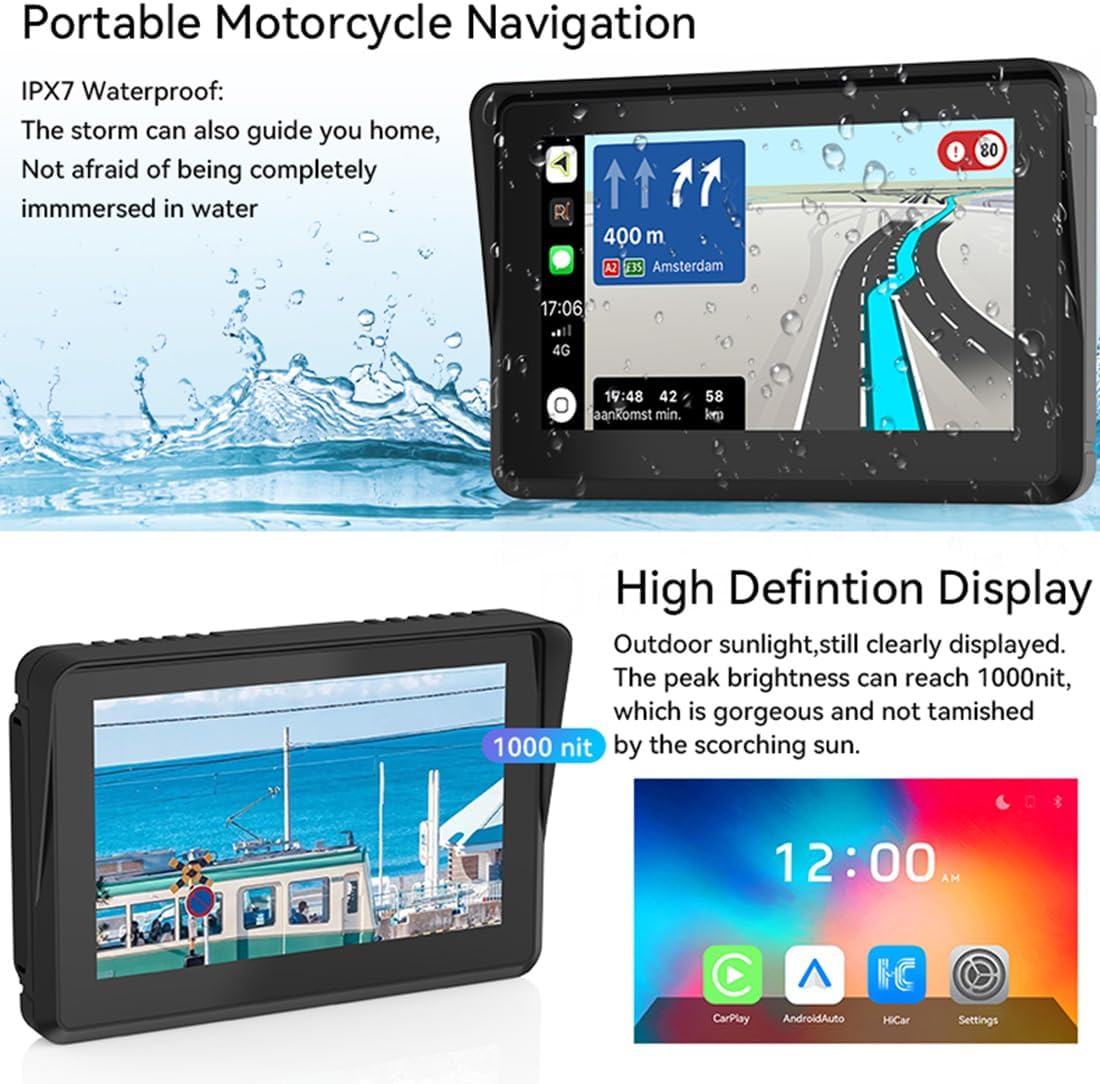
Figure 5.6: High-definition display of the Q5S, showcasing its clarity and brightness even in direct sunlight.
6. メンテナンス
6.1 画面のクリーニング
画面を拭くときは、柔らかく糸くずの出ない布を使用してください。頑固な汚れには、軽く拭いてください。amp布を水またはスクリーンに安全なクリーナーで拭いてください。刺激の強い化学薬品は避けてください。
6.2 防水(IPX7)
The Q5S is IPX7 waterproof, meaning it can withstand immersion in water up to 1 meter for 30 minutes. This protects it from rain and splashes during motorcycle rides. Ensure all ports are securely covered when exposed to water.

Figure 6.1: The Q5S device demonstrating its IPX7 waterproof capability, suitable for all weather conditions.
6.3 Anti-Theft Design
The device features a thief-proof detachable design. When leaving your motorcycle unattended, you can easily detach the main unit from its mount to prevent theft. The mounting bracket remains securely attached to the handlebars.

Figure 6.2: Anti-theft features of the mounting bracket, including special screws and nuts for secure attachment and easy detachment of the main unit.
7。 トラブルシューティング
| 問題 | 考えられる原因 | 解決 |
|---|---|---|
| デバイスの電源が入りません。 | 電源が供給されていないか、配線が間違っています。 | Check power cable connections to the motorcycle battery/ACC. Ensure the motorcycle ignition is on. |
| CarPlay/Android Autoに接続できません。 | Bluetooth not enabled on phone, device not paired, or app permissions denied. | Ensure Bluetooth is on and visible on your phone. Re-pair the device. Grant all necessary app permissions. |
| 音声出力なし。 | Volume too low, incorrect audio output selected, or Bluetooth headset not connected. | Increase device volume. Check audio output settings (built-in speaker, Bluetooth headset, AUX). Ensure Bluetooth headset is properly paired. |
| Screen is dim or hard to see in sunlight. | 明るさの設定が低すぎます。 | Adjust screen brightness in the device settings. The Q5S features a 1000-nit display for optimal outdoor visibility. |
8. 仕様
- モデル: Q5S
- 表示サイズ: 5インチ
- 解決: 800 x 480 IPS HD Touch Screen
- 輝度: 1000ニット
- 防水等級: IPX7
- 接続性: Wireless CarPlay, Wireless Android Auto, Dual Bluetooth 5.0, Wi-Fi
- 電源: 12-24V (ACC +12V and Ground), 5V/1.5A via USB
- オーディオ出力: Built-in Speaker, AUX, Stereo (via Bluetooth headset)
- 特別な機能: Voice Control (Siri/Google Assistant), Anti-glare screen, Thief-proof detachable design
- 商品の重量: 1.61ポンド
- パッケージ寸法: 6.34 x 4.57 x 4.17インチ
9. 保証とサポート
For warranty information or technical support, please refer to the contact details provided with your purchase or visit the official Polarlander webサイトでご確認ください。購入証明として購入レシートを保管してください。
メーカー: PolarLander
発売日: 28年2023月XNUMX日