
1. はじめに
This manual provides detailed instructions for the installation, operation, and maintenance of your SECULINK C17-4MP Dual-Band WiFi Dome Security Camera. This camera is designed for outdoor surveillance, featuring 4MP resolution, pan/tilt/zoom capabilities, automatic tracking, human detection, and color night vision. Please read this manual thoroughly before use to ensure proper functionality and safety.
2. パッケージ内容
パッケージにすべてのアイテムが含まれていることを確認します。
- SECULINK C17-4MP Dome Security Camera
- 電源アダプター(充電器)
- 取り付けネジと壁プラグ
- ネットワークケーブル用防水キット(該当する場合)
- クイックスタートガイド
3.製品オーバーview
The SECULINK C17-4MP camera features a robust dome design suitable for outdoor environments. Key components include:
- カメラレンズ: ビデオ foo をキャプチャしますtage.
- 赤外線LED: 夜間視力のための照明を提供します。
- White Light LEDs (Floodlight): カラー夜間視力を強化し、抑止力として機能します。
- マイクロフォン: オーディオ入力と双方向通信用。
- スピーカー: オーディオ出力と双方向通信用。
- アンテナ: For dual-band 2.4GHz/5GHz Wi-Fi connectivity.
- マイクロSDカードスロット: 最大256GBのローカルストレージをサポートします。
- リセットボタン: 工場出荷時の状態にリセットします。
- 電源ポート: DC12V電源入力。

画像3.1: 以上view of the SECULINK C17-4MP camera and its mobile application interface.
4. セットアップ
4.1 アプリのダウンロードとアカウント登録
- ダウンロード セキューアイ mobile application from the App Store (iOS) or Google Play Store (Android).
- アプリを開き、画面の指示に従って新しいアカウントを登録するか、既にアカウントをお持ちの場合はログインします。
4.2 カメラの電源を入れる
Connect the provided power adapter to the camera's power port and plug it into an electrical outlet. The camera will initiate its self-test sequence, indicated by a rotating motion and status light changes.
4.3 Wi-Fiへの接続
The SECULINK C17-4MP supports dual-band Wi-Fi (2.4GHz and 5GHz) for flexible network connectivity.
- モバイル デバイスが、カメラを接続する予定の Wi-Fi ネットワークに接続されていることを確認します。
- In the SECUEYE app, tap the "Add Device" or "+" icon.
- カメラのモデルを選択するか、カメラの QR コード (ある場合) をスキャンします。
- Follow the app's instructions to enter your Wi-Fi network name (SSID) and password.
- The app will guide you through the pairing process, which may involve scanning a QR code displayed on your phone with the camera lens or listening for an audio prompt.
- Once connected, the camera's status light will indicate a successful connection (refer to the app or quick start guide for specific light indicators).
4.4カメラの取り付け
The camera is designed for wall mounting and is IP65/IP66 weatherproof, making it suitable for outdoor installation.
- 希望する性能が得られる適切な設置場所を選択してください view角度が適切で、Wi-Fi 範囲内にあること。
- 取り付けテンプレート (付属している場合) またはカメラ ベースを使用して、壁にドリル穴の位置をマークします。
- 穴を開けて壁プラグを挿入します。
- 付属のネジを使用してカメラベースを壁に固定します。
- Attach the camera body to the base.
- Ensure all cable connections are secure and protected from weather using the waterproof kit if necessary.
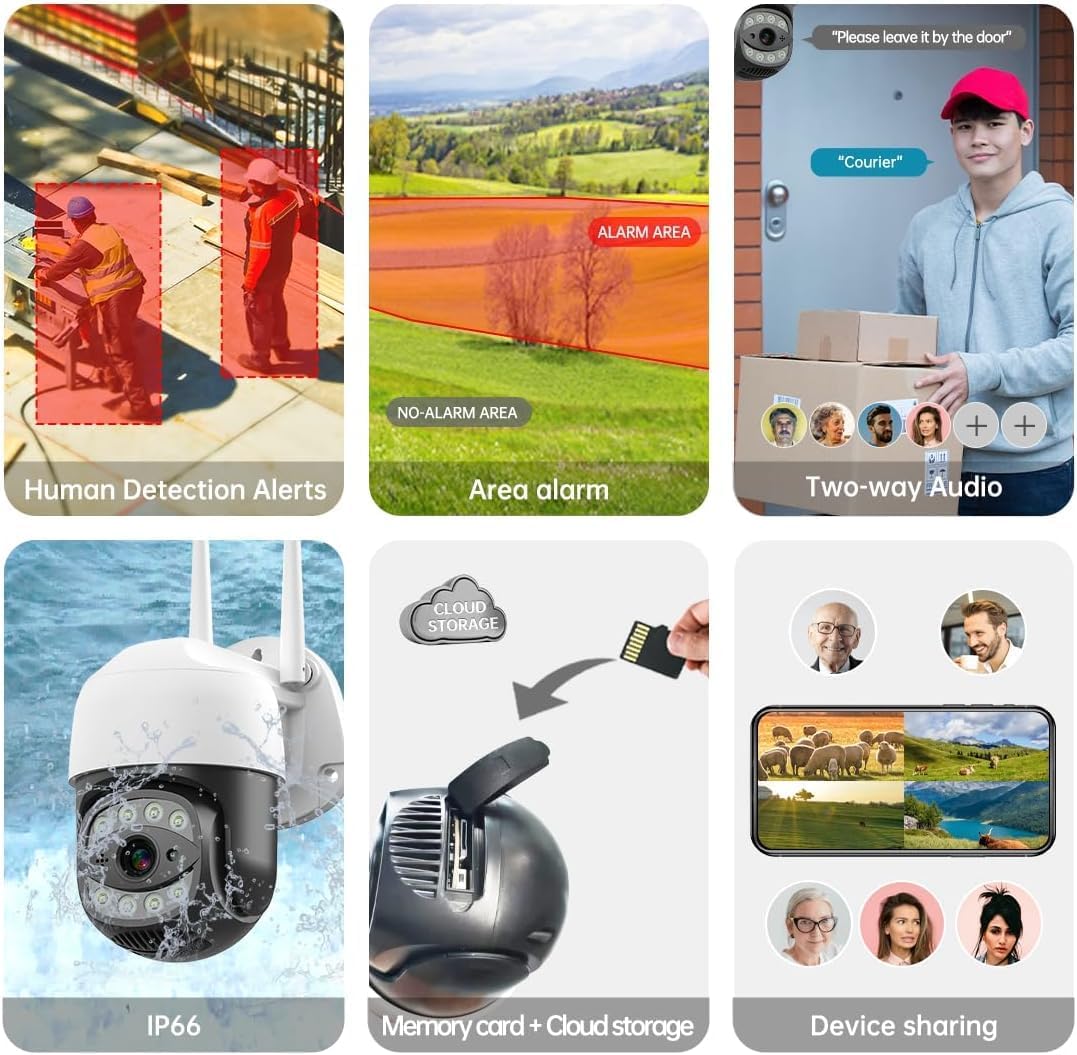
Image 4.1: The SECULINK C17-4MP camera is rated IP66 for dust and water resistance, suitable for various weather conditions.
5. 操作手順
5.1 ライブ View と再生
ライブビデオフィードにアクセスしてview 記録されたfootage through the SECUEYE app. The camera provides 4MP (2560x1440p) resolution for clear images.

Image 5.1: Visual comparison demonstrating the enhanced clarity of 5MP resolution over lower resolutions.
5.2 パン、チルト、デジタルズーム(PTZ)
カメラの viewing angle remotely using the SECUEYE app. The camera offers:
- 水平回転: 335度
- 垂直傾斜: 90度
- デジタルズーム: 10倍の倍率
Use pinch-to-zoom gestures on your mobile device to digitally zoom in on specific areas of interest.

Image 5.2: Demonstrates controlling the camera's pan and tilt functions via the mobile app.

Image 5.3: Illustration of the 10x digital zoom feature, allowing closer inspection of details.
5.3 Automatic Tracking and Human Motion Detection
The camera features intelligent detection capabilities to enhance security monitoring.
- 自動追跡: When enabled, the camera will automatically detect and follow moving human figures within its field of view, recording their path.
- 人間の動きの検出: Advanced algorithms distinguish human activity from other movements (e.g., pets, swaying branches), reducing false alarms.
- アラート: Upon detection, the camera can send real-time alerts to your mobile phone.
- Floodlight and Sound Alarm: Built-in spotlights activate upon motion detection at night, and a security siren can be triggered as an additional deterrent.

Image 5.4: The camera's AI Humanoid Detection identifies human presence and sends alerts.
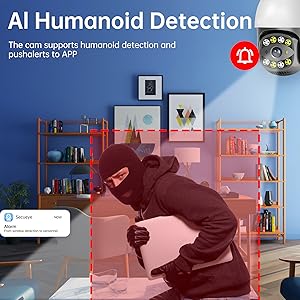
Image 5.5: The camera's automatic tracking capability follows detected human movement.

Image 5.6: Illustrates the camera's ability to differentiate human activity from other movements, reducing false alarms.
5.4 ナイトビジョンモード
The camera offers multiple night vision options for clear surveillance in low-light conditions:
- 赤外線(IR)ナイトビジョン: Uses IR LEDs to provide black and white video in complete darkness, with a range of up to 100ft (30m).
- カラーナイトビジョン: Utilizes white light LEDs (floodlight) to capture full-color video at night when motion is detected or manually activated.
- Starlight Sensor: Enhances low-light performance to produce clearer images even without additional illumination.

Image 5.7: Demonstrates the different night vision modes: infrared (black and white), white light (color), and full-color night vision.

Image 5.8: The camera's infrared night vision provides visibility up to 20 meters in darkness.
5.5 双方向オーディオ
The built-in microphone and speaker allow for real-time two-way communication through the SECUEYE app. You can listen to audio from the camera's location and speak through the camera's speaker.
5.6 ストレージオプション
The camera supports two primary storage methods for recorded footage:
- マイクロSDカード: Insert a Micro SD card (up to 256GB, sold separately) into the designated slot for local storage. The camera can record 24/7 or motion-triggered videos.
- クラウドストレージ: Optional cloud storage services are available through the SECUEYE app for secure, remote backup of your recordings.
5.7デバイス共有
You can share access to your camera's live feed and recordings with family members or trusted individuals through the SECUEYE app, allowing multiple users to monitor the property simultaneously.
6. メンテナンス
To ensure optimal performance and longevity of your SECULINK C17-4MP camera, consider the following maintenance tips:
- レンズを掃除します。 Periodically wipe the camera lens with a soft, clean, lint-free cloth to remove dust, dirt, or water spots that may affect image clarity. Avoid abrasive cleaners.
- 電源接続を確認してください: Ensure the power adapter and cable remain securely connected and free from damage, especially in outdoor environments.
- ファームウェアの更新: Regularly check the SECUEYE app for available firmware updates. Updates often include performance improvements, new features, and security enhancements.
- 取り付けの検査: Periodically check the camera's mounting for stability, especially after severe weather conditions.
7。 トラブルシューティング
If you encounter issues with your SECULINK C17-4MP camera, refer to the following common troubleshooting steps:
7.1 カメラがWi-Fiに接続できない
- Wi-Fi 信号を確認します。 Ensure the camera is within range of your Wi-Fi router. Weak signals can cause connection issues.
- Verify Network Credentials: Double-check that the Wi-Fi network name (SSID) and password entered in the app are correct.
- ルーターの互換性: Confirm your router supports 2.4GHz or 5GHz bands, and that the camera is attempting to connect to a compatible band.
- デバイスを再起動します。 Power cycle both your Wi-Fi router and the camera.
- カメラをリセット: If issues persist, perform a factory reset on the camera (refer to the quick start guide for reset button location and procedure) and attempt the setup process again.
7.2 画像品質が悪い
- レンズをきれいにする: カメラのレンズがきれいで、汚れやほこりがないことを確認してください。
- ネットワーク帯域幅: A slow internet connection can affect live stream quality. Check your network speed.
- 照明条件: Ensure adequate lighting for optimal image quality, especially for color night vision.
7.3 動き検出が機能しない、または感度が高すぎる
- 感度の調整: In the SECUEYE app settings, adjust the motion detection sensitivity level.
- 検出ゾーン: Configure specific detection zones to monitor only relevant areas and exclude areas with frequent irrelevant motion (e.g., public roads, swaying trees).
- Check Schedule: Ensure motion detection is enabled for the desired time periods in the app.
7.4 No Recording to SD Card
- Insert SD Card Correctly: Ensure the Micro SD card is inserted properly into the slot.
- SDカードのフォーマット: Format the SD card through the camera settings in the SECUEYE app.
- Card Capacity/Health: Ensure the SD card is not full or corrupted. Try a different, known-good SD card if necessary.
- 録画設定: Verify that continuous recording or motion-triggered recording is enabled in the app settings.
8. 仕様
| 特徴 | 仕様 |
|---|---|
| モデル | C17-4MP |
| 解決 | 4MP (2560x1440p Max) |
| イメージセンサー | シーモス |
| 焦点距離 | 3.6mm |
| パン回転角度 | 335°水平 |
| 傾斜回転角度 | 90°垂直 |
| デジタルズーム | 10倍 |
| ナイトビジョン | IR-Cut, Starlight, LED (Color Night Vision) |
| 赤外線距離 | 最大100フィート(30メートル) |
| オーディオ | 内蔵マイクとスピーカー(双方向オーディオ) |
| 耐水性 | IP65, IP66 (Waterproof) |
| 接続性 | Dual-Band Wi-Fi (2.4GHz/5GHz), Wired Ethernet |
| ストレージ | マイクロSDカード(最大256GB)、クラウドストレージ |
| 力 | DC 12V, 9 Watts |
| 動作温度 | -10°Cから+ 50°C(14°Fから122°F) |
| アプリの互換性 | SECUEYE (iOS, Android) |
| 寸法 | 7 x 7 x 5インチ(パッケージ) |
| アイテム重量 | 1.2ポンド |
9. 保証とサポート
For warranty information and technical support, please refer to the official SECULINK web公式サイトをご覧いただくか、カスタマーサービスに直接お問い合わせください。保証請求の際は、購入証明としてレシートを保管してください。
メーカー: セキュリンク