
導入
This manual provides detailed instructions for the installation, operation, and maintenance of your LETIANPAI 82ft/25m Smart RGB LED Strip Lights. Please read this manual thoroughly before use to ensure proper functionality and safety.
安全情報
- 設置またはメンテナンスの前に、電源が切断されていることを確認してください。
- 付属の電源アダプターのみを使用してください。互換性のないアダプターを使用すると、製品が損傷したり、安全上のリスクが生じる可能性があります。
- Do not expose the LED strips or controller to water or high humidity. This product is designed for indoor use.
- Avoid bending the LED strips sharply, as this can damage the circuit.
- Do not cover the power adapter or controller during operation to prevent overheating.
- お子様の手の届かない場所に保管してください。
- If any damage occurs to the strip, power adapter, or controller, discontinue use immediately and contact customer support.
パッケージ内容
パッケージにすべてのアイテムが含まれていることを確認します。
- 2 x 41ft (12.5m) RGB LED Strip Lights (Total 82ft/25m)
- 1 x Smart Controller Box
- 1 x IRリモコン
- 1 x Certified Power Adapter
- ユーザーマニュアル (本書) x 1

画像: 上view of the LETIANPAI 82ft/25m Smart RGB LED Strip Lights, showing the two rolls of LED strips, smart controller, IR remote, and power adapter.
セットアップとインストール
1. 表面処理
Before applying the LED strips, ensure the surface is clean, dry, and smooth. Dust, oil, or moisture can reduce the adhesive's effectiveness.
2. コンポーネントの接続
- Connect the LED strip(s) to the smart controller box. Ensure the arrows on the strip connector and the controller connector align.
- Connect the power adapter to the smart controller box.
- 電源アダプタを標準のコンセントに差し込みます。

Image: Connection diagram illustrating how to connect the LED strips to the controller, and the controller to the power adapter. Emphasizes aligning arrows on connectors.


Image: A certified power adapter and a close-up of the LED strip showing its adhesive backing.
3. Applying the LED Strips
- Unroll the LED strips carefully.
- 粘着面から保護フィルムをはがします。
- Press the strip firmly onto the desired clean surface.
4. Cutting the LED Strips (Optional)
The LED strips can be cut to your desired length. Locate the designated cutting marks (usually indicated by a scissor icon or copper pads) on the strip. Cut only at these marks to avoid damaging the circuit.
5. アプリのダウンロードとペアリング
To utilize smart features, download the "HiLighting" app:
- Scan the QR code on the smart controller box or visit http://www.easytrack.net.cn/download/165JINGZEKONGGU to download the "HiLighting" app.
- スマートフォンにアプリをインストールしてください。
- 携帯電話で Bluetooth が有効になっていることを確認してください。
- Open the "HiLighting" app. The app should automatically detect and connect to your LED strip lights.
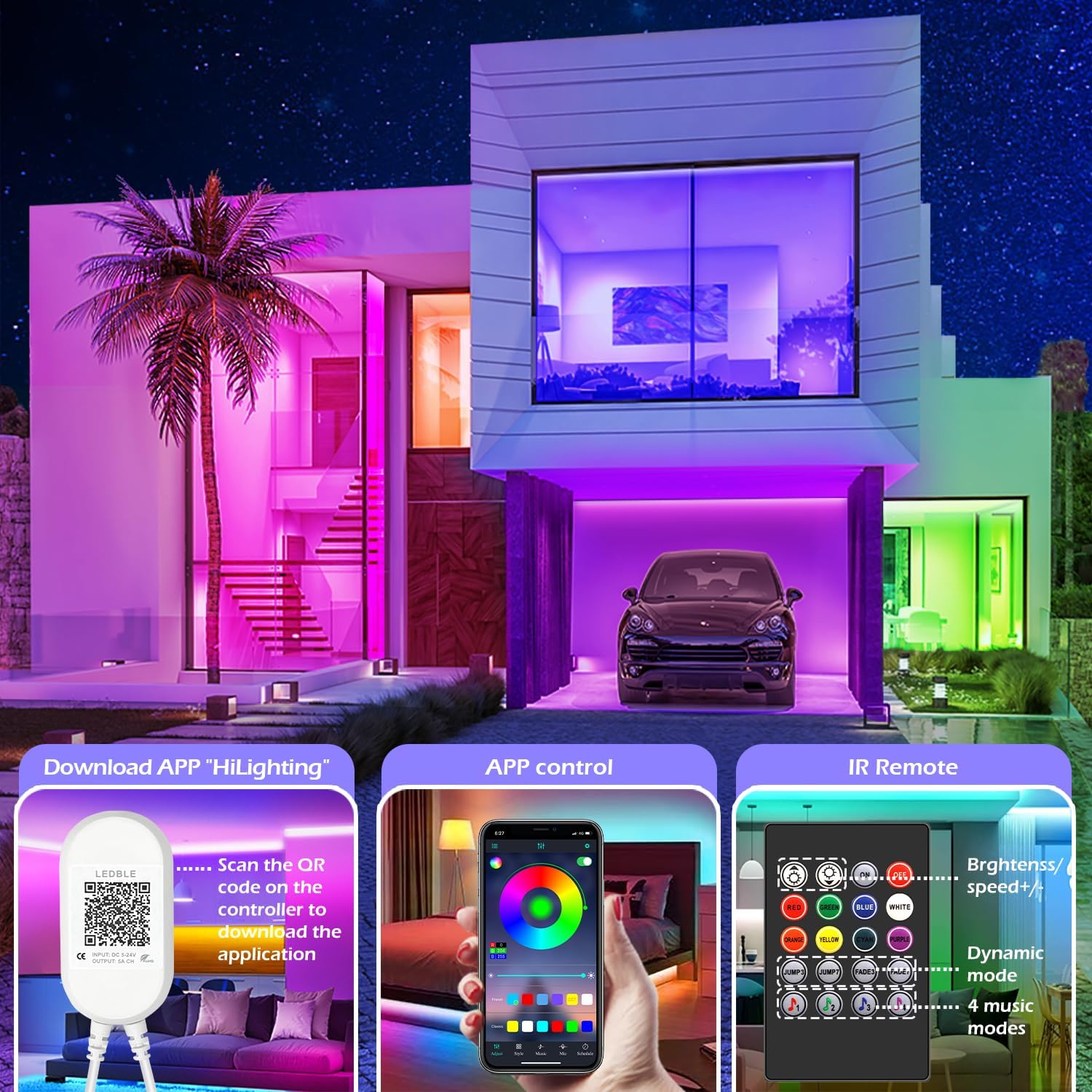
Image: Illustration of downloading the "HiLighting" app by scanning a QR code on the controller, and a preview of the app's color selection interface.

Image: Close-up of the LED controller showing the QR code for downloading the "HiLighting" application.
操作手順
1. App Control (HiLighting App)
The "HiLighting" app offers comprehensive control over your LED strip lights:
- 色の選択: Choose from 16 million vivid colors using the color wheel.
- 明るさ調整: 光の強さを0%から100%に調整します。
- ダイナミックモード: Select from 29 pre-set dynamic modes (e.g., flash, rotate, fade).
- 音楽同期モード: The lights will change color in rhythm with music played through your phone.
- MICモード: The lights will pulsate and change colors in response to ambient sounds or your voice, detected by the phone's microphone.
- タイミング機能: Set schedules for the lights to automatically turn on or off at specific times.
- グループ管理: Control multiple sets of LETIANPAI LED strip lights simultaneously or individually by organizing them into groups within the app.


Image: Screenshots of the "HiLighting" app interface, demonstrating color selection and brightness adjustment features.

Image: Depicts individuals enjoying music, with text explaining Music Sync and MIC Mode functionalities of the LED strip lights.

Image: Illustrates the timing function, allowing users to set automatic on/off schedules for the LED lights, such as turning off at 11:00 PM and on at 7:00 AM.

Image: Shows the "Group Management" feature, enabling control of multiple light sets simultaneously or individually, with examples in different rooms.
2。 赤外線リモコン
The included IR remote control provides convenient access to basic functions:
- 電源オン/オフ: ライトをオンまたはオフにします。
- 色の選択: Directly select common colors (Red, Green, Blue, White, Orange, Yellow, Cyan, Purple).
- 明るさ/速度調整: Increase or decrease brightness, or adjust the speed of dynamic modes.
- ダイナミックモード: Access various pre-set dynamic modes (e.g., Jump3, Jump7, Fade3, Fade7).
- 音楽モード: Activate 4 different music-responsive modes.

Image: Close-up of the IR remote control, detailing buttons for power, color selection, brightness/speed adjustment, dynamic modes, and music modes.
メンテナンス
- クリーニング: LEDストリップの埃を取り除くには、乾いた柔らかい布で優しく拭いてください。液体クリーナーや研磨剤は使用しないでください。
- ストレージ: ライトを長期間保管する場合は、清潔で乾燥した状態を保ち、涼しく暗い場所に保管してください。
- 検査: Periodically check the connections and the strip for any signs of damage.
トラブルシューティング
| 問題 | 考えられる原因 | 解決 |
|---|---|---|
| ライトが点灯しない。 | 電源アダプターが接続されていないか故障しています。 LED strip not properly connected to controller. リモコンの電池が切れました。 | 電源アダプターがしっかりと差し込まれていることを確認してください。 Check all connections, ensuring arrows align. Replace remote control battery (CR2025, not included). |
| Lights show incorrect colors or only one color. | Incorrect connection between strip and controller. App/remote setting issue. | Disconnect and reconnect the LED strip to the controller, ensuring arrows align. Reset the lights via the app or remote, then re-select desired color. |
| App cannot connect to the lights. | Bluetoothがオフになっています。 アプリは古くなっています。 干渉。 | スマートフォンでBluetoothが有効になっていることを確認します。 Update the "HiLighting" app to the latest version. Move closer to the controller. Restart the app and try again. |
| リモコンが機能しない。 | 電池が消耗しています。 Obstruction between remote and controller. Plastic tab not removed. | CR2025 電池を交換してください。 Ensure a clear line of sight to the controller. Remove the clear plastic tab from the remote's battery compartment. |
仕様
| モデル番号 | 100フィート |
| ブランド | LETIANPAI |
| 長さ | 82ft / 25m (2 rolls of 41ft) |
| 光源の種類 | LED (5050 RGB) |
| ライトカラー | RGB(赤、緑、青) |
| 制御方法 | Bluetooth App ("HiLighting"), IR Remote Control |
| 電源 | コード式電気 |
| 巻tage | 12ボルト |
| ワットtage | 24ワット |
| 屋内/屋外での使用 | 屋内 |
| 特集 | Cuttable, Low energy consumption, Music Sync, Strong self-adhesive, Flexible |
| 欧州連合 | 611834347362 |
保証とサポート
LETIANPAI is committed to providing quality products and customer service. All accessories included with your LED rope lights are officially certified, and the power adapter has undergone rigorous testing for safety.
If you encounter any issues during installation or operation, please contact LETIANPAI customer support directly. We aim to resolve all inquiries within 24 hours. Full refunds or free replacements are provided for quality-related issues.