
UPBRIGHT Resuxi JM-700AL 5V Power Supply
UpBright 5V 2Pin AC Adapter User Manual
For Resuxi JM-700A, JM-700AL, JM-101, LM-300, LM-2026, JM-2026, JM700AL, 101, JM101, LM300, 2026, JM2026 Professional Cordless Hair Clipper Trimmers
1.製品オーバーview
This manual provides essential information for the safe and effective use of your UpBright 5V 2Pin AC Adapter. This adapter is designed to provide reliable power to compatible Resuxi professional cordless hair clippers and trimmers.

図1.1: フロント view of the UpBright 5V 2Pin AC Adapter. This image shows the adapter's main body with the UpBright branding and input specifications, along with the attached power cord ending in a 2-pin connector.
2. セットアップと互換性
The UpBright AC Adapter is designed for straightforward setup. Ensure your device is compatible with a 5V 2-pin power input before connecting.
- 互換性: This adapter is compatible with Resuxi JM-700A, JM-700AL, JM-101, LM-300, LM-2026, JM-2026, JM700AL, 101, JM101, LM300, 2026, JM2026 Professional Rechargeable Cordless Hair Clippers and Trimmers.
- 繋がり: Insert the 2-pin connector firmly into the charging port of your compatible device. Plug the AC adapter into a standard wall outlet (100-240VAC, 50/60Hz).
- 安全機能: アダプターにはOver Volが含まれていますtag安全な動作を確保するために、過電流保護 (OVP)、短絡保護 (OCP)、および短絡保護 (SCP) を備えています。
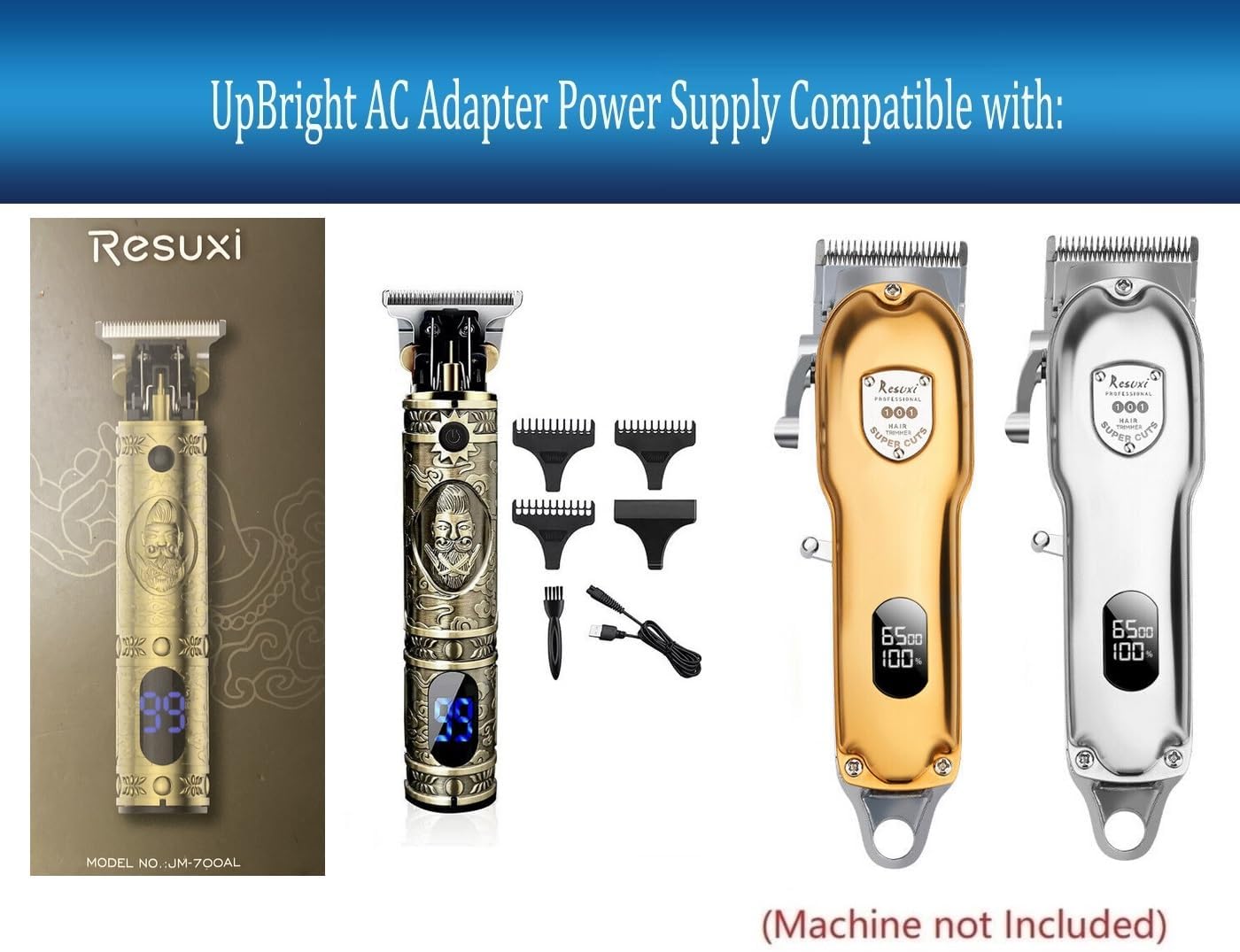
図2.1: Illustration of the UpBright AC Adapter's compatibility with various Resuxi hair clipper models. This image visually confirms the types of devices the adapter is designed to power, showing several clipper models alongside the adapter.
3. 操作手順
Once connected, the adapter will supply the necessary 5V DC power to your compatible device for charging or direct operation, depending on the device's design.
- アダプタが壁のコンセントとデバイスの両方にしっかりと差し込まれていることを確認してください。
- The adapter is designed for continuous use within its specified voltageと現在の制限。
4. メンテナンスとケア
Proper care will extend the life of your AC adapter.
- Keep the adapter in a dry environment. Avoid exposure to moisture or extreme temperatures.
- Do not bend or crimp the power cord excessively.
- Clean the adapter and connector with a soft, dry cloth. Do not use liquid cleaners.
- 物理的な損傷を防ぐため、使用していないときはアダプタを安全な場所に保管してください。
5。 トラブルシューティング
アダプタに問題が発生した場合は、次の点を考慮してください。
| 問題 | 考えられる原因 | 解決 |
|---|---|---|
| デバイスが充電されない/電源が入らない | Adapter not fully plugged in; incompatible device; faulty outlet; damaged adapter/cable. | Ensure secure connections at both ends. Verify device compatibility. Test outlet with another device. Inspect adapter and cable for damage. If damaged, discontinue use. |
| アダプターが熱く感じる | Normal operation (slight warmth); excessive load; poor ventilation. | A slight warmth is normal. If excessively hot, disconnect immediately. Ensure adequate ventilation around the adapter. Verify device power requirements do not exceed adapter's output. |
6. 製品仕様
Detailed specifications for the UpBright 5V 2Pin AC Adapter:
| 特徴 | 詳細 |
|---|---|
| 入力ボリュームtage | 100-240VAC、50/60Hz |
| 出力巻tage | 5V直流 |
| 出力電流 | 1A(1000mA) |
| コネクタタイプ | 2-Pin / 2Prong Connector |
| 製品寸法 | 4 x 3 x 2インチ |
| アイテム重量 | 3オンス |
| 特集 | OVP(オーバーボリュームtage保護)、OCP(過電流保護)、SCP(短絡保護) |
| 対応デバイス | Resuxi JM-700A, JM-700AL, JM-101, LM-300, LM-2026, JM-2026, JM700AL, 101, JM101, LM300, 2026 Hair Clippers and Trimmers |

図6.1: 後方 view of the UpBright 5V 2Pin AC Adapter, displaying detailed input and output specifications printed on the casing. This image provides a clear view of the technical data for the adapter.
7. 保証とサポート
Your UpBright AC Adapter comes with a limited warranty.
- 返金ポリシー: UpBright offers a 30-day refund policy from the date of purchase.
- 交換ポリシー: The product is covered by a 24-month exchange policy.
- For warranty claims or technical support, please refer to the contact information provided with your purchase or visit the official UpBright store page on Amazon.

図7.1: Image showing a sample UpBright Limited Warranty Certificate and various international plug adapters (AU, EU, UK). This illustrates the global compatibility and warranty support for the product.
Ask a question about this manual
Ask about setup, troubleshooting, compatibility, parts, safety, or missing instructions. Manuals+ will review the question and use this page’s manual context to help answer it.