
GMKtec G2 プラス
GMKtec Nucbox G2 Plus ミニ PC ユーザーマニュアル
モデル: G2 PLUS
1. はじめに
The GMKtec Nucbox G2 Plus is a compact and powerful mini PC designed for a variety of computing tasks, from routine office work and home entertainment to more demanding applications. Featuring the Intel N150 processor, 12GB DDR5 RAM, and a 512GB SSD, it offers efficient performance in an ultra-compact form factor. This manual provides essential information for setting up, operating, maintaining, and troubleshooting your device.

Figure 1.1: GMKtec Nucbox G2 Plus Mini PC
2.製品オーバーview
The Nucbox G2 Plus is equipped with the latest Intel Twin Lake N150 CPU, offering improved performance for everyday computing. It supports 4K triple display output, high-speed wireless connectivity with WiFi 6 and Bluetooth 5.2, and dual Gigabit Ethernet ports for robust network connections. Its compact design makes it suitable for various environments, including home, office, and multimedia setups.

Figure 2.1: Key Features of Nucbox G2 Plus
3. パッケージ内容
パッケージにすべてのアイテムが揃っていることを確認してください:
- GMKtec Nucbox G2Plus Mini PC Intel N150 12GB RAM 512GB SSD
- 電源アダプター x 1
- VESAマウント(ネジ付き)×1
- 1 x Blue Mini PC Cover Lid
- HDMIケーブル x 1
- ユーザーマニュアル x 1
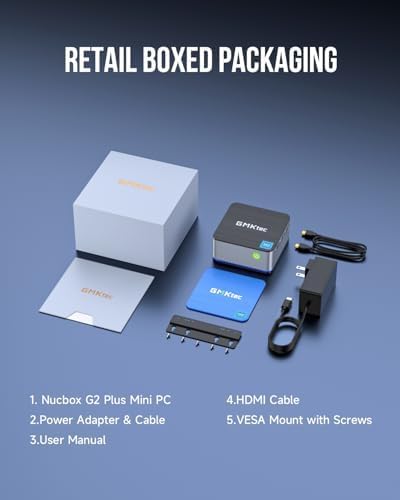
Figure 3.1: Contents of the Retail Box
4. 物理的特徴とポート
The Nucbox G2 Plus offers a comprehensive set of ports for versatile connectivity:
- USB 3.2 ポート (x3): For connecting peripherals like keyboards, mice, and external storage devices.
- HDMI 2.0 ポート (x2): Supports 4K@60Hz display output for connecting to monitors or TVs.
- DP V1.4 Port (x1): Supports 4K@60Hz display output, enabling triple display configurations.
- 3.5mmオーディオジャック: ヘッドフォンまたはスピーカー用。
- Gigabit Ethernet RJ45 Ports (x2): 安定した有線ネットワーク接続を実現します。
- USB-Cポート: For power input (12V/3A) and data transfer.
- ケンジントンロックスロット: 物理的なセキュリティのため。
- 電源ボタン: デバイスの電源をオン/オフにします。

Figure 4.1: Multi-functional Interface Layout
5.セットアップガイド
5.1 初期接続
- Connect your monitor(s) to the HDMI or DP ports using the provided HDMI cable or your own DP cable.
- キーボードとマウスを USB 3.2 ポートに接続します。
- For wired internet, connect an Ethernet cable to one of the RJ45 ports. For wireless, ensure your WiFi network is available.
- Connect the power adapter to the USB-C power input port on the mini PC, then plug the adapter into a power outlet.
5.2 Powering On and Operating System Setup
Press the power button on the front of the mini PC. The device comes pre-installed with Windows 11 Pro. Follow the on-screen instructions to complete the initial Windows setup, including language, region, network connection, and user account creation.
5.3 トリプルディスプレイ設定
The Nucbox G2 Plus supports up to three 4K@60Hz displays simultaneously. Connect two monitors via the HDMI 2.0 ports and a third via the DP V1.4 port. Once connected, Windows will automatically detect the displays. You can configure display settings (extend, duplicate, etc.) through the Windows Display Settings.

図5.1: トリプルスクリーンディスプレイ構成
5.4 ネットワーク接続
ミニ PC は、有線と無線の両方のネットワーク接続をサポートします。
- 有線(イーサネット): Connect an RJ45 Ethernet cable to either of the two Gigabit LAN ports for a stable and fast wired connection.
- ワイヤレス(WiFi 6): The device features 802.11ax (WiFi 6) for high-speed wireless internet. After booting, select your WiFi network from the taskbar and enter the password.
- Bluetooth 5.2: Connect wireless devices such as keyboards, mice, and headphones via Bluetooth. Enable Bluetooth in Windows settings and pair your devices.

Figure 5.2: Strong LAN & Wireless Network Support
6. 保管と拡張
The Nucbox G2 Plus comes with a built-in 512GB M.2 2242 SATA SSD, providing fast boot times and quick file transfers. The storage is expandable up to 2TB, allowing for significant upgrades if more space is required. The design includes a cooling fan system with dual copper turbine cooling pipes to maintain optimal performance during extended use.

Figure 6.1: Internal Components and Expandable Storage
7. 取り付けオプション
The Nucbox G2 Plus includes a VESA mount, allowing you to conveniently attach the mini PC to the back of a compatible monitor or to a wall. This helps to declutter your workspace and create a more streamlined setup.

図7.1: VESAマウントの取り付け
8. メンテナンスとケア
- Keep the mini PC in a well-ventilated area to ensure proper airflow and prevent overheating.
- デバイスを極端な温度、湿度、または直射日光にさらさないでください。
- 外装は柔らかく乾いた布で拭いてください。液体クリーナーやエアゾールは使用しないでください。
- 最適なパフォーマンスとセキュリティを確保するために、オペレーティング システムとドライバーを定期的に更新してください。
- Perform routine software maintenance, such as disk cleanup and antivirus scans.
9。 トラブルシューティング
If you encounter issues with your GMKtec Nucbox G2 Plus, consider the following common troubleshooting steps:
- 電源なし: 電源アダプタがミニPCと電源コンセントの両方にしっかりと接続されていることを確認してください。必要に応じて別のコンセントを試してください。
- 表示なし: Check all HDMI/DP cable connections to the monitor and the mini PC. Ensure the monitor is powered on and set to the correct input source. Try a different cable or monitor if possible.
- インターネット接続なし: For wired connections, check the Ethernet cable and router status. For Wi-Fi, ensure Wi-Fi is enabled in Windows settings, and you are connected to the correct network with the correct password. Restart your router and the mini PC.
- パフォーマンスが遅い: 不要なアプリケーションを閉じてください。リソースを消費している可能性のあるバックグラウンドプロセスがないか確認してください。SSDに十分な空き容量があることを確認してください。
- 周辺機器が検出されません: 周辺機器を別のUSBポートに接続してみてください。必要に応じてドライバーがインストールされていることを確認してください。
問題が解決しない場合は、保証およびサポートのセクションで連絡先情報を参照してください。
10. 技術仕様
| 特徴 | 仕様 |
|---|---|
| プロセッサ | Intel N150 (4 Core, 4 Threads, up to 3.6GHz) |
| ラム | 12GB LPDDR5 4800MHz |
| ストレージ | 512GB M.2 2242 SATA SSD (Expandable up to 2TB) |
| グラフィックス | Intel UHD Graphics 24EUs (max 1000MHz) |
| ディスプレイ出力 | 2 x HDMI 2.0 (4K@60Hz), 1 x DP V1.4 (4K@60Hz) |
| USBポート | 3 x USB 3.2, 1 x USB-C (Power/Data) |
| ネットワーク | WiFi 6 (802.11ax), Bluetooth 5.2, 2 x Gigabit Ethernet RJ45 |
| オペレーティング·システム | ウィンドウズ11プロ |
| 寸法(長さx幅x高さ) | 3.42 x 3.42 x 1.55インチ |
| 重さ | 1.65ポンド |
| 色 | Blue / Black Steel |
11. 保証とサポート
GMKtec offers a 1-year limited warranty for each mini PC, starting from the date of purchase. This warranty covers defects due to design and workmanship. For any support needs, please utilize the following channels:
- アマゾンのサポート: Amazon アカウントにログインし、「ご注文履歴」に移動して、「製品に関する質問」を選択し、直接サポートを受けてください。
- アフターサポート: You can also send an email to the GMKtec After-Sales Team at support@gmktec.com 24時間7日のカスタマーサポート。
GMKtec is committed to providing reliable products and professional after-sales service to ensure customer satisfaction.
関連文書 - G2プラス
 |
GMKtec NUCBOX G2 PLUS ユーザーマニュアルおよび安全情報 GMKtec NUCBOX G2 PLUSミニPCの包括的なユーザーマニュアル。セットアップ、仕様、安全上の注意事項、保証情報などを網羅しています。ハードウェアインターフェースの詳細な説明と操作ガイドラインも含まれています。 |
 |
GMKtec M6 ミニ PC ユーザーマニュアル GMKtec M6 Mini PC の包括的なユーザー マニュアル。AMD R5 6600H を搭載したこのコンパクトなデスクトップ コンピューターの仕様、セットアップ、操作、およびトラブルシューティングについて詳しく説明しています。 |
 |
GMKtec NUCBOX 5 Mini PC User Manual - Setup, Specifications, and Support Comprehensive user manual for the GMKtec NUCBOX 5 Mini PC, covering setup, technical specifications, safety precautions, and warranty information. Learn how to use your GMKtec mini computer. |
 |
GMKtec NUCBOX G3 PLUS ユーザーマニュアルと仕様 GMKtec NUCBOX G3 PLUSミニPCの包括的なユーザーマニュアル。セットアップ、仕様、安全上の注意事項、保証情報などを網羅しています。ハードウェアインターフェースの詳細な説明と技術的な詳細も含まれています。 |
 |
命令 GMKtec NUCBOX G3 PLUS - ミニ PC ミニ PC GMKtec NUCBOX G3 PLUS の説明。 Zawiera の詳細情報、podłączeniu、bezpieczeństwie i konserwacji。 |
 |
GMKtec NUCBOX G2 PLUS - 説明 ミニ PC GMKtec NUCBOX G2 PLUS に関する詳細情報、詳細な技術情報、詳細な情報が記載されています。 |
Ask a question about this manual
Ask about setup, troubleshooting, compatibility, parts, safety, or missing instructions. Manuals+ will review the question and use this page’s manual context to help answer it.