
1. はじめに
The MXR M222 Talk Box is a unique effects pedal designed to allow musicians to shape the sound of their instrument (guitar, keyboard, etc.) using their mouth, creating vocal-like effects. This self-contained unit includes its own amplifier and speaker driver, eliminating the need for additional external equipment. It offers Volume, Tone, and Gain controls to fine-tune the effect to your preference.

図1:上 view of the MXR M222 Talk Box Effects Pedal, showing the control knobs and voice tube input.
2 製品の特徴
- Self-Contained Unit: 内蔵の amplifier and speaker driver, removing the need for an external amplifier。
- 多彩なコントロール: Equipped with Volume, Tone, and Gain knobs for precise sound shaping.
- 幅広い互換性: Suitable for use with guitars, keyboards, and other instruments.
- コンパクトなデザイン: Durable and compact housing for both practice and live performance settings.
3. コントロールと接続
Familiarize yourself with the various controls and connection points on your MXR M222 Talk Box.
3.1 フロントパネルコントロール
- ボリュームノブ: エフェクトの全体的な出力レベルを制御します。
- トーンノブ: Adjusts the tonal character of the distorted signal, from darker to brighter.
- ゲインノブ: 信号に適用される歪みの量を制御します。
- VOICE TUBE Input: Connects the included voice tube.
- フットスイッチ: Toggles the effect on/bypass. A blue LED indicates when the effect is active.
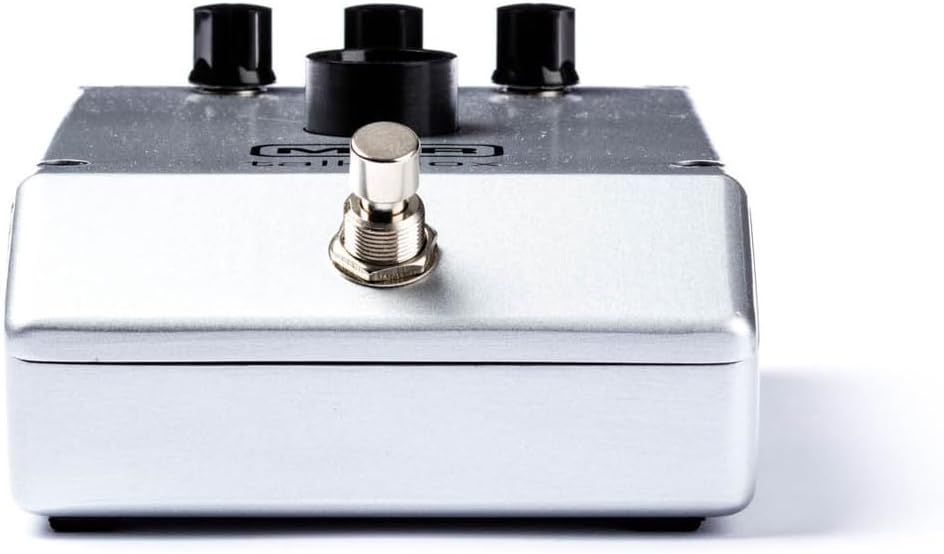
図2: 前面 view of the MXR M222 Talk Box, highlighting the footswitch.
3.2 リアパネルの接続
- 入力ジャック: Connect your instrument (guitar, keyboard) here.
- 18V DC電源入力: Connect the 18V 1000mA Dunlop ECB009 power supply here.
- 出力ジャック: これをあなたの ampライファイアとかオーディオインターフェースとか。

図3:背面 view of the MXR M222 Talk Box, showing the input, power, and output connections.
4. セットアップ
Follow these steps to set up your MXR M222 Talk Box:
- 電源接続: Connect the 18V 1000mA Dunlop ECB009 power supply to the 18V DC input jack on the rear of the pedal.
- 機器接続: Run a cable from your instrument (guitar, keyboard, etc.) to the Talk Box's INPUT jack.
- Ampライファイア接続: Run another cable from the Talk Box's OUTPUT jack to your ampライファイアとかオーディオインターフェースとか。
- Voice Tube Placement: Attach one end of the clear voice tube to the VOICE TUBE Input on the pedal. Secure the other end of the tube to your microphone stand using the included clip, ensuring the end of the tube is close to your mouth for optimal vocal shaping.
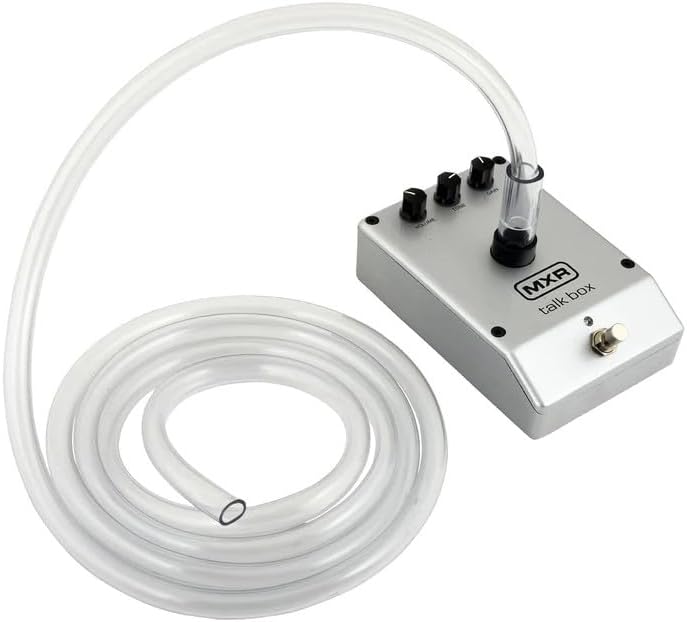
Figure 4: The MXR M222 Talk Box with the voice tube attached and ready for use.
5. 操作手順
Once set up, you can begin using your Talk Box to create expressive vocal effects:
- 初期設定: Start with the VOLUME and TONE knobs fully counter-clockwise and the GAIN knob at 12 o'clock.
- Engage Effect: Turn the effect on by depressing the footswitch. The blue LED will illuminate.
- 音量を調整: Slowly rotate the VOLUME knob clockwise until the desired volume is achieved.
- トーンを調整する: Rotate the TONE knob clockwise for a brighter sound and counter-clockwise for a darker sound.
- ゲインを調整: Rotate the GAIN knob clockwise to increase the amount of distortion and counter-clockwise to decrease it.
- Shaping Sound: After setting up your microphone and tube, place the open end of the tube in the corner of your mouth between your back teeth. Without making any sound with your voice, practice mouthing vowel sounds (A, E, I, O, U) while simultaneously playing your instrument. Exaggerate the shape of your mouth for best results.
- Advanced Vocalization: To create more complex sounds, practice mouthing words with consonants such as B, D, G, J, K, P, Q, or T. It takes practice to distinguish them from V, G, B, and D. Exaggerating with consonants is just as important with vowels.
- 位相調整: Try placing a Phase 90 or other effect in front of the MXR Talk Box for interesting results.
ビデオ1: オーバーview of the MXR M222 Talk Box Pedal, demonstrating its features and basic operation. This video is provided by a seller and is 1 minute and 2 seconds in length.
6. メンテナンス
Proper maintenance ensures the longevity and optimal performance of your Talk Box.
- クリーニング: Wipe the pedal's exterior with a soft, dry cloth. Avoid abrasive cleaners or solvents.
- Voice Tube Care: The voice tube should be cleaned regularly for hygiene. It can be washed with mild soap and water. Ensure it is completely dry before re-attaching.
- ストレージ: ペダルを使用しないときは、直射日光や極端な温度を避け、涼しく乾燥した場所に保管してください。
7。 トラブルシューティング
If you encounter issues with your MXR M222 Talk Box, refer to the following common problems and solutions:
- No Sound/Weak Effect:
- 電源が正しく接続され、機能していることを確認します。
- すべての機器をチェックし、 amplifier cables for secure connections.
- Verify the footswitch LED is illuminated, indicating the effect is active.
- Adjust the VOLUME, TONE, and GAIN knobs to appropriate levels.
- Confirm the voice tube is properly inserted into the pedal and positioned correctly in your mouth.
- 不要なノイズ/ハム音:
- Ensure you are using the correct 18V 1000mA power supply.
- ケーブルや接続に不具合がないか確認してください。
- 干渉を引き起こす可能性のある他の電子機器からペダルを離してみてください。
- Pedal Not Sitting Flat:
- Some units may exhibit slight unevenness on the bottom surface. The included rubber feet can be applied to the corners to provide stability on flat surfaces. For pedalboard mounting, consider using a mounting solution that accommodates slight variations in the pedal's base.
8. 仕様
| 仕様 | 価値 |
|---|---|
| アイテム重量 | 2.77 キログラム (6.1 ポンド) |
| パッケージ寸法 | 10.35 x 9.57 x 5インチ |
| 商品型番 | M222-TBB-3 |
| ハードウェアインターフェイス | 1/4インチオーディオ |
| 信号フォーマット | アナログ |
| 電源 | コード式電気 |
| 巻tage | 18ボルト |
| 色 | 銀 |
| 最初に利用可能 | 19年2023月XNUMX日 |
9. 安全情報
次の安全ガイドラインを遵守してください。
- Use only the specified 18V 1000mA power supply to prevent damage to the unit and voiding the warranty.
- Do not expose the pedal to water or excessive moisture.
- Avoid operating the pedal in extremely high or low temperatures.
- ユニットを自分で開けたり修理したりしないでください。修理はすべて資格のある専門家に依頼してください。
- Keep the voice tube clean and replace it if it becomes damaged or discolored.
10. 保証とサポート
For warranty information, technical support, or service inquiries, please contact the manufacturer or your authorized dealer. Keep your purchase receipt as proof of purchase for warranty claims.