
ClocTeck ClocTeck-CL01
ClocTeck Transparent Digital Alarm Clock
Model: ClocTeck-CL01
ブランド: ClocTeck
導入
This manual provides detailed instructions for the setup, operation, and maintenance of your ClocTeck Transparent Digital Alarm Clock. Please read this manual thoroughly before using the product to ensure proper function and longevity.
安全情報
- デバイスを極端な温度、直射日光、高湿度にさらさないでください。
- 落としたり、強い衝撃を与えないでください。
- デバイスを水やその他の液体から遠ざけてください。
- ご自身でデバイスの分解や修理を試みないでください。修理が必要な場合は、資格のある担当者にご連絡ください。
- Use only the specified Type-C charging cable for power.
パッケージ内容
開封したらパッケージの内容を確認してください:
- ClocTeck Transparent Digital Alarm Clock (Gold)
- Type-CUSB充電ケーブル
- ユーザーマニュアル(このドキュメント)
製品終了view
The ClocTeck Transparent Digital Alarm Clock features a clear LCD display that shows time, date, day of the week, temperature, humidity, and a weather icon. It is designed with a sleek aluminum alloy case.
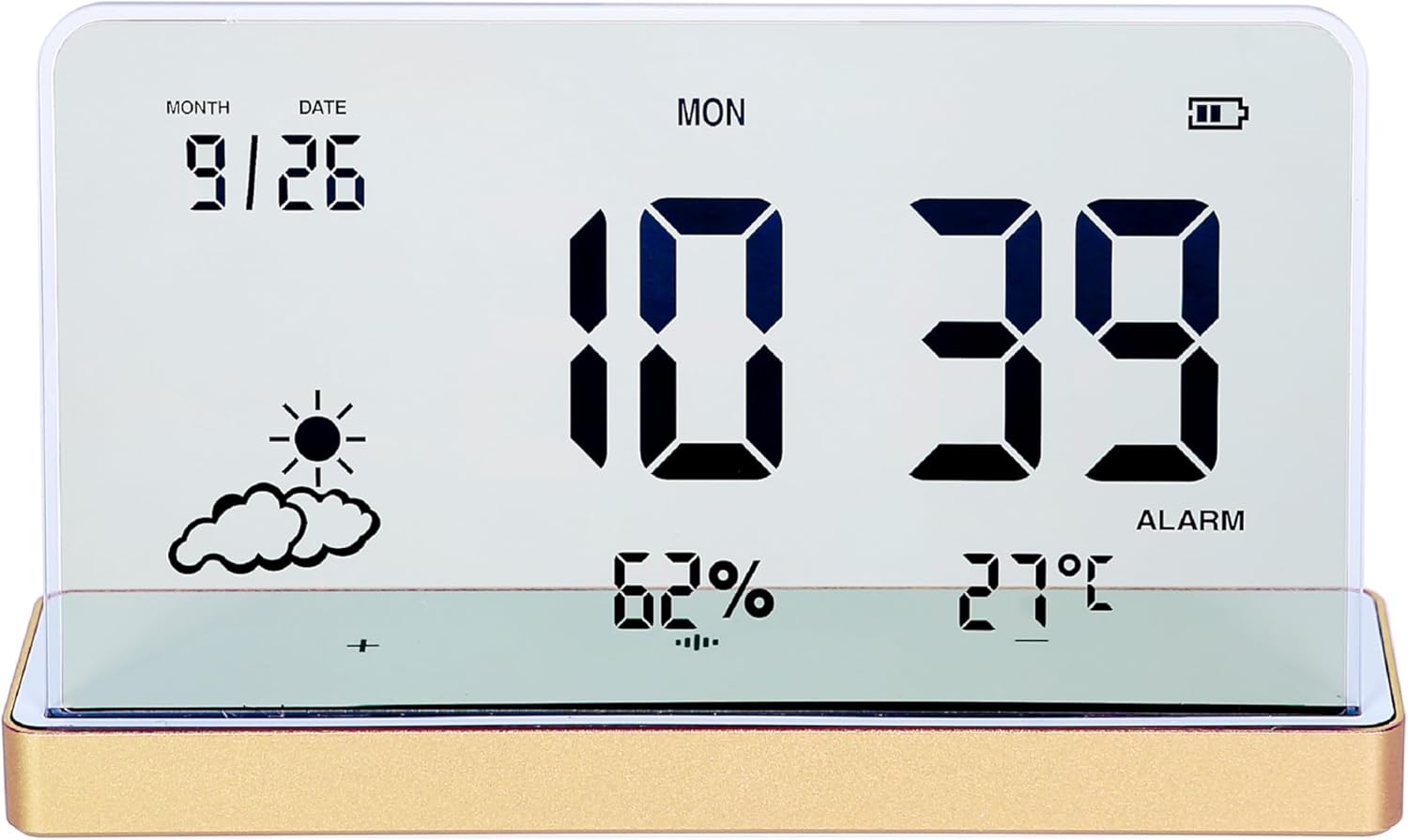
図1: 前面 view of the ClocTeck Transparent Digital Alarm Clock. The display shows the current time (10:39), date (9/26), day (MON), humidity (62%), temperature (27°C), and a partly cloudy weather icon. A battery indicator is visible in the top right corner.
主な特徴:
- Transparent LCD Display
- Time, Date, and Day Display
- Indoor Temperature and Humidity Monitoring
- Up to 3 Programmable Alarms
- Rechargeable Battery with long standby time
- 耐久性のあるアルミニウム合金ケース
設定
1. 電源投入と充電
The clock is powered by a built-in rechargeable battery. Before first use, or if the battery indicator is low, connect the provided Type-C USB charging cable to the charging port on the back or side of the clock and plug the other end into a standard USB power adapter (not included).
- A full charge provides approximately 75 days of operation.
- ディスプレイのバッテリーインジケーターに充電状態が表示されます。
2. 初期配置
Place the clock on a stable, flat surface. For accurate temperature and humidity readings, avoid placing it near heat sources, direct sunlight, or in areas with extreme drafts.
操作手順
The clock features several buttons, typically located on the back or bottom, for setting time, alarms, and other functions. Refer to the specific button labels on your device.
1. 時刻と日付の設定
- を押す セット ボタンを押すと時間設定モードに入ります。
- 使用 UP そして 下 時間を調整するためのボタン。 セット 確認して議事録に進みます。
- 分、年、月、日についても繰り返します。
- プレス セット もう一度押すと設定モードが終了します。
2.アラームの設定
The clock supports up to 3 independent alarms.
- を押す アラーム button to cycle through Alarm 1, Alarm 2, Alarm 3, and alarm off modes.
- When an alarm is selected, press and hold the アラーム button to enter alarm setting mode for that specific alarm.
- 使用 UP そして 下 buttons to set the alarm hour and minutes. Press アラーム 各ステップを確認します。
- After setting the time, you may be prompted to set the alarm's activation days (e.g., weekdays, weekends, daily). Use UP/下 そして アラーム 選択します。
- アラームをオンまたはオフにするには、 アラーム button until the alarm icon appears or disappears next to the corresponding alarm number on the display.
3. 温度と湿度の表示
The clock continuously displays indoor temperature and humidity. The temperature range is -20°C to 65°C, and the humidity range is 10% to 99%.
- Temperature is displayed in Celsius (°C).
- 湿度はパーセントで表示されますtage(%)。
4. スヌーズ機能
When an alarm sounds, press any button (other than the alarm off button, if present) to activate the snooze function. The alarm will sound again after a short interval (typically 5-10 minutes).
5。 ディスプレイの明るさ調整
The clock may feature automatic brightness adjustment or manual control. Consult the device's physical buttons for a dedicated brightness control button or a combination of buttons to adjust display intensity.
メンテナンス
- ディスプレイとcを清掃するにはasin柔らかく乾いた布を使用してください。研磨剤入りの洗剤や溶剤は使用しないでください。
- 充電ポートにほこりやごみがないことを確認してください。
- 長期間使用しない場合は、時計を涼しく乾燥した場所に保管してください。
トラブルシューティング
| 問題 | 考えられる原因 | 解決 |
|---|---|---|
| ディスプレイが空白または暗い。 | Low battery or power saving mode. | Charge the device using the Type-C cable. Check brightness settings. |
| アラームは鳴りません。 | アラームが作動していないか、音量が低すぎます。 | Ensure the alarm is set and activated (alarm icon visible). Check if there's a volume setting. |
| 温度/湿度の測定値が正しくありません。 | Device placed in an unsuitable environment. | Relocate the clock away from direct heat, cold, or high drafts. Allow time for readings to stabilize. |
| ボタンが反応しません。 | 一時的なソフトウェアの不具合またはバッテリー残量が少ない。 | Recharge the device. If issue persists, try a soft reset (refer to manual for reset procedure, if available, or let battery drain and recharge). |
仕様
- モデル: ClocTeck-CL01
- 寸法: Approximately 12.5 cm (Width) × 3.2 cm (Depth) × 8 cm (Height)
- 体重: 約0.13kg
- ケース素材: アルミニウム合金
- 表示タイプ: Transparent LCD Digital Display
- 温度範囲: -20°C ~ 65°C
- 湿度範囲: 10%から99%
- 電源: 充電式バッテリー(Type-C USB充電)
- バッテリー寿命: フル充電で約75日間
- アラーム: 3つのプログラム可能なアラーム

Figure 2: Dimensions of the ClocTeck Transparent Digital Alarm Clock. The image shows the clock with labels indicating a height of 8cm and a width of 12.5cm.
保証とサポート
ClocTeck provides a 12-month refund and exchange guarantee ご購入日から1年間。この保証は、製造上の欠陥および通常の使用に起因する問題を対象としています。
If you encounter any problems or have questions regarding your ClocTeck Transparent Digital Alarm Clock, please do not hesitate to contact our customer support team. We are committed to providing assistance and ensuring your satisfaction.
For support, please refer to the contact information provided on the product packaging or the seller's page where you purchased the item.
Ask a question about this manual
Ask about setup, troubleshooting, compatibility, parts, safety, or missing instructions. Manuals+ will review the question and use this page’s manual context to help answer it.