
導入
This manual provides essential information for the safe and effective operation, maintenance, and troubleshooting of your DEWALT DCD794 20V Cordless 1/2" Drill Driver. The DCD794 is a compact and lightweight tool designed for drilling and fastening applications, delivering up to 1,650 RPMs with a 1/2" ratcheting chuck and an integrated LED work light.

画像: 正面 view of the DEWALT DCD794 20V Cordless 1/2" Drill Driver.
一般的な安全情報
Always observe basic safety precautions to reduce the risk of fire, electric shock, and personal injury. Keep your work area clean and well-lit. Do not operate power tools in explosive atmospheres, such as in the presence of flammable liquids, gases, or dust. Keep children and bystanders away while operating a power tool. Wear appropriate personal protective equipment, including eye protection, hearing protection, and gloves. Ensure the tool is switched off before making any adjustments, changing accessories, or storing it.
製品終了view
The DEWALT DCD794 Drill Driver is engineered for performance and durability. Key features include:
- 1/2インチ ラチェットチャック: Provides high bit retention for secure accessory gripping.
- 2速トランスミッション: Allows for versatile drilling and fastening applications.
- 15 クラッチ設定: Offers precise control for various torque requirements.
- LED作業灯: 作業エリアを照らし、視認性を向上させます。
- コンパクトで軽量なデザイン: Enhances user comfort and maneuverability.
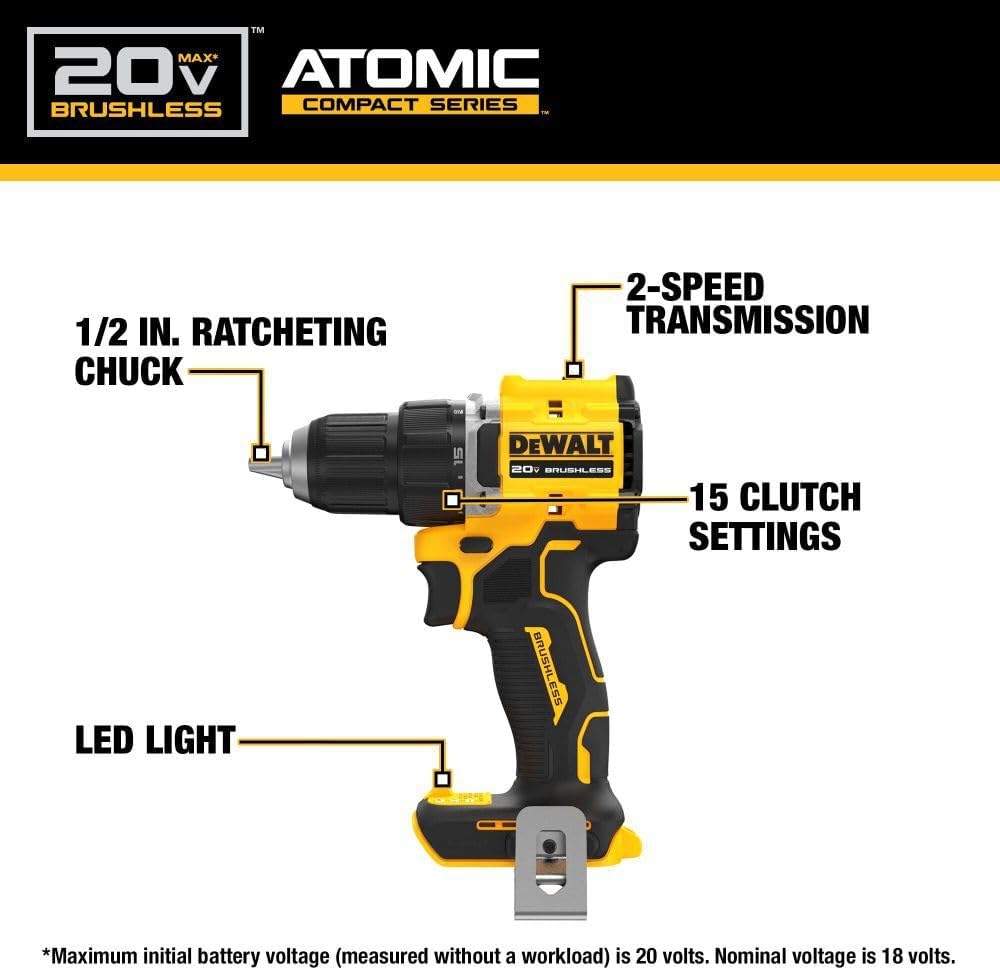
Image: Diagram highlighting the 1/2 inch ratcheting chuck, 2-speed transmission, 15 clutch settings, and LED light on the DEWALT DCD794 Drill Driver.
設定
バッテリーの取り付けと取り外し
- To install the battery, align the battery pack with the rails inside the tool's handle. Slide the pack firmly into the tool until it locks into place.
- To remove the battery, press the release button on the battery pack and pull the pack out of the handle.

Image: The DEWALT DCD794 Drill Driver with a 20V battery pack attached to the base.
ビットの取り付けと取り外し
- To install a drill bit or driver accessory, grasp the rear half of the chuck and rotate the front half counter-clockwise until the chuck jaws open wide enough to accept the accessory.
- Insert the accessory fully into the chuck.
- Grasp the rear half of the chuck and rotate the front half clockwise until the accessory is firmly clamp編。
- 削除するには、逆の手順で行ってください。
操作手順
スピード選択
The drill driver features a 2-speed transmission for optimal performance across different applications. Use the speed selector switch located on top of the tool:
- ポジション1(低速): For high torque applications, such as driving screws or drilling large diameter holes.
- ポジション2(高速): For faster drilling with smaller bits.

Image: The DEWALT DCD794 Drill Driver being used to drill into wood, illustrating its 2-speed transmission capability.
クラッチ設定
The adjustable clutch ring allows you to select the appropriate torque setting for your task. Rotate the ring to align the desired number with the indicator mark. Lower numbers are for driving small screws or into soft materials, while higher numbers are for driving larger screws or into harder materials. The drill symbol setting provides maximum torque for drilling applications.
Trigger Switch and LED Light
The variable speed trigger switch controls the tool's speed. Press the trigger to start the tool and vary the pressure to adjust the speed. The integrated LED work light activates when the trigger is pressed, illuminating the work surface. The light remains on for a short period after the trigger is released.
メンテナンス
定期的なメンテナンスにより、最適なパフォーマンスが確保され、ツールの寿命が延びます。
- クリーニング: 柔らかくてamp cloth to clean the exterior of the tool. Do not use harsh chemicals or abrasive cleaners. Keep the ventilation slots clear of dust and debris.
- チャックのメンテナンス: 適切なグリップを確保するために、チャックジョーを定期的に清掃してください。
- バッテリーのケア: 電池は直射日光を避け、涼しく乾燥した場所に保管してください。放電した状態で長期間保管しないでください。
- 検査: Regularly inspect the tool for any damaged parts, loose screws, or worn components. Have any damaged parts repaired by a qualified service technician.
トラブルシューティング
| 問題 | 考えられる原因 | 解決 |
|---|---|---|
| ツールが起動しない | バッテリーが充電されていないか、正しく取り付けられていない | Charge battery fully; ensure battery is securely inserted. |
| 動作中の電力損失 | バッテリーの充電量が少ない | バッテリーを充電してください。 |
| ビットがチャック内で滑る | Chuck not tightened sufficiently or jaws are dirty | Tighten chuck firmly; clean chuck jaws. |
| 過度の振動 | 曲がったドリルビットまたは付属品 | Replace with a straight, undamaged accessory. |
仕様
| 特徴 | 仕様 |
|---|---|
| ブランド | DEWALT |
| モデル番号 | DCD794B-NBX |
| 電源 | 電池駆動(20ボルト) |
| 最高回転数 | 1650 回転 |
| 最大チャックサイズ | 0.5インチ |
| 最大トルク | 1.5 ニュートンメートル |
| 最大出力 | 300ワット |
| 材質タイプ | プラスチック |
| 商品の寸法 (長さ x 幅 x 高さ) | 長さ6インチ x 幅3インチ x 高さ8インチ |
| アイテム重量 | 2.54 ポンド |
保証情報
DEWALT provides a limited warranty for its products. For specific details regarding the warranty period, coverage, and terms for your DCD794 Drill Driver, please refer to the warranty card included with your purchase or visit the official DEWALT webサイトでご確認ください。保証請求に備えて購入証明書を保管してください。
サポート
さらに詳しいサポート、技術サポート、または認定サービスセンターを探すには、DEWALTの公式ウェブサイトをご覧ください。 web公式サイトをご覧いただくか、カスタマーサービスにお問い合わせください。さらに詳しい情報やリソースについては、 AmazonのDEWALTストア またはDEWALT本社 webサイト。