
nubia Nubia Pad 3D
Nubia Pad 3D ユーザーマニュアル
Model: Nubia Pad 3D
導入
This user manual provides comprehensive instructions for the safe and efficient operation of your Nubia Pad 3D. Please read this manual thoroughly before using the device and keep it for future reference.
The Nubia Pad 3D is an advanced tablet featuring a unique 12.4-inch 3D display, powerful processing capabilities, and high-resolution cameras, designed for an immersive visual experience.
重要な安全情報
To prevent injury or damage to your device, observe the following precautions:
- デバイスを極端な温度、直射日光、高湿度にさらさないでください。
- デバイスを落としたり、強い衝撃を与えたりしないでください。
- 製造元が承認した充電器とアクセサリのみを使用してください。
- ご自身でデバイスの分解や修理を試みないでください。資格のあるサービス担当者にご相談ください。
- デバイスを水やその他の液体から遠ざけてください。
セットアップガイド
1. 開梱と初期検査
すべての部品をパッケージから慎重に取り出してください。以下のすべての部品が揃っていて、損傷がないことを確認してください。
- Nubia Pad 3D Tablet
- USB-C充電ケーブル
- 電源アダプター
- クイックスタートガイド

Figure 1: The Nubia Pad 3D tablet showcasing its immersive 3D display with an astronaut and floral scene.
2. デバイスの充電
Before first use, fully charge the Nubia Pad 3D. Connect the USB-C cable to the tablet's charging port and the other end to the power adapter. Plug the adapter into a wall outlet.
- 充電インジケータライトが点灯します。
- フル充電には通常約2〜3時間かかります。
- The device features a 9070 mAh battery for extended use.

Figure 2: An illustration highlighting the 9070 mAh battery capacity of the Nubia Pad 3D, indicating its long endurance.
3. 初回電源投入とセットアップウィザード
Press and hold the power button (located on the side of the tablet) until the Nubia logo appears. Follow the on-screen instructions to complete the initial setup, including language selection, Wi-Fi connection, and account setup.
操作手順
1. インターフェースの操作
The Nubia Pad 3D runs on iOS (as per specifications). Use touch gestures to navigate:
- タップ: 項目を選択するか、アプリを開きます。
- スワイプ: ページまたはリストをスクロールします。
- ピンチしてズーム: 画像を拡大または縮小し、 web ページ。
2. Understanding the 3D Display
The Nubia Pad 3D features a 12.4-inch IPS display with 3D technology and a 120Hz refresh rate. It allows seamless switching between 2D and 3D modes.
To activate 3D mode, locate the dedicated 3D button or setting within the display options. For optimal 3D viewing, ensure you are positioned directly in front of the screen.
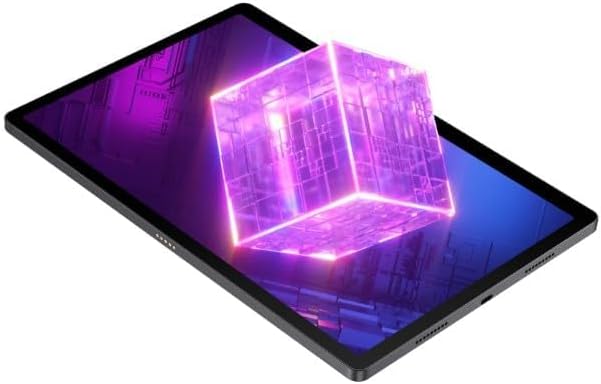
Figure 3: The Nubia Pad 3D screen displaying a vibrant 3D cube, illustrating its stereoscopic capabilities.
3. カメラの使用
The tablet is equipped with a 16 MP rear camera and 8 MP front cameras. Open the Camera application to capture photos and videos.
- リアカメラ: Ideal for high-resolution photos and scanning.
- フロントカメラ: Suitable for video calls and selfies.

図4:背面 view of the Nubia Pad 3D, highlighting the dual camera setup and the "3D" branding near the camera module.
4. オーディオ機能
The Nubia Pad 3D features quad stereo speakers with Dolby Atmos technology, providing an enhanced audio experience for media consumption.

Figure 5: A diagram illustrating the placement of the quad stereo speakers on the Nubia Pad 3D, emphasizing Dolby Atmos technology for superior sound.
メンテナンス
1.デバイスのクリーニング
柔らかく糸くずの出ない布を使用して、タブレットの画面と本体を拭いてください。頑固な汚れには、軽く拭いてください。amp布に水または電子機器用のスクリーンクリーナーを含ませて拭いてください。刺激の強い化学薬品や研磨剤の使用は避けてください。
2. ソフトウェアの更新
Regularly check for and install software updates to ensure optimal performance, security, and access to new features. Navigate to Settings > General > Software Update to check for available updates.
3. バッテリーのお手入れ
バッテリー寿命を延ばすには:
- バッテリーを頻繁に完全に放電することは避けてください。
- デバイスを完全に充電した後は、長時間充電したまま放置しないでください。
- 長期間使用しない場合は、デバイスを涼しく乾燥した場所に保管してください。
トラブルシューティング
This section addresses common issues you might encounter with your Nubia Pad 3D.
| 問題 | 考えられる原因 | 解決 |
|---|---|---|
| デバイスの電源が入りません。 | バッテリー残量が少なくなり、ソフトウェアがクラッシュしました。 | デバイスを少なくとも30分間充電してください。電源ボタンを10~15秒間押し続けて強制的に再起動してください。 |
| 画面が反応しません。 | 一時的なソフトウェアの不具合。 | デバイスを再起動してください。画面が清潔で乾いていることを確認してください。 |
| 3D effect is not visible or distorted. | 正しくない viewing angle; 3D mode not activated. | あなたがいることを確認してください viewing the screen directly. Check display settings to confirm 3D mode is enabled. |
| バッテリーの消耗が早いです。 | Too many apps running in background; high screen brightness. | Close unused apps. Reduce screen brightness. Disable unnecessary features like Bluetooth/Wi-Fi when not in use. |
問題が解決しない場合は、カスタマー サポートにお問い合わせください。
仕様
Below are the key technical specifications for the Nubia Pad 3D:
- モデル名: Nubia Pad 3D
- 画面: 12.4 Inches, 3D IPS, 120Hz refresh rate
- プロセッサ: Snapdragon 888 (Note: Product specifications also list Intel Processor Brand, but Snapdragon 888 is mentioned in the product description.)
- ラム: 12ギガバイト
- ストレージ: 256ギガバイト
- オペレーティング·システム: iOS (Note: This is unusual for a Snapdragon device, but stated in provided data.)
- リアカメラ: 16 MP
- フロントカメラ: 8 MP
- バッテリー: 9070 mAh (up to 20 hours battery life)
- オーディオ: Quad Stereo Speakers with Dolby Atmos
- 接続性: Cellular, 802.11g Wireless
- 重さ: 1.3キログラム
- 寸法: 31.5 x 22 x 4 cm(パッケージ寸法)
保証とサポート
For warranty information and customer support, please refer to the warranty card included with your product or visit the official Nubia webサイトでご確認ください。保証請求に備えて購入証明書を保管してください。
オンラインサポート: Visit the official Nubia Store on Amazon
関連文書Nubia Pad 3D


Ask a question about this manual
Ask about setup, troubleshooting, compatibility, parts, safety, or missing instructions. Manuals+ will review the question and use this page’s manual context to help answer it.