
導入
This manual provides detailed instructions for the installation, operation, and maintenance of your DB Drive WDX200.4 4-Channel Speaker Ampライファイア。本製品を設置または操作する前に、このマニュアルをよくお読みください。 amplifier to ensure proper function and safety. The WDX200.4 is a versatile 4-channel amplifier designed to deliver high-quality audio performance for various applications.
セットアップとインストール
適切な設置は、最適なパフォーマンスと寿命を実現するために重要です。 amp取り付けは資格を持った専門家に依頼することをお勧めします。
取り付け
の amplifier features a surface mount design. Ensure the mounting location provides adequate ventilation to prevent overheating. Avoid mounting in direct sunlight or near heat sources.
電源接続
The WDX200.4 operates within a voltage range of 9V to 16V DC. Connect the power and ground cables securely to the robust power and output connectors. Ensure proper gauge wiring is used for power and ground connections to handle the ampライフファイアーの現在の引き分け。
入力接続
の amplifier supports both RCA (low-level) and high-level inputs. This allows for compatibility with both aftermarket and factory head units without the need for additional adapters.
- RCA入力: Use RCA cables to connect your head unit's pre-amp 出力 ampリファイアーのRCA入力。
- 高レベル入力: If your head unit does not have RCA outputs, use the high-level input. This input typically connects directly to your head unit's speaker outputs.
スピーカー接続
The WDX200.4 is a 4-channel amplifier, providing 200 Watts RMS per channel at 2 ohms. It also supports bridging, allowing for 2 channels of 400 Watts RMS at 4 ohms. Connect your speakers to the appropriate output terminals, ensuring correct polarity.

画像: 上部と下部 view of the DB Drive WDX200.4 4-Channel Speaker Amplifier, illustrating the various input and output terminals for connection.
クロスオーバー調整
の amplifier features integrated crossovers with High-Pass Filter (HPF), Low-Pass Filter (LPF), and Full-Range adjustments. These allow you to tailor the frequency response for your specific speaker setup (subwoofers, woofers, midranges, tweeters).
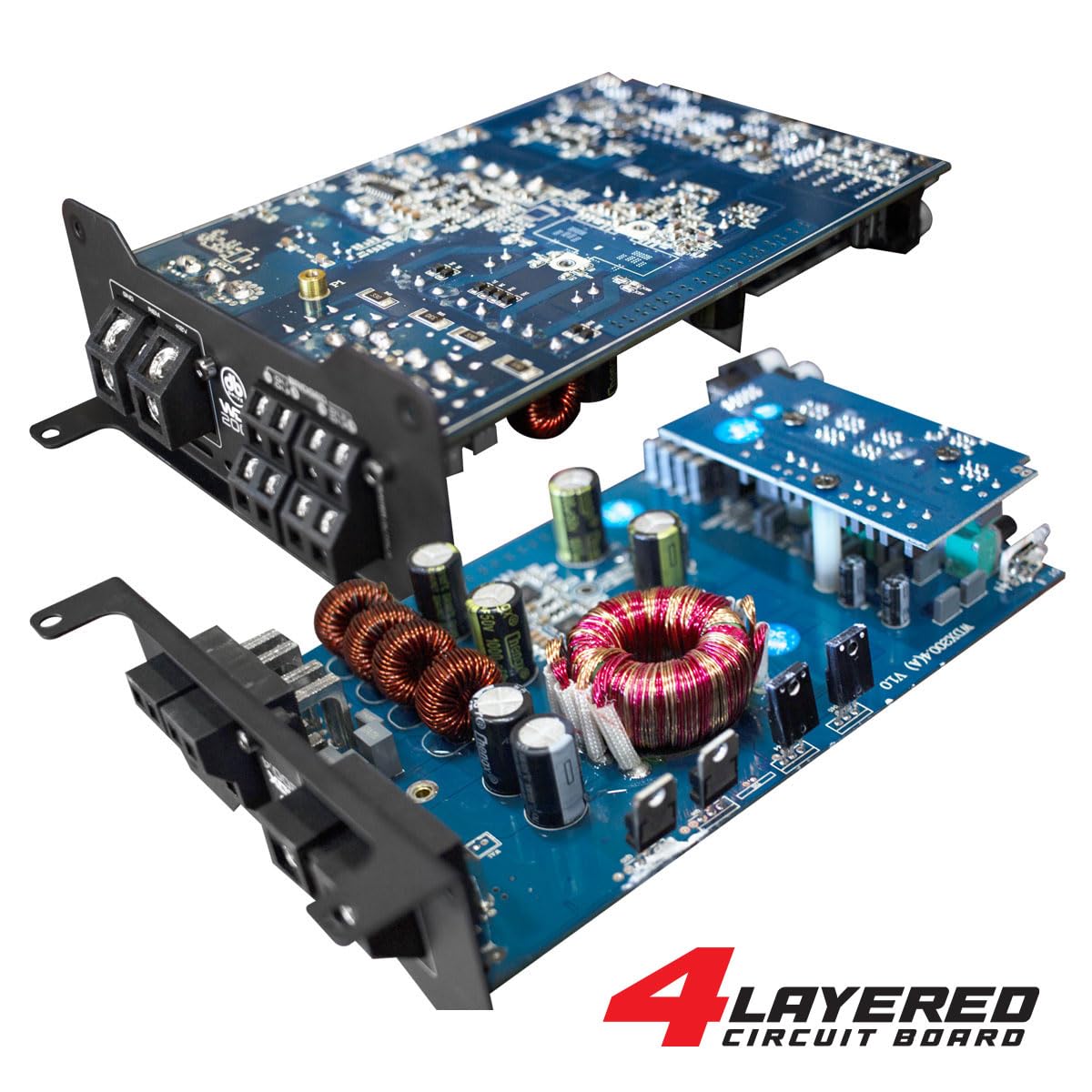
画像: 内部 view of the DB Drive WDX200.4 amplifier, highlighting its 4-layered circuit board design for enhanced performance and durability.
操作手順
インストールしたら、 amplifier requires minimal user interaction for daily operation. The primary adjustments are for input level and crossover settings.
レベル調整
Adjust the input level controls to match the output voltage of your head unit. Start with the amplifier's level control at minimum and slowly increase it until the desired volume is achieved without distortion.
クロスオーバー設定
- HPF(ハイパスフィルター): Use this setting for speakers that should only reproduce high frequencies (e.g., tweeters, mid-range speakers). This filters out low bass frequencies.
- LPF(ローパスフィルター): Use this setting for speakers that should only reproduce low frequencies (e.g., subwoofers). This filters out high frequencies.
- FULL(フルレンジ): Use this setting for speakers that should reproduce the entire frequency spectrum.
Adjust these settings according to the specifications of your speakers and your desired audio output.
メンテナンス
To ensure the longevity and optimal performance of your DB Drive WDX200.4 ampライフライザーを使用する場合は、次のメンテナンス ガイドラインに従ってください。
- クリーニング: 定期的に外装を清掃してください amplifier with a soft, dry cloth. Do not use harsh chemicals or abrasive cleaners. Ensure all ventilation openings are free from dust and debris.
- 接続: Regularly check all power, ground, and speaker connections to ensure they are secure and free from corrosion. Loose connections can lead to poor performance or damage.
- 換気: 確実に amplifier always has adequate airflow around it. Blocked vents can lead to overheating and thermal shutdown.
トラブルシューティング
問題が発生した場合は、 amp問題が頻繁に発生する場合は、次の一般的な問題と解決策を参照してください。
- 電源なし: Check the main fuse, power and ground connections, and the remote turn-on wire. Ensure the vehicle's battery has sufficient charge.
- 音が出ない: Verify all input and output connections. Check speaker wires for shorts or open circuits. Ensure the head unit is functioning correctly and sending an audio signal. Check crossover settings.
- 歪んだ音: Reduce the input level (gain) on the amplifier. Check for proper crossover settings. Ensure speakers are not overdriven or damaged.
- Ampライファイア過熱: 十分な換気を確保してください ampスピーカーのインピーダンスが適合していることを確認してください。 amplifier's capabilities. Reduce the volume or gain settings.
- 保護モード: もし、 amplifier enters protection mode (indicated by a specific LED), it usually signifies an issue such as overheating, a short circuit in the speaker wiring, or an impedance mismatch. Disconnect power, inspect all connections and speaker wiring, and allow the amplifier to cool before reconnecting.
これらの解決策を試しても問題が解決しない場合は、資格のあるカーオーディオ技術者に相談してください。
仕様
| 特徴 | 仕様 |
|---|---|
| モデル番号 | WDX200.4 |
| ブランド | DBドライブ |
| チャンネル数 | 4 |
| 出力(ステレオ) | 200 Watts RMS per channel at 2 Ohms |
| Output Power (Bridged) | 400 Watts RMS per channel at 4 Ohms (2 channels) |
| 巻tage | 9~16ボルト(DC) |
| 取り付けタイプ | 表面実装 |
| クロスオーバー | Integrated HPF, LPF, Full-Range |
| 入力 | RCA (Low-Level), High-Level with Automatic Turn-On |
| 認証 | 連邦通信委員会 |
保証とサポート
保証情報およびテクニカルサポートについては、ご購入時に同梱されているマニュアルを参照するか、公式DB Driveをご覧ください。 webサイトでご確認ください。保証請求に備えて購入証明書を保管してください。