
AENO AGH0004S-US
AENO赤外線ヒーター ユーザーマニュアル
Brand: AENO | Model: AGH0004S-US
1. 重要な安全情報
Please read this manual carefully before using the AENO Infrared Heater. Failure to follow these instructions may result in electric shock, fire, or serious injury.
- Always ensure the heater is unplugged before cleaning or performing any maintenance.
- コードやプラグが損傷した状態でヒーターを操作しないでください。
- Keep flammable materials (furniture, curtains, bedding, paper, clothes, etc.) at least 3 feet (0.9 meters) from the front, sides, and rear of the heater.
- This heater is for indoor use only. Do not use it outdoors or in wet locations.
- Do not use in bathrooms, laundry areas, or similar indoor locations where it may come into contact with water.
- 通気口や排気口に異物を挿入したり、異物が入るのを許さないでください。感電や火災の原因になったり、ヒーターが損傷する恐れがあります。
- 吸気口や排気口を塞がないでください。ベッドなど、開口部が塞がれる可能性のある柔らかい表面では使用しないでください。
- ヒーターが作動しているときは、子供やペットを監視してください。
2.製品オーバーview
The AENO Infrared Heater is a modern, energy-efficient heating solution designed for indoor spaces. Featuring a slim, elegant glass panel, it provides comfortable infrared heat without drying the air or burning oxygen. It can be used as a freestanding unit or wall-mounted, offering versatile placement options. The heater is equipped with smart Wi-Fi technology for convenient control via a mobile application and has been recognized as a Reddot Winner 2023 for its innovative design.

This image displays the AENO Infrared Heater in its freestanding configuration, highlighting its sleek black panel design. A close-up inset shows the digital control panel on the side of the heater, while a smartphone in the foreground illustrates the user-friendly AENO mobile application for remote control.

This image showcases the AENO Infrared Heater's "Invisible design," featuring one unit freestanding on the left and another mounted vertically on a wall on the right. The design is recognized with the Reddot Winner 2023 award, emphasizing its aesthetic integration into modern interiors.
3. セットアップとインストール
The AENO Infrared Heater offers two convenient installation options: freestanding with included legs or wall-mounted using the provided brackets.
3.1 自立設置
- ヒーターとすべての付属品をパッケージから慎重に取り出します。
- Attach the two provided legs to the bottom of the heater using the designated screws. No extra tools are typically required for this step.
- Place the heater on a stable, level surface, ensuring adequate clearance from walls and other objects as specified in the safety guidelines.
3.2壁取り付けの設置
- Identify a suitable wall location, ensuring it is a sturdy surface capable of supporting the heater's weight (approx. 19.6 lbs).
- Use the mounting stencil (if provided) to mark the drilling points for the wall brackets.
- 穴を開けて適切な壁アンカーを挿入します(壁の材質に応じて必要に応じて)。
- Securely attach the two mounting brackets to the wall.
- Carefully hang the heater onto the mounted brackets, ensuring it is securely seated.

This image provides a visual guide for the easy unpacking and assembly of the AENO Infrared Heater. It details the included components such as mounting brackets, legs, and a quick start guide, and illustrates the straightforward process of attaching the legs for freestanding use or mounting the heater on a wall.

A detailed diagram illustrating the compact dimensions of the AENO Infrared Heater: 0.43 inches in depth, 14.37 inches in width, and 39.37 inches in height. The image also notes the use of premium materials like glass and aluminum, and its origin as "Made in Europe," emphasizing its stylish and innovative design.
4. 操作手順
The AENO Infrared Heater can be operated via its integrated control panel or through the AENO mobile application.
4.1手動制御
The control panel is located on the side of the heater and features an LED display and touch buttons.
- 電源ボタン: 押すとヒーターのオン/オフが切り替わります。
- 温度調整: Use the '+' and '-' buttons to set your desired temperature. The maximum temperature setting is 248°F.
- スマートモード: Activate or deactivate smart mode for optimized heating.

This image details the LED screen and control buttons on the AENO Infrared Heater, providing a quick reference for setting the heater's functions, including power, temperature, and smart mode.
4.2 Optimal Heating Placement
For optimal heating performance, position the infrared heater to directly face the area or individuals you wish to warm. Infrared heat warms objects and people directly, rather than heating the air.

This visual guide illustrates the optimal placement for the AENO Infrared Heater to achieve effective heating coverage up to 215 sq. ft. It shows correct placements (marked with green checkmarks) where the heater directly warms individuals, and incorrect placements (marked with red crosses) where the heat is obstructed or misdirected.
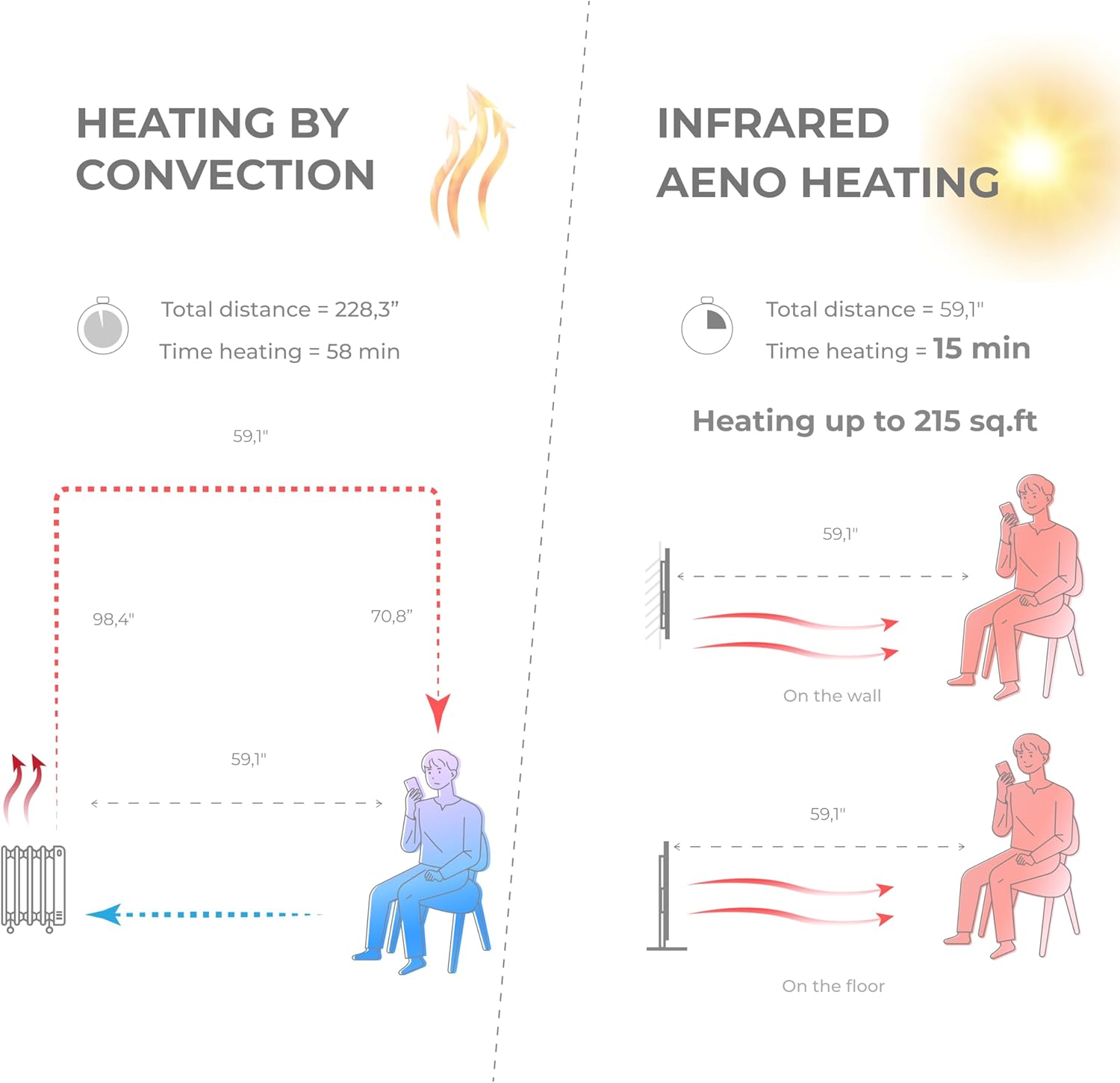
A comparative diagram illustrating the efficiency of AENO Infrared Heating versus traditional convection heating. It shows that infrared heating warms a space up to 215 sq. ft. in 15 minutes, compared to 58 minutes for convection heating, by directly warming objects and people rather than the air.

This image emphasizes the health and comfort benefits of the AENO Infrared Heater. It depicts a serene environment with a person meditating, illustrating that the heater is odorless, silent, does not blow air or cause pollution, and importantly, does not dry out the air or burn oxygen, contributing to a healthier indoor climate.

This image highlights the silent operation of the AENO Infrared Heater, stating "Totally silent 0 dB." It shows the heater in a quiet room setting, reinforcing that it provides warmth without any operational noise, making it ideal for bedrooms, offices, or any space requiring tranquility.
5. AENO App Control
Unlock the full potential of your AENO Infrared Heater by connecting it to the AENO mobile application.
5.1 アプリのダウンロード
- 検索する "AENO" in the Apple App Store (for iOS devices) or Google Play Store (for Android devices).
- Download and install the AENO application on your smartphone.
5.2 Wi-Fiへの接続
- ヒーターがコンセントに差し込まれ、電源がオンになっていることを確認してください。
- Open the AENO app and follow the on-screen instructions to add a new device.
- Select your AENO Infrared Heater from the list of discoverable devices.
- プロンプトが表示されたら、Wi-Fi ネットワークの資格情報を入力します。
- Once connected, the heater's Wi-Fi indicator will confirm successful pairing.
5.3 アプリの機能
The AENO app provides comprehensive control and monitoring capabilities:
- リモートオン/オフ: どこからでもヒーターのオン/オフを切り替えることができます。
- 温度設定: Precisely adjust the target room temperature.
- スケジュール: Create custom heating schedules and timers to automate operation.
- エネルギー消費の監視: Track and analyze your heater's electricity usage to optimize energy savings.
- Multi-Heater Control: Manage multiple AENO smart devices from a single app.
- スマートホーム統合: Compatible with popular smart home ecosystems like Amazon Alexa, Google Home, and Apple Siri.

This image demonstrates the advanced control features of the AENO Infrared Heater via its smartphone application. It shows how users can remotely turn the heater on/off, adjust the panel temperature between 140-248°F, and monitor and analyze electricity consumption from anywhere in the world. Links to download the app are also visible.

This image illustrates the remote control capabilities of the AENO App, allowing users to switch the heater on/off, set room temperature, create heating schedules, manage multiple heaters, control energy consumption, and set up devices within the AENO ecosystem.

This image highlights the energy efficiency of the AENO Infrared Heater, suggesting it can reduce heating costs by up to 50%. It promotes the concept of spot heating as an effective replacement for central heating systems, keeping specific areas warm with adaptive panel temperature.
6. メンテナンス
Regular cleaning and proper care will ensure the longevity and efficient operation of your AENO Infrared Heater.
- クリーニング: 清掃する前に、必ずヒーターのプラグを抜き、完全に冷ましてください。柔らかくて乾いた布を使用してください。amp cloth to wipe the exterior surfaces. Do not use abrasive cleaners, waxes, or polishes.
- ストレージ: ヒーターを長期間保管する場合は、プラグを抜いて、できれば元の梱包のまま、涼しく乾燥した場所に保管してください。
- ユーザーが修理可能な部品はありません: The heater contains no user-serviceable parts. Do not attempt to disassemble or repair the unit yourself. Refer all servicing to qualified service personnel.
7。 トラブルシューティング
If you experience issues with your AENO Infrared Heater, please consult the following common troubleshooting steps:
- ヒーターがオンにならない:
- 電源コードが機能しているコンセントにしっかりと差し込まれていることを確認してください。
- 回路ブレーカーが落ちていないか確認してください。
- Verify the power button on the heater or in the app is pressed.
- ヒーターが十分な熱を発生していません:
- Confirm the temperature setting is higher than the current room temperature.
- Ensure the heater is placed optimally, facing the desired heating area, and not obstructed.
- Check the room size; the heater is designed for areas up to 215 sq. ft.
- アプリの接続の問題:
- Ensure your smartphone is connected to a 2.4GHz Wi-Fi network (5GHz networks are not supported by some smart devices).
- Restart your Wi-Fi router and the heater.
- Ensure the heater is within range of your Wi-Fi router.
- Try re-pairing the heater with the app.
- 異常な音や臭い:
- The AENO Infrared Heater operates silently. If you hear unusual noises, unplug the unit immediately and contact customer support.
- A slight odor may be present during the first few uses; this is normal and should dissipate quickly. If a strong or burning odor persists, unplug the unit and contact support.
If the problem persists after attempting these steps, please contact AENO customer support for further assistance.
8. 仕様
| 特徴 | 詳細 |
|---|---|
| ブランド | あえの |
| モデル番号 | AGH0004S-US |
| 特集 | App, Manual control, Remote control, Programmable, On/off timer, Energy saving |
| 色 | 黒 |
| フォームファクター | パネル |
| 屋内/屋外での使用 | 屋内 |
| 製品寸法 | 奥行き0.44インチ x 幅14.38インチ x 高さ39.4インチ |
| 製品の推奨用途 | 家 |
| 取り付けタイプ | 壁掛け、床置き |
| 部屋タイプ | Room, kitchen, living room |
| 暖房範囲 | 最大215平方フィート |
| バーナータイプ | 赤外線 |
| 燃料の種類 | 電気 |
| 巻tage | 120ボルト |
| Amp怒る | 5.83 Amps |
| 最高温度設定 | 華氏248度 |
| アイテム重量 | 19.6ポンド |
| 初回利用可能日 | 5年2023月XNUMX日 |
9. 保証とサポート
Specific warranty details for the AENO Infrared Heater are not provided in this manual. Please refer to the warranty card included with your product or visit the official AENO web最新の保証情報については、サイトをご覧ください。
For technical support, troubleshooting assistance, or any product-related inquiries, please contact AENO customer service through their official webサイトまたは製品パッケージに記載されている連絡先情報を参照してください。
Ask a question about this manual
Ask about setup, troubleshooting, compatibility, parts, safety, or missing instructions. Manuals+ will review the question and use this page’s manual context to help answer it.