
Miracase 8ad21a1b-09de-4df8-8689-16518fb3ae13
Miracase 3-in-1 Cell Phone Holder User Manual
Model: 8ad21a1b-09de-4df8-8689-16518fb3ae13
製品終了view
The Miracase 3-in-1 Cell Phone Holder is a versatile mounting solution designed for your car. It offers three different installation methods: dashboard, air vent, and windshield, providing flexibility to suit various vehicle interiors and user preferences. This holder is engineered for secure grip and easy adjustability, ensuring your smartphone remains stable and accessible during your travels.

Figure 1: Miracase 3-in-1 Cell Phone Holder components.
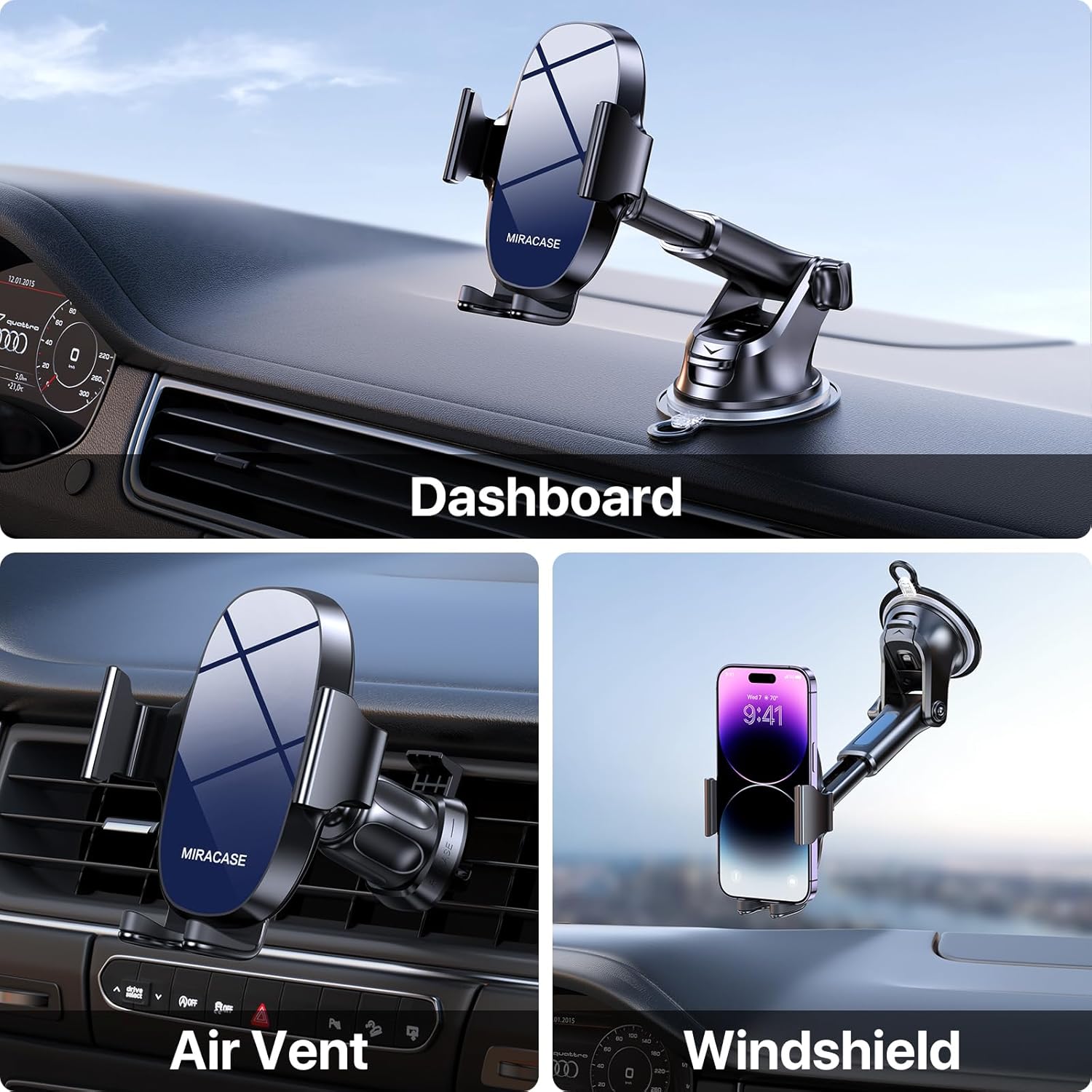
Figure 2: Demonstrating the three mounting options: Dashboard, Air Vent, and Windshield.
セットアップとインストール
1. Choosing Your Mounting Location
This holder provides options for dashboard, windshield, or air vent installation. Select the location that offers the best visibility and accessibility without obstructing your driving view または車両の制御。
2. Dashboard/Windshield Mount Installation
- 表面をきれいにする: Ensure the chosen dashboard or windshield area is clean and free of dust or oils. Use an alcohol wipe if necessary and let it dry completely.
- 吸盤を取り付けます: Press the suction cup firmly onto the desired smooth, flat surface.
- Lock the Suction: Push down the locking lever located at the base of the suction cup to create a strong vacuum seal.
- アームの角度を調整します: Loosen the adjustment knob on the arm to set the desired angle, then tighten it securely.

Figure 3: The robust suction cup provides a secure hold, capable of withstanding various temperatures.
3. Air Vent Mount Installation
- Attach Vent Clip: Slide the upgraded metal hook of the vent clip onto one of your car's air vent blades.
- クリップを固定します: Tighten the screw on the vent clip to firmly clamp it onto the vent blade, preventing wobbling.
- 安定性を確保する: Gently tug on the installed vent clip to confirm it is securely attached before mounting the phone holder.

Figure 4: Close-up of the upgraded vent clip with metal hook for enhanced stability.

Figure 5: Dimensions of the air vent clip for compatibility reference.
4. Attaching Phone Holder to Mount
Once your chosen mount (suction cup or vent clip) is securely installed, attach the phone holder cradle to the spherical joint on the mount. Tighten the collar around the joint to lock the cradle in place.
操作手順
1. Placing and Removing Your Phone
- Clを開くamps: Press the release button located on the back of the phone holder to open the side clamp腕を。
- 電話番号を挿入: Place your smartphone into the holder, ensuring it rests on the bottom support. The side clamps will automatically close to secure the phone.
- 電話を削除: リリースボタンをもう一度押すと、clが開きますamps and carefully remove your phone.
2. 調整 View角度
The Miracase phone holder features multiple adjustment points for optimal viewing:
- 360°回転: The phone cradle can rotate a full 360 degrees, allowing for both portrait and landscape viewingモード。
- 270°角度調整: The arm of the holder can be adjusted up to 270 degrees, enabling you to find the perfect vertical angle.

Figure 6: The holder offers extensive adjustability for optimal view角度を変える。
3. 携帯電話の互換性
This holder is designed to accommodate a wide range of smartphones, typically those with screen sizes between 4.0 and 7.0 inches. It is also compatible with various phone cases, including battery cases, wallet cases, OtterBox, and MagSafe cases, ensuring a secure fit without needing to remove your phone's protective cover.

Figure 7: Compatibility with various phone sizes and case types.
メンテナンス
- 吸盤の掃除: If the suction cup loses its stickiness, rinse it with warm water and let it air dry. Do not use harsh chemicals or abrasive materials.
- 一般的な清掃: 電話ホルダーを柔らかくて乾いた布で拭いてくださいamp 布で埃や汚れを拭き取ってください。過度の湿気は避けてください。
- ストレージ: When not in use for extended periods, store the holder in a cool, dry place away from direct sunlight to preserve the integrity of the materials.
トラブルシューティング
- 吸盤がくっつかない:
解決: Ensure the mounting surface is clean, smooth, and dry. Re-wet the suction cup slightly with water, press firmly, and then engage the locking lever. Avoid porous or textured surfaces. - 電話がしっかりと固定されていない:
解決: サイドclを確認してくださいamping arms are fully closed around your phone. Press the release button and re-insert the phone, allowing the arms to auto-clamp. Check for any obstructions. - Vent Clip Wobbles:
解決: Make sure the metal hook is fully inserted into the vent blade and the tightening screw is securely fastened. Some vent designs may not provide optimal stability. - 角度調整の難しさ:
解決: Loosen the adjustment knobs sufficiently before attempting to change the angle or rotation. Tighten them firmly once the desired position is achieved.
仕様
| 特徴 | 詳細 |
|---|---|
| ブランド | ミラケース |
| モデル番号 | 8ad21a1b-09de-4df8-8689-16518fb3ae13 |
| 取り付けタイプ | Dashboard / Air Vent / Windshield |
| 対応デバイス | スマートフォン(4.0~7.0インチ) |
| アイテム重量 | 9.1オンス |
| パッケージ寸法 | 5.04 x 4.76 x 2.64インチ |
| 特集 | Adjustable, Upgraded Metal Hook Vent Clip |
| 色 | 青 |
| 原産国 | 中国 |
| 初回利用可能日 | 1年2023月XNUMX日 |
保証とサポート
For warranty information and customer support, please refer to the official Miracase web販売店のウェブサイトをご覧いただくか、カスタマーサービスに直接お問い合わせください。具体的な保証条件は、地域や購入日によって異なる場合があります。