
導入
This manual provides detailed instructions for the operation and maintenance of your TEKMAGIC W64-NCA-BK Digital Sports Watch. Designed for durability and functionality, this watch features 10 ATM (100m) water resistance, a chronograph, stopwatch, timer, countdown, calendar, dual time zone display, and an alarm clock. Please read this manual thoroughly to ensure proper use and to maximize the lifespan of your watch.
見守るview およびボタン機能
Your TEKMAGIC W64-NCA-BK watch features four primary buttons for navigation and function control. Refer to the diagram below for button identification.
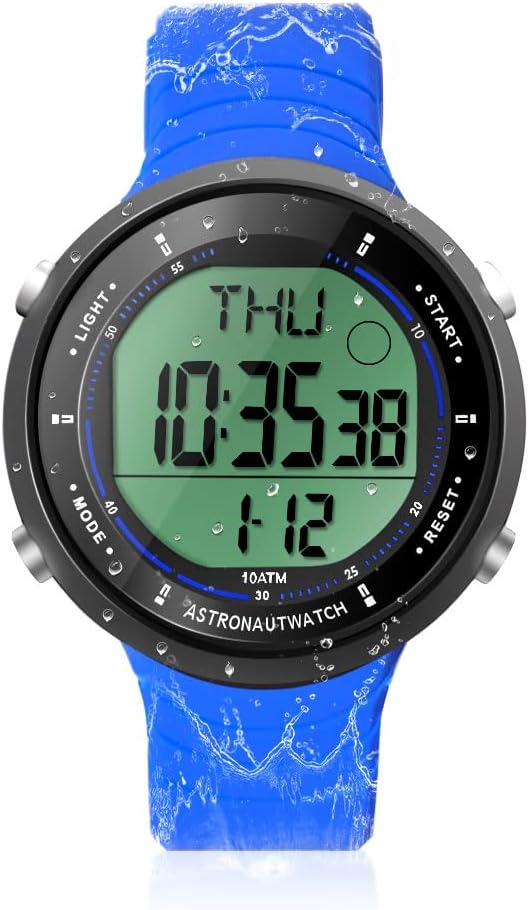
画像の説明: フロント view of the TEKMAGIC W64-NCA-BK Digital Sports Watch. The watch has a blue silicone strap and a black case with a digital display showing "THU 10:35:38 1-12". Four buttons are visible on the sides, labeled "LIGHT", "MODE", "START", and "RESET".
- ライトボタン(左上): 暗い場所でも視認性を確保するためにバックライトを点灯します。
- MODEボタン(左下): Cycles through different modes: Time, Chronograph, Timer, Countdown, Alarm, Dual Time.
- スタートボタン(右上): Starts/stops functions in Chronograph, Timer, and Countdown modes. Adjusts values in setting modes.
- リセットボタン(右下): Resets functions in Chronograph, Timer, and Countdown modes. Cycles through digits in setting modes.
セットアップと基本操作
1. 初回電源投入
The watch typically comes pre-installed with a battery. If the display is blank, the battery may need replacement (refer to Maintenance section).
2. 時刻と日付の設定
- 時間モードで、 モード 秒が点滅し始めるまでボタンを押します。これは設定モードを示します。
- を押す リセット button to cycle through the setting options: Seconds → Hour → Minute → Year → Month → Day → 12/24 Hour Format.
- 使用 始める 点滅している値を調整するボタンです。
- すべての設定が完了したら、 モード ボタンを押して設定モードを終了します。
3. 12/24時間形式切り替え
During time setting, you can switch between 12-hour (with AM/PM indicator) and 24-hour formats using the 始める button when the hour format option is flashing.
操作機能
1. クロノグラフ(ストップウォッチ)
クロノグラフ機能により、イベントの正確な時間を計測できます。

画像の説明: A close-up of the TEKMAGIC W64-NCA-BK watch face showing the stopwatch function. The display reads "ST 0:00543" with "CHIME" indicated. The image also shows a person swimming with the watch.
- を押す モード button repeatedly until "ST" (Stopwatch) appears on the display.
- プレス 始める タイミングを開始します。
- プレス 始める もう一度押すとタイミングが一時停止します。
- プレス リセット ストップウォッチをゼロにクリアします。
- 一時停止後に計測を再開するには、 始める.
2. カウントダウンタイマー
時計がカウントダウンする特定の時間を設定します。
画像の説明: A close-up of the TEKMAGIC W64-NCA-BK watch face showing the countdown timer function. The display reads "TR 0:0621". The image also shows a person surfing with the watch.
- を押す モード button repeatedly until "TR" (Timer) appears on the display.
- を押し続けます リセット 時間が点滅し始めるまでボタンを押します。
- プレス 始める to adjust the flashing hour value.
- プレス リセット to move to minutes, then 始める to adjust. Repeat for seconds.
- 希望のカウントダウン時間を設定したら、 モード 設定モードを終了します。
- プレス 始める カウントダウンを開始します。
- プレス 始める もう一度押すとカウントダウンが一時停止します。 リセット 設定した時間にリセットします。
- カウントダウンがゼロになるとアラームが鳴ります。
3. 目覚まし時計
毎日特定の時間にアラームが鳴るように設定します。

画像の説明: A composite image showing various watch functions. One quadrant specifically shows the watch face with "AL 12:00" indicating the alarm setting mode.
- を押す モード ディスプレイに「AL」(アラーム)が表示されるまでボタンを繰り返し押します。
- を押し続けます リセット 時間の数字が点滅し始めるまでボタンを押します。
- プレス 始める to adjust the flashing hour value.
- プレス リセット to move to minutes, then 始める 調整する。
- プレス モード アラーム設定モードを終了します。
- アラームをオン/オフにするには、 始める アラームモード(設定モードではない)の場合、アラームアイコンが表示/非表示になります。
4. ホurlyチャイム
ほurly chime provides an audible alert at the top of every hour.
画像の説明: A composite image showing various watch functions. One quadrant specifically shows the watch face with "CHIME" indicated, signifying the hourlyチャイムがアクティブです。
- While in Alarm mode ("AL"), press the リセット 切り替えボタンurlチャイムのオン/オフ。チャイムアイコンが表示されたり消えたりします。
5. デュアルタイムゾーン
Display a second time zone for convenience when traveling or communicating across different regions.

画像の説明: A composite image showing two TEKMAGIC W64-NCA-BK watches side-by-side, one displaying "THU 4:52:23" and the other "T2 16:52:23", illustrating the dual time zone feature. The image also shows people wearing the watch while hiking.
- を押す モード button repeatedly until "T2" (Dual Time) appears on the display.
- を押し続けます リセット 時間の数字が点滅し始めるまでボタンを押します。
- プレス 始める to adjust the flashing hour value.
- プレス リセット to move to minutes, then 始める 調整する。
- プレス モード デュアルタイム設定モードを終了します。
6. バックライト
To illuminate the display, press the ライト button (top left). The backlight will remain on for a few seconds.
メンテナンス
1. Water Resistance (10 ATM / 100m)
This watch is rated for 10 ATM (100 meters / 330 feet) water resistance, making it suitable for swimming, diving, snorkeling, and other water activities. Ensure all buttons are not pressed while underwater to maintain water resistance integrity.

画像の説明: A composite image demonstrating the watch's 10 ATM waterproof capability. The top shows a diver underwater wearing the watch. The bottom left shows a person's arm with the watch in a swimming pool. The bottom right shows the watch submerged in water with splashes.
2. バッテリーの交換
The watch uses a CR2025 battery. If the display becomes dim or the watch stops functioning, it's time to replace the battery. It is recommended to have battery replacement performed by a qualified watch technician to ensure proper sealing and maintain water resistance.
- Carefully remove the back cover of the watch using a suitable tool.
- 古い CR2025 電池を取り外します。
- 新しい CR2025 電池をプラス (+) 側を上に向けて挿入します。
- Replace the back cover, ensuring it is securely fastened to maintain water resistance.
3. 清掃
時計は定期的に柔らかくてきれいな布で拭いてください。amp cloth. For stubborn dirt, a mild soap solution can be used, followed by rinsing with fresh water and drying thoroughly. Avoid using harsh chemicals or abrasive materials.
トラブルシューティング
| 問題 | 考えられる原因 | 解決 |
|---|---|---|
| ディスプレイが空白または暗い。 | バッテリー残量が少ないか切れています。 | CR2025 電池を交換してください。 |
| Watch loses time or functions incorrectly. | 電池残量が少ない、内部故障。 | バッテリーを交換してください。問題が解決しない場合は、カスタマーサポートにお問い合わせください。 |
| 時計の中に水が入りました。 | Buttons pressed underwater; back cover not sealed properly after battery change. | Immediately take to a watch repair specialist. Avoid pressing buttons underwater. Ensure proper sealing after maintenance. |
| Alarm or chime not sounding. | Alarm/chime function is turned off. | Ensure alarm/chime is activated in the respective mode. |
仕様
| 特徴 | 詳細 |
|---|---|
| モデル番号 | W64-NCA-BK |
| 耐水性 | 10 ATM (100 m / 330 フィート) |
| 移動タイプ | 日本のクォーツ |
| 電池のタイプ | CR2025 |
| 動作バッテリー寿命 | 1.5~2年 |
| 時間の精度 | 月±30秒 |
| カウントダウン範囲 | 23:59'59'' to 0:0'0'' |
| ケース素材 | アブソリュート |
| ストラップ素材 | シリコーン |
| ケース直径 | 45mm(1.8インチ) |
| ケースの厚さ | 12mm(0.47インチ) |
| ストラップの幅 | 22mm(0.9インチ) |
| 最大手首周囲径 | 230mm(9.1インチ) |
| Min Wrist Circumference | 160mm(6.3インチ) |
| 製品重量 | 53g(0.12ポンド) |

画像の説明: A diagram illustrating the dimensions of the TEKMAGIC W64-NCA-BK Digital Sports Watch. It shows the watch with measurements for case diameter (45mm), case thickness (12mm), strap width (22mm), and minimum/maximum wrist circumference (160mm/230mm).
カスタマーサポート
For further assistance or inquiries, please refer to the product's official support channels or contact your retailer. Keep your purchase receipt for warranty purposes.