
導入
Thank you for choosing the La Crosse Technology WS6207 Modern Design Weather Station. This device provides accurate indoor and outdoor temperature and humidity readings, a radio-controlled clock, weather forecasts, and other useful meteorological data. This manual will guide you through the setup, operation, and maintenance of your new weather station.
主な特徴:
- Radio-controlled time and date (12 or 24-hour format)
- Calendar and day of the week display in 7 languages
- スヌーズ機能付きアラーム2個
- Indoor and outdoor temperature and humidity display
- Min/Max records for temperature and humidity
- Outdoor temperature alerts
- 室内快適インジケーター
- Weather forecast with atmospheric pressure detection
- Snow alert and moon phases display
- Window opening/closing advice
- 調整可能なバックライト
- Supports up to 3 outdoor sensors (one included)
- 低バッテリーインジケーター
- 周波数:433 MHz
パッケージ内容
すべての品物が揃っていて良好な状態であることを確認してください。
- 1 x WS6207 Modern Design Weather Station (Main Unit)
- ワイヤレス屋外センサー x 1
- ユーザーマニュアル x 1

画像: The La Crosse Technology WS6207 weather station displayed in a home setting. This image provides an overall view of the product and its modern design with a wooden base.
設定
1. 屋外センサーへの電源供給
- 屋外センサーの背面にある電池ケースのカバーを開きます。
- 極性マーク(+/-)に従って、単3電池2本(別売)を挿入します。
- 電池カバーをしっかりと閉じてください。
2. 本体の電源供給
- 本体背面の電池カバーを開けます。
- 極性マーク(+/-)に従って、単4電池3本(別売)を挿入します。
- Close the battery compartment cover securely. The display will light up and begin searching for the outdoor sensor and radio-controlled time signal.
3.センサーの配置
For accurate outdoor readings, place the wireless sensor in a shaded area, away from direct sunlight and sources of heat or moisture. Ensure it is protected from direct rain. The maximum transmission range is approximately 100 meters (330 feet) in open air. Walls and other obstructions may reduce this range.
4. 初期同期
両方のユニットに電池を挿入すると、本体は自動的に屋外センサーとの接続を試みます。この処理には数分かかる場合があります。接続が完了すると、本体のディスプレイに屋外の温度と湿度が表示されます。
5. Radio-Controlled Time Setup
The weather station will automatically attempt to synchronize with the DCF (or similar regional) radio time signal. This process can take several hours, especially during initial setup. For best reception, place the unit near a window and away from electronic devices that may cause interference. The time will automatically adjust for Daylight Saving Time (DST).
操作手順
1. 表示終了view
The main unit's LCD display is divided into several sections, providing a comprehensive overview of current conditions and time information.

画像: This image displays the main unit's screen, illustrating the layout of information including the current time, date, day of the week, indoor temperature and humidity, outdoor temperature and humidity, and weather forecast icons.
- 上部セクション: Weather forecast icons (sunny, cloudy, rainy, snowy), atmospheric pressure, and radio-controlled time.
- 中間セクション: Current time, DST indicator, date, and day of the week.
- Bottom Left Section: Outdoor temperature and humidity, with min/max indicators.
- Bottom Right Section: Indoor temperature and humidity, with comfort indicator (DRY, OK, WET).
2. 手動で時刻と日付を設定する
If the radio-controlled time signal is not available, you can set the time and date manually. Refer to the detailed instructions in the included printed manual for specific button presses.
3. アラーム機能
The weather station features two independent alarms. To set an alarm, press the 'ALARM' button, then use the '+' and '-' buttons to adjust the hour and minute. Press 'ALARM' again to confirm. The snooze function can be activated by pressing any button (except 'ALARM' or 'SET') when the alarm sounds.
4. 温度と湿度の表示
Press the 'C/F' button to switch between Celsius and Fahrenheit temperature units. The station automatically records minimum and maximum temperature and humidity values for both indoor and outdoor readings. Press the 'MIN/MAX' button to cycle through these records.
5. 天気予報
The weather station predicts weather conditions for the next 12-24 hours based on atmospheric pressure changes. The forecast icons (sunny, partly cloudy, cloudy, rainy, snowy) are indicative and may not always reflect real-time conditions. The atmospheric pressure is displayed in hPa.
6. Window Opening/Closing Advice
This feature provides a recommendation on whether to open or close windows based on the indoor and outdoor temperature and humidity differences, aiming to optimize indoor comfort and energy efficiency.
7. 調整可能なバックライト
The display features an adjustable backlight for improved visibility in various lighting conditions. Press the 'LIGHT' button to cycle through different brightness levels or to turn it off.
メンテナンス
1. バッテリーの交換
When the low battery indicator appears on the display for either the main unit or the outdoor sensor, replace the batteries promptly. Use fresh, high-quality batteries of the specified type (AAA for main unit, AA for sensor).
2. 清掃
気象ステーションとセンサーを柔らかくて清潔な布で拭いてください。amp 布で拭いてください。研磨剤入りの洗剤や溶剤はディスプレイやコンピューターを損傷する恐れがあるため使用しないでください。asing. Ensure no moisture enters the battery compartments.
3. ストレージ
If the weather station will not be used for an extended period, remove all batteries from both units to prevent leakage and corrosion. Store the units in a cool, dry place.
トラブルシューティング
- 本体にディスプレイが表示されない: Check if batteries are inserted correctly with correct polarity. Replace with fresh batteries.
- 屋外センサーが接続されていません: Ensure the sensor is within range of the main unit. Check and replace sensor batteries. Press the 'SEARCH' button on the main unit (if available) to manually initiate a search for the sensor. Avoid major metal objects or electronic interference between units.
- 温度/湿度の測定値が不正確: Ensure the outdoor sensor is placed in a shaded, well-ventilated area, away from direct sunlight, heat sources, or excessive moisture. Allow time for readings to stabilize after initial setup or battery replacement.
- Time not synchronizing (radio-controlled clock): Place the main unit near a window, away from electronic devices that may cause interference. Allow up to 24 hours for the initial synchronization. Manual time setting is an alternative if the signal is consistently weak.
- Weather forecast seems incorrect: The weather forecast is a prediction based on atmospheric pressure trends and may not always match local conditions perfectly. It is an indication for the next 12-24 hours, not a real-time observation.
仕様
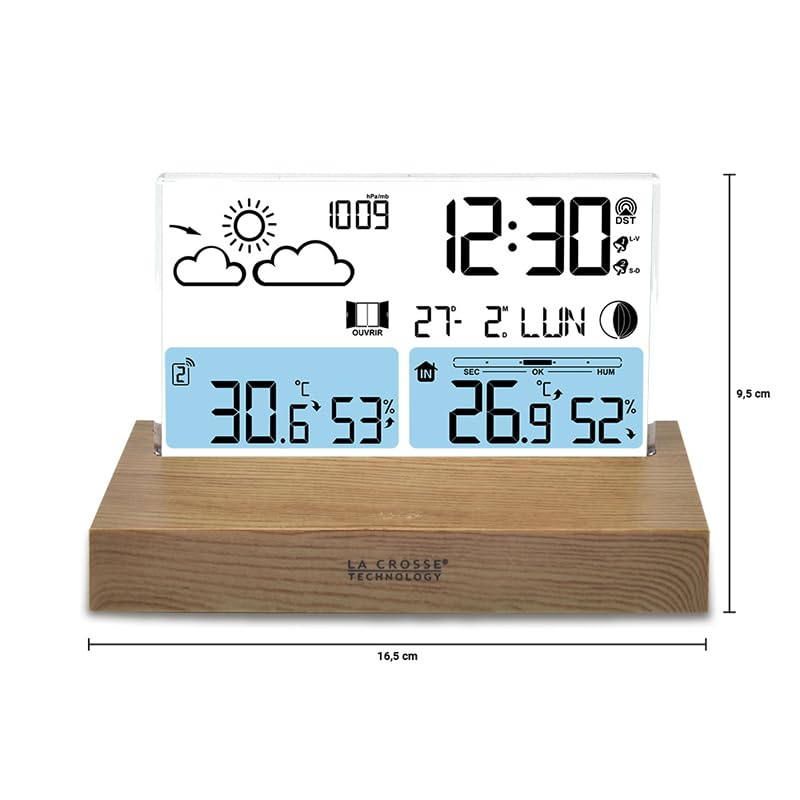
画像: This diagram illustrates the physical dimensions of the weather station's main unit, indicating a width of 16.5 cm and a height of 9.5 cm, useful for placement considerations.
| 特徴 | 詳細 |
|---|---|
| モデル番号 | WS6207 |
| 外形寸法図(本体) | 16 x 4 x 9 cm (長さ x 幅 x 高さ) |
| 重さ | 350グラム |
| 電源(本体) | Battery powered (3 x AAA, not included) |
| 電源(屋外センサー) | 電池駆動(単三電池2本、別売) |
| 接続技術 | ワイヤレス、433MHz |
| 特集 | 無線センサー |
| 材料 | Wood (base) |
| 表示タイプ | 液晶 |
| 温度精度 | 1~2℃ |
| Temperature Reading Accuracy | ±0.5℃ |
| 上限定格温度 | 摂氏35度 |
| センサー技術 | 無線周波数(RF) |
保証とサポート
La Crosse Technology products are manufactured to high-quality standards. For specific warranty information, please refer to the warranty card included in your product packaging or visit the official La Crosse Technology webサイトでご確認ください。購入証明として購入レシートを保管してください。
If you encounter any issues or have questions not covered in this manual, please contact La Crosse Technology customer support. Contact details can typically be found on the product packaging or the official brand webサイト。