
1. はじめに
Thank you for choosing the GameSir T4 Cyclone Wireless Controller. This manual provides detailed instructions for setting up, operating, maintaining, and troubleshooting your controller. The GameSir T4 Cyclone is designed for a versatile gaming experience across multiple platforms.

画像: 正面 view of the GameSir T4 Cyclone Wireless Controller.
2. パッケージ内容
- GameSir T4 Cyclone Wireless Controller
- USB-Cケーブル
- ユーザーマニュアル
- Note: The 2.4G wireless receiver is sold separately.
3. セットアップ
3.1 コントローラの充電
Before first use, fully charge the controller. Connect the supplied USB-C cable to the controller's charging port and the other end to a USB power source (e.g., computer, wall adapter). The controller features an 860mAh battery, providing approximately 25 hours of playtime on a full charge.

Image: Illustration showing 860mAh battery capacity and 25 hours playing time.
3.2 互換性
The GameSir T4 Cyclone Wireless Controller is compatible with the following platforms:
- Nintendo Switch (including Switch, Switch Lite, and Switch OLED)
- Windows 10/11 PC
- Androidデバイス(Android 6.0以上)
- iOS devices (iOS 13.0 and above)
- スチームデッキ
Note: Xbox consoles are NOT supported.

Image: Controller shown with icons for Switch, PC, iOS, and Android, indicating multi-platform compatibility.
3.3 接続オプション
The controller offers three ways to connect to your devices:
- Bluetooth接続:
- コントローラーが充電されていることを確認してください。
- コントローラの電源を入れます。
- デバイス(Switch、Android、iOS、PC)で、Bluetooth 設定に移動し、利用可能なデバイスを検索します。
- Select "GameSir T4 Cyclone" to pair.
- 2.4G Wireless Connection (Receiver Sold Separately):
- Plug the 2.4G wireless receiver into an available USB port on your device (PC, Steam Deck).
- コントローラーの電源を入れます。自動的に受信機に接続されます。
- USB-C有線接続:
- Connect the controller to your device using the supplied USB-C cable.
- The controller will function as a wired controller and charge simultaneously.

Image: Visual representation of Bluetooth, USB-C, and 2.4G wireless connectivity options.
4. 操作手順
4.1 Hall Effect Sensing Joysticks
The GameSir T4 Cyclone features Hall Effect joysticks, which use magnetic sensors to detect movement. This technology provides:
- ゼロデッドゾーン: Ensures immediate response to even the slightest input.
- Anti-Drift Performance: Eliminates common stick drift issues found in traditional joysticks, ensuring long-term precision.
- 耐久性: Designed for up to 5 million cycles.

Image: Diagram illustrating the internal components of GameSir Hall Effect Sticks, highlighting anti-drift and longevity.
4.2 ホール効果アナログトリガー
The analog triggers also utilize Hall Effect technology, offering precise and consistent input. You can switch between two trigger modes:
- Regular Trigger Mode: Provides a full range of motion for nuanced control in racing or driving games.
- Fast Trigger Mode (Hair Trigger): Reduces travel distance for quicker, mouse-click-like responses, ideal for FPS or RPG games.

Image: Diagram showing the internal mechanism of Hall Effect Analog Triggers with 0.1mm accuracy.
4.3 プログラム可能なマクロバックボタン
The controller features two programmable back buttons (L4 and R4) that can be customized for enhanced gameplay. These buttons allow you to:
- ボタンのマッピング: Assign a single button function to L4 or R4.
- ターボ機能: Set a button to rapidly repeat its input.
- コンボ機能: Program a sequence of button presses to execute complex actions with a single press.
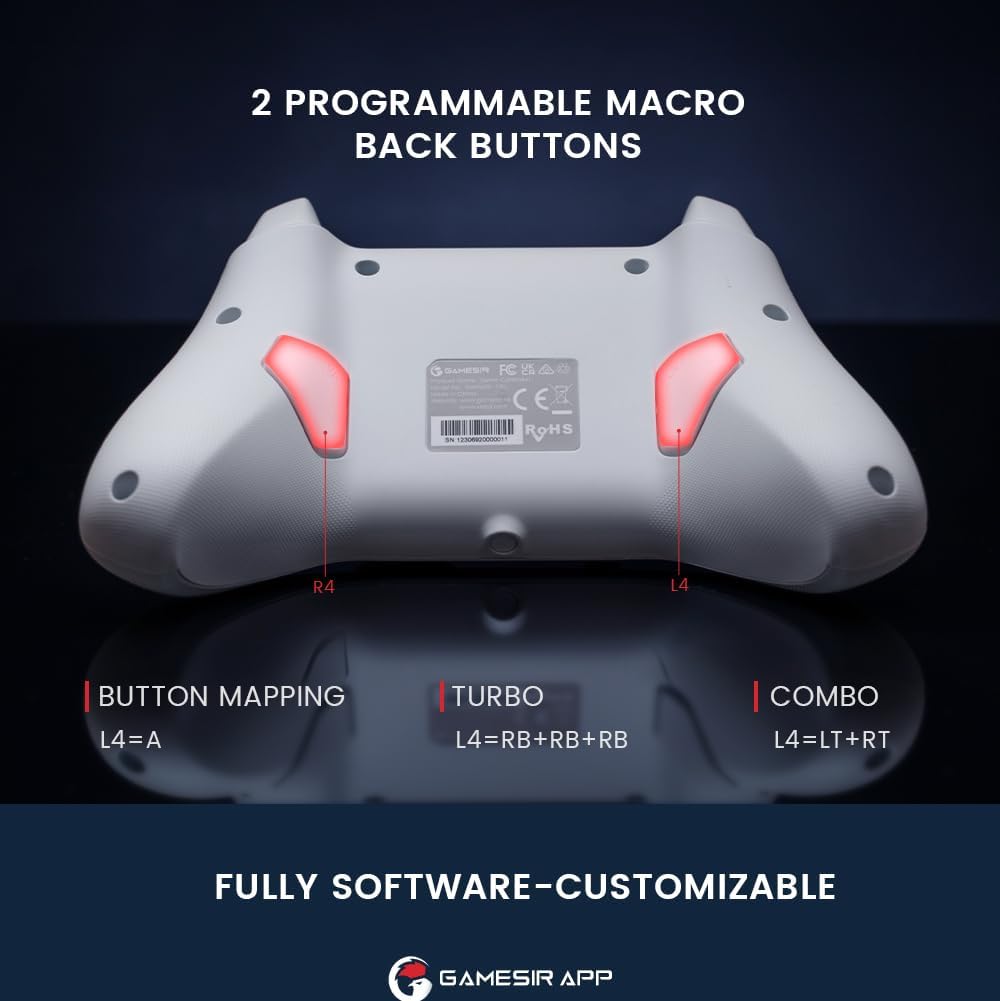
画像: 背面 view of the controller highlighting the L4 and R4 programmable macro back buttons.
4.4 多機能Mボタン
The 'M' button provides quick access to various settings without needing the app:
- M + LT/RT: Switch between Hair Trigger (fast) and Linear Trigger (regular) modes.
- M + LS/RS: Adjust stick deadzone settings.
- M + Dパッド上/下: 振動強度を調整します。
- M + A: Change ABXY button layout (e.g., Switch layout vs. Xbox layout).

Image: Diagram showing the multi-function M button and its combinations for various settings.
4.5 モーションコントロール
The controller supports motion controls, allowing for interactive gameplay in compatible Nintendo Switch titles. Tilt, shake, or rotate the controller to interact with your games.

Image: Controller shown with dynamic lines indicating motion control in action during gameplay.
4.6 GameSirアプリのカスタマイズ
For advanced customization, download the GameSir App. The app allows you to:
- ボタンのマッピングをカスタマイズします。
- Adjust stick deadzone.
- トリガーの移動距離を設定します。
- 振動の強さを微調整します。
- コントローラーのファームウェアを更新します。

Image: Screenshots of the GameSir App interface showing options for button mapping, stick, triggers, and vibration settings.
5. メンテナンス
- クリーニング: コントローラーの清掃には、柔らかく乾いた布をご使用ください。刺激の強い化学薬品や研磨剤の使用は避けてください。
- ストレージ: コントローラーは、直射日光や極端な温度を避け、涼しく乾燥した場所に保管してください。
- バッテリーのケア: 内蔵バッテリーの交換は行わないでください。コントローラーを長期間使用しない場合は、バッテリーの性能を維持するために定期的に充電してください。
6。 トラブルシューティング
- コントローラーが接続されていません:
- コントローラーが完全に充電されていることを確認してください。
- デバイスで Bluetooth が有効になっており、コントローラーがペアリング モードになっていることを確認します。
- If using 2.4G wireless, ensure the receiver is properly inserted and the controller is in 2.4G mode.
- コントローラーとデバイスの両方を再起動してみてください。
- 入力遅延または反応しないコントロール:
- Ensure there are no obstructions or excessive distance between the controller and your device.
- 他のワイヤレス デバイスからの干渉を最小限に抑えます。
- For critical gaming, consider using the USB-C wired connection for the lowest latency.
- Stick Drift or Inaccurate Movement:
- The Hall Effect joysticks are designed to prevent drift. If you experience issues, ensure the controller firmware is up to date via the GameSir App.
- Check the stick deadzone settings in the GameSir App and ensure it is set to 0 for optimal responsiveness.
- Rumble Motor Noise:
- Some users may notice a high-pitched squeal from the rumble motors. If this is distracting, the vibration intensity can be adjusted or disabled via the multi-function M button or the GameSir App.
- LED Indicator Too Bright:
- The LED brightness can be adjusted through the GameSir App.
- GameSir App Not Recognizing Controller:
- Ensure Bluetooth is enabled and the controller is paired with your mobile device.
- Check for app updates and controller firmware updates.
- Verify that the app has necessary permissions on your mobile device.
7. 仕様
| 特徴 | 詳細 |
|---|---|
| ブランド | ゲームサー |
| モデル名 | ゲームサー T4 サイクロン |
| 対応デバイス | Android, iOS, Nintendo Switch, PC, Steam Deck |
| コントローラータイプ | ジョイスティック |
| 接続技術 | Bluetooth, 2.4G Wireless (receiver sold separately), USB C |
| 追加機能 | Wireless, Hall Effect Joysticks, Hall Effect Triggers, Programmable Back Buttons, Motion Control |
| ボタンの数量 | 16 |
| ハードウェアプラットフォーム | デスクトップ、ゲーム機、ノートパソコン、スマートフォン、タブレット |
| 電源 | Wireless (Rechargeable Battery) |
| バッテリー容量 | 860mAh |
| プレイ時間 | 約25時間 |
| アイテム重量 | 400グラム |
| 商品の寸法 (長さ x 幅 x 高さ) | 6.14 x 4.21 x 2.48インチ |
8. 公式製品ビデオ
ビデオ: 当局者がview of the GameSir T4 Cyclone and Pro Wireless Controllers, demonstrating features and compatibility.
9. 保証とサポート
GameSir products come with a limited warranty. For detailed warranty information, please refer to the warranty card included with your product or visit the official GameSir website. For technical support, troubleshooting assistance, or to download the GameSir App and firmware updates, please visit the GameSir support page or contact customer service.
GameSir App: The GameSir App is essential for unlocking the full customization potential of your controller and for keeping its firmware updated. It is available for download on Google Play and the Apple App Store.