
導入
The Nonstop NSA2-BK Station A is a versatile bedside companion designed to enhance your daily routine. This device integrates a wireless Bluetooth speaker, an alarm clock, and a multi-functional charging station, providing convenience and relaxation in one compact unit. It features soothing soundscapes for improved sleep and multiple charging options for your devices.

図1: 前面 view of the Nonstop NSA2-BK Station A, displaying the digital clock, alarm settings, and charging indicators.
主な特徴
- ワイヤレス Bluetooth スピーカー: Enjoy enhanced stereo sound for music, videos, and apps from your Bluetooth-enabled devices.
- Relaxation Soundscapes: Improve sleep quality with built-in soothing sounds, including gentle ocean waves, calming rain, and noise-masking ambient sounds.
- Wireless Qi Charging: Conveniently charge Qi-compatible smartphones by simply placing them on the top surface of the unit.
- Dual USB Universal Charging: Equipped with two USB ports to charge a variety of devices, including smartphones, iPads, Kindles, and wireless headphones.

Figure 2: Illustration of the relaxation sound features, showing icons for Gentle Waves, Soothing Rain, and White Noise.
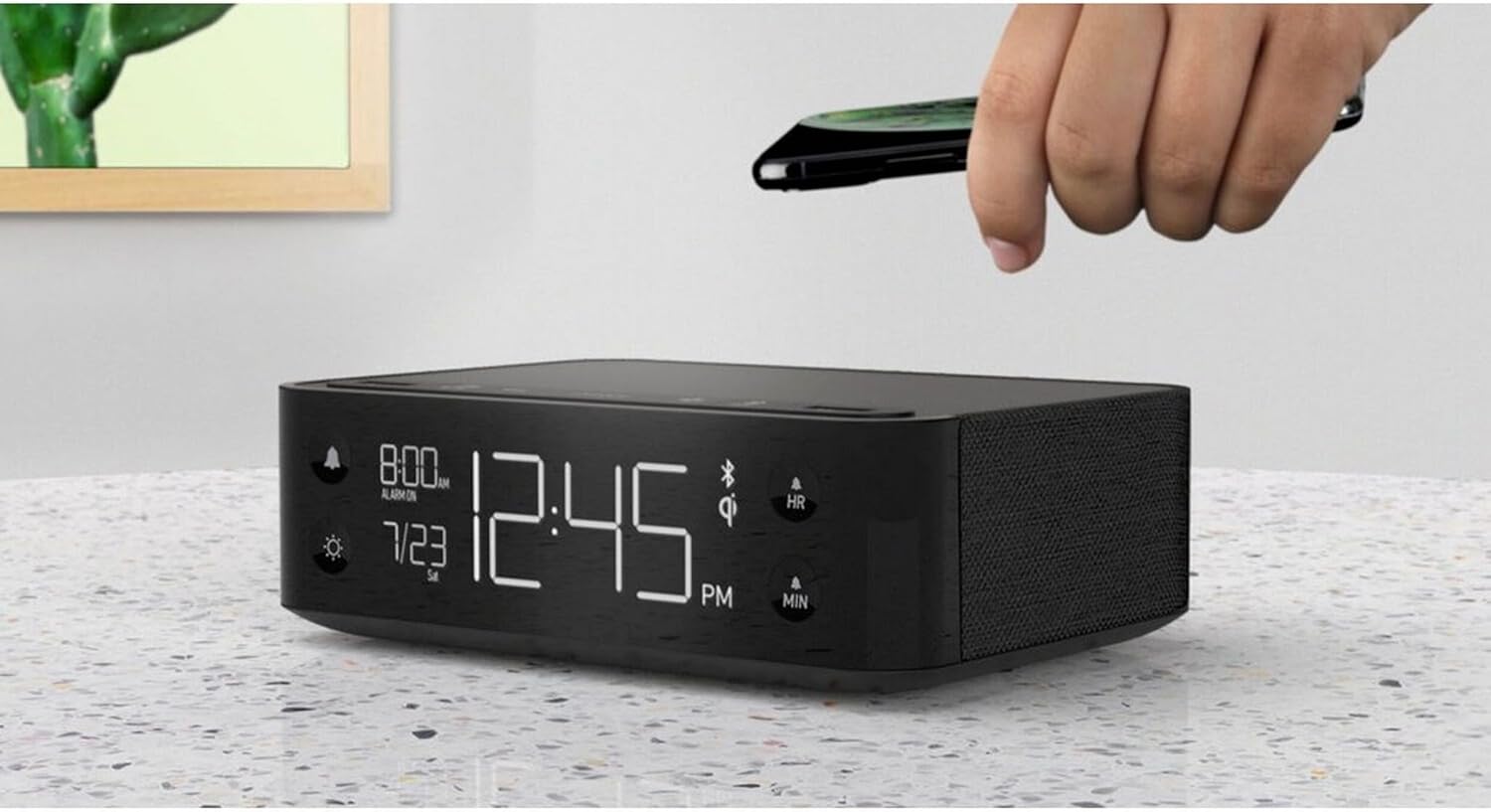
Figure 3: A smartphone being placed on the top surface of the Station A for wireless charging.
設定
1. 電源接続
- Unpack the Nonstop NSA2-BK unit and all accessories from the packaging.
- 付属の電源アダプターを本体背面の DC 入力ポートに接続します。
- Plug the power adapter into a standard electrical outlet. The display will illuminate, indicating the unit is powered on.
2. 初期時計設定
Upon first power-up, the clock may display a default time. Refer to the "Operating Instructions" section for detailed steps on setting the current time and date.
3.Bluetoothペアリング
- Ensure Bluetooth is enabled on your mobile device (smartphone, tablet, etc.).
- On the Nonstop NSA2-BK, press the Bluetooth pairing button (refer to button layout in "Operating Instructions" if available, otherwise assume a standard Bluetooth icon button). The Bluetooth indicator on the display will flash.
- On your mobile device, search for available Bluetooth devices. Select "Nonstop NSA2-BK" from the list.
- Once paired, the Bluetooth indicator on the unit will become solid, and you will hear an audible confirmation.
4. Wireless Qi Charging Setup
No specific setup is required for wireless charging beyond connecting the unit to power. Simply place your Qi-compatible device on the designated charging pad on top of the unit. Ensure the device is centered for optimal charging.
操作手順
時刻と日付の設定
- を押し続けます 時間設定 button (or equivalent, often combined with HR/MIN buttons).
- 使用 HR (時間)と 分 (分)ボタンを押して時間を調整します。
- を押す 時間設定 button again to confirm and move to date setting (if applicable).
- 使用 HR そして 分 buttons to adjust the month and day.
- プレス 時間設定 終了します。
アラームの設定と使用
- を押し続けます アラームセット button (bell icon). The alarm time will flash.
- 使用 HR そして 分 ボタンを押して希望のアラーム時間を設定します。
- プレス アラームセット 再度確認します。
- アラームをオン/オフにするには、 アラームのオン/オフ button (bell icon). An alarm indicator will appear/disappear on the display.
- アラームが鳴ったら、を押します スヌーズ button (if available, or any button except alarm off) for a temporary pause. Press the アラームのオン/オフ アラームを完全にオフにするボタン。
Using Bluetooth Speaker
- Ensure the unit is paired with your device (see "Bluetooth Pairing" in Setup).
- Play audio from your paired device. Sound will be output through the NSA2-BK speaker.
- Adjust volume using the volume controls on your paired device or on the NSA2-BK unit (if available).
Playing Relaxation Sounds
- を押す 音 button (or similar, possibly a wave/rain icon).
- Press repeatedly to cycle through available soundscapes (Ocean Waves, Rain, Ambient Sounds).
- を押し続けます 音 button to turn off the soundscape.
Using Charging Functions
- Wireless Qi Charging: Place your Qi-compatible smartphone centrally on the top charging pad. A charging indicator on the display will illuminate.
- USB充電: Connect your device's USB charging cable to one of the two USB ports on the back or side of the unit. Charging will begin automatically.
ディスプレイの明るさを調整する
- を押す ディマー button (sun icon).
- Press repeatedly to cycle through different brightness levels for the display.
メンテナンス
- クリーニング: Disconnect the power before cleaning. Use a soft, dry cloth to wipe the exterior of the unit. Do not use liquid cleaners or abrasive materials.
- ストレージ: ユニットを長期間保管する場合は、電源を外して涼しく乾燥した場所に保管してください。
- 液体を避ける: ユニットを水や過度の湿気から遠ざけてください。
- 換気: 過熱を防ぐため、本体周囲の換気を十分に行ってください。通気口を塞がないでください。
トラブルシューティング
| 問題 | 考えられる原因 | 解決 |
|---|---|---|
| ユニットの電源が入りません。 | 電源アダプタが接続されていないか、コンセントがアクティブではありません。 | 電源アダプタがユニットにしっかりと差し込まれており、電源コンセントが機能していることを確認してください。 |
| Bluetoothデバイスをペアリングできません。 | Unit is not in pairing mode; device is too far; another device is already connected. | Ensure the NSA2-BK is in pairing mode. Move device closer. Disconnect any previously paired devices. |
| ワイヤレス充電が機能しません。 | Device is not Qi-compatible; device not centered; foreign objects on pad; thick phone case. | Verify device supports Qi wireless charging. Re-position device centrally. Remove foreign objects or thick phone cases. |
| USB充電が機能しません。 | Cable is faulty; device is not compatible; unit is overloaded. | Try a different USB cable. Ensure device is compatible. Avoid charging too many high-power devices simultaneously. |
| アラームは鳴りません。 | アラームが作動しません。音量が低すぎます。 | Ensure the alarm is set and activated (alarm indicator visible). Increase the unit's volume. |
仕様
- ブランド: ノンストップ
- モデル: NSA2-BK
- 色: Black, Ocean
- 商品の重量: 3ポンド
- ハードウェアインターフェイス: USB
- 対応デバイス: iPad, Smartphones, Kindle, Wireless Headphones (via USB/Qi)
- 合計 USB ポート: 2
- ワットtage: 10 watts (for charging)
- 国際コード: 840148709171
- ASIN: B0C8LDWF57
- 最初に入手可能: 29年2024月XNUMX日
保証とサポート
Specific warranty details for the Nonstop NSA2-BK are typically provided with the product packaging or on the manufacturer's official web保証に関する包括的な情報については、これらの情報源を参照してください。
For technical support, troubleshooting assistance beyond this manual, or inquiries regarding parts and service, please contact Nonstop customer support through their official webサイトまたは製品の元のドキュメントに記載されている連絡先情報を参照してください。
注意: 保証請求のために購入証明を常に保管してください。