
1. はじめに
The TOPPING D70 Pro Sabre is a high-performance Digital-to-Analog Converter (DAC) designed for audiophiles seeking exceptional sound quality. Featuring the ES9039SPro chip, advanced I/V conversion circuitry, and versatile input/output options, this device delivers precise and immersive audio reproduction. It supports various audio formats and offers a user-friendly interface for an enhanced listening experience.
2. 安全情報
- 本製品を分解または改造しないでください。許可されていない改造は保証の対象外となり、安全上のリスクが生じる可能性があります。
- デバイスを水、湿気、高温から遠ざけてください。
- 過熱を防ぐために、ユニットの周囲に適切な換気を確保してください。
- 付属の電源ケーブルと付属品のみを使用してください。
- 雷雨のときや長期間使用しない場合は、電源ケーブルを抜いてください。
3. パッケージ内容
パッケージにすべてのアイテムが揃っていることを確認してください:
- 1 x TOPPING D70 Pro Sabre DAC
- リモコン x 1
- USBケーブル1本
- AC電源ケーブル x 1
- 1xBluetoothアンテナ
- ユーザーマニュアル (本書) x 1

Image: TOPPING D70 Pro Sabre DAC with its included accessories and dimensions.
4.製品オーバーview
4.1フロントパネル

画像: 正面 view of the TOPPING D70 Pro Sabre, showing the full-color display and control knob.
The front panel features a full-color display (Aurora UI) that shows current input, sample rate, volume level, and other playback information. A multi-function knob allows for input selection, volume adjustment, and menu navigation. Touch buttons provide quick access to various settings and display modes like FFT and VU meters.
4.2 背面パネル

画像: 背面 view of the TOPPING D70 Pro Sabre, illustrating the various input and output connections.
The rear panel provides a comprehensive set of input and output options:
- 入力: USB, AES, Optical, Coaxial, Bluetooth 5.1 (with antenna connector).
- 出力: Balanced XLR, Unbalanced RCA.
- 力: AC電源入力。
5. セットアップ
5.1 電源の接続
- Connect the provided AC power cable to the power input on the rear panel of the D70 Pro Sabre.
- Plug the other end of the AC power cable into a suitable wall outlet.
5.2 オーディオソースの接続
次のいずれかの入力方法を選択します。
- USB入力: Connect a USB cable from your computer (Windows 10/11, macOS, Linux) to the USB input on the D70 Pro Sabre. For Windows systems, a driver installation may be required for ASIO applications.
- Optical/Coaxial/AES Input: Connect your digital audio source (e.g., CD player, streamer) using an optical, coaxial, or AES cable to the corresponding input on the D70 Pro Sabre.
- Bluetooth入力: Bluetooth アンテナを背面パネルの指定されたコネクタにねじ込みます。
5.3 接続 Amplifier/Headphones
Connect the D70 Pro Sabre to your amplifierまたはヘッドフォン amplifier using either XLR or RCA cables:
- XLR出力: For balanced connections, use XLR cables to connect the D70 Pro Sabre to an amplifier with XLR inputs.
- RCA出力: For unbalanced connections, use RCA cables to connect the D70 Pro Sabre to an ampRCA 入力を備えたリファイア。

Image: Diagram illustrating typical connections for the D70 Pro Sabre with a PC, headphone ampライター、ヘッドフォン。
6. 操作手順
6.1 電源オン/オフ
Press the power button on the front panel or the remote control to turn the device on or off.
6.2入力の選択
Rotate the multi-function knob or use the remote control to cycle through available inputs (USB, AES, Optical, Coaxial, Bluetooth).
6.3 ボリュームコントロール
Rotate the multi-function knob to adjust the output volume. The D70 Pro Sabre features independent volume memory for Single Ended, Balanced, and All modes, automatically recalling the last used volume for each output type.

Image: The D70 Pro Sabre display showing the current volume level and PCM sampルレート。
6.4 Display Modes (Aurora UI)
The D70 Pro Sabre features an intuitive Aurora UI with a full-color display. Use the touch buttons or remote to navigate and customize the display, including options for FFT (Fast Fourier Transform) and VU (Volume Unit) meters to visualize playback information.
6.5Bluetoothペアリング
- Select Bluetooth as the input source on the D70 Pro Sabre.
- On your Bluetooth device (e.g., smartphone, tablet), search for available devices and select "TOPPING D70 Pro Sabre".
- Once paired, audio will be streamed wirelessly to the DAC. The D70 Pro Sabre supports LDAC, aptX-Adaptive, aptX HD, aptX, AAC, and SBC codecs for high-quality wireless audio transmission.

Image: Illustration of Bluetooth 5.1 connectivity and performance graphs of the D70 Pro Sabre.
6.6 音色の微調整
The D70 Pro Sabre allows direct switching between different timbre modes: Default, Valve, and Transistor. These modes adjust the sound characteristics to suit your preference.
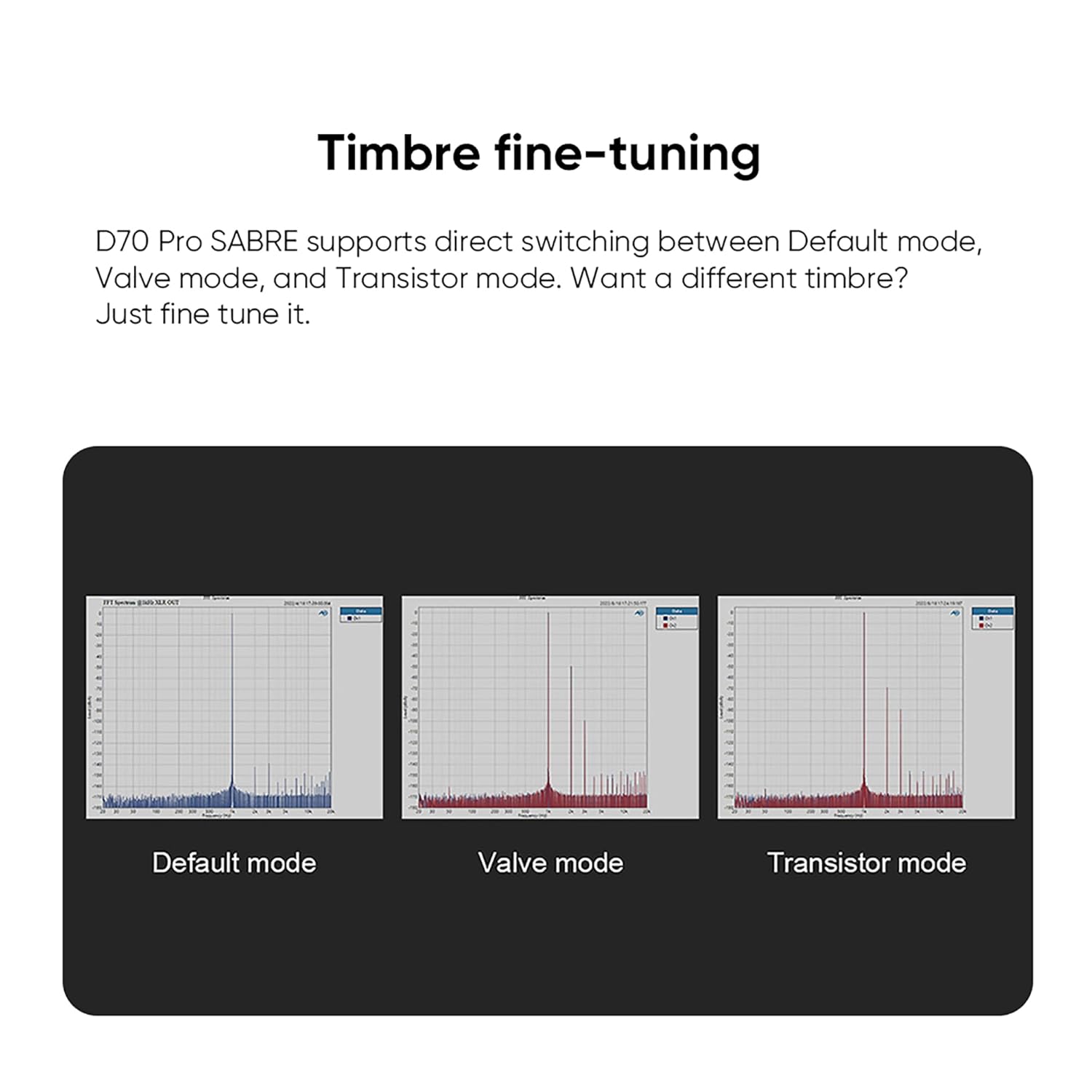
Image: Visual representation of the Default, Valve, and Transistor timbre modes available on the D70 Pro Sabre.
7. メンテナンス
- Clean the device regularly with a soft, dry cloth. Avoid using abrasive cleaners or solvents.
- すべての接続が安全であり、ほこりがないことを確認してください。
- デバイスを使用しないときは、涼しく乾燥した場所に保管してください。
8。 トラブルシューティング
| 問題 | 考えられる原因 | 解決 |
|---|---|---|
| 音声出力なし | Incorrect input selected, cables loose, amplifier off, volume too low. | Verify input selection, check all cable connections, ensure amplifier is on and volume is adequate. |
| Bluetooth接続が不安定 | Antenna not connected, interference, device too far. | Ensure Bluetooth antenna is securely attached. Reduce distance between devices. Avoid sources of interference. |
| 表示なし | Device not powered on, display settings. | Check power connection and power button. Adjust display settings via menu. |
| 歪んだ音 | 不正なample rate, faulty cable, source issue. | Check source sample rate matches DAC capabilities. Try different cables. Test with another audio source. |
9. 仕様
The TOPPING D70 Pro Sabre DAC features the powerful ES9039SPro chip and advanced I/V conversion circuitry. Below are key performance parameters (Line Out/USB In@96kHz):
| パラメータ | RCA出力 | XLR出力 |
|---|---|---|
| THD+N (A-wt) @1kHz | <0.00008% | <0.00006% |
| THD @90kBw (No-wt) @20-20kHz | <0.0004% | <0.0002% |
| SNR (A-wt) @1kHz | 128デシベル | 133デシベル |
| Dynamic Range (A-wt) @1kHz | 128デシベル | 133デシベル |
| 周波数応答 | 20Hz-20kHz (+0.05dB), 20Hz-40kHz (+0.2dB) | 20Hz-20kHz (+0.05dB), 20Hz-40kHz (+0.2dB) |
| Output Level @0dBFS (4V mode) | 2.1Vrms | 4.2Vrms |
| Output Level @0dBFS (5V mode) | 2.5Vrms | 5.0Vrms |
| ノイズ(A-wt) | <1.0uVrms | <1.0uVrms |
| チャネルクロストーク@1kHz | -128dB | -140dB |
| チャンネルバランス | 0.3デシベル | 0.3デシベル |
| 出力インピーダンス | 50Ω | 100Ω |
Note: The above data is the result obtained from TOPPING's laboratory tests at AC220V 50Hz, with D70 Pro SABRE set to 5V output mode.
一般仕様:
- メーカー: トッピング
- 部品番号: D70Pro SE
- 製品重量: 2.02キログラム
- 製品寸法: 22.2 x 17.6 x 4.8 cm
- 色: 黒
- インターフェースタイプ: RCA、USB
- Minimum/Maximum Supply Voltage: 5 ボルト (DC)
10. 保証とサポート
TOPPING provides after-sales support and technical assistance for its products. If you encounter any issues during purchase or use, please contact the seller directly for assistance. For general inquiries or technical support, refer to the official TOPPING webサイトにアクセスするか、カスタマーサービスにお問い合わせください。
The seller, AOSHIDA Audio-JP, is available to assist with product-related concerns. You can find their contact information on the Amazon platform.