Welcome to the user manual for your Bmax B7 Power Mini PC. This document provides essential information for setting up, operating, maintaining, and troubleshooting your device. Please read this manual thoroughly before using your Mini PC to ensure optimal performance and longevity.
2. 箱の中身
Upon opening your Bmax B7 Power Mini PC package, please verify that all components are present and in good condition. The standard package contents include:
Bmax B7 Power Mini PC Unit
電源アダプター
HDMIケーブル
VESAマウントブラケットとネジ
ユーザーマニュアル(このドキュメント)
開梱のビジュアルガイドについては、以下のビデオを参照してください。
Official unboxing video for the Bmax B7 Power Mini PC, demonstrating the contents of the package.
Image showing the Bmax B7 Power Mini PC unit along with its included accessories, such as the power adapter and cables.
3.製品オーバーview
The Bmax B7 Power Mini PC is a compact yet powerful desktop computer designed for various applications, from office work and streaming to light gaming and multi-display setups. It features advanced components and efficient design for reliable performance.
ストレージ: 1TB NVMe SSD (ultrafast for quick boot and app loads)
ワイヤレス接続: Hyper-fast WiFi 6 (802.11a/b/g/n/ac/ax) and Bluetooth 5.2
有線接続: ギガビットイーサネット
表示出力: Supports triple 4K displays via HDMI and Type-C
冷却: Smart fan and dual copper heat pipes with innovative dual mode (Performance/Balance)
オペレーティング·システム: Pre-installed Windows 11
回復: Unique Smart Recovery Environment for easy system reset
オーバーview image highlighting the key features of the Bmax B7 Power Mini PC, including processor, graphics, memory, storage, and connectivity options.
3.2 ポートと接続
The Bmax B7 Power Mini PC offers a comprehensive set of ports for versatile connectivity:
2×HDMIポート
1 x Type-C ポート (フル機能)
USB 2 ポート x 3.0
USB 2 ポート x 2.0
ギガビットイーサネットポート x 1
3.5mmヘッドセットジャック×1
クリアCMOSボタン x 1
電源ボタン x 1
詳細 view of the front and rear ports of the Bmax B7 Power Mini PC, with labels indicating each connection type.
3.3 パフォーマンスオーバーview
Equipped with the Intel Core i7-11390H processor, 32GB DDR4 RAM, and a 1TB NVMe SSD, this mini PC delivers robust performance for demanding tasks. The Intel Iris Xe Graphics ensures smooth 4K video output and supports up to three displays simultaneously.
An image detailing the specifications and benchmark results of the Intel Core i7-11390H processor.
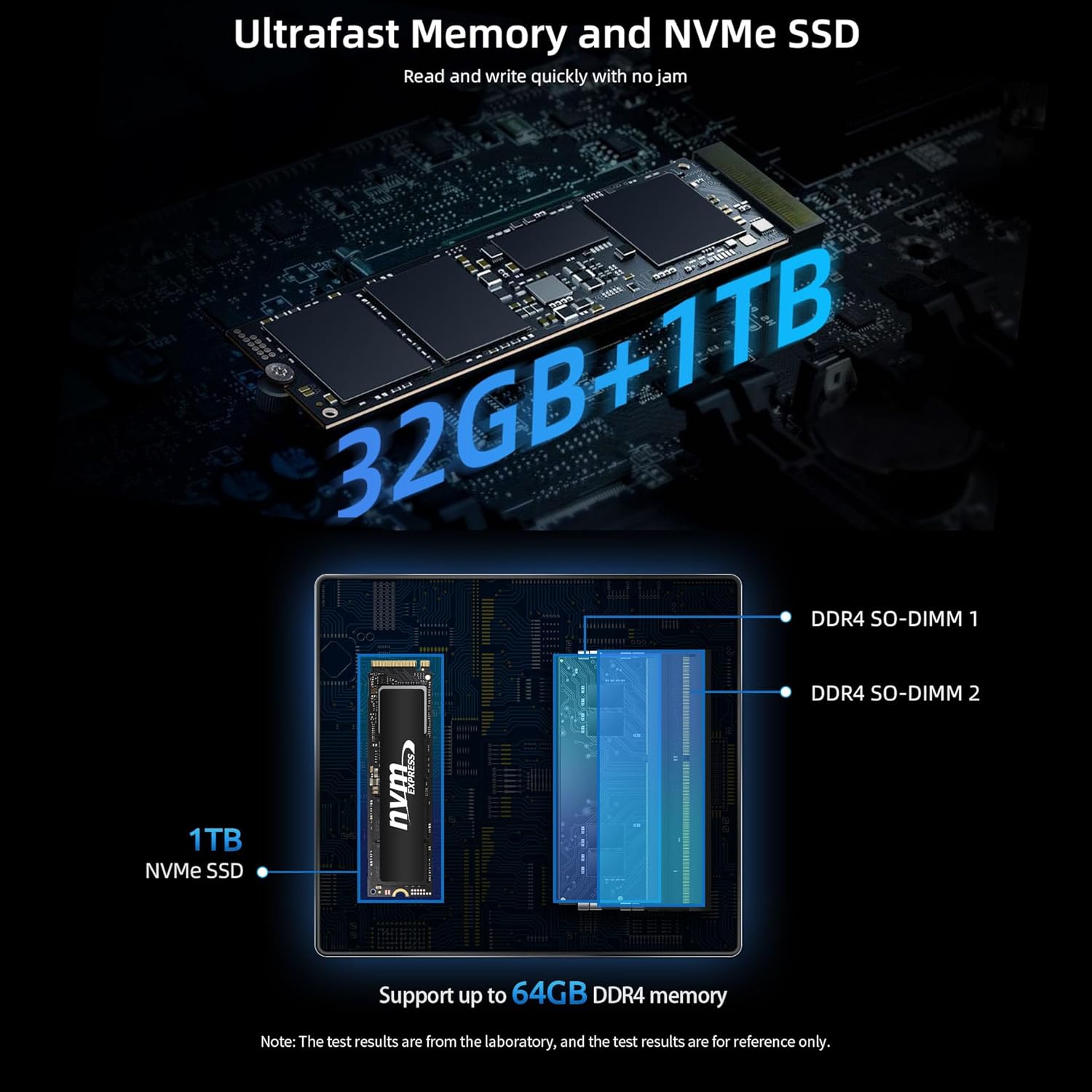
Visual representation of the ultrafast 32GB DDR4 memory and 1TB NVMe SSD, highlighting their components and upgrade potential.
An infographic explaining the benefits of Wi-Fi 6, including faster connections, lower latency, and improved coverage compared to Wi-Fi 5.
3.4 スマート冷却システム
The Bmax B7 Power Mini PC incorporates a smart fan and dual copper heat pipes for efficient heat dissipation. It features a unique dual mode operation:
パフォーマンスモード: High-speed fans for maximum performance during intensive tasks.
バランスモード: Quieter operation with lower fan speeds, ideal for general use and quiet environments.
Diagram illustrating the smart fan and dual copper heat pipes, and explaining the Performance and Balance cooling modes.
3.5 スマートリカバリ環境
The Mini PC includes a Smart Recovery Environment, allowing you to quickly reset your Windows operating system to factory settings. This feature is invaluable for resolving OS issues, slow performance, or preparing the device for a new user.
Screenshot of the Bmax Smart Recovery Environment interface, showing options for Factory Reset and Exit.
4.セットアップガイド
Follow these steps to set up your Bmax B7 Power Mini PC:
ディスプレイに接続する: Use the provided HDMI cable to connect your Mini PC to a monitor, TV, or projector. You can connect up to three displays using the HDMI and Type-C ports.
周辺機器を接続します。 キーボード、マウス、その他の USB デバイスを利用可能な USB ポートに接続します。
ネットワークに接続する: For wired internet, connect an Ethernet cable to the Gigabit Ethernet port. For wireless internet, the device will prompt you to connect to a Wi-Fi network during the initial Windows setup.
接続電源: 電源アダプタをミニ PC の DC 入力ポートに差し込み、アダプタを電源コンセントに差し込みます。
電源オン: ミニPCの前面にある電源ボタンを押します。電源インジケータライトが点灯します。
Windowsの初期セットアップ: 画面上の指示に従って、言語、地域、ネットワーク接続、ユーザー アカウントの作成などの Windows 11 のセットアップを完了します。
Image demonstrating flexible placement options for the Mini PC, either on a desk or mounted behind a monitor using the VESA bracket.
5. 操作手順
Your Bmax B7 Power Mini PC runs on Windows 11, providing a familiar user experience. Here are some basic operating tips:
電源オン/オフ: Press the power button to turn the PC on. To turn off, click the Start button in Windows, then select Power > Shut down.
再起動: From the Windows Start menu, select Power > Restart.
スリープモード: From the Windows Start menu, select Power > Sleep.
Wi-Fiへの接続: After initial setup, you can manage Wi-Fi connections via the Network & Internet settings in Windows.
Bluetooth デバイスの接続: Pair Bluetooth devices through the Bluetooth & devices settings in Windows.
Using Multiple Displays: Connect additional monitors to the available HDMI and Type-C ports. Windows will automatically detect them, and you can configure display settings (extend, duplicate, etc.) via Display settings.
Accessing Smart Recovery: If your system encounters issues, you can access the Smart Recovery Environment to perform a factory reset. Refer to Section 3.5 for more details.
A user working with a triple monitor setup, showcasing the multi-display capabilities of the Bmax B7 Power Mini PC for enhanced productivity.
6. メンテナンス
定期的なメンテナンスを行うことで、ミニ PC の寿命が長くなり、パフォーマンスが最適化されます。
清潔に保つ: Regularly wipe the exterior with a soft, dry cloth. Use compressed air to clear dust from vents to maintain proper airflow and cooling.
障害物を避けてください: Ensure the Mini PC's vents are not blocked to allow for proper heat dissipation.
安全なシャットダウン: Always shut down the PC properly through the operating system rather than simply unplugging it.
7。 トラブルシューティング
If you encounter issues with your Bmax B7 Power Mini PC, try the following troubleshooting steps:
問題
考えられる解決策
電源が入らない/電源が入らない
Check power cable connection to the PC and wall outlet. Ensure the power adapter is working. Try a different power outlet.
表示出力なし
Ensure the monitor is on and set to the correct input source. Check HDMI/Type-C cable connections. Try a different cable or display.
パフォーマンスが遅い
Close unnecessary applications. Check for background processes. Ensure sufficient free storage space. Run a disk cleanup. Consider using the Smart Recovery feature if issues persist.
Wi-Fi/Bluetoothの問題
Restart the Mini PC and your router/modem. Check device manager for driver issues. Ensure Wi-Fi/Bluetooth is enabled in Windows settings.
システムのクラッシュ/フリーズ
Ensure all drivers are updated. Check for Windows updates. Run a system file checker (sfc /scannow in Command Prompt). Consider using Smart Recovery.
If these steps do not resolve your issue, please contact Bmax customer support.
8. 仕様
特徴
詳細
製品寸法
10.51 x 6.14 x 2.91インチ
アイテム重量
1.87 ポンド
モデル番号
B7パワー
ASIN
B0C85T8YVF
初回利用可能日
15年2023月XNUMX日
メーカー
ビーマックス
9. 保証とサポート
Bmax products are designed for reliability and performance. For information regarding your product's warranty, please refer to the warranty card included in your package or visit the official Bmax website. For technical support, troubleshooting assistance, or service inquiries, please contact Bmax customer support through their official channels. Keep your purchase receipt as proof of purchase for warranty claims.
You can visit the official Bmax store for more information and support: Bmax公式ストア