
1. はじめに
This manual provides detailed instructions for setting up, operating, and maintaining your Bmax B7 Power Mini PC. Please read this manual thoroughly before using the device to ensure proper functionality and longevity. The Bmax B7 Power is a compact and powerful mini PC designed for various computing tasks, from everyday productivity to multimedia consumption and light gaming.
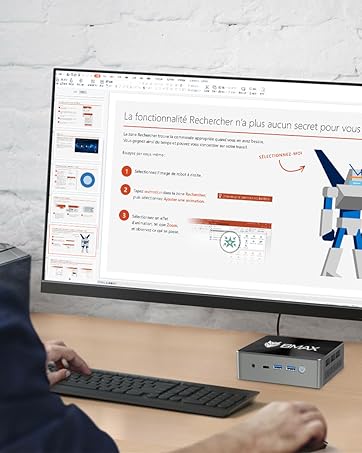
The Bmax B7 Power Mini PC in a typical desktop setup.
2. パッケージ内容
Upon opening the package, verify that all items listed below are present and in good condition. If any items are missing or damaged, please contact customer support.
- Bmax B7 パワーミニPC
- 電源アダプター
- HDMIケーブル
- VESAマウントブラケットとネジ
- ユーザーマニュアル(このドキュメント)
Video: An unboxing demonstration of the Bmax B7 Power Mini PC, showing the contents of the retail package.
3.製品オーバーview
The Bmax B7 Power Mini PC features a compact design with essential ports for connectivity and expansion. Familiarize yourself with the port layout before connecting peripherals.
ビデオ: 入門view of the Bmax B7 Power Mini PC, highlighting its design, features, and port configuration.
フロントパネル
- 電源ボタン: 押すと PC の電源がオンまたはオフになります。
- USB 3.0 ポート (x2): 高速 USB デバイスを接続します。
- タイプCポート: データ転送およびディスプレイ出力用。
- 3.5mmヘッドセットジャック: オーディオ出力とマイク入力用。
- CMOSクリアボタン: Used to reset BIOS settings (use with caution).
背面パネル
- HDMIポート(x2): ディスプレイに接続します。
- USB 2.0 ポート (x2): 標準 USB デバイスを接続します。
- イーサネットポート: 有線ネットワーク接続用。
- 電源: 付属の電源アダプターをここに接続します。
4. セットアップ手順
Follow these steps to set up your Bmax B7 Power Mini PC:
- ディスプレイに接続する: Use the provided HDMI cable to connect the Mini PC to your monitor or TV. The B7 Power supports up to three displays simultaneously.
- 周辺機器を接続します。 利用可能な USB ポートに USB キーボードとマウスを接続します。
- ネットワークに接続する(オプション): For a wired connection, plug an Ethernet cable into the Ethernet port. For wireless, ensure your Wi-Fi network is available during initial setup.
- 接続電源: 電源アダプタをミニ PC の「電源入力」ポートに接続し、アダプタを電源コンセントに差し込みます。
- 電源オン: Press the power button on the front panel. The Mini PC will boot up.
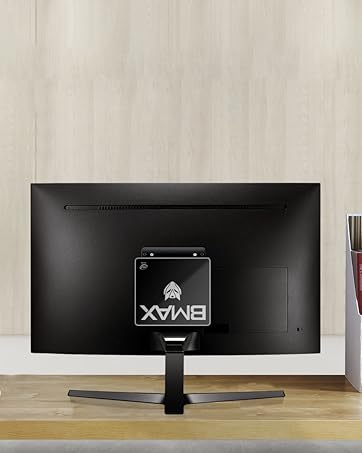
The Bmax B7 Power can be mounted behind a monitor for a clean setup.
5. 操作手順
Windowsの初期セットアップ
Upon first boot, you will be guided through the Windows operating system setup process. Follow the on-screen prompts to configure language, region, network settings, and user accounts. Ensure you have your Wi-Fi password ready if you choose a wireless connection.
Wi-Fiへの接続
The Bmax B7 Power supports Wi-Fi 6 (802.11ax) for high-speed wireless networking. To connect:
- Click the Wi-Fi icon in the system tray (usually bottom-right of the screen).
- リストから希望の Wi-Fi ネットワークを選択します。
- Enter the network security key (password) and click "Connect".
電源管理
- シャットダウン: [スタート] ボタンをクリックし、[電源] > [シャットダウン] をクリックします。
- 再起動: [スタート] ボタンをクリックし、[電源] > [再起動] をクリックします。
- 寝る: [スタート] ボタンをクリックし、[電源] > [スリープ] をクリックします。
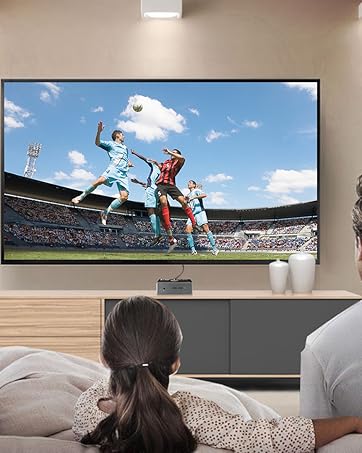
The Bmax B7 Power is suitable for home entertainment, including playing 4K UHD videos.
6. 仕様
| 特徴 | 詳細 |
|---|---|
| モデル番号 | B7パワー |
| プロセッサ | Intel Core i7-11390H (up to 5.0GHz) |
| ラム | 16GB DDR4 (Supports up to 64GB) |
| ストレージ | 1TB NVMe SSD |
| ワイヤレス接続 | 802.11a/b/g/n/ac/ax WiFi 6 |
| 寸法 | 10.51 x 6.14 x 2.91インチ |
| 重さ | 1.87 ポンド |
| メーカー | ビーマックス |
| 最初に利用可能 | 14年2023月XNUMX日 |
7. メンテナンス
Regular maintenance helps ensure the optimal performance and lifespan of your Mini PC.
- クリーニング: Use a soft, dry cloth to clean the exterior of the device. For dust accumulation in vents, use compressed air. Ensure the device is powered off and unplugged before cleaning.
- ソフトウェアアップデート: Regularly check for and install operating system updates (e.g., Windows Updates) and driver updates to maintain security and performance.
- 換気: 過熱を防ぐために、Mini PC は換気のよい場所に設置し、通気口が塞がれないようにしてください。
8。 トラブルシューティング
If you encounter issues with your Bmax B7 Power Mini PC, refer to the following common problems and solutions:
電源なし
- 電源アダプタがミニ PC と正常な電源コンセントの両方にしっかりと接続されていることを確認します。
- 別のデバイスで電源コンセントをテストし、機能していることを確認します。
- 電源タップを使用している場合は、電源がオンになっていることを確認してください。
ディスプレイ出力なし
- HDMI ケーブルがミニ PC とモニターの両方にしっかりと接続されていることを確認します。
- モニターの電源がオンになっており、正しい入力ソース (HDMI 1、HDMI 2 など) に設定されていることを確認します。
- 可能であれば、別の HDMI ケーブルまたはモニターを試してください。
Wi-Fi接続の問題
- 他のデバイスが Wi-Fi ネットワークに接続できるかどうかを確認します。
- Wi-Fi ルーターとミニ PC を再起動します。
- Ensure Wi-Fi drivers are up to date in Device Manager.
- If the issue persists, consider using a wired Ethernet connection as an alternative.
9. 保証とサポート
Your Bmax B7 Power Mini PC comes with a manufacturer's warranty. Please refer to the warranty card included in your package for specific terms and conditions. For technical support, product inquiries, or warranty claims, please contact Bmax customer service through their official webサイトまたは購入時に提供された連絡先情報を参照してください。
For additional resources and FAQs, visit the official Bmax webサイト: Bmax公式ストア